








After some initial hype around edge rendering, the mood in the front-end ecosystem has muted down somewhat after the surprising discovery that most datasets that people want to render on top of, sits in a database that runs in a single region and that’s not going to magically get distributed all over the world. This post will show an approach to fast edge rendering on top of normal centralized APIs by using smart caching and cache invalidation.
Edge rendering can be fast if combined with edge API caching. This is a simple guide to using Remix with edge rendering and Netlify Functions as a backend for the front-end that uses stale-while-revalidate to keep API responses fast at the edge.
To illustrate the concept, we’re going to build a really simple Hacker News clone with Remix, just showing the main front-page list of stories and rendering them on the edge as a simple unstyled list.
By following these steps below, you’ll get your own example built and deployed to Netlify using Remix and configured to use Netlify’s advanced caching controls.
Let’s start by creating a new Remix application with edge rendering:
npx create-remix@latest --template netlify/remix-template
You’ll get prompted how you want to run your Remix project. Pick “Netlify Edge Functions” to do edge rendering.
Now you can open the project in your code editor of choice and start the local dev server by running netlify dev.
Your new Remix app will render in Netlify’s edge functions, and we’ll want to fetch the list of front-page stories from the Hackernews API.
Like many other API’s, the Hackernews API runs from a datacenter on the east coast of the US. Here’s a quick view of global latency to the top stories endpoint:
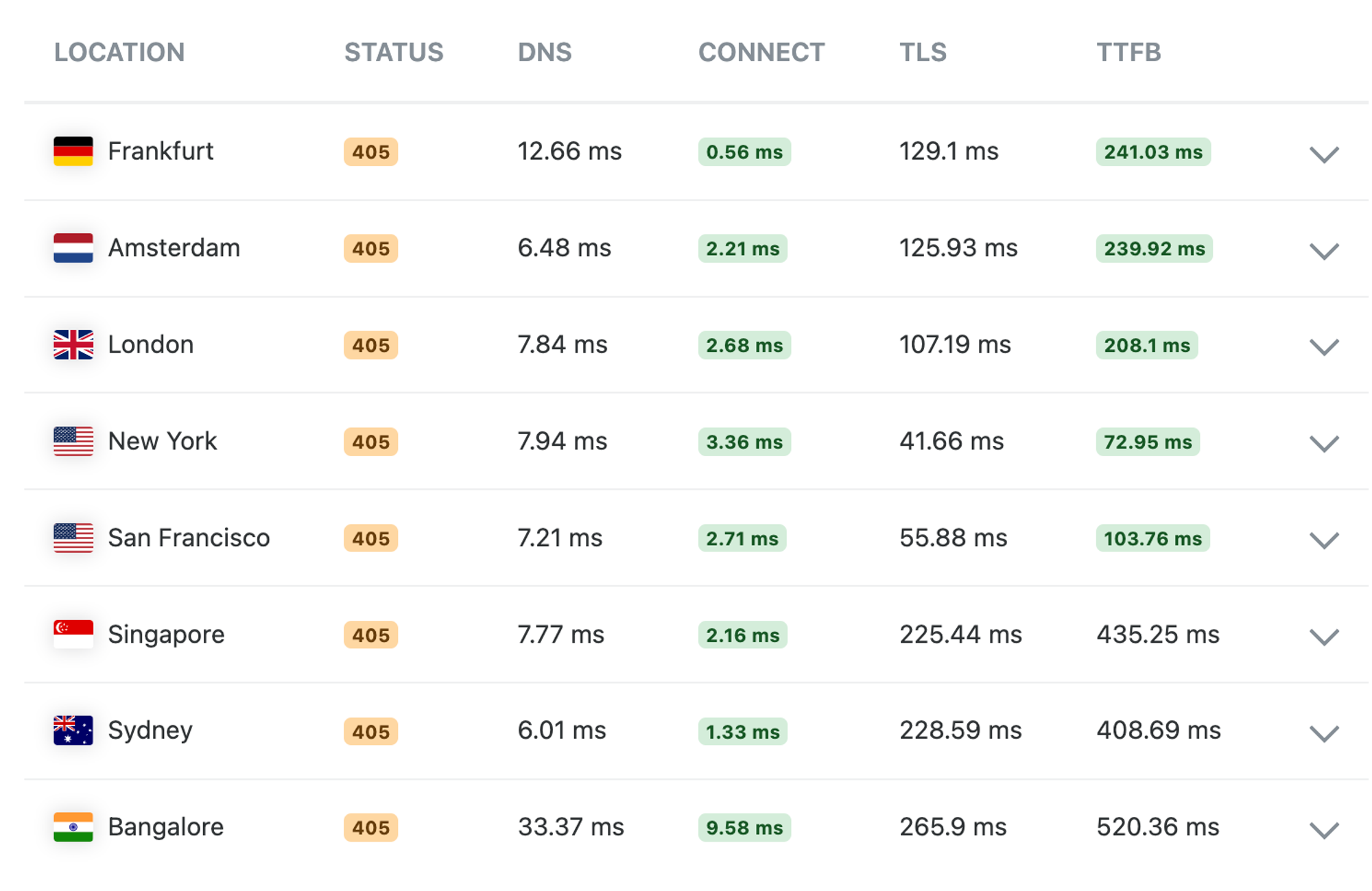
To make matters worse, the top stories endpoint we need to get our list of stories just returns a list of IDs.
[ 40192204, 40190542, 40192359, 40191047, 40187656, ...]
To render a list of each story, we’ll have to do an extra API request for each story.
If we implement this directly in the loader of our Remix app, we would be much, much better off running the remix rendering in us-east-1 where the roundtrips to the Hackernews API are short, versus globally distributed where the latency to the API would really hurt performance since each roundtrip for a story could have hundreds of milliseconds of latency.
So we’re going to take another approach and create a Netlify Function that acts as the backend, this function we can deploy in US East 1 so the many roundtrips to the API has as low latency as possible.
We’ll implement this function by creating a new file, /netlify/functions/stories.ts with the following content:
export default async () => {
const resp = await fetch("https://hacker-news.firebaseio.com/v0/topstories.json");
const ids = await resp.json();
const stories = await Promise.all(
ids.slice(0, 100).map(async (id) => {
const story = await fetch(`https://hacker-news.firebaseio.com/v0/item/${id}.json`);
return story.json();
})
);
return new Response(JSON.stringify(stories), {
headers: {
"content-type": "application/json",
},
});
};
This will give us an endpoint for our site on the route /.netlify/functions/stories that returns the most recent stories in a format ready to render from:
[{"by":"CommieBobDole","descendants":46,"id":40190542,"kids":[40190798,40192389,40191773,40190714,40191293,40191418,40190648,40191343,40190948],"score":251,"time":1714328186,"title":"A small lathe built in a Japanese prison camp","type":"story","url":"<http://www.lathes.co.uk/bradley-pow-lathe/"},{"by":"_bramses","descendants":2,"id":40192359,"kids":[40192565],"score":26,"time":1714341420,"title":"Personal> computing paves the way for personal library science","type":"story","url":"<https://www.bramadams.dev/issue-55/>"}, ...]
Now lets use this endpoint from our Remix app through a loader. Change the app/routes/_index.tsx to the following:
import type { MetaFunction, LoaderFunction } from "@netlify/remix-runtime";
import { useLoaderData } from "@remix-run/react";
export const meta: MetaFunction = () => {
return [{ title: "Edge Rendered HN" }, { name: "description", content: "Demo of Edge Rendering with Remix" }];
};
export const loader: LoaderFunction = async ({ request }) => {
return (await fetch(new URL(`/.netlify/functions/stories`, request.url))).json();
};
interface Story {
id: string;
title: string;
}
export default function Index() {
const stories = useLoaderData() as Story[];
return (
<div style={{ fontFamily: "system-ui, sans-serif", lineHeight: "1.8" }}>
<h1>Hackernews</h1>
<ul>
{stories.map((story) => (
<li key={story.id}>{story.title}</li>
))}
</ul>
</div>
);
}
If you run this locally with netlify dev you’ll see we now render the list of stories on the Hackernews front page.
However, we didn’t actually make edge rendering any faster than just running the whole Remix app in us-east-1 close to where the API sits.
Let’s fix that.
We’re going to do this with one simple addition to our stories function: adding a netlify-cdn-cache-control header with a stale-while-revalidate instruction.
Change the netlify/functions/stories.ts file to the following:
export default async () => {
const resp = await fetch("https://hacker-news.firebaseio.com/v0/topstories.json");
const ids = await resp.json();
const stories = await Promise.all(
ids.slice(0, 100).map(async (id) => {
const story = await fetch(`https://hacker-news.firebaseio.com/v0/item/${id}.json`);
return story.json();
})
);
return new Response(JSON.stringify(stories), {
headers: {
"content-type": "application/json",
"netlify-cdn-cache-control": "public, max-age=0, stale-while-revalidate=86400",
},
});
};
This is an instruction targeted to Netlify’s CDN, telling it to cache the response of the API request, serve the cached version to any visitor, but automatically revalidate the cached object in the background by doing one new request to /.netlify/functions/stories.
Once the site has warmed up globally this means each edge cache will always return a cached response of the latest stories to the Remix loader, but then update the version in the cache, giving us really fast edge rendering with mostly fresh content.
To deploy this, just run:
netlify deploy --build -p
Here’s the version I deployed as part of building this demo (note that this is a demo site that might not be getting any traffic, so there’s a good chance you’ll get a slow first load from any given region. Refresh the page and you’ll see the API caching kick in):
https://remix-hn-edge-demo.netlify.app/
You can also explore the code in its repo: https://github.com/netlify-labs/remix-edge-api-caching
This is a very simple demo, where the performance benefits are not as good as what we would get by just setting a cache header on the remix response.
For more complex apps where rendering on the fly is actually needed (vs pure static output), and we don’t have just one API request per page, this can be a really powerful technique to make edge rendering fast by caching logical groups of API requests together.
Netlify also provide other abstractions that make API caching even more powerful. One of them is Cache Tags and custom cache purges.
We could add a Cache-Tag: hn header to the response from stories and have a process trigger a cache purge when a new story makes front-page, and for more complex examples we can do this with whichever granularity we need.
By default Netlify will purge all the cached responses globally when we deploy a new version of the site. This makes a lot of sense when we’re caching full HTML pages that will include links to CSS and JS files, images, and other pages that might change between deploys and break in unpredictable ways for our users unless we can guarantee Atomic Deploys.
For our API endpoints, however, we might want to sidestep that. We can do that by adding a Netlify-Cache-Id: hn header to the response from stories.ts instead of the Cache-Tag header. Now the stories responses only gets a purge if we explicitly purge the hn cache tag.
The primitives makes it really simple to create a globally cached backend for the front-end that works incredibly well with edge rendered applications.
此内容由惯性聚合(RSS阅读器)自动聚合整理,仅供阅读参考。 原文来自 — 版权归原作者所有。