惯性聚合 高效追踪和阅读你感兴趣的博客、新闻、科技资讯
阅读原文 在惯性聚合中打开

推荐订阅源

Security Archives - TechRepublic
Project Zero
Project Zero
K
Kaspersky official blog
G
Google Developers Blog
T
Threat Research - Cisco Blogs
T
The Blog of Author Tim Ferriss
Cyberwarzone
Cyberwarzone
Y
Y Combinator Blog
Recorded Future
Recorded Future
Blog — PlanetScale
Blog — PlanetScale
Threat Intelligence Blog | Flashpoint
Cisco Talos Blog
Cisco Talos Blog
Latest news
Latest news
Microsoft Security Blog
H
Help Net Security
S
Schneier on Security
P
Palo Alto Networks Blog
H
Hacker News: Front Page
N
News and Events Feed by Topic
N
Netflix TechBlog - Medium
博客园 - Franky
OSCHINA 社区最新新闻
OSCHINA 社区最新新闻
SecWiki News
SecWiki News
Cloudbric
Cloudbric
TaoSecurity Blog
TaoSecurity Blog
CTFtime.org: upcoming CTF events
The Hacker News
The Hacker News
C
Check Point Blog
L
LangChain Blog
腾讯CDC
小众软件
小众软件
T
Tenable Blog
Google DeepMind News
GbyAI
GbyAI
L
LINUX DO - 最新话题
A
About on SuperTechFans
Google Online Security Blog
C
Cisco Blogs
Recent Announcements
Hacker News: Ask HN
Hacker News: Ask HN
freeCodeCamp Programming Tutorials: Python, JavaScript, Git & More
Vercel News
Vercel News
雷峰网
雷峰网
美团技术团队
D
DataBreaches.Net
Martin Fowler
Martin Fowler
Help Net Security
Help Net Security
钛媒体:引领未来商业与生活新知
钛媒体:引领未来商业与生活新知
F
Full Disclosure
博客园_首页

Icarus

Getting Started with Icarus Icarus User Guide - Configuring the Theme FAQ Cyberpunk Theme Variant Upgrade Guide Custom Hexo Tag Helpers 自定义Hexo标签插件 Hexo Built-in Tag Helpers Icarus User Guide - CDN Providers Icarus User Guide - Comment Plugins Icarus User Guide - Other Plugins Icarus User Guide - Share Buttons Icarus User Guide - Search Plugin Icarus User Guide - Web Analytics Plugins Icarus User Guide - Widgets Icarus快速上手 Icarus用户指南 - 主题配置 常见问题 升级指南
Icarus User Guide - Donation Buttons
PPOffice · 2017-01-31 · via Icarus

This article covers donation button configurations supported by Icarus 5. If you need to display multiple donation buttons at once, add individual button configuration to the donates array like the following:

_config.icarus.yml
1
2
3
4
5
6
7
donates:
-
type: ...
...
-
type: ...
...

The following donation buttons are provided by ppoffice/hexo-component-inferno. Please refer to it for a complete list of supported buttons and their configuration details.

Afdian.net

Installation Guide

  1. Register for Afdian.net and copy the URL to your personal page.

  2. Add the following configuration to your theme configurations:

    _config.icarus.yml
    1
    2
    3
    4
    5
    donates:
    -
    type: afdian

    url: /path/to/afdian.net/personal/page

Alipay

Installation Guide

  1. Log into Alipay and export payment QR code.

  2. Save the QR code picture to the asset directory of your Hexo website, or upload it to an image sharing service.

  3. Add the following configuration to your theme configurations:

    _config.icarus.yml
    1
    2
    3
    4
    5
    donates:
    -
    type: alipay

    qrcode: /path/to/alipay/qrcode.png

Buy me a Coffee

Installation Guide

  1. Register for Buy me a Coffee and copy the URL to your personal page.

  2. Add the following configuration to your theme configurations:

    _config.icarus.yml
    1
    2
    3
    4
    5
    donates:
    -
    type: buymeacoffee

    url: /path/to/buymeacoffee/personal/page

Paypal

Installation Guide

  1. Log into Paypal, click here to create a Paypal donation button.

  2. Select “Country/Region” and “Language” in the “Choose button style” page and click “Continue” to advance to the next page.
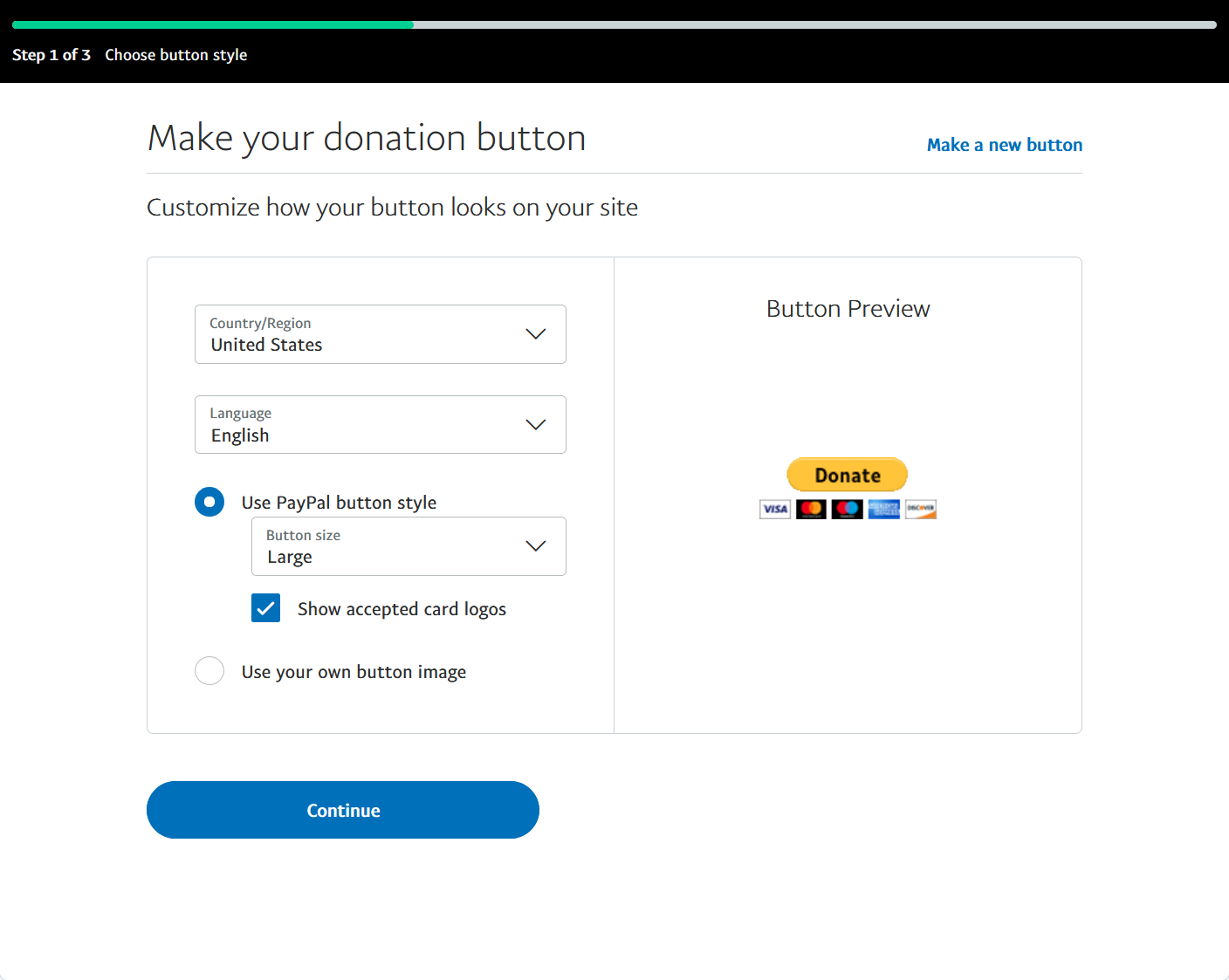
    Choose Button Style - Paypal
  3. Select “Use account ID” or “Use email address” as the unique identifier of your account in the “Add organization details” page. Then, click “Continue” to go to the next page.
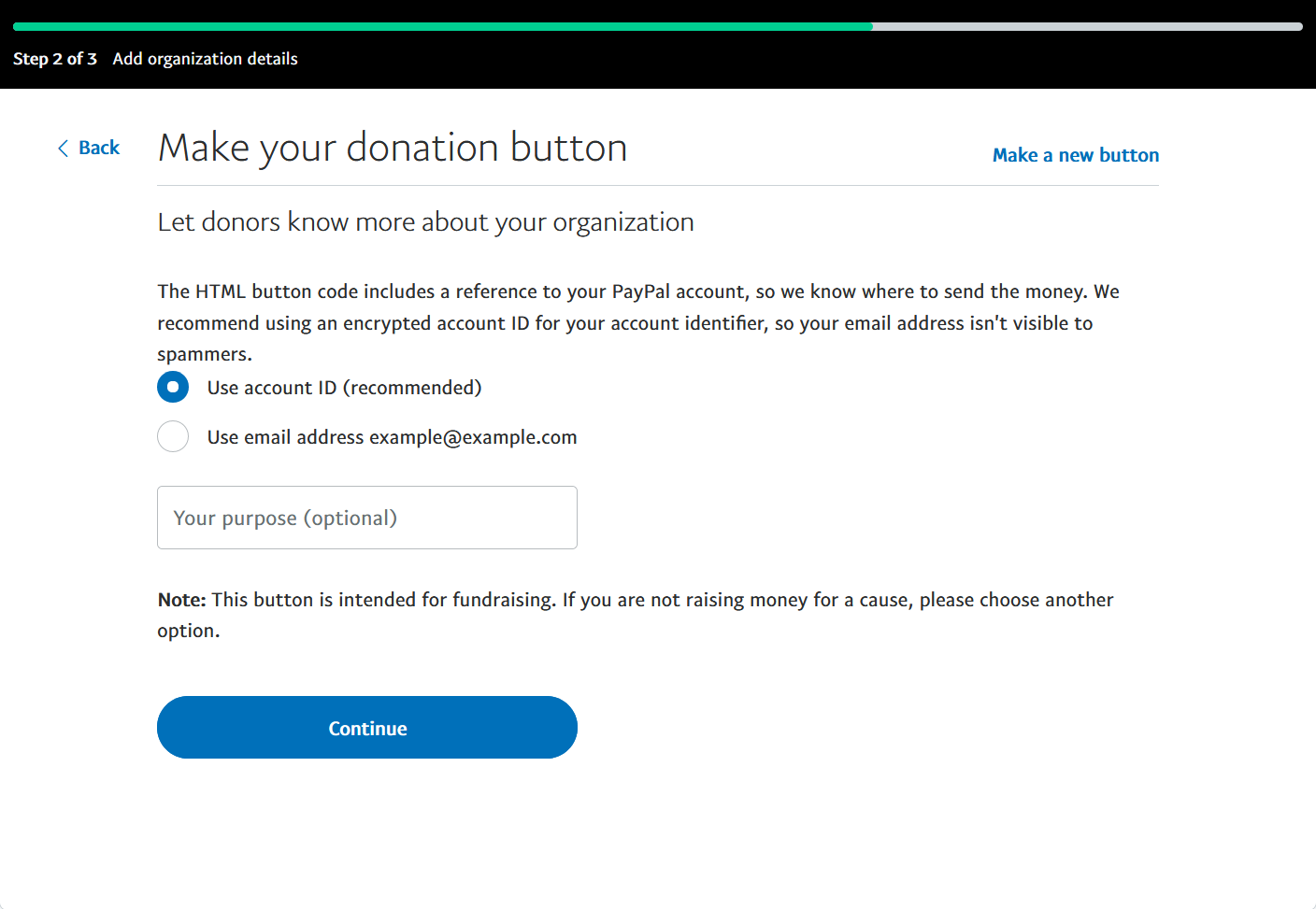
    Add Organization Details - Paypal
  4. Choose the “Currency you’ll receive donations in” and set “Amount donors can give” to “Any amount” in the “Set donation amounts” page. We currently do not support the option of donating in “An exact amount”. Click “Finish and Get Code” to go to the next page.
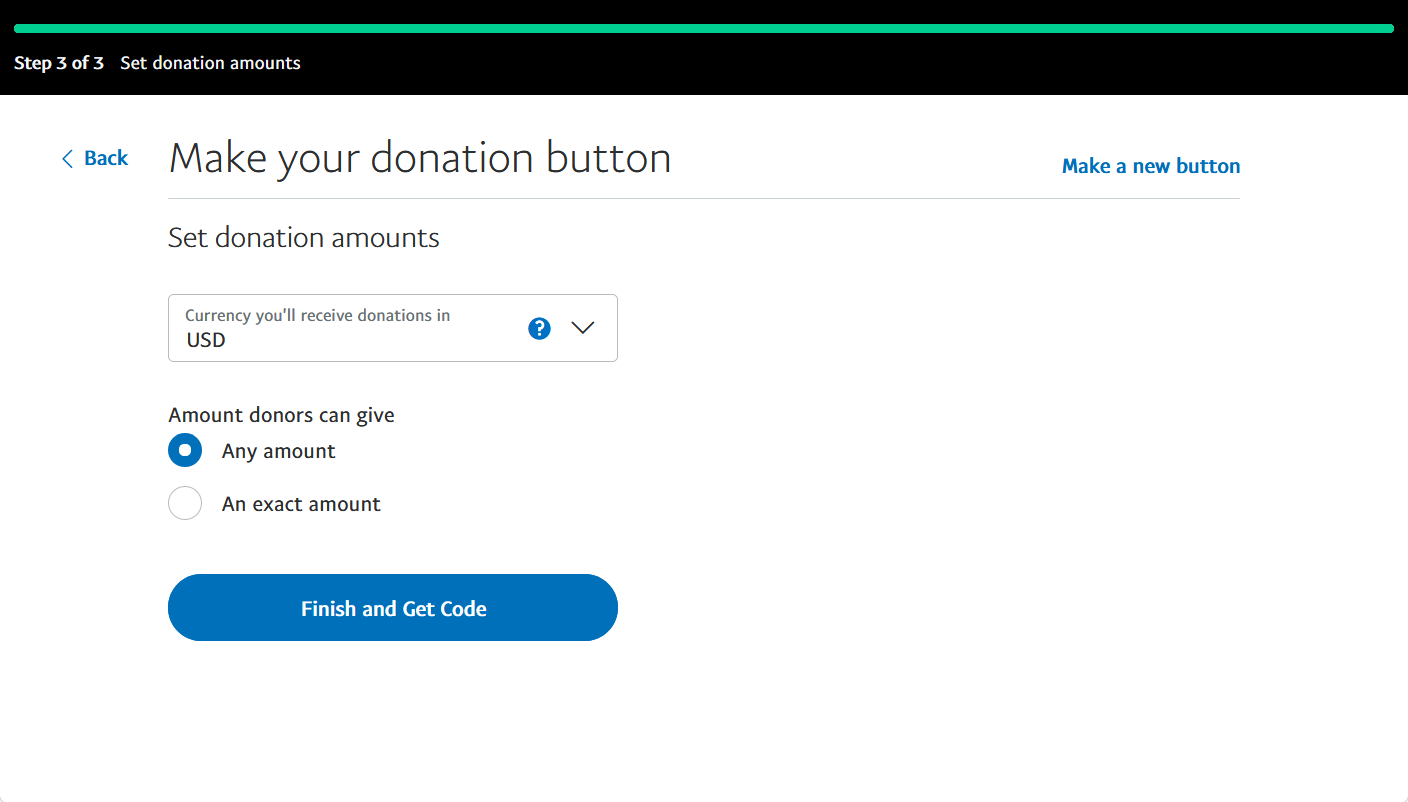
    Set Donation Amounts - Paypal
  5. Copy business and currency_code from the “Button HTML” on the page. Put them to the business and currency_code settings in your theme configurations.
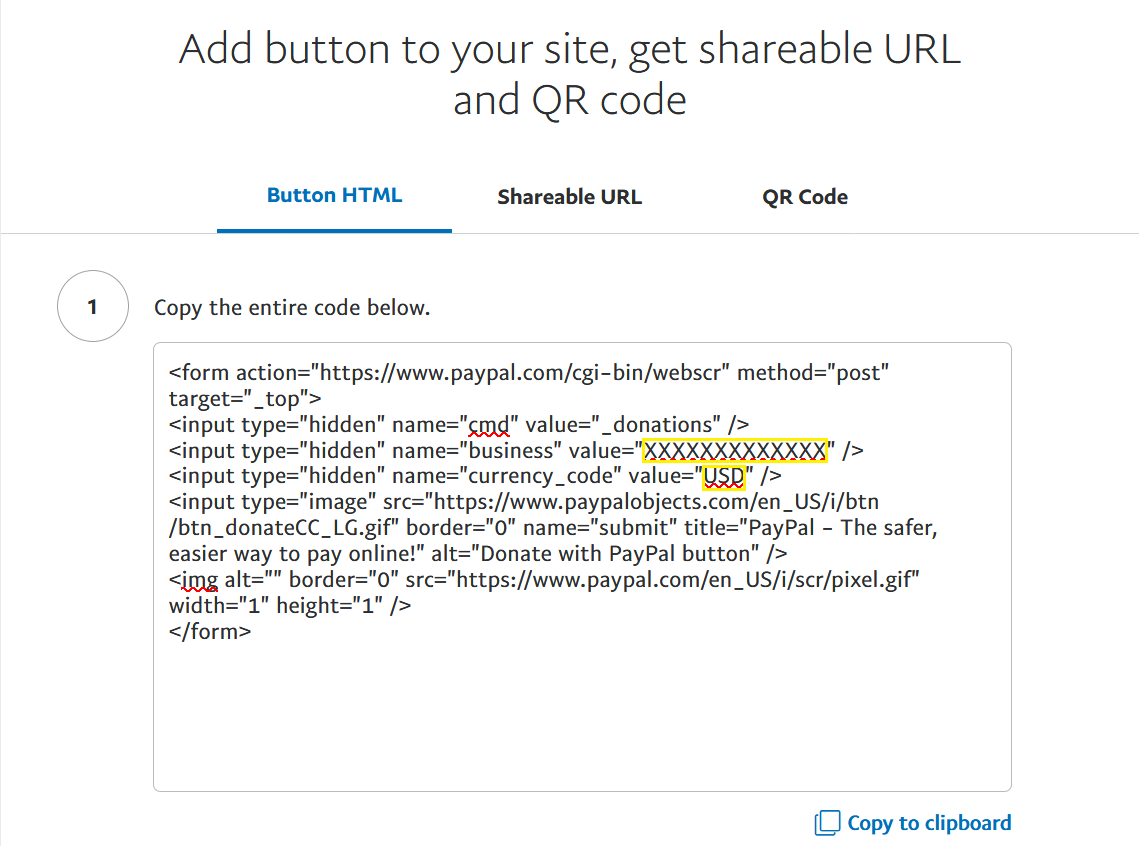
    Get Code - Paypal

    For example, the following Paypal donation button code:

    Paypal HTML code
    1
    2
    3
    4
    5
    6
    <form action="https://www.paypal.com/cgi-bin/webscr" ...>
    <input type="hidden" name="cmd" value="_donations" />
    <input type="hidden" name="business" value="XXXXXXXXXXXXX" />
    <input type="hidden" name="currency_code" value="USD" />
    ...
    </form>

    maps to the following configuration:

    _config.icarus.yml
    1
    2
    3
    4
    5
    donates:
    -
    type: paypal
    business: XXXXXXXXXXXXX
    currency_code: USD

Patreon

Installation Guide

  1. Register for Patreon and copy the URL to your personal page.

  2. Add the following configuration to your theme configurations:

    _config.icarus.yml
    1
    2
    3
    4
    5
    donate:
    -
    type: patreon

    url: /path/to/patreon/personal/page

WeChat

Installation Guide

  1. Log into WeChat and export payment QR code.

  2. Save the QR code picture to the asset directory of your Hexo website, or upload it to an image sharing service.

  3. Add the following configuration to your theme configurations:

    _config.icarus.yml
    1
    2
    3
    4
    5
    donates:
    -
    type: wechat

    qrcode: /path/to/wechat/qrcode.png

Something wrong with this article? Click here to submit your revision.
