
惯性聚合 高效追踪和阅读你感兴趣的博客、新闻、科技资讯
阅读原文 在惯性聚合中打开

推荐订阅源

S
Schneier on Security
The Register - Security
月光博客
月光博客
freeCodeCamp Programming Tutorials: Python, JavaScript, Git & More
OSCHINA 社区最新新闻
OSCHINA 社区最新新闻
The GitHub Blog
The GitHub Blog
博客园 - 司徒正美
罗磊的独立博客
U
Unit 42
S
SegmentFault 最新的问题
Y
Y Combinator Blog
博客园_首页
Hugging Face - Blog
Hugging Face - Blog
J
Java Code Geeks
Schneier on Security
Know Your Adversary
Know Your Adversary
C
Check Point Blog
Cyber Security Advisories - MS-ISAC
Simon Willison's Weblog
V
Vulnerabilities – Threatpost
让小产品的独立变现更简单 - ezindie.com
阮一峰的网络日志
阮一峰的网络日志
The Hacker News
The Hacker News
博客园 - 叶小钗
C
Cybersecurity and Infrastructure Security Agency CISA
Spread Privacy
Spread Privacy
L
LINUX DO - 热门话题
T
The Exploit Database - CXSecurity.com
P
Palo Alto Networks Blog
cs.CL updates on arXiv.org
Latest news
Latest news
L
Lohrmann on Cybersecurity
A
About on SuperTechFans
L
LangChain Blog
Stack Overflow Blog
Stack Overflow Blog
S
Securelist
A
Arctic Wolf
D
Darknet – Hacking Tools, Hacker News & Cyber Security
T
Threatpost
Scott Helme
Scott Helme
博客园 - 聂微东
博客园 - 【当耐特】
T
Tenable Blog
I
Intezer
D
DataBreaches.Net
B
Blog RSS Feed
Security Latest
Security Latest
C
Cisco Blogs
T
Tor Project blog
N
Netflix TechBlog - Medium

Sanonz

使用 Invox Setup 实现 Electron 安装包界面美化 用 VS Code 编辑器开发 STM32 嵌入式 使用 FontCreator 编辑字体库 | Sanonz 使用 React Context API 和 Hooks 实现全局状态管理和性能优化 使用 Phonegap + Cordova 搭建混合开发平台 利用 Github Actions 自动部署 Hexo 博客 在 WEB 端实现亮/暗主题跟随系统功能 | Sanonz Metalness vs Specular Workflows for PBR Shading 以太坊概念与使用 wep3/infura 实现以太币及合约币交易流程 | Sanonz 实现树莓派(Raspberry Pi)联网发送本机IP到绑定的微信 | Sanonz 使用 Three.js 的 RenderTarget 实现离屏渲染 使用 redux-store-provider 简化 react 开发流程 浏览器 HTTP 并发请求规则探讨 | Sanonz JavaScript Event Loop、Micro Task、Macro Task WebAssembly 从入门到吃鸡 | Sanonz Let's Encrypt 使用教程,免费的 SSL 证书,让你的网站拥抱 HTTPS Let's Encrypt 使用教程,免费的 SSL 证书,让你的网站拥抱 HTTPS Ubuntu 搭建 php、mysql、nginx 开发环境 | Sanonz WebGL 三维教程 - 绘制矩形和点(二) | Sanonz WebGL 三维教程 - WebGL 介绍(一)
Hexo 搭建静态博客与 hexo-theme-concise 主题使用教程 | Sanonz
Sanonz · 2017-10-20 · via Sanonz

什么是 Hexo?

Hexo 是一款基于Node.js的一个快速、简洁且高效的博客框架。Hexo 使用 Markdown(或其他渲染引擎)解析文章,在几秒内,即可利用靓丽的主题生成静态网页,你可以把生成的静态网页上传到 Web 服务器上,这里我们选用的是 GitHub 做 Web 服务器,你没看错,全球最大的同性恋交友网站(🙈逃……),然后就可以访问到博客站点,因为每个页面都是静态的,所以访问速度是非常快的,用户体验非常好。

什么是 Markdown

Markdown 是一种用来写作的轻量级「标记语言」,后缀格式通常为:.md 或 .markdown,用简洁的语法来描述排版格式,可以让我们更专心的写作,因为 Markdown 是纯文本格式,所以可以实现跨平台,不管你切换到什么设备都可以查阅及写作,并且可以轻松的转换为HTML、PDF、电子书等。目前市场上还有大量在线编辑器,支持实时预览,让你充分享受 Markdown 带来的愉悦感。

安装前提

安装 Hexo 相当简单。然而在安装前,您必须检查电脑中是否已安装下列应用程序:

安装与使用

1
2
3
4
5
$ 
$ npm config set registry https://registry.taobao.org/
$
$
$ npm install -g hexo-cli

如果报错 certificate has expired 说明 registry.taobao.org 域名证书于 2014-01-22 已经到期,请换成新的 registry.npmmirror.com

安装完成后执行以下命令新建一个站点

1
2
3
4
5
6
7
8
$ 
$ hexo init blog-markdown
$
$
$ cd blog-markdown
$
$
$ hexo new welcome

文章默认会被添加到 ./source/_posts 目录下,进入到此目录然后使用心意的编辑器打开 welcome.md 文件

1
2
3
4
5
---
title: welcome
date: 2017-10-20 23:01:31
tags:
---

编辑为

1
2
3
4
5
6
7
8
9
10
---
title: 我发布的第一篇文章
date: 2017-10-20 23:01:31
tags:
- 生活
- 诗和远方
---


人生不只眼前的苟且,还有诗和远方。

生成静态文件

1
2
$ 
$ hexo generate

执行以下命令,在浏览器中打开:http://localhost:4000/ 进行预览

1
2
3
4
$ 
$ hexo server
INFO Start processing
INFO Hexo is running at http://localhost:4000/. Press Ctrl+C to stop.

登陆到 GitHub

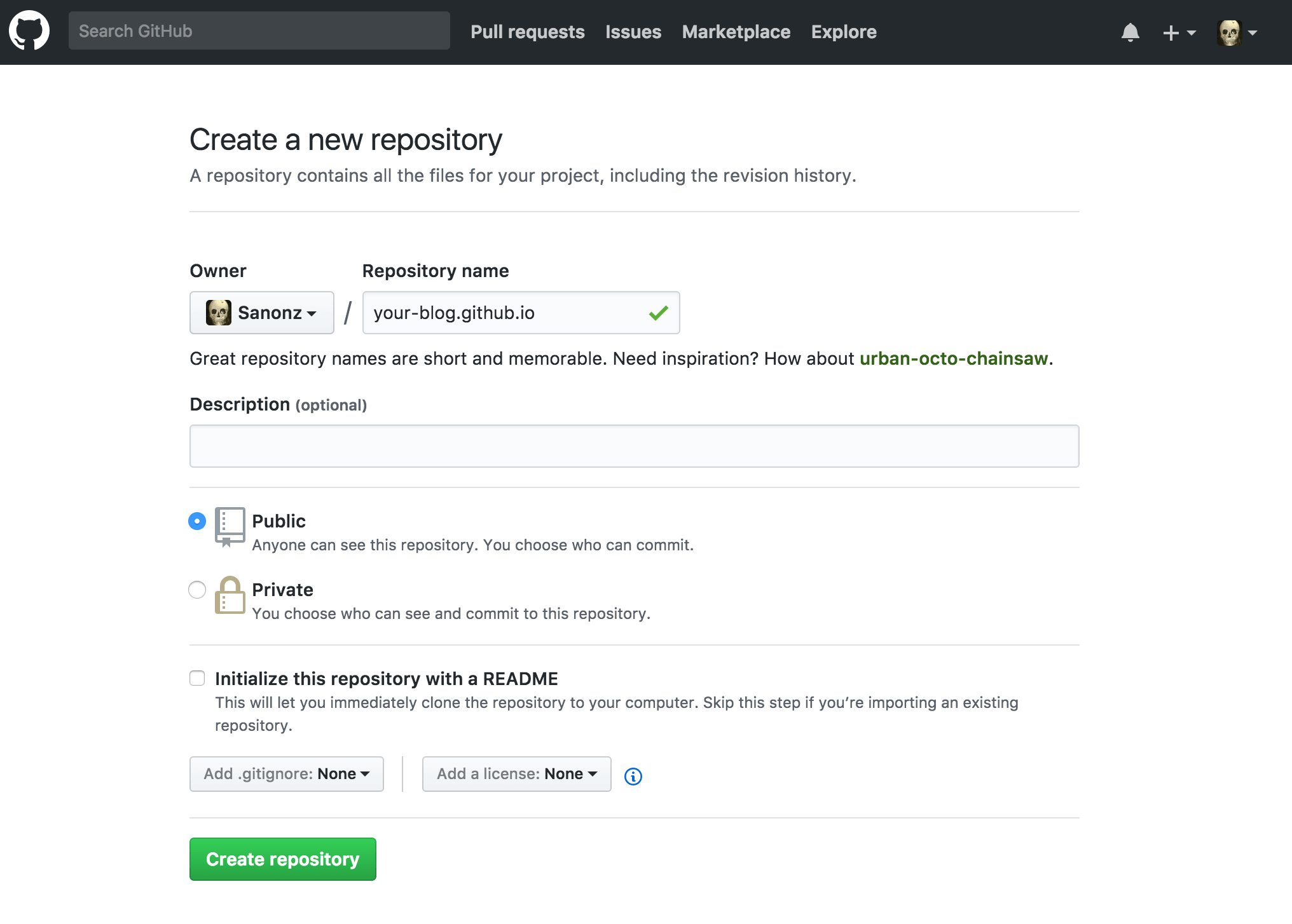
登陆地址:https://github.com/,没有账号注册一个,登陆成功之后点击顶部导航条的➕号,并选择 New repository,如下图

填写 Repository name 一项,比如填写 sanonz 然后就可以通过:https://sanonz.github.io 来访问(访问之前根目录要有默认的 index.html 才能正常打开),填写完成后点击 Create repository 按钮提交创建,如下图
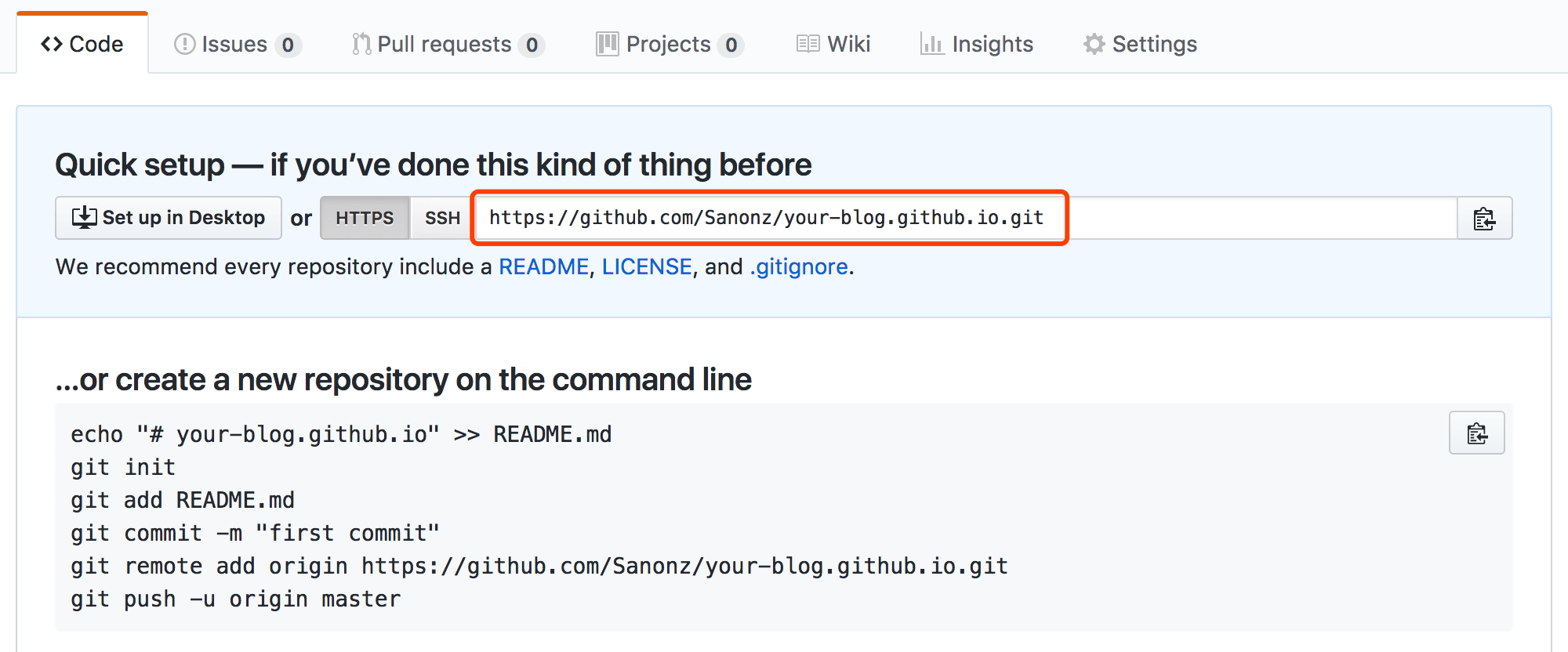
提交成功后复制红色框住的仓库地址
部署到 GitHub

修改 _config.yml 中的参数

1
2
deploy:
type: git

安装 hexo-deployer-git

1
npm install hexo-deployer-git

修改 _config.yml 配置,把刚刚复制的仓库地址粘贴到 repo: 后边

1
2
3
4
5
deploy:
type: git
repo: https://github.com/Sanonz/your-blog.github.io.git
branch: master

参数描述
repo库(Repository)地址
branch分支名称。如果您使用的是 GitHub 或 GitCafe 的话,程序会尝试自动检测。
message自定义提交信息 (默认为 Site updated: {{ now('YYYY-MM-DD HH:mm:ss') }} )

Hexo 一键部署到 GitHub

1
$ hexo deploy

部署成功后查看站点:https://your-blog.github.io

使用 hexo-theme-concise 主题

Concise 主题为博主开发的简约主题,也就是本站所用的主题,如果您喜欢的话可以按以下教程切换为本站所使用的主题

1
$ git clone git@github.com:sanonz/hexo-theme-concise.git themes/concise

修改 _config.yml 配置

1
theme: concise

因为这个主题使用了 less 编译,Hexo 默认的编译器为 hexo-renderer-stylus 要切换为 hexo-renderer-less

1
$ npm install hexo-renderer-less --save

如果你不需要 hexo-renderer-stylus 可以把它卸载掉

1
$ npm uninstall hexo-renderer-stylus --save

清除缓存数据

1
2
$ hexo clean
$ hexo server

刷新页面查看新主题效果,Concise 主题的具体配置到 这里查看,如果在使用过程遇到问题欢迎提 Issues,最后如果喜欢的话给个 Star 😍