惯性聚合 高效追踪和阅读你感兴趣的博客、新闻、科技资讯
阅读原文 在惯性聚合中打开

推荐订阅源

N
News and Events Feed by Topic
D
Docker
云风的 BLOG
云风的 BLOG
F
Fortinet All Blogs
F
Full Disclosure
H
Hackread – Cybersecurity News, Data Breaches, AI and More
P
Proofpoint News Feed
Microsoft Azure Blog
WordPress大学
WordPress大学
The GitHub Blog
The GitHub Blog
L
LangChain Blog
H
Help Net Security
B
Blog
T
Tailwind CSS Blog
V
V2EX
博客园_首页
阮一峰的网络日志
阮一峰的网络日志
人人都是产品经理
人人都是产品经理
The Cloudflare Blog
Recent Announcements
aimingoo的专栏
aimingoo的专栏
美团技术团队
A
About on SuperTechFans
C
Cybersecurity and Infrastructure Security Agency CISA
K
Kaspersky official blog
I
InfoQ
Project Zero
Project Zero
I
Intezer
Google DeepMind News
博客园 - 【当耐特】
Hugging Face - Blog
Hugging Face - Blog
奇客Solidot–传递最新科技情报
奇客Solidot–传递最新科技情报
T
Threat Research - Cisco Blogs
Last Week in AI
Last Week in AI
C
Cyber Attacks, Cyber Crime and Cyber Security
G
GRAHAM CLULEY
Threat Intelligence Blog | Flashpoint
AWS News Blog
AWS News Blog
Spread Privacy
Spread Privacy
S
Securelist
Recorded Future
Recorded Future
D
Darknet – Hacking Tools, Hacker News & Cyber Security
博客园 - 叶小钗
S
Security Affairs
Blog — PlanetScale
Blog — PlanetScale
cs.AI updates on arXiv.org
月光博客
月光博客
freeCodeCamp Programming Tutorials: Python, JavaScript, Git & More
罗磊的独立博客
The Hacker News
The Hacker News

Giscafer's blog

博客停更说明 使用 ViewContainerRef 探索Angular DOM操作 GIS520论坛关闭停止运营 ionic3之组件封装篇 ionic3之图片选择插件com.synconset.imagepicker ionic3开发遇到的一些问题及解决方法 ionic3之自定义tabs菜单图标 ionic3 之Android的actionsheet渲染和ios一致 Hexo博客畅言评论插件试用 从GISer到互联网前端工程师,JUST DO IT angular实现IM聊天图片发送 Cafe主题v1.0发布 React搭建百度前端技术学院习题演示SPA react-ponitor React 与 Redux 实践 —— 城市筛选面板 1.Two Sum 如何组件化开发WebGIS系统 2016年末总结 hexo-theme-cafe
代码理解React组件生命周期过程
2016-12-15 · via Giscafer's blog

生命周期

React Component整个生命周期分为三大块:初始化——存在期(更新)——销毁清理

首次实例化 调用方法

  • getDefaultProps()
  • getInitialState()
  • componentWillMount()
  • render()
  • componentDidMount()()

ES6写法中则为

  • constructor()
  • componentWillMount()
  • render()
  • componentDidMount()

存在期 调用方法

propsstate状态改变

  • componentWillReceiveProps()
  • shouldComponentUpdate()
  • componentWillUpdate()
  • render()
  • componentDidUpdate()

销毁清理 调用方法

  • componentWillUnmount()

代码演示

创建一个LifeCycleComponent.js组件

1

2

3

4

5

6

7

8

9

10

11

12

13

14

15

16

17

18

19

20

21

22

23

24

25

26

27

28

29

30

31

32

33

34

35

36

37

38

39

40

41

42

43

44

45

46

47

48

49

50

51

52

53

54

'use strict'

import React from 'react';

import Nav from '../nav/Nav';

class LifeCycleComponent extends React.Component{

constructor(props){

super(props);

fpLog('初始化调用:constructor()');

}

componentWillMount(){

fpLog('完成渲前调用:componentWillMount()')

}

render(){

fpLog('渲染时调用:render()');

return(

<div>

<Nav/>

<p>{this.props.text}</p>

<a href="https://facebook.github.io/react/docs/react-component.html" target="_blank">Component Specs and Lifecycle</a>

</div>

)

}

shouldComponentUpdate(nextProps, nextState){

fpLog('当渲染新的props或state调用:shouldComponentUpdate()');

fpLog2('<span style="color:blue">原始props.text='+this.props.text+'</span>');

fpLog2('<span style="color:red">改变后的props.text='+nextProps.text+'</span>');

if(this.props.info!==nextProps.text){

return true

}

}

componentWillUpdate(){

fpLog('接收到新的props或者state后,进行渲染之前调用:componentWillUpdate()');

}

componentDidUpdate(){

fpLog('完成渲染新的props或者state后调用,此时可以访问到新的DOM元素:componentDidUpdate()');

}

componentDidMount(){

fpLog('真实DOM渲染后调用:componentDidMount()')

}

componentWillReceiveProps(nextProps){

fpLog('组件接收到新的props时调用:componentWillReceiveProps()---'+nextProps.text)

}

componentWillUnmount(){

fpLog('组件销毁前调用:componentWillUnmount()')

}

}

LifeCycleComponent.dispalyName='LifeCycleComponentDemo';

export default LifeCycleComponent;

父组件入口文件Main.js,改组件主要用来动态改变state值后,观察LifeCycleComponent组件的生命周期方法的调用情况

1

2

3

4

5

6

7

8

9

10

11

12

13

14

15

16

17

18

19

20

21

22

23

24

25

26

27

28

29

30

31

32

33

34

35

36

37

38

39

import LifeCycleApp from './LifeCycle';

import React from 'react';

class LifeCycleMainComponent extends React.Component {

constructor() {

super();

this.state = {

info: 'The React Component Lifecycle'

}

}

render() {

return (

<LifeCycleApp text={this.state.info} />

);

}

componentDidMount() {

//定时更新state的值

setTimeout(() => {

this.setState({

info: 'React组件生命周期'

})

}, 2000)

setTimeout(() => {

this.setState({

info: '再次改变state值'

})

}, 5000)

}

componentWillUnmount() {

}

}

LifeCycleMainComponent.defaultProps = {

};

export default LifeCycleMainComponent;

最后输出日志为:

1

2

3

4

5

6

7

8

9

10

11

12

13

14

15

16

17

18

- 初始化调用:constructor()

- 完成渲前调用:componentWillMount()

- 渲染时调用:render()

- 真实DOM渲染后调用:componentDidMount()

- 组件接收到新的props时调用:componentWillReceiveProps()---React组件生命周期

- 当渲染新的props或state调用:shouldComponentUpdate()

>>> 原始props.text=The React Component Lifecycle

>>> 改变后的props.text=React组件生命周期

- 接收到新的props或者state后,进行渲染之前调用:componentWillUpdate()

- 渲染时调用:render()

- 完成渲染新的props或者state后调用,此时可以访问到新的DOM元素:componentDidUpdate()

- 组件接收到新的props时调用:componentWillReceiveProps()---再次改变state值

- 当渲染新的props或state调用:shouldComponentUpdate()

原始props.text=React组件生命周期

改变后的props.text=再次改变state值

- 接收到新的props或者state后,进行渲染之前调用:componentWillUpdate()

- 渲染时调用:render()

- 完成渲染新的props或者state后调用,此时可以访问到新的DOM元素:componentDidUpdate()

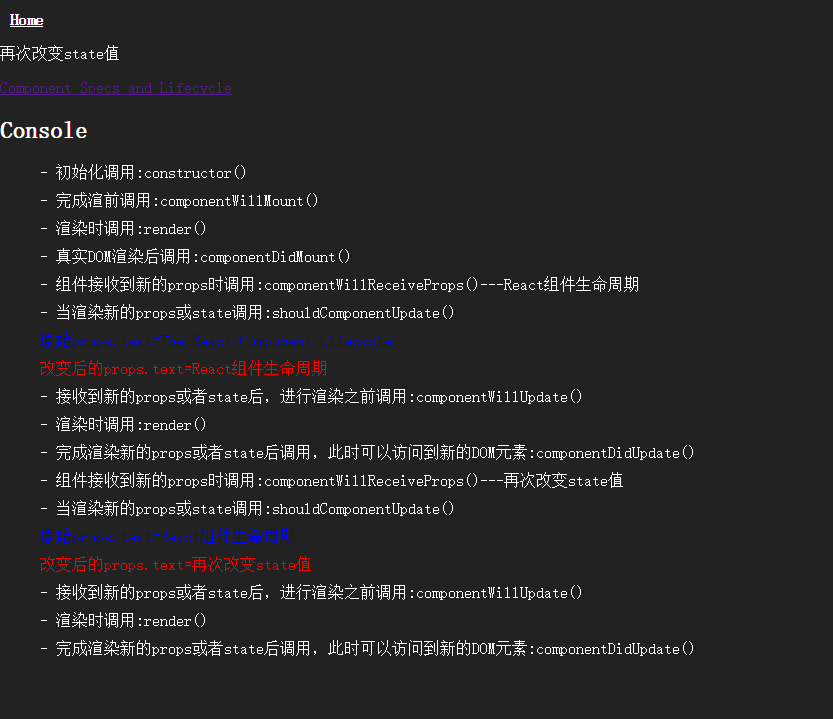
结果截图:

React Component lifeCycle

源码

https://github.com/giscafer/react-demo-list

[参考链接]

推荐文章