惯性聚合 高效追踪和阅读你感兴趣的博客、新闻、科技资讯
阅读原文 在惯性聚合中打开

推荐订阅源

Simon Willison's Weblog
Help Net Security
Help Net Security
P
Privacy International News Feed
T
Threat Research - Cisco Blogs
C
Cisco Blogs
C
CERT Recently Published Vulnerability Notes
NISL@THU
NISL@THU
L
LINUX DO - 热门话题
Security Latest
Security Latest
A
Arctic Wolf
G
GRAHAM CLULEY
月光博客
月光博客
S
Securelist
D
Docker
J
Java Code Geeks
T
Troy Hunt's Blog
T
Tenable Blog
让小产品的独立变现更简单 - ezindie.com
SecWiki News
SecWiki News
S
Security @ Cisco Blogs
量子位
freeCodeCamp Programming Tutorials: Python, JavaScript, Git & More
L
LINUX DO - 最新话题
Recent Commits to openclaw:main
aimingoo的专栏
aimingoo的专栏
博客园 - 【当耐特】
H
Heimdal Security Blog
The Hacker News
The Hacker News
博客园 - 三生石上(FineUI控件)
Application and Cybersecurity Blog
N
Netflix TechBlog - Medium
Vercel News
Vercel News
Forbes - Security
Forbes - Security
B
Blog RSS Feed
H
Hackread – Cybersecurity News, Data Breaches, AI and More
IT之家
IT之家
B
Blog
MongoDB | Blog
MongoDB | Blog
博客园 - 聂微东
Google DeepMind News
S
Secure Thoughts
Threat Intelligence Blog | Flashpoint
C
Check Point Blog
云风的 BLOG
云风的 BLOG
CTFtime.org: upcoming CTF events
T
The Blog of Author Tim Ferriss
L
Lohrmann on Cybersecurity
F
Full Disclosure
D
Darknet – Hacking Tools, Hacker News & Cyber Security
P
Proofpoint News Feed

Giscafer's blog

博客停更说明 使用 ViewContainerRef 探索Angular DOM操作 GIS520论坛关闭停止运营 ionic3之组件封装篇 ionic3之图片选择插件com.synconset.imagepicker ionic3开发遇到的一些问题及解决方法 ionic3之自定义tabs菜单图标 Hexo博客畅言评论插件试用 从GISer到互联网前端工程师,JUST DO IT angular实现IM聊天图片发送 Cafe主题v1.0发布 React搭建百度前端技术学院习题演示SPA react-ponitor React 与 Redux 实践 —— 城市筛选面板 1.Two Sum 如何组件化开发WebGIS系统 2016年末总结 代码理解React组件生命周期过程 hexo-theme-cafe
ionic3 之Android的actionsheet渲染和ios一致
2017-06-19 · via Giscafer's blog

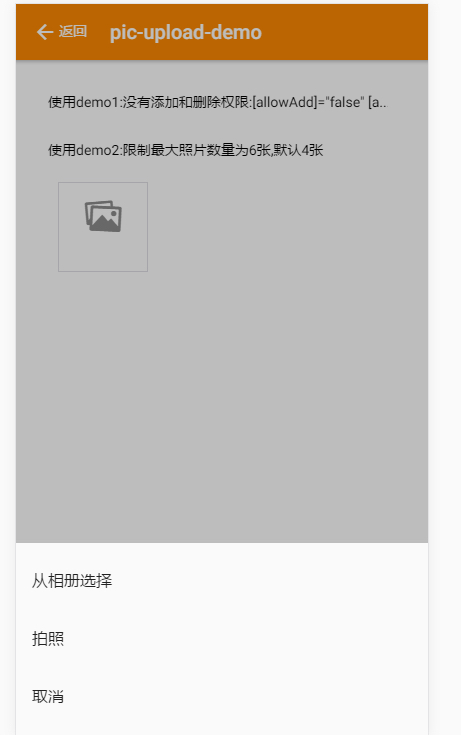
Android的action-sheet是比较丑,默认几乎不带样式,如果不给图标的话。如图:

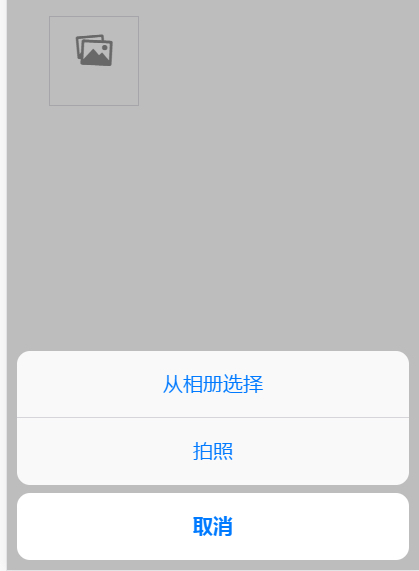
首先对比一下ios和android样式的区别,然后在ionic.css文件中,将ios的action-sheet样式拷贝出来,独立为actionsheet.scss,这样就可以覆盖了。

1

2

3

4

5

6

7

8

9

10

11

12

13

14

15

16

17

18

19

20

21

22

23

24

25

26

27

28

29

30

31

32

33

34

35

36

37

38

39

40

41

42

43

44

45

46

47

48

49

50

51

52

53

54

55

56

57

58

59

60

61

62

63

64

65

66

67

68

69

70

71

72

73

74

75

76

77

78

79

80

81

82

83

84

85

86

87

88

/**

* 覆盖action-sheet样式

*

**/

.action-sheet-md {

text-align: center;

}

.action-sheet-md .action-sheet-container {

padding: 0 10px;

background: none;

}

.action-sheet-md .action-sheet-group {

overflow: hidden;

margin-bottom: 8px;

border-radius: 13px;

background: #f9f9f9;

}

.action-sheet-md .action-sheet-group:last-child {

margin-bottom: 10px;

}

.action-sheet-md .action-sheet-title {

text-align: center;

padding: 1.5rem;

border-bottom: 0.55px solid #d6d6da;

border-radius: 0;

font-size: 1.3rem;

font-weight: 400;

color: #8f8f8f;

}

.action-sheet-md .action-sheet-button {

margin: 0;

padding: 18px;

min-height: 5.6rem;

border-bottom: 0.55px solid #d6d6da;

font-size: 2rem;

color: #007aff;

background: transparent;

.button-inner {

display: -webkit-flex;

display: -ms-flexbox;

display: flex;

-webkit-flex-flow: row nowrap;

-ms-flex-flow: row nowrap;

flex-flow: row nowrap;

-webkit-flex-shrink: 0;

-ms-flex-negative: 0;

flex-shrink: 0;

-webkit-align-items: center;

-ms-flex-align: center;

align-items: center;

-webkit-justify-content: center;

-ms-flex-pack: center;

justify-content: center;

width: 100%;

height: 100%;

}

}

.action-sheet-md .action-sheet-button:last-child {

border-bottom-color: transparent;

}

.action-sheet-md .action-sheet-button.activated {

margin-top: -0.55px;

border-top: 0.55px solid #ebebeb;

border-bottom-color: #ebebeb;

background: #ebebeb;

}

.action-sheet-md .action-sheet-selected {

font-weight: bold;

background: #fff;

}

.action-sheet-md .action-sheet-destructive {

color: #f53d3d;

}

.action-sheet-md .action-sheet-cancel {

font-weight: 600;

background: #fff;

}

最终效果如图:

其实ionic支持指定UI渲染模式,config设置modeios即可

推荐文章