惯性聚合 高效追踪和阅读你感兴趣的博客、新闻、科技资讯
阅读原文 在惯性聚合中打开

推荐订阅源

S
SegmentFault 最新的问题
Spread Privacy
Spread Privacy
Google DeepMind News
WordPress大学
WordPress大学
Blog — PlanetScale
Blog — PlanetScale
OSCHINA 社区最新新闻
OSCHINA 社区最新新闻
Apple Machine Learning Research
SecWiki News
SecWiki News
腾讯CDC
P
Privacy International News Feed
Webroot Blog
Webroot Blog
J
Java Code Geeks
爱范儿
爱范儿
A
About on SuperTechFans
S
Secure Thoughts
cs.CL updates on arXiv.org
D
DataBreaches.Net
Cloudbric
Cloudbric
Security Archives - TechRepublic
CTFtime.org: upcoming CTF events
C
Cyber Attacks, Cyber Crime and Cyber Security
P
Proofpoint News Feed
钛媒体:引领未来商业与生活新知
钛媒体:引领未来商业与生活新知
H
Hackread – Cybersecurity News, Data Breaches, AI and More
Security Latest
Security Latest
Forbes - Security
Forbes - Security
小众软件
小众软件
www.infosecurity-magazine.com
C
Cybersecurity and Infrastructure Security Agency CISA
T
Threatpost
量子位
MongoDB | Blog
MongoDB | Blog
奇客Solidot–传递最新科技情报
奇客Solidot–传递最新科技情报
月光博客
月光博客
W
WeLiveSecurity
P
Privacy & Cybersecurity Law Blog
Vercel News
Vercel News
Google Online Security Blog
云风的 BLOG
云风的 BLOG
GbyAI
GbyAI
S
Security @ Cisco Blogs
T
The Exploit Database - CXSecurity.com
Help Net Security
Help Net Security
V
Visual Studio Blog
C
CXSECURITY Database RSS Feed - CXSecurity.com
Application and Cybersecurity Blog
博客园 - 聂微东
P
Proofpoint News Feed
C
CERT Recently Published Vulnerability Notes
Attack and Defense Labs

Giscafer's blog

博客停更说明 使用 ViewContainerRef 探索Angular DOM操作 GIS520论坛关闭停止运营 ionic3之组件封装篇 ionic3之图片选择插件com.synconset.imagepicker ionic3开发遇到的一些问题及解决方法 ionic3 之Android的actionsheet渲染和ios一致 Hexo博客畅言评论插件试用 从GISer到互联网前端工程师,JUST DO IT angular实现IM聊天图片发送 Cafe主题v1.0发布 React搭建百度前端技术学院习题演示SPA react-ponitor React 与 Redux 实践 —— 城市筛选面板 1.Two Sum 如何组件化开发WebGIS系统 2016年末总结 代码理解React组件生命周期过程 hexo-theme-cafe
ionic3之自定义tabs菜单图标
2017-06-27 · via Giscafer's blog

ionic的tabs组件默认图标更换方式可以通过自定义图标样式来替换。自定义图标可以是图标字体库,也可以是png图标等。

在tabs.scss文件(组件作用域),或者全局app.scss覆盖都行。下边是菜单覆盖代码:

1

2

3

4

5

6

7

8

9

10

11

12

13

14

15

16

17

18

19

20

21

22

23

24

25

26

27

28

29

30

31

32

33

34

35

36

37

38

39

40

41

42

43

44

page-tabs {

.ion-tab-icon-base {

width: 32px !important;

height: 32px !important;

padding: 4px 4px 2px;

}

.ion-tab-icon-md-base {

min-width: 0 !important;

height: 32px;

}

$tabImageName: 'home' 'task' 'master' 'my';

@for $i from 1 to 5 {

.ion-ios-tab-#{nth($tabImageName, $i)} {

@extend .ion-tab-icon-base;

content: url("../../assets/ui/tabs/icon_#{nth($tabImageName, $i)}_on.png");

}

.ion-ios-tab-#{nth($tabImageName, $i)}-outline {

@extend .ion-tab-icon-base;

content: url("../../assets/ui/tabs/icon_#{nth($tabImageName, $i)}_off.png");

}

.tabs-md .tab-button[aria-selected=true] {

.ion-md-tab-#{nth($tabImageName, $i)} {

@extend .ion-tab-icon-md-base;

content: url("../../assets/ui/tabs/icon_#{nth($tabImageName, $i)}_on.png");

}

}

.tabs-md .tab-button[aria-selected=false] {

.ion-md-tab-#{nth($tabImageName, $i)} {

@extend .ion-tab-icon-md-base;

content: url("../../assets/ui/tabs/icon_#{nth($tabImageName, $i)}_off.png");

}

}

}

.ion-ios-tab-task,.ion-ios-tab-task-outline,.ion-ios-tab-master,.ion-ios-tab-master-outline{

width: 30px !important;

height: 32px !important;

}

}

使用了scss的语法,定义 $tabImageName: 'home' 'task' 'master' 'my';数组,然后循环,通过#{nth($tabImageName, $i)}取出循环中的每个元素,定义每个图标的样式,这个就是scss预编译样式的好处,省去重复的工作和重复的代码。

从样式代码可以看出,定义了两份代码,一份是ios的ion-ios-前缀,一份是android版本的ion-md-.tabs-md前缀,还有这个是ionic对不同平台有不同的样式,如果了解一看就明白了。-outline为ios未选中样式,[aria-selected=false]为android未选中样式。

然后在html里边,修改tabIcon为样式中定义的图标即可。(上边样式图标统一加了tab-前缀,为了和自带图标区分开来)

1

2

3

4

5

6

7

8

<ion-tabs #mainTabs [selectedIndex]="mySelectedIndex">

<ion-tab [root]="homeView" tabTitle="首页" tabIcon="tab-home"></ion-tab>

<ion-tab [root]="taskView" tabTitle="任务" tabIcon="tab-task"></ion-tab>

<ion-tab [root]="courseView" tabTitle="师傅学院" tabIcon="tab-master"></ion-tab>

<ion-tab [root]="userCenterView" tabTitle="我的" tabIcon="tab-my"></ion-tab>

<ion-tab [root]="demoView" tabTitle="DEMO" tabIcon="bug"></ion-tab>

</ion-tabs>

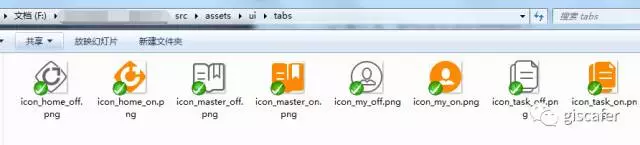
图标路径放在src/assets/ui下,如图

图标路径

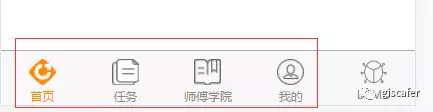
更换前和更换后对比

自带图标

自定义图标

推荐文章