










Large language models can write code quickly, but they still misremember APIs, miss version-specific details, and forget what they learned at the end of a session.
That is the problem Context Hub is trying to solve.
Context Hub (chub) gives coding agents curated, versioned documentation and skills that they can search and fetch through a CLI. It also gives them two learning loops: local annotations for agent memory and feedback for maintainers.
In this tutorial, you'll learn how the official chub workflow works, how Context Hub organizes docs and skills, how annotations and feedback create a memory loop, and how to build a companion relevance engine that improves retrieval without breaking the upstream content model.
This tutorial uses two public repositories side by side:
the official upstream project: andrewyng/context-hub
the companion implementation for this article: natarajsundar/context-hub-relevance-engine
I've also opened a corresponding upstream pull request from my fork to the main project. If you want to track that work from the article, use the upstream pull request list filtered by author: andrewyng/context-hub pull requests by natarajsundar.
What We'll Build
By the end of this tutorial, you'll have:
a clear mental model for how Context Hub works
a working local install of the official
chubCLIa repeatable workflow for search, fetch, annotations, and feedback
a companion repo that adds an additive reranking layer on top of a Context-Hub-style content tree
a small benchmark and local comparison UI you can run end to end
a clear bridge between the companion repo and the smaller upstream PR
Prerequisites
Before you start, make sure you have:
Node.js 18 or newer
npm
comfort with the terminal
basic familiarity with Markdown
Table of Contents
How to Understand Context Hub
Context Hub is easiest to understand as a workflow for turning fast-moving documentation into a reliable input for coding agents.
Instead of asking an agent to rely on whatever it remembers from training data, you give it a predictable contract:
search for the right entry
fetch the right doc or skill
write code against that curated content
save local lessons as annotations
send doc-quality feedback back to maintainers

That system boundary matters.
It makes the agent easier to audit, easier to improve, and easier to extend. It also keeps the interface small enough that you can reason about where the failures happen. If the agent still misses the answer, you can ask whether the problem happened during search, fetch, context selection, or generation.
How to Understand the Official Repo, the Companion repo, and the Upstream PR
This tutorial is intentionally split across two codebases and one contribution path.
The official upstream project, andrewyng/context-hub, is the source of truth for the real CLI, the content model, and the documented workflows. That's the codebase you should use to learn how chub works today.
The companion repository, natarajsundar/context-hub-relevance-engine, is where the relevant ideas in this article are made concrete. It's a companion implementation, not a replacement product. Its job is to make retrieval tradeoffs visible, measurable, and easy to run locally.
The upstream PR is the bridge between those two worlds. The companion repo is where you can iterate faster on benchmarks, reranking, and the comparison UI. The upstream PR is where the smallest reviewable slices can be proposed back to the main project. You can track that thread here: upstream PR search filtered by author.
That three-part framing keeps the article honest:
use the upstream repo to understand the current system
use the companion repo to explore relevant improvements end to end
use the upstream PR to show how a larger idea can be broken into reviewable pieces
How to Install and Use the Official CLI
The official quick start is intentionally small.
npm install -g @aisuite/chub
Once the CLI is installed, you can search for what is available and fetch a specific entry:
chub search openai
chub get openai/chat --lang py
That's the happy path, but it helps to think through the request flow.
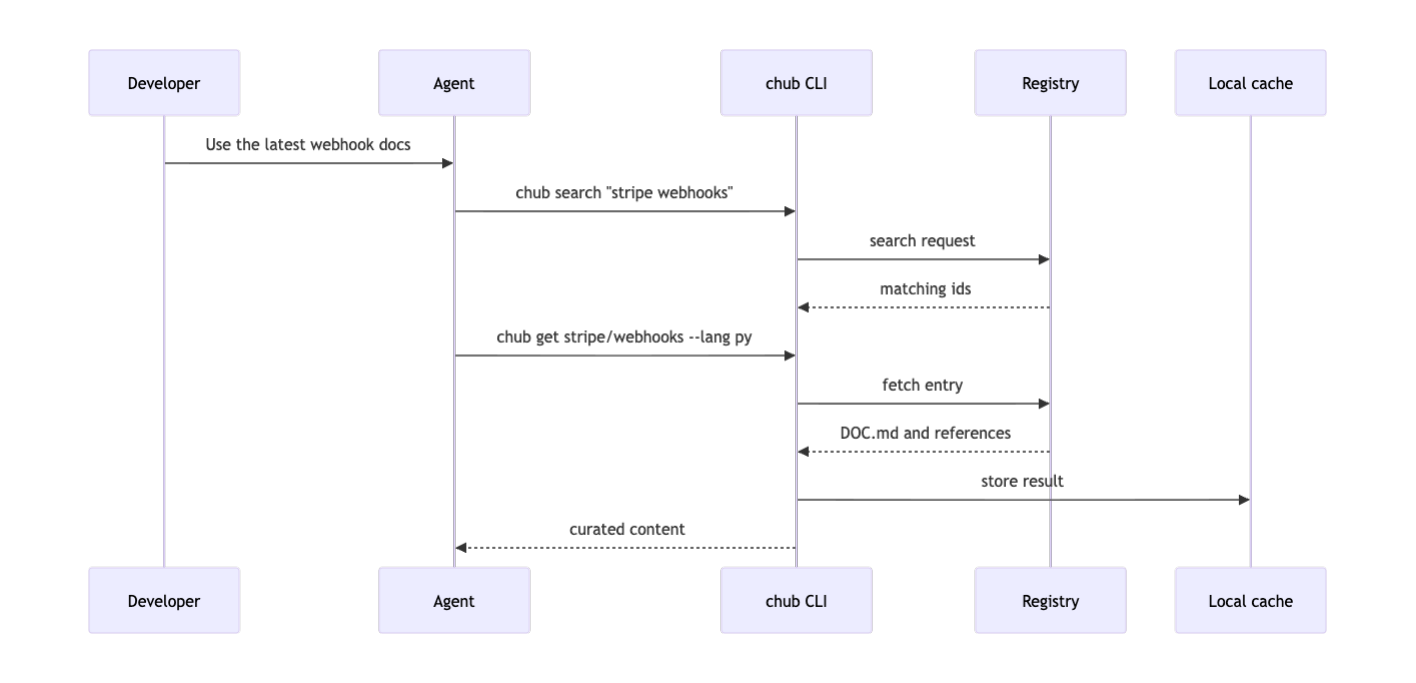
In practice, the most useful detail is that the CLI is designed for the agent to use, not just for the human to use by hand.
That's why the upstream CLI also ships a get-api-docs skill. For example, if you use Claude Code, you can copy the skill into your local project like this:
mkdir -p .claude/skills
cp $(npm root -g)/@aisuite/chub/skills/get-api-docs/SKILL.md \
  .claude/skills/get-api-docs.md
That step teaches the agent a retrieval habit:
Before you write code against a third-party SDK or API, use
chubinstead of guessing.
That behavioral rule is often as important as the docs themselves.
How to Understand Docs, Skills, and the Content Layout
Context Hub separates content into two categories:
docs, which answer “what should the agent know?”
skills, which answer “how should the agent behave?”
That distinction makes the content model easier to scale. Docs can be versioned and language-specific. Skills can stay short and operational.
The directory structure is also predictable. The content guide organizes entries by author, then by docs or skills, then by entry name.
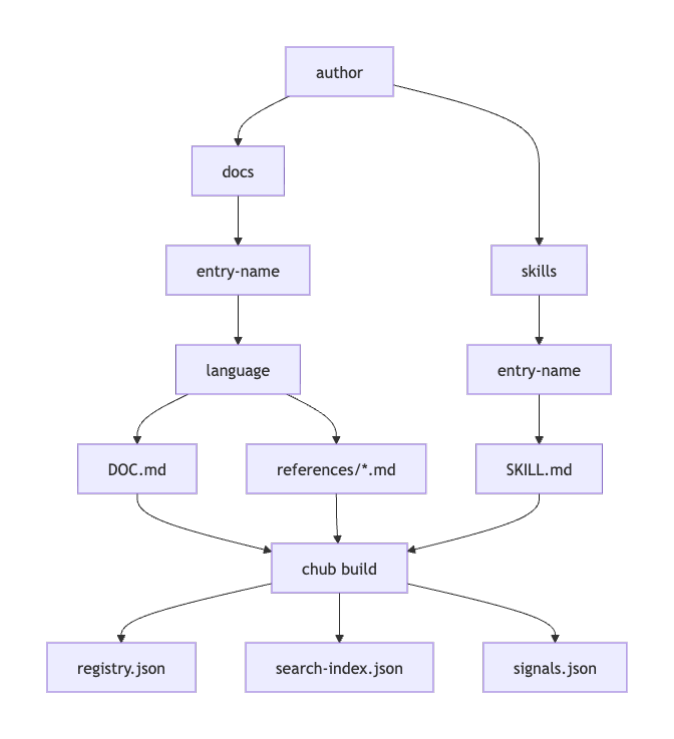
A small example looks like this:
author/docs/payments/python/DOC.md
author/docs/payments/python/references/errors.md
author/skills/login-flows/SKILL.md
This is one of the reasons Context Hub is easy to work with.
The shape of the content is plain Markdown, the main entry file is predictable, and the build output is inspectable. You don't have to reverse engineer a hidden prompt layer to figure out what the agent is reading.
How to Use Incremental Fetch and Layered Sources
One of the best design choices in Context Hub is that it doesn't force you to inject every file into the model on every request.
Instead, the entry file gives you the overview, and the reference files hold the deeper material.
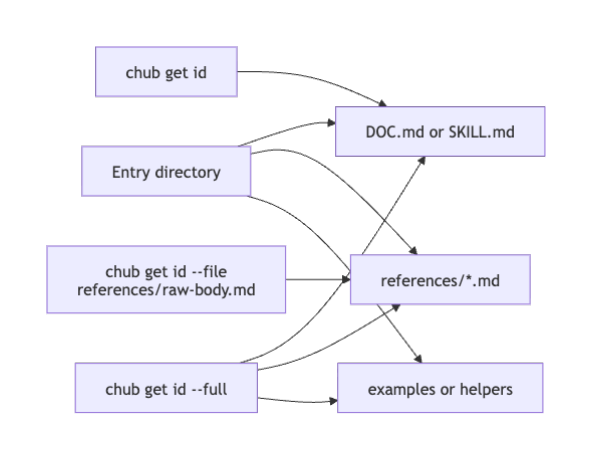
That lets you fetch content in progressively larger slices.
chub get stripe/webhooks --lang py
chub get stripe/webhooks --lang py --file references/raw-body.md
chub get stripe/webhooks --lang py --full
This is a token-budget feature as much as it is a documentation feature. A good agent should first load the overview, decide what part of the task matters, and only then fetch the specific supporting file.
Context Hub also supports layered sources. You can merge public content with your own local build output through ~/.chub/config.yaml.
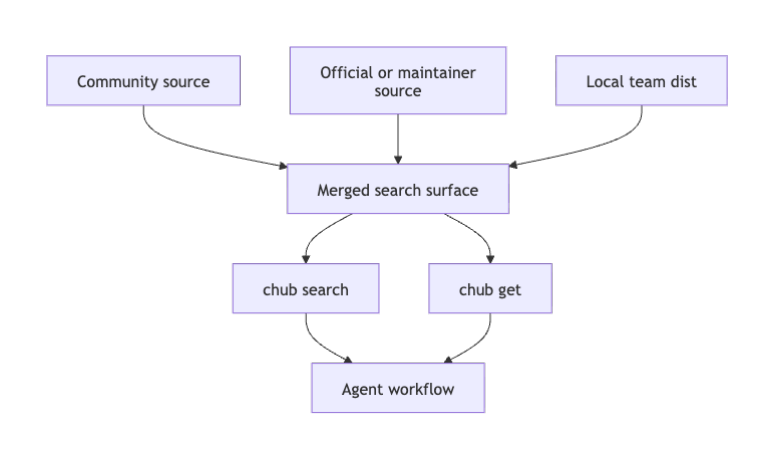
A minimal configuration looks like this:
sources:
  - name: community
    url: https://cdn.aichub.org/v1
  - name: my-team
    path: /opt/team-docs/dist
That means you can keep public docs in one lane and team-specific runbooks in another lane while still giving the agent one search surface.
How to Use Annotations and Feedback to Create a Memory Loop
Context Hub has two different improvement channels.
Annotations are local. They help your agent remember what worked last time. Feedback is shared. It helps maintainers improve the docs for everyone.
That distinction matters because not every lesson belongs in the shared registry. Some lessons are environment-specific. Others point to content quality issues that should be fixed centrally.
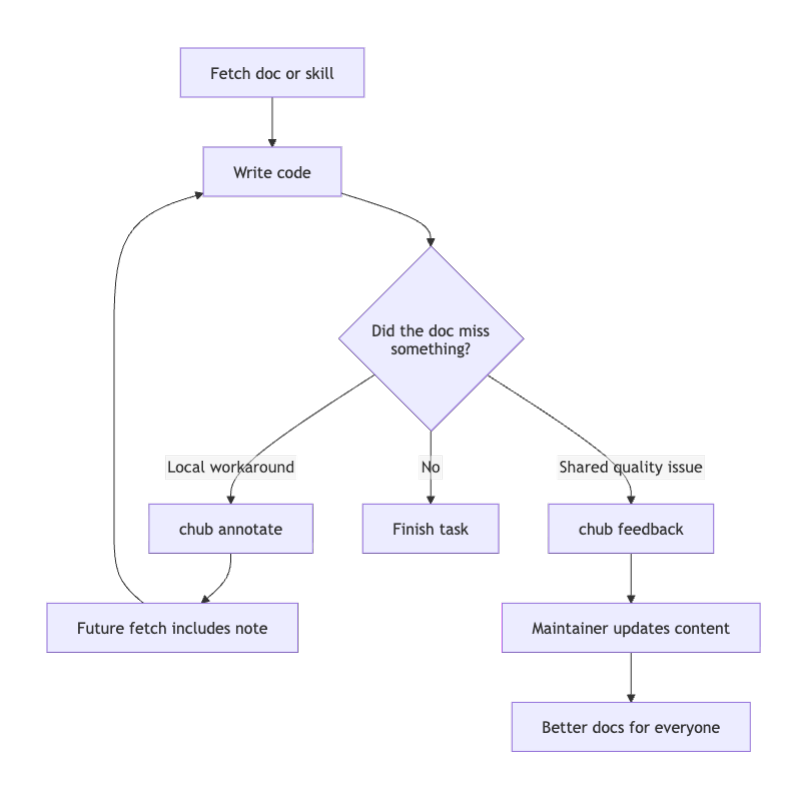
Here is what local memory looks like in practice:
chub annotate stripe/webhooks \
  "Remember: Flask request.data must stay raw for Stripe signature verification."
And here's the feedback path:
chub feedback stripe/webhooks up
That loop is simple, but it's one of the most important ideas in the project. It turns a one-off debugging lesson into either persistent local memory or a signal that the shared docs need to improve.
How to See Where Relevance Still Misses
The upstream project already has a real ranking story. It uses BM25 and lexical rescue so that package-like identifiers, exact tokens, and fuzzy matches still have a chance to surface.
That is a strong baseline.
But developer queries are often much messier than package names.
People search for:
rrfsigninpg vectorhnswraw body stripe
Those aren't “bad” queries. They're realistic shorthand.
And they expose an opportunity in the content model itself: many of the exact answers live in reference files such as references/rrf.md, references/raw-body.md, and references/hnsw.md.
So the question is not whether the current search works at all. It clearly does. The better question is this:
How can you improve retrieval without breaking the content contract that already makes Context Hub useful?
The answer in the companion repo is to keep the current model and add a reranking layer on top of it.
How the Companion Relevance Engine Improves Retrieval
The companion repository in this article is context-hub-relevance-engine.
It keeps the same broad ideas that make Context Hub attractive:
plain Markdown content
DOC.mdandSKILL.mdentry pointsbuild artifacts you can inspect
local annotations and feedback
progressive fetch behavior
Then it adds one new build artifact: signals.json.
At build time, the engine extracts extra signals such as:
headings from the main file
titles and tokens from reference files
language and version metadata
source metadata and freshness
annotation overlap
feedback priors
The first pass stays cheap and transparent. The reranker only runs after the baseline has done its work.
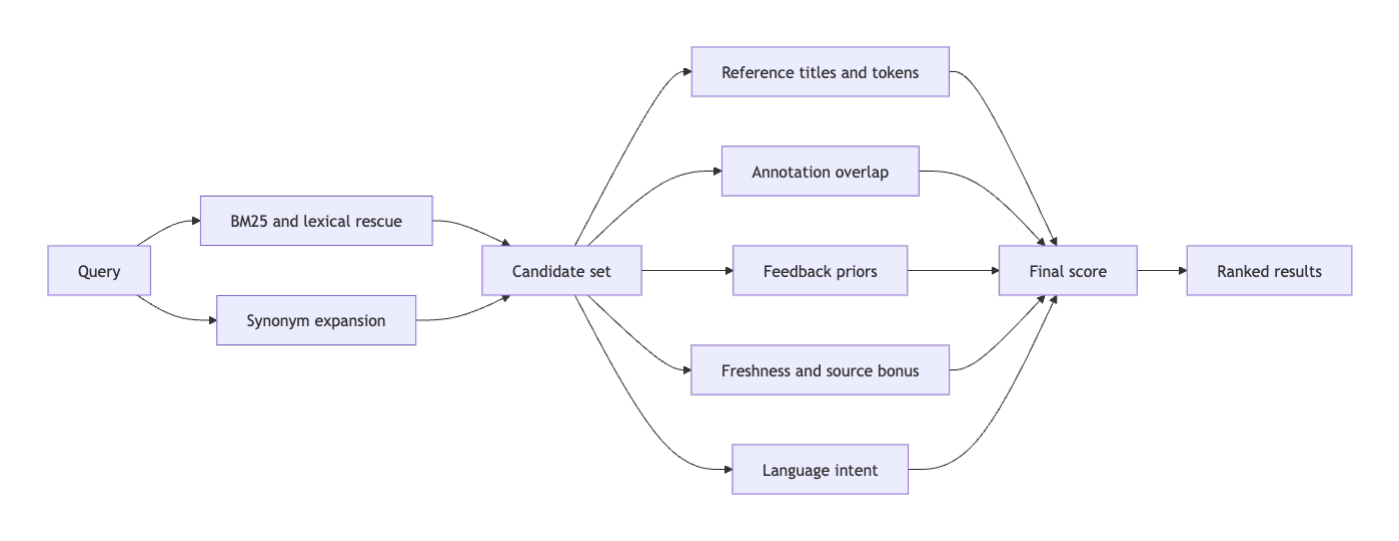
That approach matters for two reasons.
First, it's additive. You don't have to redesign the content tree.
Second, it's measurable. You can define concrete failure modes, fix them one by one, and run the same benchmark every time you change the scorer.
How to Run the Companion Repo End to End
Open the repository on GitHub, clone it using GitHub’s normal clone flow, and then run the commands below from the project root.
cd context-hub-relevance-engine
npm install
npm run build
npm test
The repository has no third-party runtime dependencies, so npm install is mostly there to keep the workflow familiar. The main commands are all plain Node scripts.
How to Reproduce a Baseline Miss
Start with the query rrf.
node bin/chub-lab.mjs search rrf --mode baseline --lang python
Expected output:
No results.
Now run the improved mode.
node bin/chub-lab.mjs search rrf --mode improved --lang python
Expected top result:
langchain/retrievers [doc] score=320.24
  Composable retrieval patterns for hybrid search, parent documents, query expansion, and reranking.
That win happens because the improved mode looks beyond the top-level entry description. It also sees the reference file title rrf, the related terms from query expansion, and the broader token overlap in the extracted signals.
How to Reproduce a Workflow-intent Win
Try a sign-in query.
node bin/chub-lab.mjs search signin --mode baseline
node bin/chub-lab.mjs search signin --mode improved
The baseline misses. The improved mode returns playwright-community/login-flows because the reranker treats signin, sign in, login, and authentication as related intent.
How to Test the Memory Loop
Write a local note:
node bin/chub-lab.mjs annotate stripe/webhooks \
  "Remember: Flask request.data must stay raw for Stripe signature verification."
Then fetch the doc:
node bin/chub-lab.mjs get stripe/webhooks --lang python
You will see the main doc content, the list of available reference files, and the appended annotation.
That's the behavior you want from an agent memory loop: learn once, reuse many times.
How to Run the Benchmark
Start from an empty store:
npm run reset-store
node bin/chub-lab.mjs evaluate
The included synthetic stress set reports the following summary with an empty store:
| Mode | Top-1 Accuracy | MRR |
|---|---|---|
| baseline | 0.333 | 0.333 |
| improved | 1.000 | 1.000 |
You can also seed the store and rerun the evaluation:
npm run seed-demo
node bin/chub-lab.mjs evaluate
That demonstrates how annotations and feedback can push relevant entries even higher when the query overlaps with the agent’s own history.
How to Launch the Local Comparison UI
npm run serve
Then open http://localhost:8787 in your browser.
The UI lets you compare baseline and improved retrieval, inspect stored annotations and feedback, rebuild the local artifacts, and rerun the benchmark from one place.
How to Read the Benchmark Honestly
The benchmark in this repo is intentionally small.
That is a feature, not a flaw.
The point is not to claim universal search quality. The point is to make a handful of realistic failure modes easy to reproduce:
acronym queries
shorthand workflow queries
reference-file topic queries
memory-aware reranking
That keeps the evaluation honest.
If a future scoring change breaks rrf, signin, or raw body stripe, you'll know immediately. And if you add a stronger dataset later, you can keep these tests as regression guards.
The benchmark files included in the repo are:
demo/benchmark.jsondocs/benchmark-empty-store.jsondocs/benchmark-seeded-store.jsondocs/relevance-improvement-plan.md
How to Connect the Companion Repo to the Upstream PR
A good companion repo is broad enough to explore ideas quickly. A good upstream PR is narrow enough to review.
That's why the two shouldn't be identical.
The companion repository is where you can keep the full relevance story together:
the local comparison UI
the synthetic benchmark
the richer reranking signals
the debug and explain surfaces
the documentation that walks through tradeoffs end to end
The upstream PR should be smaller and more surgical. In practice, that usually means proposing the most reviewable slices first, such as:
reference-file signal extraction
explainable score output for debugging
a lightweight benchmark fixture format
one additive reranking hook behind a flag
That keeps the main repository maintainable while still letting the article and companion repo tell the full engineering story. The upstream thread for this work lives here: andrewyng/context-hub pull requests by natarajsundar.
Conclusion
What makes Context Hub interesting is not just that it stores documentation. It gives you a clear system boundary for improving coding agents.
You can inspect what the agent reads. You can decide when it should retrieve. You can layer public and private sources. You can persist local lessons. And you can improve ranking without tearing the whole model apart.
The companion relevance engine shows how to keep what already works, make one part of the system measurably better, and package the result in a way other developers can run, inspect, and extend. The upstream PR, in turn, shows how to turn a broad idea into smaller pieces that are realistic to review in the main project.
Diagram Attribution
All diagrams used in this article were created by the author specifically for this tutorial and its companion repository.
Sources
Learn to code for free. freeCodeCamp's open source curriculum has helped more than 40,000 people get jobs as developers. Get started