



惯性聚合 高效追踪和阅读你感兴趣的博客、新闻、科技资讯
阅读原文 在惯性聚合中打开

推荐订阅源

D
DataBreaches.Net
T
The Exploit Database - CXSecurity.com
V
Vulnerabilities – Threatpost
Know Your Adversary
Know Your Adversary
Exploit-DB.com RSS Feed
N
News and Events Feed by Topic
Spread Privacy
Spread Privacy
Application and Cybersecurity Blog
S
Secure Thoughts
G
GRAHAM CLULEY
Google Online Security Blog
Help Net Security
Help Net Security
cs.CL updates on arXiv.org
O
OpenAI News
Google DeepMind News
K
KPMG report finds enterprise disconnect between AI and its ROI | CIO
Security Archives - TechRepublic
L
LINUX DO - 最新话题
Microsoft Azure Blog
C
Cybersecurity and Infrastructure Security Agency CISA
Stack Overflow Blog
Stack Overflow Blog
OSCHINA 社区最新新闻
OSCHINA 社区最新新闻
freeCodeCamp Programming Tutorials: Python, JavaScript, Git & More
L
Lohrmann on Cybersecurity
H
Hacker News: Front Page
W
WeLiveSecurity
P
Privacy International News Feed
Forbes - Security
Forbes - Security
月光博客
月光博客
PCI Perspectives
PCI Perspectives
T
Tailwind CSS Blog
N
News and Events Feed by Topic
T
Threat Research - Cisco Blogs
Engineering at Meta
Engineering at Meta
F
Full Disclosure
AI
AI
Hacker News - Newest:
Hacker News - Newest: "LLM"
Schneier on Security
Threat Intelligence Blog | Flashpoint
Cyber Security Advisories - MS-ISAC
B
Blog
酷 壳 – CoolShell
酷 壳 – CoolShell
D
Darknet – Hacking Tools, Hacker News & Cyber Security
V
Visual Studio Blog
The Hacker News
The Hacker News
博客园 - 叶小钗
G
Google Developers Blog
Google DeepMind News
博客园 - 司徒正美
T
The Blog of Author Tim Ferriss

freeCodeCamp Programming Tutorials: Python, JavaScript, Git & More

Learn Command Line Interface (CLI) Development with Dart: From Zero to a Fully Published Developer Tool How to Bypass Cloud SMTP Restrictions Using Brevo and HTTP APIs How to Build a Live Options Database in Python – A Complete Guide How to Migrate to S3 Native State Locking in Terraform How to Use SCons to Build Software Projects [Full Handbook] How to Run Open Source LLMs Locally and in the Cloud QuRT: The Real-Time OS Inside Your Phone's Processor [Full Handbook] The Real Infrastructure Behind Remote Work (It’s Not Just Wi-Fi) The Lithography Handbook: Machines, Markets, and the Next Wave of Semiconductor Startups ITCM vs DTCM vs DDR: Embedded Memory Types Explained [Full Handbook] AI Paper Review: Improving Language Understanding by Generative Pre-Training (GPT-1) How to Build a Market Research Copilot with MCP and Python [Full Handbook] How to Build a Scoped Note-Taking API with Django Rest Framework and SimpleJWT The Complete SOC 2 Type II Implementation Handbook for Engineers: A Month-by-Month Roadmap with Real Commands Mastering the JavaScript Event Loop Data Science Insights: Why the Mean Lies When Handling Messy Retail Data How to Build High-Ranking SEO Landing Page How to Query Data in DynamoDB Using .Net How to Unblock Your AI PR Review Bottleneck: A Tech Lead’s Guide to Building a Codebase-Aware Reviewer How to Navigate Microservices as a Frontend Engineer How to Compress PDF Files in the Browser Using JavaScript (Step-by-Step) Stanford's youngest instructor talks InfoSec, AI, and catching cheaters - Rachel Fernandez interview [Podcast #217] Product Experimentation with Propensity Scores: Causal Inference for LLM-Based Features in Python How to Build a Multi-Agent AI System with LangGraph, MCP, and A2A [Full Book] How to Land Your First Cloud or DevOps Role: What Hiring Managers Actually Look For How to Deploy a Serverless Spam Classifier Using Scikit-Learn, AWS Lambda, & API Gateway How to Dockerize a Go Application – Full Step-by-Step Walkthrough Learn Hardware, Cloud, DevOps, Networking, Security, Databases, DNS, Git, and Linux Inside TreeHacks 2026, Stanford’s Elite Student Hakc Inside Stanford’s Elite Student Hackathon [Full Documentary] How to Measure Your AI Citation Rate Across ChatGPT, Perplexity, and Claude How to Deploy a Full-Stack Next.js App on Cloudflare Workers with GitHub Actions CI/CD How to Build a Multi-Tenant SaaS Platform with Next.js, Express, and Prisma How I Completed 15 freeCodeCamp Certifications in 4 Months: A Structured Learning Journey How to Build an Agentic Terminal Workflow with GitHub Copilot CLI and MCP Servers How AI Changed the Economics of Writing Clean Code How to Apply STRIDE Threat Modeling and SonarQube Analysis for Secure Software Development How to Set Up OpenID Connect (OIDC) in GitHub Actions for AWS How to Split PDF Files in the Browser Using JavaScript (Step-by-Step) How to Build Your Own Language-Specific LLM [Full Handbook] How to Build a Self-Learning RAG System with Knowledge Reflection How to Trace Multi-Agent AI Swarms with Jaeger v2 How I Tested Malaysia's Open Data Portals with Plain English How I Built a Production-Ready CI/CD Pipeline for a Monorepo-Based Microservices System with Jenkins, Docker Compose, and Traefik The Hidden Tax of Infrastructure: Why Your Team Shouldn’t Be Running It Anymore From Metrics to Meaning: How PaaS Helps Developers Understand Production From Symptoms to Root Cause: How to Use the 5 Whys Technique Product Experimentation for AI Rollouts: Why A/B Testing Breaks and How Difference-in-Differences in Python Fixes It How to Create a GPU-Optimized Machine Image with HashiCorp Packer on GCP 3D Web Development with Blender and Three.js How to Fix a Failing GitHub PR: Debugging CI, Lint Errors, and Build Errors Step by Step How to Handle Stripe Webhooks Reliably with Background Jobs How to Build an Automatic Knowledge Graph for Your Blog with PHP and JSON-LD Understanding Proxies and Reverse Proxies: Your Gateway to Secure Networking The Evolution of Nvidia Blackwell GPU Memory Architecture How to Use PostgreSQL as a Cache, Queue, and Search Engine The New Definition of Software Engineering in the Age of AI Reclaim Your Time – Master Automation with Zapier How to Create Dynamic Emails in Go with React Email Why Many Beginner Self-Taught Developers Struggle (And What to Do About It) How to Build a Headless WordPress Frontend with Astro SSR on Cloudflare Pages How to Make Your GitHub Profile Stand Out How to Use Context Hub (chub) to Build a Companion Relevance Engine Why Chrome OS Is the Operating System the AI Era Was Built For How to Build Microservices-Based REST APIs for Healthcare Portals How to friction-max your learning with software engineer Jessica Rose [Podcast #216] Shadow AI Explained: Why Employees Are Using AI Behind Your Back Traditional Scraping vs AI Scraping: A Practical Guide for Developers and Data Teams How Database Indexes Work – A Practical Guide with PostgreSQL Examples How to Streamline Search in Web Applications with Elasticsearch How to Build an Open Source Data Lake for Batch Ingestion OpenAI Codex Essentials – AI Assisted Agentic Development Course Learn Software System Design How to Generate PDF Files in the Browser Using JavaScript (With a Real Invoice Example) How to Get Started with Terraform Service-to-Service Communication: When to Use REST, gRPC, and Event-Driven Messaging A Developer’s Guide to Lazy Loading in React and Next.js The Data Quality Handbook: Data Errors, the Developer's Role, and Validation Layers Explained. United States Residential Proxy: Why Local IP Accuracy Matters for SERP, Ads, and Pricing How to Build a Fashion App That Helps You Organize Your Wardrobe How to Build an Admin Dashboard Sidebar with shadcn/ui and Base UI The AI Governance Handbook: How to Build Responsible AI Systems That Actually Ship How to Build a Local DevOps HomeLab with Docker, Kubernetes, and Ansible How to Use Mixins in Flutter [Full Handbook] How to Prep for Technical Interviews – A Guide for Web Developers GPT-5.4 vs GLM-5: Is Open Source Finally Matching Proprietary AI? Data Visualization Tools for Svelte Developers How to Keep Human Experts Visible in Your AI-Assisted Codebase Efficient Data Processing in Python: Batch vs Streaming Pipelines Explained How to Build and Deploy Multi-Architecture Docker Apps on Google Cloud Using ARM Nodes (Without QEMU) How to Build a Secure AI PR Reviewer with Claude, GitHub Actions, and JavaScript How to Build a Positioning-Based Crude Oil Strategy in Python [Full Handbook] How to learn programming and CS in the AI hype era – interview with dev and prof Mark Mahoney [Podcast #215] CUDA Programming for NVIDIA H100s How to Build Reliable AI Systems. How to Build an Online Marketplace with Next.js, Express, and Stripe Connect How to Build a Cost-Efficient AI Agent with Tiered Model Routing The WebCodecs Handbook: Native Video Processing in the Browser The Bluetooth LE Audio Handbook: From "Why Does My Call Sound Like a Tin Can?" to AOSP Implementation How to Set Up OpenClaw and Design an A2A Plugin Bridge
How to Merge PDF Files in the Browser Using JavaScript (Step-by-Step)
Bhavin Sheth · 2026-04-23 · via freeCodeCamp Programming Tutorials: Python, JavaScript, Git & More
How to Merge PDF Files in the Browser Using JavaScript (Step-by-Step)

Working with PDFs is something almost every developer needs to know how to do.

Sometimes you need to combine reports or invoices, or simply merge multiple documents into a single clean file.

Most tools that handle this either require installing software or uploading files to a server, which can be slow and not always ideal – especially when dealing with private documents.

But what if you could merge PDFs directly in the browser, without any backend?

That’s exactly what we’ll build in this tutorial.

By the end, you’ll have a fully working browser-based PDF merger. It will allow users to upload files, preview them, reorder documents using drag-and-drop, select specific pages, and download the final merged PDF instantly.

Browser-based PDF merger tool with drag-and-drop upload interface

Table of Contents

  1. How PDF Merging Works in the Browser

  2. Project Setup

  3. What Library Are We Using?

  4. Creating the Upload Interface

  5. Rendering PDF Previews

  6. Reordering Files Drag and Drop

  7. Sorting and Reordering PDFs (Important)

  8. Merging PDFs Using JavaScript

  9. Improving User Experience

  10. Demo: How the PDF Merger Works

  11. Important Notes from Real-World Use

  12. Common Mistakes to Avoid

  13. Conclusion

How PDF Merging Works in the Browser

At a high level, merging PDFs means loading multiple PDF files, extracting pages from each, and combining them into a single document.

Traditionally, this process happens on a server. Files are uploaded, processed, and then returned to the user.

But modern JavaScript libraries make it possible to do all of this directly in the browser. Instead of sending files anywhere, the entire process runs locally on the user’s device.

This approach has a few practical advantages. It makes the process faster because there’s no upload time involved. It also improves privacy, since files never leave the user’s system. And from a development perspective, it removes the need for backend processing altogether.

Project Setup

We’ll keep this project simple.

You only need:

  • an HTML file

  • JavaScript

  • a few libraries

No backend required.

What Library Are We Using?

We’ll use two important libraries:

<script src="https://unpkg.com/pdf-lib@1.17.1/dist/pdf-lib.min.js"></script>
<script src="https://cdnjs.cloudflare.com/ajax/libs/pdf.js/2.16.105/pdf.min.js"></script>
  • We'll use pdf-lib to merge and modify PDFs

  • We'll use pdf.js to render previews in the browser

This combination is very powerful and commonly used in real projects.

Creating the Upload Interface

Start with a simple drag-and-drop area:

<div id="upload-area">
  <input type="file" id="file-input" multiple accept="application/pdf">
</div>

Users can either drag files or click to select.

Once files are selected, we read them using:

const arrayBuffer = await file.arrayBuffer();

This allows us to pass the file into our PDF libraries.

Rendering PDF Previews

To improve usability, we'll show a preview of each uploaded PDF.

Using pdf.js, we can render pages like this:

const pdf = await pdfjsLib.getDocument(arrayBuffer).promise;
const page = await pdf.getPage(1);

const viewport = page.getViewport({ scale: 1.5 });
canvas.height = viewport.height;
canvas.width = viewport.width;

page.render({
  canvasContext: context,
  viewport: viewport
});

This gives users visual feedback before merging.

Reordering Files (Drag and Drop)

Order matters when merging PDFs.

Instead of forcing users to upload in sequence, we'll allow reordering.

We can use a library like Sortable.js for this:

new Sortable(document.getElementById('pdf-grid'), {
  animation: 150
});

This enables drag-and-drop sorting and instant visual updates.

Sorting and Reordering PDFs (Important)

This is where the tool becomes more practical in real-world use.

Instead of forcing users to upload files in a specific order, the tool allows them to rearrange PDFs before merging.

Users can manually drag and drop files to adjust the sequence, or use built-in sorting options such as arranging files alphabetically or by file size. This makes it easy to quickly organize multiple documents without re-uploading them.

This flexibility ensures that the final merged document follows the exact order the user needs. In real-world scenarios, this is especially useful when combining reports, invoices, or other documents where sequence is important.

Here’s a simple example of how you might sort uploaded files:

function sortFiles(files, type) {
  return files.sort((a, b) => {
    if (type === "name-asc") {
      return a.name.localeCompare(b.name);
    }

    if (type === "name-desc") {
      return b.name.localeCompare(a.name);
    }

    if (type === "size-asc") {
      return a.size - b.size;
    }

    if (type === "size-desc") {
      return b.size - a.size;
    }

    return 0;
  });
}

This allows precise control over what gets merged.

Merging PDFs Using JavaScript

Now comes the core logic. We'll use pdf-lib to combine pages:

const { PDFDocument } = PDFLib;

const mergedPdf = await PDFDocument.create();

for (const file of files) {
  const pdf = await PDFDocument.load(file.arrayBuffer);
  const pages = await mergedPdf.copyPages(pdf, selectedPages);

  pages.forEach(page => mergedPdf.addPage(page));
}

const pdfBytes = await mergedPdf.save();

Finally, we'll create a downloadable file:

const blob = new Blob([pdfBytes], { type: 'application/pdf' });

Improving User Experience

A simple merge tool works, but a good tool feels smooth.

Small improvements make a big difference.

For example:

  • showing previews before merging

  • allowing users to remove files

  • enabling page navigation

  • providing instant feedback

These details turn a basic feature into a real product.

Demo: How the PDF Merger Works

Here’s how the full flow looks in practice:

Step 1: Upload PDFs
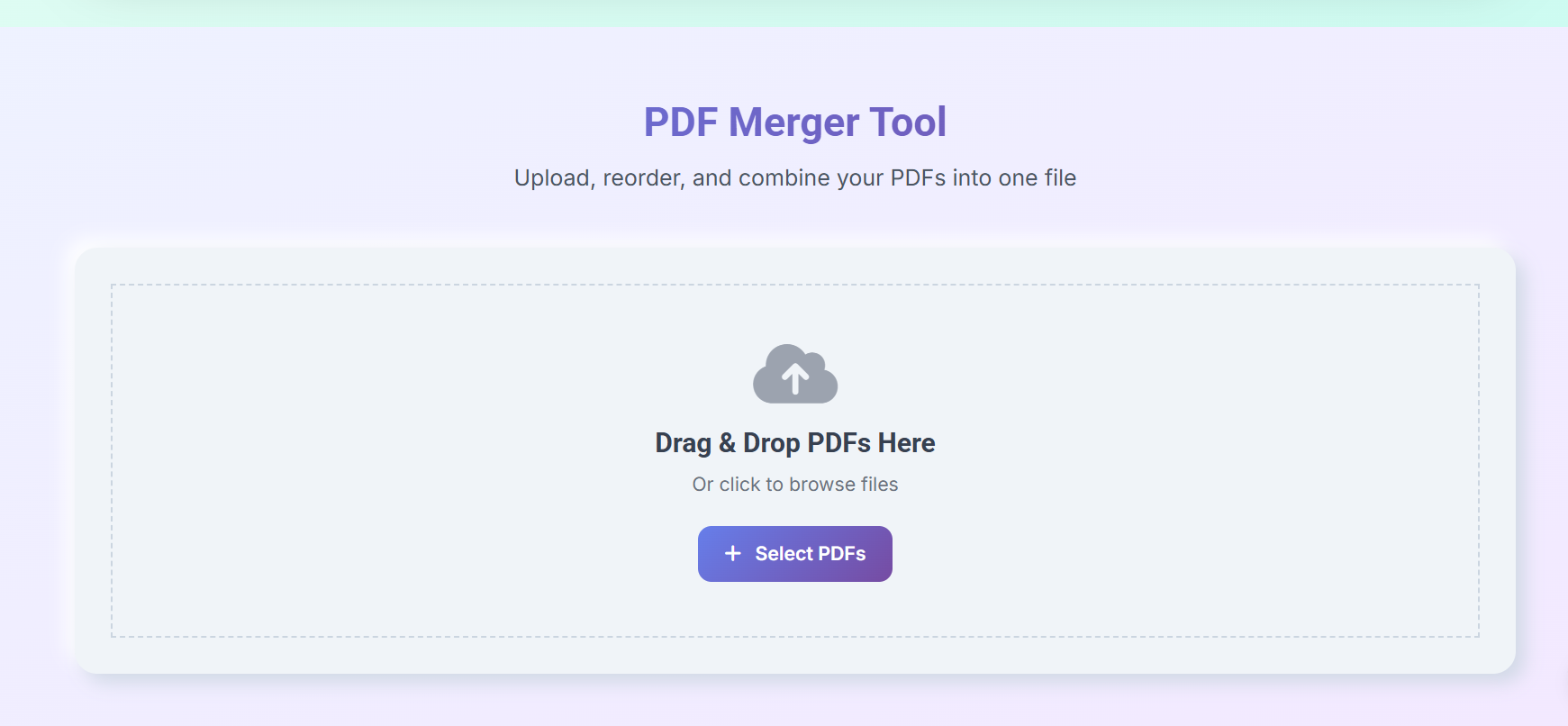
PDF merger tool interface showing drag and drop upload area with select files button

Users can drag and drop PDF files into the upload area or select them manually.

Step 2: Preview Files
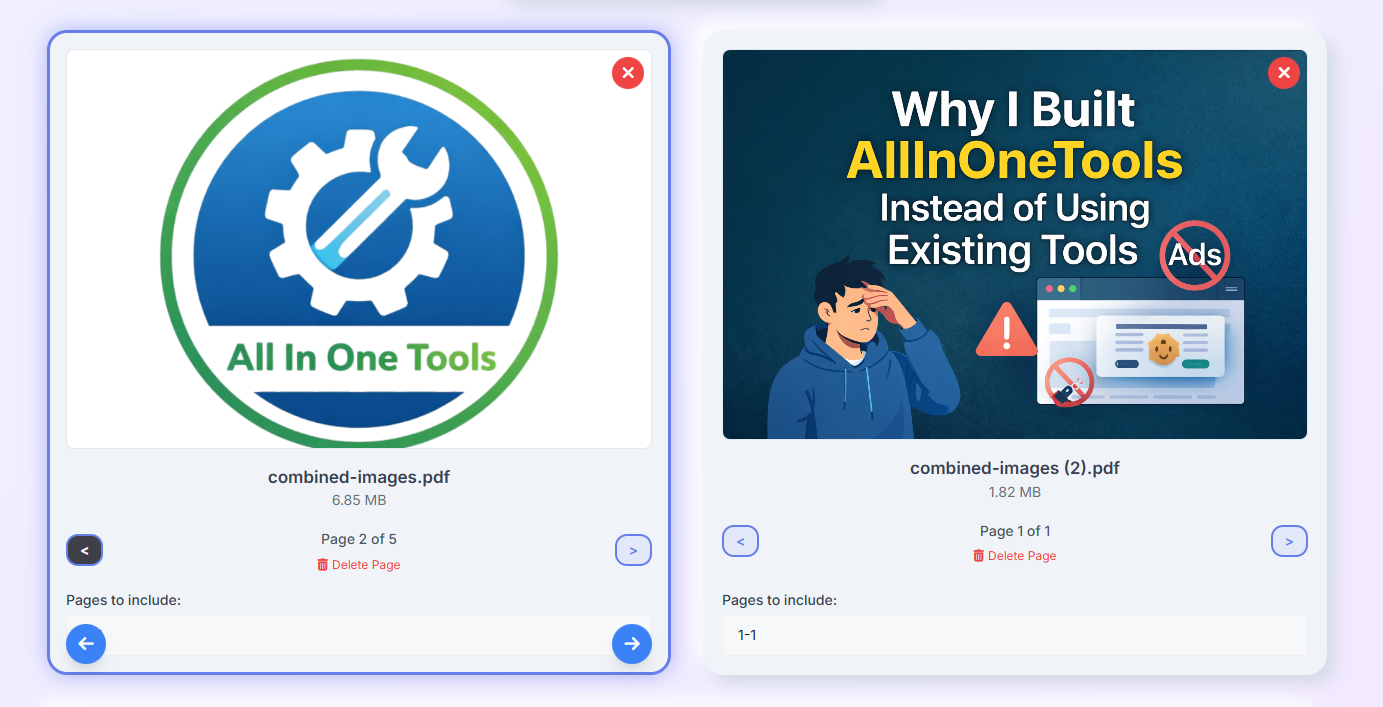
Preview of uploaded PDF files showing document thumbnails and file details before merging

Each uploaded file is displayed with a preview as well as pdf files details (name, size, nos of page, and so on), so users can verify the content before merging.

Step 3: Reorder Files
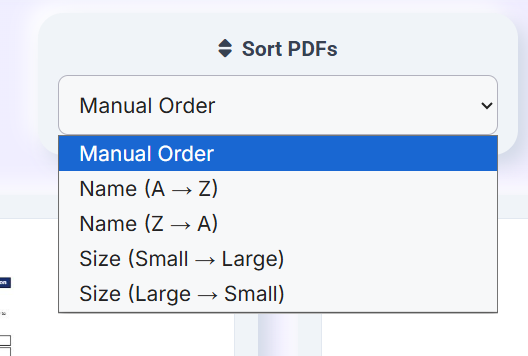
PDF sorting options interface showing manual order and sorting by name or file size

Users can arrange the order of PDFs using drag-and-drop or sorting options as well as manual options. This ensures the final merged document follows the correct sequence.

Step 4: Merge PDFs

Merge PDFs button used to combine multiple PDF files into a single document

Once everything is arranged, users can click the merge button to combine all selected PDFs into a single file.

Step 5: Download the Final PDF
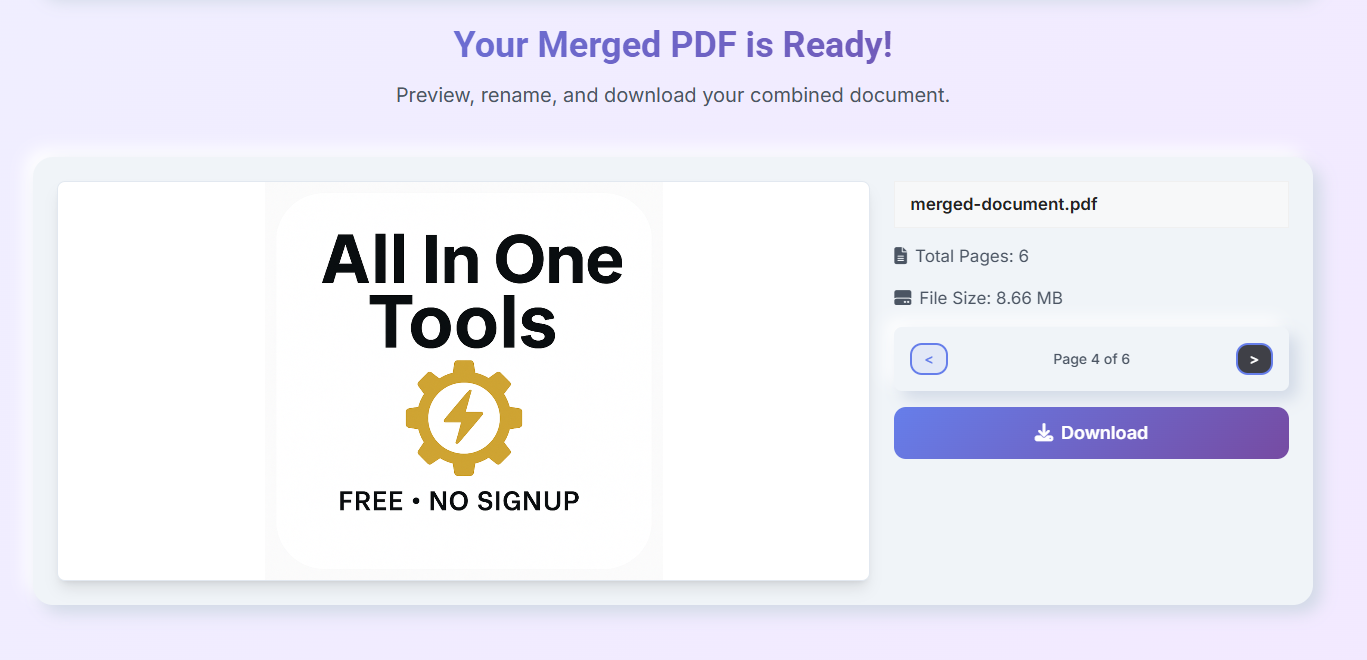
Merged PDF preview with file details and download button after combining documents

The merged PDF is generated instantly in the browser, and users can preview , rename, and download it without any server interaction.

Important Notes from Real-World Use

When building tools like a PDF merger, handling large files efficiently becomes important.

If multiple large PDFs are loaded at once, it can slow down the browser or consume too much memory. Instead of processing everything at once, it’s better to handle files step by step.

For example, instead of loading all PDFs together, you can process them one by one:

const { PDFDocument } = PDFLib;

const mergedPdf = await PDFDocument.create();

for (const file of files) {
  const arrayBuffer = await file.arrayBuffer();
  const pdf = await PDFDocument.load(arrayBuffer);

  const pages = await mergedPdf.copyPages(pdf, pdf.getPageIndices());

  pages.forEach(page => mergedPdf.addPage(page));
}

This approach keeps memory usage lower and avoids freezing the browser when working with larger files.

You can also improve performance by limiting file size or the number of files users can upload at once. This helps keep the tool responsive even on lower-powered devices.

Another important aspect is privacy. Since everything runs directly in the browser, files are never uploaded to a server. This means sensitive documents stay on the user’s device.

But it’s still important to be transparent about this. In real-world tools, you should clearly mention that all processing happens locally and no files are stored or transmitted.

This client-side approach improves both performance and user trust, especially when working with private or confidential documents.

Common Mistakes to Avoid

A common mistake is skipping validation. If users upload invalid files or empty inputs, the merge process can fail.

Another issue is ignoring page ranges. If parsing is incorrect, users may get unexpected results.

Also, relying on fixed layouts or assumptions can break the experience across different files. Testing with different PDF types is important.

Conclusion

In this tutorial, you built a browser-based PDF merger using JavaScript.

More importantly, you learned how to process files locally in the browser, render previews for better usability, handle user input safely, and manage dynamic document structures when working with PDFs.

This approach removes the need for a backend and keeps everything fast, private, and efficient.

Once you understand this pattern, you can extend it to build more advanced tools. For example, you could create features like PDF splitting, compression, editing, or other document-based utilities using the same core ideas.

And that’s where things start getting really interesting.


Learn to code for free. freeCodeCamp's open source curriculum has helped more than 40,000 people get jobs as developers. Get started