







I used to spend too long deciding what to wear, even when my closet was full.
That frustration made the problem feel very clear to me: it was not about having fewer clothes. It was about having better organization, better visibility, and better guidance when making outfit decisions.
So I built a fashion web app that helps users organize their wardrobe, get outfit suggestions, evaluate shopping decisions, and improve recommendations over time using feedback.
In this article, I’ll walk through what the app does, how I built it, the decisions I made along the way, and the challenges that shaped the final result.
Table of Contents
What the App Does
At a high level, the app combines six core capabilities:
Wardrobe management
Outfit recommendations
Shopping suggestions
Discard recommendations
Feedback and usage tracking
Secure multi-user accounts
Users can upload clothing items, explore suggested outfits, and mark recommendations as helpful or not helpful. They can also rate outfits and track whether items are worn, kept, or discarded.
That feedback becomes structured data for improving future recommendation quality.
Why I Built It
I wanted to create something that felt personal and actually useful. A lot of fashion apps look polished, but they do not always help with everyday decisions. My goal was to build something that could make wardrobe management easier and outfit selection less overwhelming. The app needed to do three things well:
store each user’s wardrobe data
personalize recommendations
learn from user feedback over time .
That feedback loop mattered to me because it makes the app feel more alive instead of static.
Tech Stack
Here are the tools I used to built the app:
Frontend: React + Vite
Backend: FastAPI
Database: SQLite (local development)
Background jobs: Celery + Redis
Authentication: JWT (access + refresh token flow)
Deployment support: Docker and GitHub Codespaces
This ended up giving me a pretty modular setup, which helped a lot as features started increasing: fast frontend iteration, clean API boundaries, and room to evolve recommendations separately from UI.
Product Walkthrough (What Users See)
1. Onboarding and Account Setup
To start using the app, a user needs to register, verify their email, and complete some profile basics.
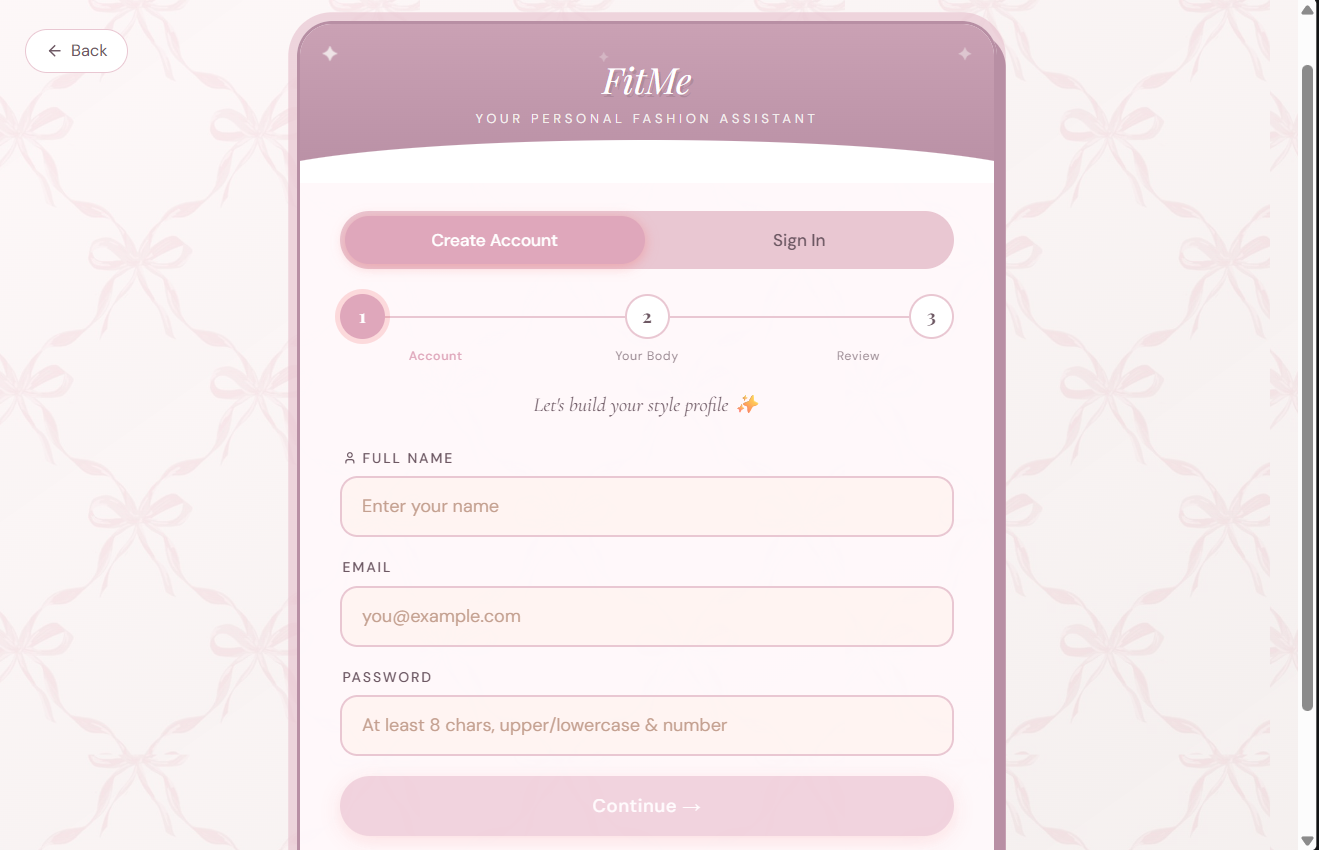
Each account is isolated, so wardrobe history and recommendations stay user-specific.
In this onboarding screen above, you can see account creation, email verification, and profile fields for body shape, height, weight, and style preferences.
2. Wardrobe Upload
Users can upload clothing images .
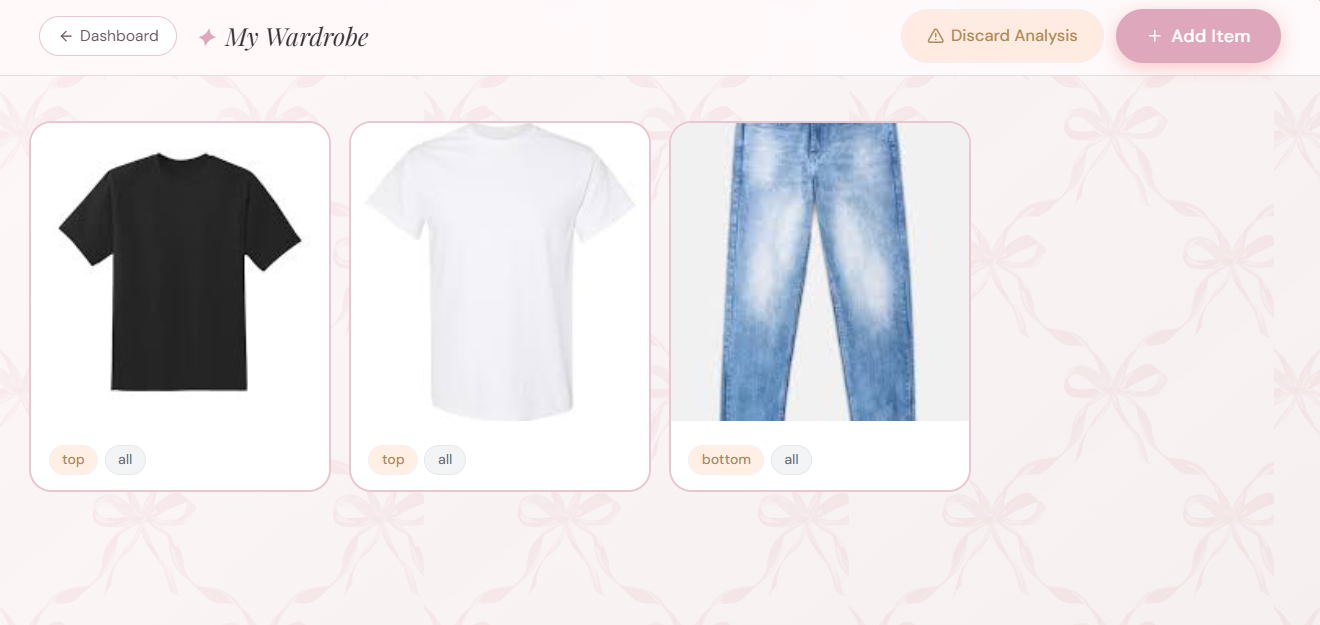
Image analysis labels each item and makes it searchable for recommendations. The wardrobe upload form shows image analysis results with category, dominant color, secondary color, and pattern details listed.
3. Outfit Recommendations
Users can request recommendations, then rate outputs.
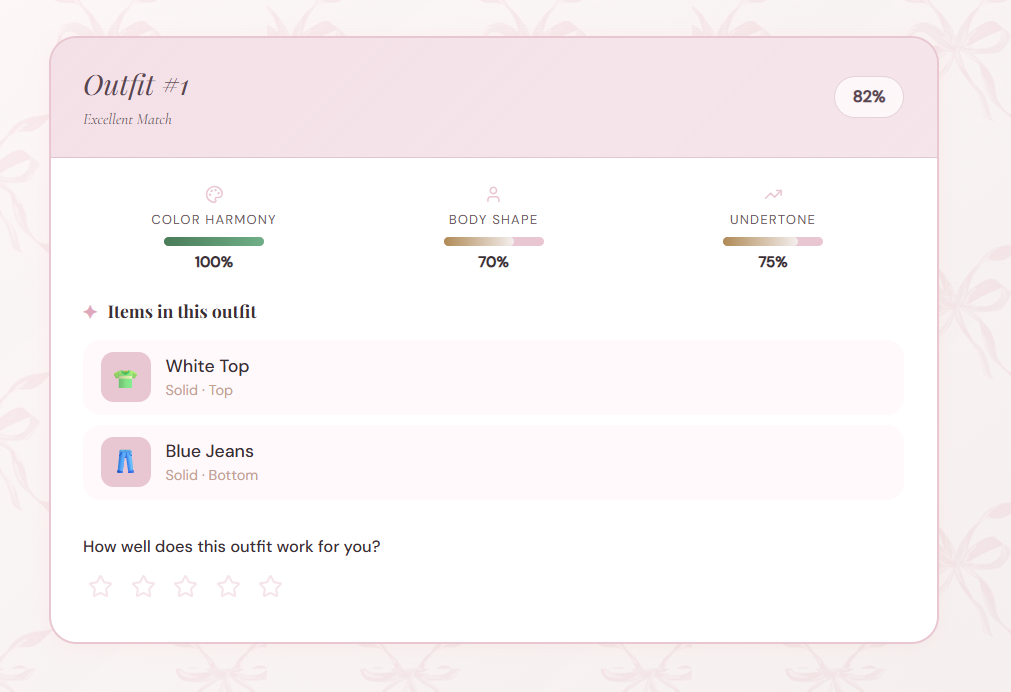
Above you can see the outfit recommendation dashboard that shows ranked outfit cards with feedback and rating actions. Recommendations are ranked by a weighted scoring model.
4. Shopping and Discard Assistants
The app evaluates new items against existing wardrobe data and flags low-value wardrobe items that may be worth removing.
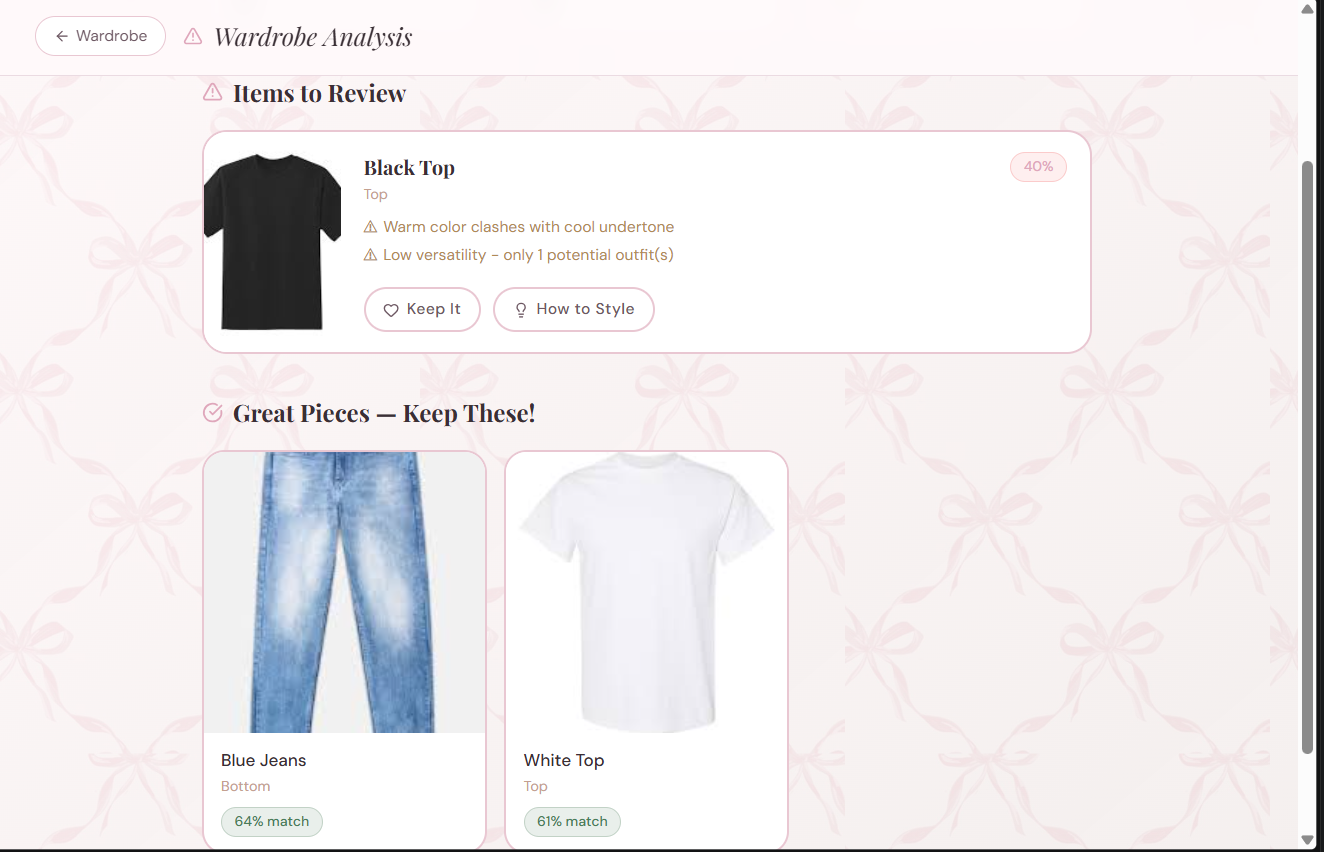
You can see the recommendation scores, written reasons (not just a binary decision), and styling guidance for each item above. It also features a "how to style it" incase the user still wants to keep the item.
How I Built It
1. Frontend Setup (React + Vite)
I used React + Vite because I wanted fast iteration and a clean component structure.
The frontend is split into feature areas like onboarding, wardrobe management, outfits, shopping, and discarded-item suggestions. I also keep API calls in a service layer so the UI components stay focused on rendering and interaction.
The snippet below is a simplified example of the API service pattern used in the app. It is not meant to be copy-pasted as-is, but it shows the same structure the frontend uses when talking to the backend.
Example API client pattern:
export async function getOutfitRecommendations(userId, params = {}) {
  const query = new URLSearchParams(params).toString();
  const url = `/users/\({userId}/outfits/recommend\){query ? `?${query}` : ""}`;

  const response = await fetch(url, {
    headers: {
      Authorization: `Bearer ${localStorage.getItem("access_token")}`,
    },
  });

  if (!response.ok) {
    throw new Error("Failed to fetch outfit recommendations");
  }

  return response.json();
}
Here's what's happening in that snippet:
URLSearchParamsbuilds optional query strings likeoccasion,season, orlimit.The request path is user-scoped, which keeps each user’s recommendations isolated.
The
Authorizationheader sends the access token so the backend can verify the session.The response is checked before parsing so the UI can surface a useful error if the request fails.
This pattern kept the frontend simple and reusable as the number of API calls grew.
2. Backend Architecture with FastAPI
The backend is organized around clear route groups:
auth routes for register, login, refresh, logout, and sessions
user analysis routes
wardrobe CRUD routes
recommendation routes for outfits, shopping, and discard analysis
feedback routes for ratings and helpfulness signals
One of the most important design choices was enforcing ownership checks on user-scoped resources. That prevented one user from accessing another user’s wardrobe or feedback data.
The backend snippet below is another simplified example from the app’s route layer. It shows the request validation and orchestration logic, while the actual scoring work stays in the recommendation service.
@app.get("/users/{user_id}/outfits/recommend")
def recommend_outfits(user_id: int, occasion: str | None = None, season: str | None = None, limit: int = 10):
    user = get_user_or_404(user_id)
    wardrobe_items = get_user_wardrobe(user_id)

    if len(wardrobe_items) < 2:
        raise HTTPException(status_code=400, detail="Not enough wardrobe items")

    recommendations = outfit_generator.generate_outfit_recommendations(
        wardrobe_items=wardrobe_items,
        body_shape=user.body_shape,
        undertone=user.undertone,
        occasion=occasion,
        season=season,
        top_k=limit,
    )

    return {"user_id": user_id, "recommendations": recommendations}
Here's how to read that code:
get_user_or_404loads the profile data needed for personalization.get_user_wardrobefetches only the current user’s items.The minimum wardrobe check prevents the recommendation logic from running on incomplete data.
generate_outfit_recommendationshandles the scoring logic separately, which keeps the route handler small and easier to test.The response returns the results in a shape the frontend can consume directly.
That separation helped keep the API layer readable while the recommendation logic stayed isolated in its own service.
3. Recommendation Logic
I intentionally started with deterministic rules before introducing heavy ML. That made behavior easier to debug and explain.
The outfit recommender scores combinations using weighted signals:
$$\text{outfit score} = 0.4 \cdot \text{color harmony} + 0.4 \cdot \text{body-shape fit} + 0.2 \cdot \text{undertone fit}$$
The snippet below is a simplified example from the recommendation engine. It shows how the app combines multiple signals into a single score:
def score_outfit(combo, user_context):
    color_score = color_harmony.score(combo)
    shape_score = body_shape_rules.score(combo, user_context.body_shape)
    undertone_score = undertone_rules.score(combo, user_context.undertone)

    total = 0.4 * color_score + 0.4 * shape_score + 0.2 * undertone_score
    return round(total, 3)
The logic behind this approach is straightforward:
color harmony helps the outfit feel visually coherent
body-shape scoring helps the outfit feel flattering
undertone scoring helps the colors work better with the user’s profile
I used a similar structure for discard recommendations and shopping suggestions, but with different factors and thresholds.
4. Authentication and Secure Multi-user Design
Security was one of the most important parts of this build.
I implemented:
short-lived access tokens
refresh tokens with JTI tracking
token rotation on refresh
session revocation (single session and all sessions)
email verification and password reset flows
The snippet below is a simplified example of the refresh-token lifecycle used in the app. It shows the important control points rather than every helper function:
def refresh_access_token(refresh_token: str):
    payload = decode_jwt(refresh_token)
    jti = payload["jti"]

    token_record = db.get_refresh_token(jti)
    if not token_record or token_record.revoked:
        raise AuthError("Invalid refresh token")

    new_refresh, new_jti = issue_refresh_token(payload["sub"])
    token_record.revoked = True
    token_record.replaced_by_jti = new_jti

    new_access = issue_access_token(payload["sub"])
    return {"access_token": new_access, "refresh_token": new_refresh}
What this code is doing:
It decodes the refresh token and looks up its JTI in the database.
It rejects reused or revoked sessions, which helps prevent replay attacks.
It rotates the refresh token instead of reusing it.
It issues a fresh access token so the session stays valid without forcing the user to log in again.
This design made multi-device sessions safer and gave me server-side control over logout behavior.
5. Background Jobs for Long-running Operations
Image analysis can be expensive, especially when the app needs to classify clothing, analyze colors, and estimate body-shape-related signals. To keep the request path responsive, I added Celery + Redis support for background tasks.
That gave the app two modes:
synchronous processing for simpler local development
queued processing for heavier or slower jobs
That tradeoff mattered because it let me keep the developer experience simple without blocking the app during more expensive work.
6. Data Model and Feedback Capture
A recommendation system only improves if it captures the right signals.
So I added dedicated feedback tables for:
outfit ratings (1-5 + optional comments)
recommendation helpful/unhelpful feedback
item usage actions (worn/kept/discarded)
Here is the shape of one of those models:
class RecommendationFeedback(Base):
    __tablename__ = "recommendation_feedback"

    id = Column(Integer, primary_key=True)
    user_id = Column(Integer, ForeignKey("users.id"), nullable=False)
    recommendation_type = Column(String(50), nullable=False)
    recommendation_id = Column(Integer, nullable=False)
    helpful = Column(Boolean, nullable=False)
    created_at = Column(DateTime, default=datetime.utcnow)
How to read this model:
user_idties feedback to the person who gave it.recommendation_typetells me whether the feedback belongs to outfits, shopping, or discard suggestions.recommendation_ididentifies the exact recommendation.helpfulstores the user’s direct response.created_atmakes it possible to analyze feedback trends over time.
This part of the system gives the app a real learning foundation, even though the feedback-to-model-update loop is still a future improvement.
Challenges I Faced
This was the section that taught me the most.
1. Image-heavy endpoints were slower than I wanted
The analyze and wardrobe upload flows were doing a lot of work at once: image validation, classification, color extraction, storage, and database writes.
At first, that made the request flow feel heavier than it should have.
What I changed:
I bounded concurrent image jobs so the app wouldn't try to do too much at once.
I separated slower jobs into background processing where possible.
I used load-test results to confirm which endpoints were actually expensive.
The practical effect was that heavy image requests stopped competing with each other so aggressively. Instead of letting many expensive tasks pile up inside the same request cycle, I limited the active work and pushed slower operations into the queue when needed.
Why this fixed it:
Bounding concurrency prevented the system from overloading CPU-bound tasks.
Moving expensive work into async jobs kept the main request/response cycle more responsive.
Load testing gave me evidence instead of guesswork, so I could tune the system based on real performance behavior.
In other words, I didn't just “optimize” the endpoint in theory. I changed the execution model so expensive analysis could not block every other request behind it.
2. JWT sessions needed real server-side control
A basic JWT setup is easy to get working, but it becomes less useful if you cannot revoke sessions or manage multiple devices cleanly.
What I changed:
I stored refresh tokens in the database.
I tracked token JTI values.
I rotated refresh tokens when users refreshed their session.
I added endpoints for logging out a single session or all sessions.
The important shift here was moving from “token exists, therefore session is valid” to “token exists, matches the database record, and has not been revoked or replaced.” That gave the server the authority to invalidate old sessions immediately.
Why this fixed it:
Server-side token tracking made revocation possible.
Rotation reduced the chance of token reuse.
Session management became visible to the user, which made the app feel more trustworthy.
This is what made logout-all and multi-device management work in a real way instead of just being cosmetic UI actions.
3. User data isolation had to be explicit
Because this is a multi-user app, I had to be careful that one account could never accidentally see another account’s wardrobe data.
What I changed:
I added ownership checks to user-scoped routes.
I kept all wardrobe and feedback queries filtered by
user_id.I used encrypted image storage instead of exposing raw paths.
In practice, this meant every route had to ask the same question: “Does this user own the resource they are trying to access?” If the answer was no, the request stopped immediately.
Why this fixed it:
Ownership checks made data access rules explicit.
User-filtered queries prevented accidental cross-account reads.
Encrypted storage improved privacy and reduced the risk of exposing image data directly.
That combination is what kept wardrobe data, feedback history, and images separated correctly across accounts.
The app includes the frontend, backend, Redis, Celery worker, and Celery Beat, so the first challenge was making the setup feel reproducible instead of fragile.
What I changed:
I defined the stack in Docker Compose.
I documented the required environment variables.
I kept the dev stack aligned with how the app runs in practice.
This removed a lot of setup ambiguity. Instead of asking someone to manually figure out how the frontend, backend, Redis, and workers fit together, I made the stack describe itself.
Why this fixed it:
Docker let contributors start the project with fewer manual steps.
Clear environment configuration reduced setup mistakes.
Matching the stack to the architecture made the app easier to understand and test.
That was important because the app depends on several moving parts, and the simplest way to make the project approachable was to make startup behavior predictable.
What I Learned
This project taught me a few important lessons:
Small features become much more valuable when they work together.
Feedback data is one of the strongest signals for improving recommendations.
Clean data modeling matters a lot when multiple users are involved.
Docker and clear setup instructions make a project much easier for other people to try.
I also learned that a project does not need to be huge to be useful. A focused app that solves one problem well can still feel meaningful.
What I Want to Improve Next
My roadmap from here:
Integrate feedback directly into ranking updates
Add visual analytics for recommendation quality trends
Improve mobile UX parity
Deploy with persistent cloud storage and production database defaults
Provide a public demo mode for easier evaluation
Future Improvements
There are still a few things I would like to add later:
a more advanced recommendation engine
visual analytics for user feedback
better mobile support
live deployment with persistent cloud storage
a public demo mode for easier testing
Conclusion
This project began as a personal frustration and turned into a full web application with authentication, wardrobe storage, recommendation logic, and feedback infrastructure.
The most rewarding part was seeing how practical software decisions, not just flashy UI, can help people make everyday choices faster.
If you want to explore or run the project, check out the repo. You can try the flows and share feedback. I would especially love input on recommendation quality, UX clarity, and what features would make this genuinely useful in daily life.
Learn to code for free. freeCodeCamp's open source curriculum has helped more than 40,000 people get jobs as developers. Get started