


OpenClaw is getting attention because it turns a popular AI idea into something you can actually run yourself. Instead of opening one more browser tab, you run a Gateway on your own machine or server and connect it to communication tools you already use.
That matters because OpenClaw is self-hosted, multi-channel, open source, and built around agent workflows such as sessions, tools, plugins, and multi-agent routing. It feels less like a toy chatbot and more like an operator-controlled agent runtime.
In this guide, you'll do three things. First, you'll learn what OpenClaw is and why developers are paying attention to it. Second, you'll get it running the beginner-friendly way through the dashboard. Third, you'll walk through an original design contribution: a proposed OpenClaw-to-A2A plugin architecture and a proof-of-concept relay that shows how OpenClaw’s session model could map to the A2A protocol.
That last part is important, so I want to frame it carefully. The A2A integration in this article is not presented as a built-in OpenClaw feature. It's a documented architecture proposal built on top of the extension points OpenClaw already exposes.
Prerequisites
This guide is beginner-friendly for OpenClaw itself, but it assumes a few basics so you can follow the architecture and proof-of-concept sections comfortably.
Before you continue, you should be familiar with:
Basic JavaScript or Node.js (reading and running scripts)
How HTTP APIs work (requests, responses, JSON payloads)
Using a terminal to run commands
High-level concepts like services, APIs, or microservices
You don't need prior experience with OpenClaw or A2A. The setup steps walk through everything you need to get started.
Table of Contents
What OpenClaw Is
According to the official docs, OpenClaw is a self-hosted gateway that connects chat apps like WhatsApp, Telegram, Discord, iMessage, and a browser dashboard to AI agents.
That wording is useful because it tells you where OpenClaw sits in the stack. It's not just a model wrapper. It's a Gateway that handles sessions, routing, and app connections, while agents, tools, plugins, and providers do the actual work.
Here is the simplest mental model:
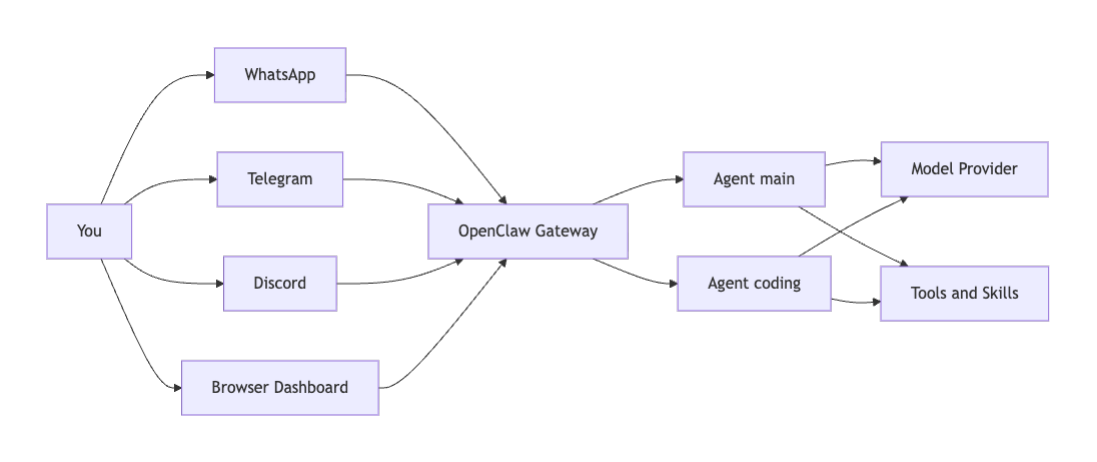
If you're new to the project, this is the practical way to think about it:
your chat apps are the front door
the Gateway is the traffic and control layer
the agent is the reasoning layer
the model provider and tools are what let the agent actually do work
That's one reason OpenClaw feels different from a normal browser-only assistant.
Why Developers Are Paying Attention to OpenClaw
OpenClaw is getting a lot of attention for a few reasons.
The first reason is control. The docs position OpenClaw as self-hosted and multi-channel, which means you can run it on your own machine or server instead of depending on a fully hosted assistant.
The second reason is that OpenClaw already looks like an agent platform. The docs talk about sessions, plugins, tools, skills, multi-agent routing, and ACP-backed external coding harnesses. That's a much richer story than “ask a model a question in a web page.”
The third reason is workflow fit. A lot of people don't want another inbox. They want an assistant that can live in the tools they already check every day.
There's also a broader industry trend behind the hype. Developers are actively looking for ways to connect multiple agents and multiple tools without giving up visibility into what's happening. OpenClaw sits directly in that conversation.
What the A2A Protocol Is
A2A, short for Agent2Agent, is an open protocol for communication between agent systems. The A2A specification says its purpose is to help independent agent systems discover each other, negotiate interaction modes, manage collaborative tasks, and exchange information without exposing internal memory, tools, or proprietary logic.
That last point matters. A2A is about interoperability between agent systems, not about exposing all of one agent's internals to another.
A2A introduces a few core concepts that are worth learning early:
Agent Card: a JSON description of the remote agent, its URL, skills, capabilities, and auth requirements
Task: the main unit of remote work
Artifact: the output of a task
Context ID: a stable interaction boundary across multiple related turns
A2A tasks follow a fairly clean lifecycle:
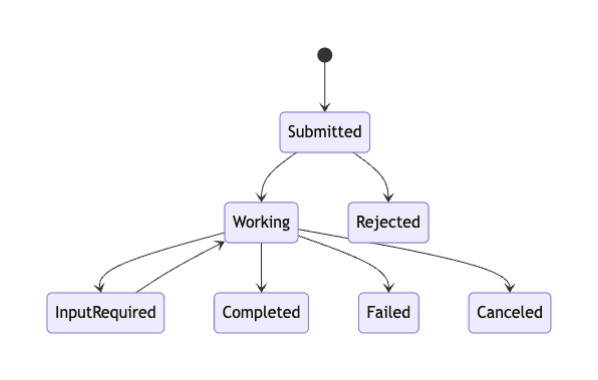
The A2A docs also explain that A2A and MCP are complementary, not competing. A2A is for agent-to-agent collaboration. MCP is for agent-to-tool communication.
That distinction is useful when you compare A2A with OpenClaw, because OpenClaw already has strong local tool and session concepts.
OpenClaw and A2A are not the same thing, but they line up in interesting ways.
OpenClaw already documents several features that point in a multi-agent direction:
multi-agent routing for multiple isolated agents in one running Gateway
session tools such as
sessions_sendandsessions_spawna plugin system that can register tools, HTTP routes, Gateway RPC methods, and background services
ACP support and the
openclaw acpbridge for external coding clients
But it's still important to stay precise here.
OpenClaw documents ACP, plugins, and local multi-agent coordination today. The docs I checked do not describe native A2A support as a first-class built-in capability.
That means the honest claim is this:
OpenClaw can be meaningfully connected to A2A in theory because the architectural pieces line up, but the A2A bridge still has to be built.
ACP versus A2A
ACP and A2A solve different problems.
ACP in OpenClaw today is about bridging an IDE or coding client to a Gateway-backed session.
A2A is about one agent system talking to another agent system across a protocol boundary.


That difference is one reason I prefer the phrase plugin bridge here instead of native A2A support.
What You Need Before You Start
The easiest first run does not require WhatsApp, Telegram, or Discord.
The OpenClaw onboarding docs say the fastest first chat is the dashboard. That makes this a much more approachable beginner setup.
Before you start, you'll need:
Node 24 if possible, or Node 22.16+ for compatibility
an API key for the model provider you want to use
If you're on Windows, WSL2 is the recommended path for the full experience. Native Windows works for core CLI and Gateway flows, but the docs call out caveats and position WSL2 as the more stable setup.
about five minutes for the first dashboard-based run
Step 1: Install OpenClaw
The official getting-started page recommends the installer script.
On macOS, Linux, or WSL2, run:
curl -fsSL https://openclaw.ai/install.sh | bash
On Windows PowerShell, the docs show this:
iwr -useb https://openclaw.ai/install.ps1 | iex
If you're on Windows, the platform docs recommend installing WSL2 first:
wsl --install
Then open Ubuntu and continue with the Linux commands there.
Step 2: Run the Onboarding Wizard
Once the CLI is installed, run the onboarding wizard.
openclaw onboard --install-daemon
The onboarding wizard is the recommended path in the docs. It configures auth, gateway settings, optional channels, skills, and workspace defaults in one guided flow.
The most beginner-friendly choice is to keep the first run simple. Don't worry about chat apps yet. Get the local Gateway working first.
Step 3: Check the Gateway and Open the Dashboard
After onboarding, verify that the Gateway is running.
openclaw gateway status
Then open the dashboard:
openclaw dashboard
The docs call this the fastest first chat because it avoids channel setup. It's also the safest way to start, because the dashboard is local and the OpenClaw docs clearly say the Control UI is an admin surface and should not be exposed publicly.
The beginner setup flow looks like this:
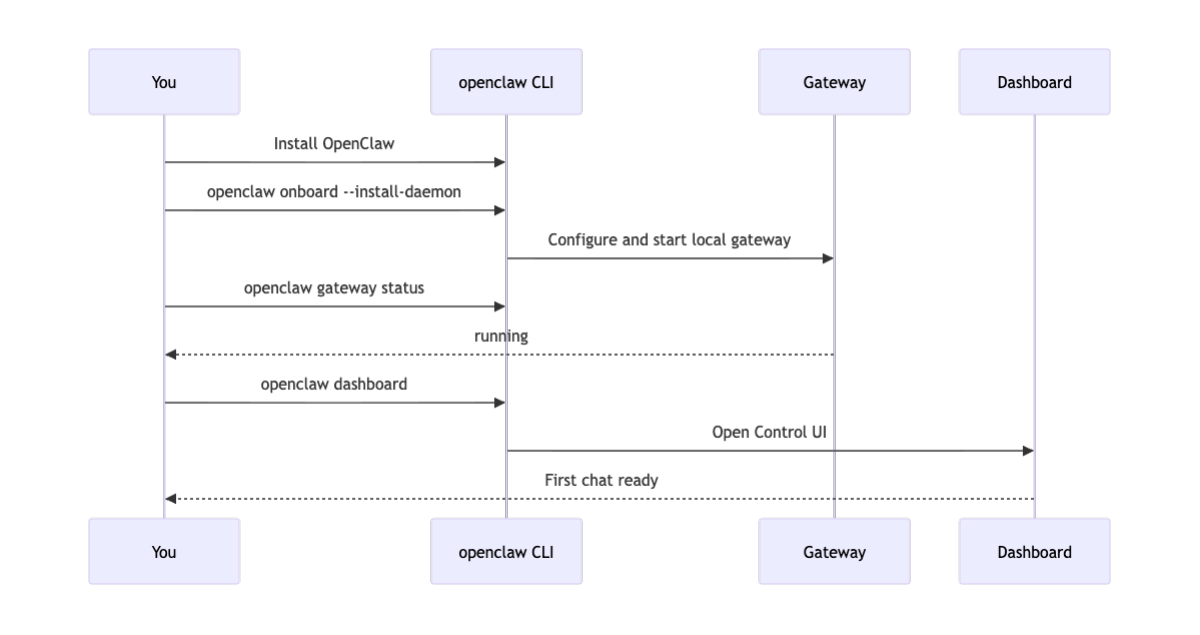
If you can chat in the dashboard, your day-zero setup is working.
Step 4: Use OpenClaw as a Private Coding Assistant
The best first use case is not to drop OpenClaw into a public group chat.
Use it as a private coding assistant in the dashboard.
For example, try a prompt like this:
I am building a small Node.js utility that reads Markdown files and generates a table of contents. Turn this idea into a project plan, a README outline, and the first five implementation tasks.
That kind of prompt is ideal for a first run because it gives you something concrete back right away.
You can also use it to:
turn rough notes into a plan,
summarize a bug report into action items,
draft a README,
propose a folder structure, or
write a safe first implementation checklist.
That is already enough to make OpenClaw useful before you touch any advanced protocol work.
Step 5: Understand Multi Agent Routing
Once the basic setup is working, it helps to understand OpenClaw’s local multi-agent model.
The docs describe multi-agent routing as a way to run multiple isolated agents in one Gateway, with separate workspaces, state directories, and sessions.
That means you can imagine setups like this:
a personal assistant
a coding assistant
a research assistant
an alerts assistant
OpenClaw already has a model for that:
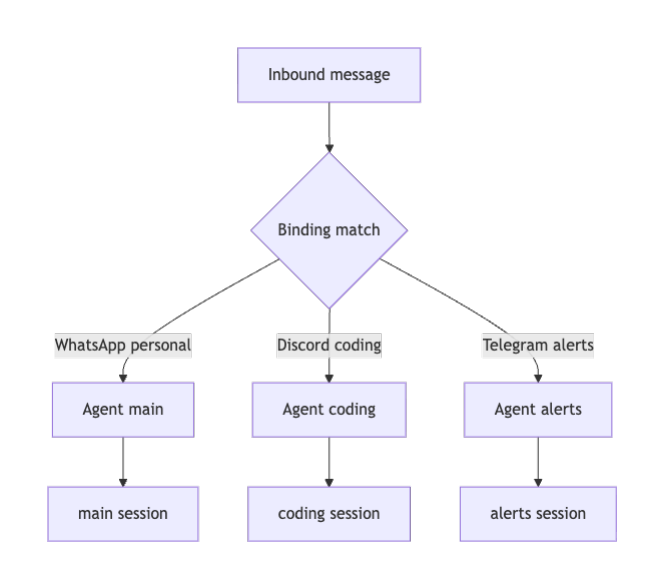
You don't need to set this up on day one.
But it matters for the A2A discussion, because once you understand how OpenClaw routes work between local agents, it becomes much easier to think about routing work to remote agents through a protocol like A2A.
Where A2A Could Fit Later
A2A could fit into OpenClaw in two broad ways.
Option 1: OpenClaw as an A2A Client
In this model, OpenClaw stays your personal edge assistant.
It receives a request from the dashboard or a chat app, decides the task needs a specialist, discovers a remote A2A agent through an Agent Card, sends the task, waits for updates or artifacts, and translates the result back into a normal OpenClaw reply.
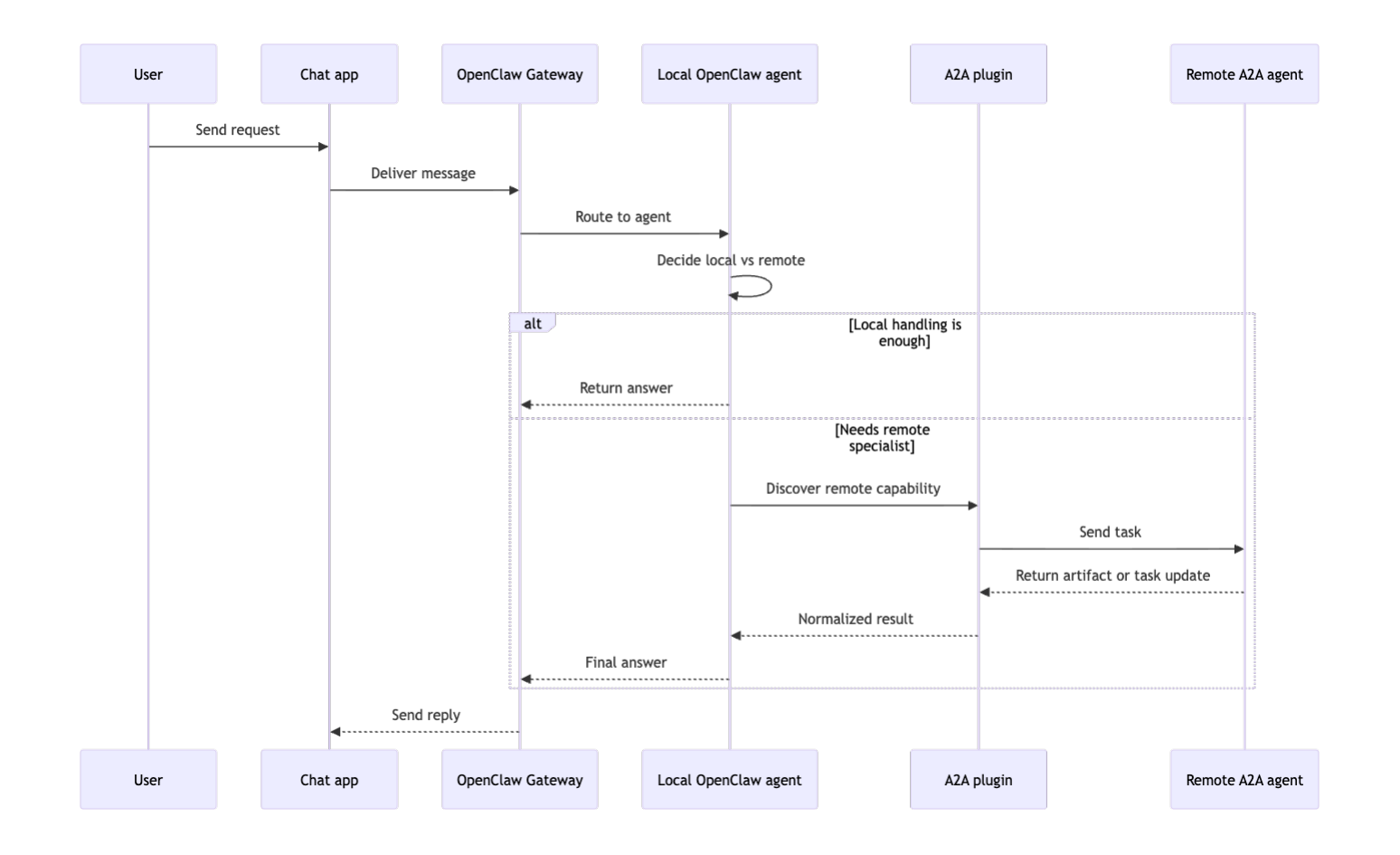
This is the cleaner story for a personal assistant. OpenClaw stays the front door, and A2A becomes a delegation path behind the scenes.
Option 2: OpenClaw as an A2A Server
In this model, OpenClaw exposes some of its own capabilities to other agents.
A plugin could theoretically publish an A2A Agent Card, advertise a narrow skill set, accept A2A tasks, and map those tasks into OpenClaw sessions or sub-agent runs.
That's technically plausible because the plugin system can register HTTP routes, tools, Gateway methods, and background services.
It's also the riskier direction for a personal assistant, which is why I think client-first is the right starting point.
A Proposed OpenClaw to A2A Plugin Architecture
This section is my original contribution in the article.
I think the cleanest first architecture is not a full bidirectional bridge. It's a narrow outbound delegation plugin that lets OpenClaw call a small allowlist of remote A2A agents.
The design goal is simple:
Reuse OpenClaw for user-facing conversations and local tool access, but use A2A only when a remote specialist agent is the best place to do the work.
Here is the architecture I would start with:
Why This Design is a Good Fit for OpenClaw
This proposal is grounded in extension points OpenClaw already documents.
A plugin can register:
an agent tool for delegation,
a Gateway method for health and diagnostics,
an HTTP route for future callbacks or webhook verification, and
a background service for cache warming, task subscriptions, or cleanup.
That means the bridge doesn't have to modify OpenClaw core to be credible.
The Mapping Table
The most important design decision is how to map OpenClaw’s session model to A2A’s task model.
Here is the mapping I recommend:
| OpenClaw concept | A2A concept | Why this mapping works |
|---|---|---|
sessionKey |
contextId |
A single OpenClaw conversation should keep a stable remote context across related delegated turns |
| one delegated remote call | one Task |
each remote specialization request becomes a discrete unit of work |
| plugin tool call | SendMessage |
the delegation tool is the natural point where the local agent crosses the protocol boundary |
| remote output | Artifact |
A2A wants task outputs returned as artifacts rather than chat-only replies |
| plugin HTTP route | callback or future push handler | gives you a place to verify webhooks if you later adopt async push |
| Gateway method | status endpoint | gives operators a direct way to inspect relay health without going through the model |
| background service | polling or cache work | keeps asynchronous and maintenance work out of the tool call path |
This is the key architectural claim in the article:
Treat the OpenClaw session as the long-lived conversational boundary, and treat each remote A2A task as one delegated execution inside that boundary.
That preserves both sides cleanly.
The Design in One Sentence
The a2a_delegate tool should:
resolve an allowlisted remote Agent Card,
reuse an existing A2A
contextIdfor the currentsessionKeywhen possible,create a fresh remote
Taskfor the new delegated turn,normalize remote artifacts back into a simple local answer, and
never expose the whole OpenClaw Gateway directly to the public internet.
I like this design because it is incremental, testable, and consistent with OpenClaw’s personal-assistant trust model.
Build the Proof of Concept Relay
To make the architecture concrete, I built a small proof-of-concept relay.
https://github.com/natarajsundar/openclaw-a2a-secure-agent-runtime
It's intentionally small. It doesn't try to become a full production plugin. Instead, it proves the hardest conceptual part of the bridge: how to map one OpenClaw session to a reusable A2A context while creating a fresh A2A task per delegated turn.
Here's the repository layout:
openclaw-a2a-secure-agent-runtime/
├── README.md
├── package.json
├── examples/
│   └── openclaw-plugin-entry.example.ts
├── src/
│   ├── a2a-client.mjs
│   ├── agent-card-cache.mjs
│   ├── demo.mjs
│   ├── mock-remote-agent.mjs
│   ├── openclaw-a2a-relay.mjs
│   ├── session-task-map.mjs
│   └── utils.mjs
└── test/
    └── relay.test.mjs
The PoC does six things:
fetches a remote Agent Card from
/.well-known/agent-card.json,caches it with simple
ETagrevalidation,records local
sessionKeyto remotecontextIdmappings,sends an A2A
SendMessagerequest,polls
GetTaskuntil the task finishes, andconverts the remote artifact into a local text answer.
Run the Demo
The repo uses only built-in Node.js modules.
cd openclaw-a2a-secure-agent-runtime
npm run demo
The demo spins up a mock remote A2A server, delegates one task, delegates a second task from the same local session, and shows that the same remote contextId is reused.
The Core Relay Idea
This is the important logic in plain English:
look up the most recent remote mapping for the current OpenClaw
sessionKeyreuse the old
contextIdif one existscreate a fresh A2A
Taskfor the new requestpoll until that task becomes
TASK_STATE_COMPLETEDturn the returned artifact into a normal text result that OpenClaw can send back to the user
That makes the bridge predictable.
Here's a shortened version of the relay logic:
const previous = await sessionTaskMap.latestForSession(sessionKey, remoteBaseUrl);
const contextId = previous?.contextId ?? crypto.randomUUID();

const sendResult = await client.sendMessage({
  text,
  contextId,
  metadata: {
    openclawSessionKey: sessionKey,
    requestedSkillId: skillId,
  },
});

let task = sendResult.task;
while (!isTerminalTaskState(task.status?.state)) {
  await sleep(pollIntervalMs);
  task = await client.getTask(task.id);
}

return {
  contextId,
  taskId: task.id,
  answer: taskArtifactsToText(task),
};
That's the heart of the design.
Why This Repo is a Useful Proof of Concept
A lot of “integration” articles stay too abstract. This repo avoids that problem in three ways.
First, it makes the session-to-context mapping explicit.
Second, it includes a mock remote A2A agent so you can test the flow without needing a large external setup.
Third, it includes a test that checks the most important invariant: repeated delegations from one local OpenClaw session reuse the same A2A context.
That is the piece I most wanted to make concrete, because it is where architecture turns into implementation.
How the Proof of Concept Maps to a Real OpenClaw Plugin
The proof of concept is the relay core.
A real OpenClaw plugin would wrap that relay with four extension surfaces that the OpenClaw docs already describe.
1: A Delegation Tool
This is the main entry point.
A plugin would register an optional tool like a2a_delegate so the local agent can explicitly choose to delegate work.
That tool should be optional, not always-on, because remote delegation is a side effect and should be easy to disable.
2: A Gateway Method for Diagnostics
A method like a2a.status would let you inspect whether the relay is healthy, which remote cards are cached, and whether any tasks are still being tracked.
That is much better than asking the model to “tell me if the bridge is healthy.”
3: A Plugin HTTP Route
You may not need this on day one.
But once you move beyond polling and want push-style callbacks or webhook verification, a plugin route gives you the right boundary for that work.
4: A Background Service
A small service is a clean place to do cache warming, cleanup, or later subscription handling.
That keeps the tool path focused on delegation instead of maintenance work.
If I were turning this into a real plugin package, I would sequence the work in this order:
wrap the relay in
registerTool,add a small config schema with an allowlist of remote agents,
add
a2a.status,keep polling as the first async model,
add a callback route only if a real use case needs it.
That is the most practical path from theory to a real extension.
I tested the relay flow locally with the mock remote agent and confirmed that repeated delegations from the same local session reused the same remote contextId.
Security Notes Before You Go Further
This is the section you should not skip.
The OpenClaw security docs explicitly say the project assumes a personal assistant trust model: one trusted operator boundary per Gateway. They also say a shared Gateway for mutually untrusted or adversarial users is not the supported boundary model.
That has a direct consequence for A2A.
A2A is designed for communication across agent systems and organizational boundaries. That is powerful, but it is also a different threat model from a single private OpenClaw deployment.
So the safer design is not this:
expose your personal OpenClaw Gateway publicly,
let arbitrary remote agents reach it,
and hope the tool boundaries are enough.
The safer design is closer to this:
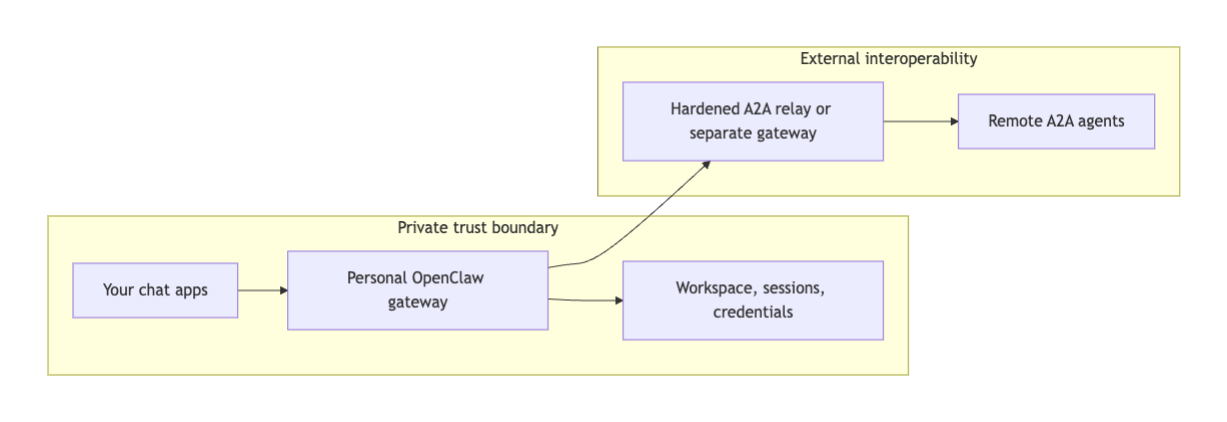
This diagram shows two separate trust boundaries.
On the left is your private OpenClaw deployment. This includes your Gateway, your sessions, your workspace, and any credentials or tools your agent can access. This boundary is designed for a single trusted operator.
On the right is the external A2A ecosystem, where remote agents live. These agents may belong to other teams or organizations and operate under different security assumptions.
The key idea is that communication between these two sides should happen through a controlled relay layer, not by directly exposing your OpenClaw Gateway. The relay enforces allowlists, limits what data is sent out, and ensures that remote agents cannot directly access your local tools or state.
This separation lets you experiment with agent interoperability while keeping your personal assistant environment safe.
In plain English, keep your personal assistant boundary private.
If you experiment with A2A, treat that as a separate exposure boundary with its own allowlists, auth, and operational controls.
That is why the proof-of-concept relay in this article starts with an explicit remote allowlist.
Why This Design and Not the Other One?
A natural question is why this article proposes an outbound-only A2A bridge first, instead of immediately building a full bidirectional or server-style integration.
The short answer is that OpenClaw’s current design is centered around a personal assistant trust boundary, where one operator controls the Gateway, sessions, and tools. Introducing external agents into that environment requires careful control over what is exposed.
Starting with outbound delegation gives you a safer and more incremental path.
Outbound-only first means:
preserving the personal-assistant trust boundary, so your local OpenClaw deployment remains private and operator-controlled
avoiding exposing the OpenClaw Gateway as a public A2A server before you have strong auth, policy, and monitoring in place
allowing you to test remote delegation patterns (Agent Cards, tasks, artifacts) without committing to full interoperability complexity
keeping OpenClaw as the user-facing control plane, while remote agents act as optional specialists
This approach follows a common systems design pattern: start with controlled outbound integration, validate behavior and constraints, and only then consider expanding to inbound or bidirectional communication.
In practice, this means you can experiment with A2A safely, learn how the models fit together, and evolve the system without introducing unnecessary risk early on.
Final Thoughts
OpenClaw is worth learning because it gives you a self-hosted assistant that can live in the communication tools you already use.
The simplest beginner path is still the right one:
install it,
run onboarding,
check the Gateway,
open the dashboard,
try one private workflow.
That is already a real end-to-end setup.
A2A belongs in the conversation because it gives you a credible way to connect OpenClaw to remote specialist agents later.
But the most important thing in this article isn't the buzzword. It's the boundary design.
If you keep OpenClaw as the private user-facing edge and use a narrow plugin bridge for outbound delegation, the OpenClaw session model and the A2A task model can fit together cleanly.
That is the architectural idea I wanted to make concrete here.
Diagram Attribution
All diagrams in this article were created by the author specifically for this guide.
Further Reading
Learn to code for free. freeCodeCamp's open source curriculum has helped more than 40,000 people get jobs as developers. Get started