


Generating PDF files is something most developers eventually need to do. Whether it’s invoices, reports, or downloadable documents, PDFs are still one of the most widely used formats.
The usual approach involves backend services. You send data to a server, generate the file there, and return it to the user. It works, but it adds complexity, latency, and maintenance overhead.
Modern browsers make this much simpler.
In this tutorial, you’ll learn how to generate PDF files directly in the browser using JavaScript. There’s no server involved, no file uploads, and everything happens instantly on the client side.
To make things practical, we’ll build a simple invoice-style PDF generator so you can see how this works in a real-world scenario.
Table of Contents
How PDF Generation Works in the Browser
A PDF is essentially a structured document that defines how text and elements are positioned on a page.
Instead of manually constructing that structure, we use a JavaScript library that handles it for us. You pass content into the library, and it generates a downloadable file.
The key advantage here is that everything runs locally. This makes the process faster and avoids sending any data to a server.
Project Setup
This project is intentionally simple.
You only need an HTML file and a JavaScript file. There’s no backend, no API, and no database involved. This keeps the focus on understanding how PDF generation works inside the browser.
What Library Are We Using?
We’ll use jsPDF, a lightweight library that allows you to create PDF files directly in JavaScript.
Add it using a CDN:
<script src="https://cdnjs.cloudflare.com/ajax/libs/jspdf/2.5.1/jspdf.umd.min.js"></script>
Creating the HTML Structure
We’ll start with a simple interface where users can enter invoice data and generate a PDF.
<input type="text" id="title" placeholder="Invoice Title">
<textarea id="content" placeholder="Enter invoice details"></textarea>
<button onclick="generatePDF()">Generate PDF</button>
This creates a basic input flow where users can provide the title and content for the PDF.
In real-world applications, this input could include more structured data like customer details, item lists, and pricing. But for this tutorial, we’ll keep things simple and focus on how the PDF generation works.
Now we connect the inputs to the PDF logic.
function generatePDF() {
  const { jsPDF } = window.jspdf;
  const doc = new jsPDF();

  const title = document.getElementById("title").value;
  const content = document.getElementById("content").value;

  if (!title.trim() && !content.trim()) {
    alert("Please enter valid content before generating the PDF.");
    return;
  }

  const margin = 10;
  let y = 20;

  const pageWidth = doc.internal.pageSize.getWidth();
  const pageHeight = doc.internal.pageSize.getHeight();
  const maxWidth = pageWidth - margin * 2;

  doc.setFontSize(18);

  // ✅ Wrap title
  const titleLines = doc.splitTextToSize(title, maxWidth);
  doc.text(titleLines, margin, y);

  const titleLineHeight = doc.getLineHeight() / doc.internal.scaleFactor;
  y += titleLines.length * titleLineHeight + 5;

  doc.setFontSize(12);

  // ✅ Wrap content
  const lines = doc.splitTextToSize(content, maxWidth);

  const lineHeight = doc.getLineHeight() / doc.internal.scaleFactor;

  lines.forEach((line) => {
    // ✅ Page break
    if (y > pageHeight - margin) {
      doc.addPage();
      y = margin;
    }

    doc.text(line, margin, y);
    y += lineHeight;
  });

  doc.save("invoice.pdf");
}
This creates a PDF directly in the browser. It handles long text, maintains proper spacing, and automatically adds new pages if the content exceeds the page height.
How the PDF Is Created
When you initialize jsPDF, it creates a blank document.
Each text() call places content at a specific coordinate. This gives you full control over layout, but it also means you need to manage spacing carefully.
Finally, calling save() converts everything into a downloadable file.
Handling Dynamic Content (Important)
In real-world use cases like invoices, content length is rarely fixed. If a user enters multiple lines or longer text, it can overflow or go outside the page.
To handle this, you should wrap text based on the page width instead of using fixed values.
const pageWidth = doc.internal.pageSize.getWidth();
const margin = 10;
const maxWidth = pageWidth - margin * 2;

const lines = doc.splitTextToSize(content, maxWidth);
doc.text(lines, margin, 40);
This ensures your content wraps properly and fits within the page.
If the content is long, you should also update spacing dynamically:
const lineHeight = doc.getLineHeight() / doc.internal.scaleFactor;
let y = 40;

lines.forEach((line) => {
  doc.text(line, margin, y);
  y += lineHeight;
});
This keeps the layout readable and prevents overlapping when working with dynamic input.
Improving Layout and Spacing
Good layout makes a big difference in how your PDF looks and feels.
Instead of placing everything at fixed positions, you can gradually adjust the Y position as content grows. This helps prevent overlapping and keeps the document visually structured.
For example, instead of hardcoding positions, you can do something like this:
const margin = 10;
let y = 20;

const pageWidth = doc.internal.pageSize.getWidth();
const maxWidth = pageWidth - margin * 2;

doc.setFontSize(18);

// Wrap title
const titleLines = doc.splitTextToSize(title, maxWidth);
doc.text(titleLines, margin, y);

const lineHeight = doc.getLineHeight() / doc.internal.scaleFactor;
y += titleLines.length * lineHeight + 5;

doc.setFontSize(12);

// Wrap content
const lines = doc.splitTextToSize(content, maxWidth);
doc.text(lines, margin, y);

y += lines.length * lineHeight;
Here, the y value increases based on actual content height instead of fixed spacing. This ensures consistent spacing between elements and avoids overlapping.
Another important issue is handling long text. If content is too long, it can go outside the page width or overlap with other elements. Instead of using fixed values, you should always calculate width dynamically:
const pageWidth = doc.internal.pageSize.getWidth();
const maxWidth = pageWidth - margin * 2;

const lines = doc.splitTextToSize(content, maxWidth);
doc.text(lines, margin, y);
This automatically breaks the text into multiple lines so it fits properly within the page.
Using dynamic spacing and text wrapping together ensures that your layout remains clean and readable, even when the content size changes. This becomes especially important when generating documents like invoices, where multiple sections need consistent alignment.
How to Download the PDF
The download process is handled using the save() method:
doc.save("invoice.pdf");
This tells the browser to generate the PDF and download it instantly.
You can also customize the file name dynamically based on user input:
const fileName = (title || "document").trim() + ".pdf";
doc.save(fileName);
This makes the downloaded file more meaningful instead of always using a fixed name.
Since everything runs in the browser, no server is involved and no data is uploaded. This makes the process fast and keeps user data private.
Important Notes from Real-World Use
When building tools like invoice generators, layout control becomes more important than the logic itself.
In a browser, layouts are flexible. But in a PDF, everything is fixed. That means you need to carefully control spacing, positioning, and readability.
For example, if you add multiple sections without adjusting spacing, content can easily overlap. Instead of using fixed positions, it’s better to update the Y position dynamically as content grows:
let y = 20;

doc.text("Invoice Title", 10, y);
y += 10;

doc.text("Customer Name", 10, y);
y += 10;
This ensures each section appears below the previous one without overlapping.
Another common issue is long content. If text is too long, it won’t automatically wrap like it does in HTML. You need to handle this manually using dynamic width:
const pageWidth = doc.internal.pageSize.getWidth();
const margin = 10;
const maxWidth = pageWidth - margin * 2;

const lines = doc.splitTextToSize(content, maxWidth);
doc.text(lines, margin, y);

const lineHeight = doc.getLineHeight() / doc.internal.scaleFactor;
y += lines.length * lineHeight;
This keeps the text readable and ensures it fits within the page.
You also need to think about how screen inputs translate into a fixed-size document. For example, a long description in a textarea may look fine on screen, but in a PDF it needs proper spacing, wrapping, and sometimes even pagination.
Optimizing PDF Generation Performance
Performance is another important factor. Generating large PDFs with a lot of content can slow down rendering in the browser.
One simple approach is to limit input size:
if (content.length > 2000) {
  alert("Content is too large. Consider splitting it into multiple sections.");
  return;
}
Another approach is to split content across multiple pages instead of forcing everything onto one page:
const pageHeight = doc.internal.pageSize.getHeight();
const lineHeight = doc.getLineHeight() / doc.internal.scaleFactor;

lines.forEach((line) => {
  if (y > pageHeight - margin) {
    doc.addPage();
    y = margin;
  }

  doc.text(line, margin, y);
  y += lineHeight;
});
This ensures large content is handled efficiently without breaking layout or performance.
In real-world tools, small decisions like spacing, wrapping, pagination, and content limits make a big difference in how usable and professional your generated PDFs feel.
Common Mistakes to Avoid
One common issue is skipping validation. If users generate a PDF with empty fields, the result won’t be useful.
To avoid this, always validate input properly and handle whitespace:
if (!title.trim() && !content.trim()) {
  alert("Please enter valid content before generating the PDF.");
  return;
}
This ensures users don’t download empty or broken PDFs.
Another mistake is ignoring text overflow. In a browser, text wraps automatically, but in a PDF it does not. Without handling this, long content can overlap or go outside the page.
You can fix this using dynamic text wrapping:
const pageWidth = doc.internal.pageSize.getWidth();
const margin = 10;
const maxWidth = pageWidth - margin * 2;

const lines = doc.splitTextToSize(content, maxWidth);
doc.text(lines, margin, 40);
This keeps the content inside the page and improves readability.
A related issue is overlapping content caused by fixed positioning. If you place everything at static coordinates, sections can stack on top of each other.
Instead, update positions dynamically:
let y = 20;

doc.text(title, 10, y);
y += 10;

const lines = doc.splitTextToSize(content, maxWidth);
doc.text(lines, 10, y);

const lineHeight = doc.getLineHeight() / doc.internal.scaleFactor;
y += lines.length * lineHeight;
This keeps spacing consistent and prevents layout issues.
Finally, forgetting to load the jsPDF library properly will break the entire feature. If the script is missing or incorrect, the PDF won’t generate at all.
Always make sure the CDN is included correctly:
<script src="https://cdnjs.cloudflare.com/ajax/libs/jspdf/2.5.1/jspdf.umd.min.js"></script>
In practice, most issues come down to proper validation, dynamic spacing, and handling content size correctly. Fixing these early makes your PDF generator much more reliable.
Demo: How the PDF Generator Works
For this example, we’ll generate a simple invoice PDF to demonstrate how this works in a real-world scenario.
Step 1: Enter Company Details
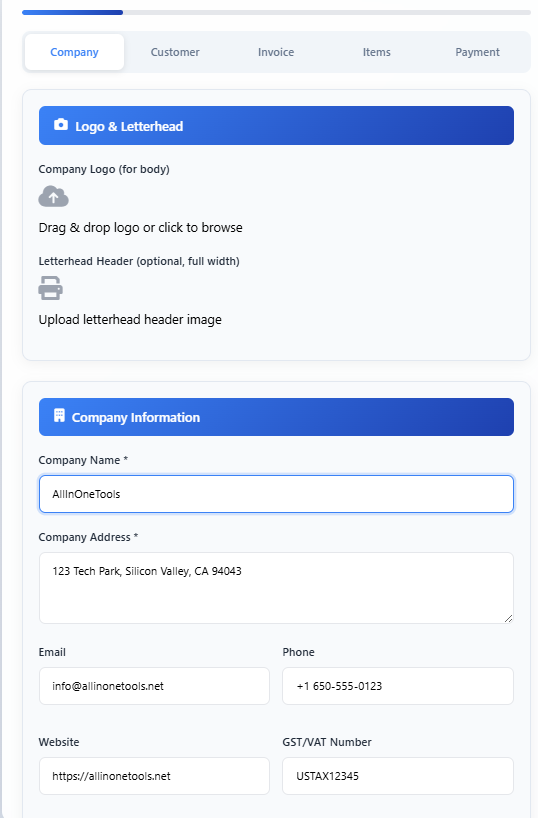
Start by entering your company details such as name, address, contact information, and other identifiers. This data will appear at the top of the generated invoice.
Step 2: Add Customer Information
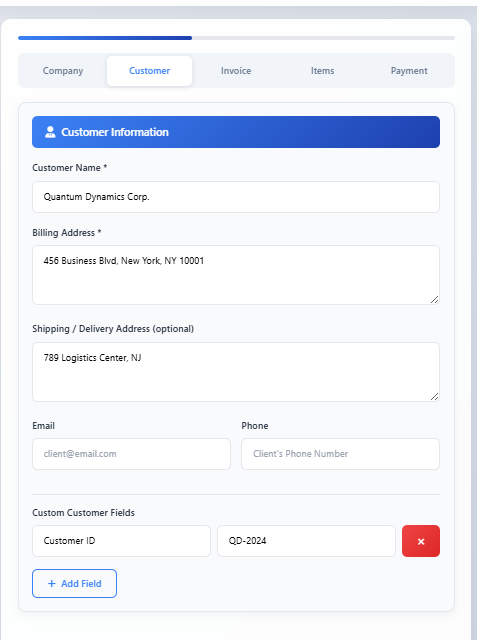
Next, fill in the customer details including billing and shipping addresses. This ensures the invoice is correctly assigned.
Step 3: Enter Invoice Details
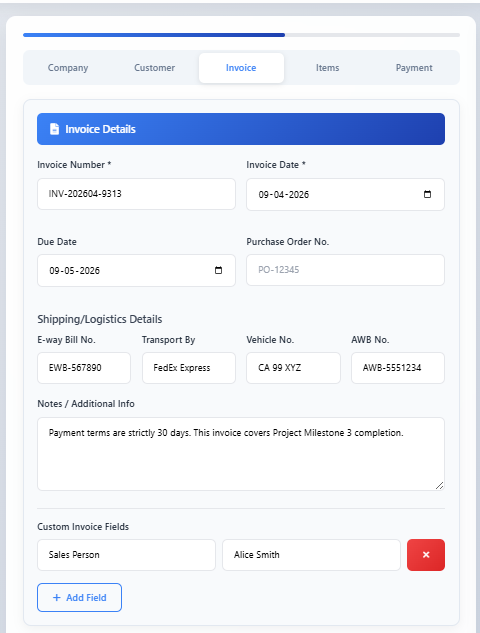
Provide invoice-specific details such as invoice number, dates, and any additional notes. These values help structure the document properly.
Step 4: Add Items to the Invoice
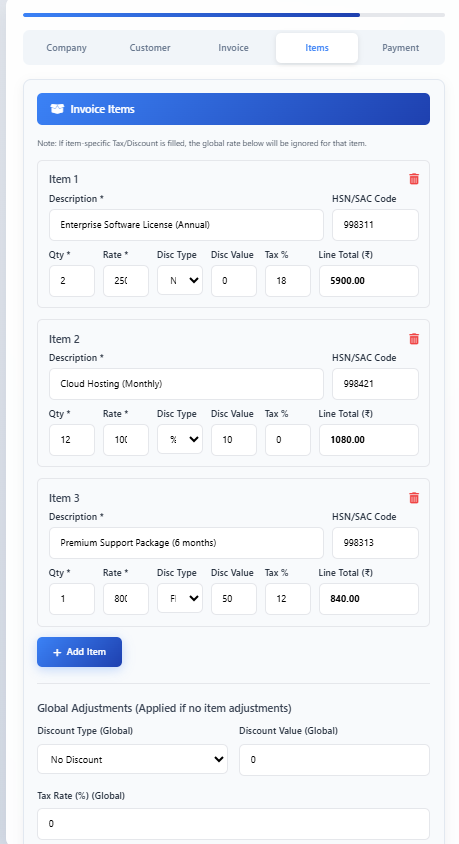
Add the items or services included in the invoice. Each item can include quantity, pricing, tax, and discounts, which are automatically calculated.
Step 5: Configure Payment and Terms
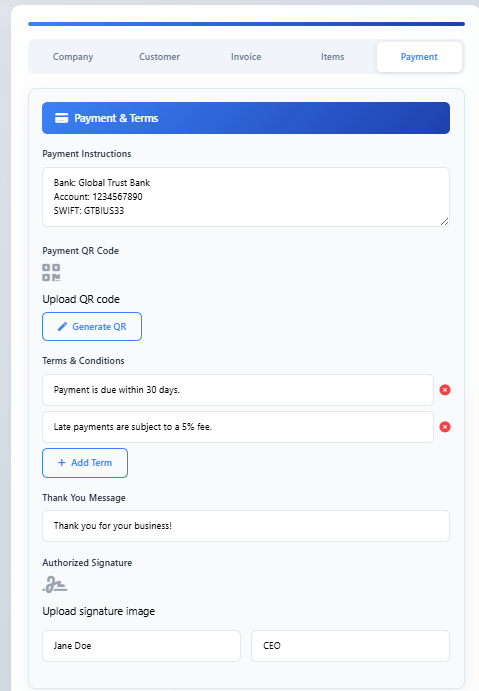
Define payment instructions, terms, and any additional conditions. This section ensures the invoice is complete and ready for real use.
Step 6: Preview the Generated Invoice
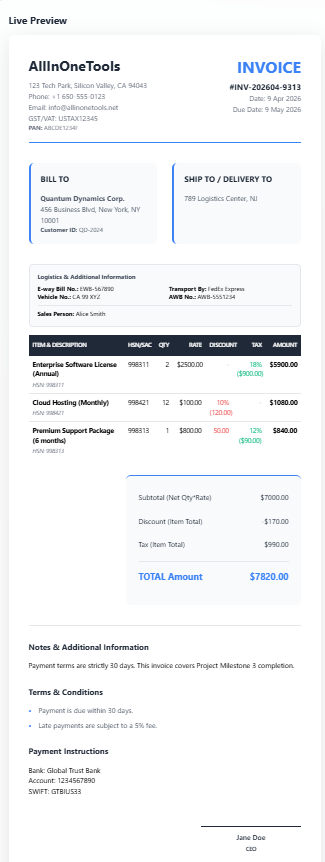
The interface provides a live preview of the invoice so you can review everything before generating the PDF.
Step 7: Generate and Download the PDF
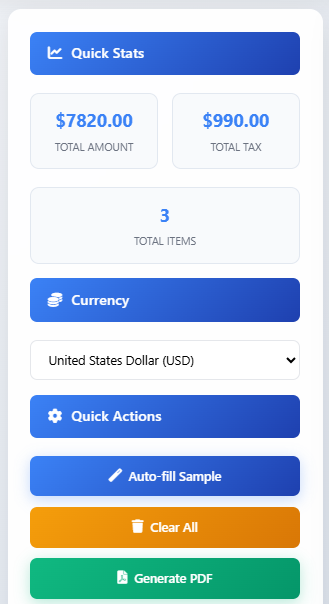
Finally, click the generate button to create and download the PDF instantly. The file is generated directly in the browser without any server interaction.
Conclusion
In this tutorial, you built a PDF generator using JavaScript that runs entirely in the browser.
More importantly, you learned how to think about building real tools using client-side capabilities. This approach reduces complexity, improves performance, and keeps user data private.
Once you understand this pattern, you can extend it to build more advanced tools like invoice systems, report generators, and document exporters.
And that’s where things start to get really interesting.
Learn to code for free. freeCodeCamp's open source curriculum has helped more than 40,000 people get jobs as developers. Get started