











Enormous amounts of data are constantly generated on the open web. Product prices change, job listings go live and get taken down, news articles are published, and company information gets updated.
For developers and teams that rely on this kind of data, the question has never been whether to scrape the web, but how to do so reliably over time.
For a long time, the approach has been straightforward. You inspect a page, write selectors, and extract the data using tools like BeautifulSoup or browser automation libraries like Playwright and Selenium. This works well, but it comes with a familiar problem: the moment the structure of a page changes, your scraper breaks and needs fixing.
Recently, a different approach has started gaining attention. Instead of writing selectors, you describe what you want and let the system figure out how to extract it. This is what people refer to as AI scraping.
Both approaches are widely used today, but they solve the problem in very different ways. This guide breaks down how each one works, where each one fits, and how to decide which approach makes sense for your use case.
Table of Contents
What is Traditional Web Scraping?
Traditional web scraping scraping is built on a simple idea that if a browser can load a page and display data to a user, then a program should be able to do the same and extract that data automatically.
This is done with CSS selectors and XPath. For CSS selectors, a selector like .product-card .price means “find the price element inside a product card.” It's easy to understand and works well for most use cases.
XPath, on the other hand, is more powerful but more complex. It allows you to navigate the structure of a page in more detail, including moving up and down the DOM, filtering by text, or handling deeply nested elements.
In practice, most developers start with CSS selectors and only use XPath when the structure becomes too complex.
This idea has been around since the early days of the web. Instead of manually copying information from a page, developers started writing scripts that send requests, receive HTML responses, and extract the pieces they care about.
At its core, nothing about that model has really changed.
You still fetch a page, inspect its structure, and extract data from it. The difference today is not the concept, but how sophisticated the tooling and scale have become.
The Tools Behind Traditional Scraping
Over time, a solid ecosystem of tools has developed around this approach.
Requests is the de facto Python library for making HTTP calls. Most traditional scrapers use
requeststo fetch pages and then pass the response to BeautifulSoup for parsing. It's simple and reliable for static sites.BeautifulSoup is a Python library for parsing HTML and XML. It takes raw HTML and builds a navigable tree of objects from it. It's fast to learn, very readable, and excellent for static pages. Its main limitation is that it has no browser engine, so it can't execute JavaScript. If a site renders content dynamically after page load, BeautifulSoup will see an empty container.
Selenium and Playwright are browser automation tools that control a real browser. They can click buttons, scroll, and wait for JavaScript to finish loading before extracting data. The trade-off is that they are slower and more resource-intensive than simple HTTP requests, but they are necessary for dynamic sites.
Traditional Scraping in Practice
Let's build a real, working scraper using Books to Scrape, a sandbox site built specifically for practicing web scraping. The goal is to extract the title, price, and star rating for every book listed on the first page.
Step 1: Install Dependencies
pip install requests beautifulsoup4
Step 2: Inspect the Page
Before writing a single line of code, open the target page in your browser and inspect its HTML. Right-click any book title and choose "Inspect" to see the structure.
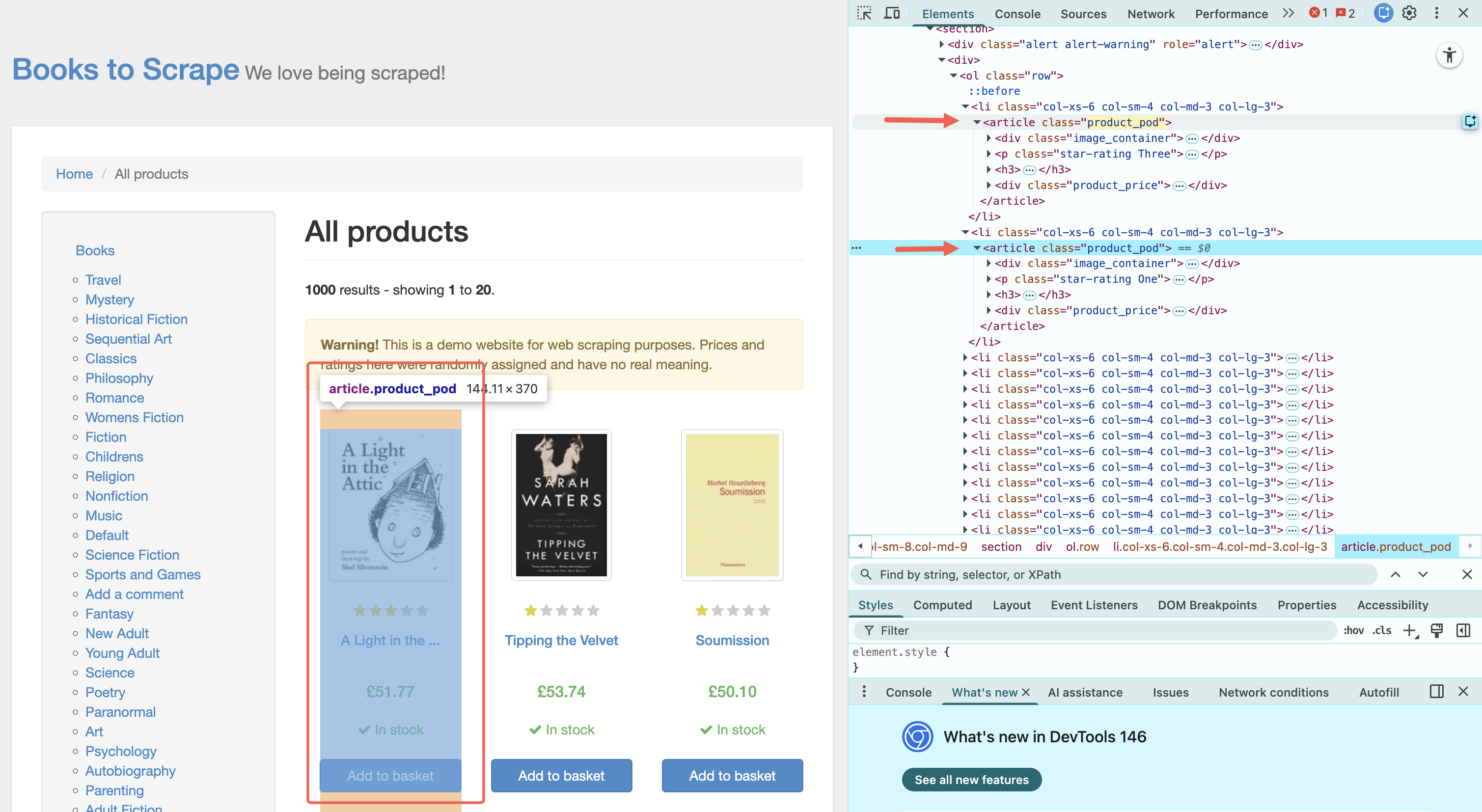
You'll notice each book lives inside an <article class="product_pod"> element, and within it:
The title is in the
<h3>tag, inside an<a>element (as atitleattribute)The price is in a
<p class="price_color">elementThe star rating is encoded in the CSS class of a
<p>element — for example,<p class="star-rating Three">means three stars
This is the core detective work of traditional scraping: you study the HTML, find the patterns, and write selectors to match them.
Step 3: Write the Scraper
import requests
from bs4 import BeautifulSoup

# 1. Fetch the page
url = "https://books.toscrape.com/"
response = requests.get(url)

# Always check the request succeeded before going further
if response.status_code != 200:
    print(f"Failed to fetch page: {response.status_code}")
    exit()

# 2. Parse the HTML
soup = BeautifulSoup(response.content, "html.parser")

# 3. Find all book containers on the page
books = soup.select("article.product_pod")

# 4. Extract data from each book
results = []

for book in books:
    # Title is stored as an attribute, not visible text
    title = book.select_one("h3 a")["title"]

    # Price is the text inside the price element
    price = book.select_one("p.price_color").get_text(strip=True)

    # Rating is encoded as a word in the CSS class: "star-rating Three"
    # We grab the second class name and map it to a number
    rating_word = book.select_one("p.star-rating")["class"][1]
    rating_map = {"One": 1, "Two": 2, "Three": 3, "Four": 4, "Five": 5}
    rating = rating_map.get(rating_word, 0)

    results.append({
        "title": title,
        "price": price,
        "rating": rating
    })

# 5. Display results
for book in results:
    print(f"{book['title']} | {book['price']} | {book['rating']} stars")
Step 4: Run It
python scraper.py
Your output will look something like this:
A Light in the Attic | £51.77 | 3 stars
Tipping the Velvet | £53.74 | 1 stars
Soumission | £50.10 | 1 stars
Sharp Objects | £47.82 | 4 stars
Sapiens: A Brief History of Humankind | £54.23 | 5 stars
...
Twenty books, all structured and clean.
Step 5: Extend It to Multiple Pages
The site has 50 pages. Extending the scraper to crawl all of them requires following the "next" button:
import requests
from bs4 import BeautifulSoup

BASE_URL = "https://books.toscrape.com/catalogue/"
start_url = "https://books.toscrape.com/catalogue/page-1.html"

all_books = []
url = start_url

while url:
    response = requests.get(url)
    soup = BeautifulSoup(response.content, "html.parser")

    for book in soup.select("article.product_pod"):
        title = book.select_one("h3 a")["title"]
        price = book.select_one("p.price_color").get_text(strip=True)
        rating_word = book.select_one("p.star-rating")["class"][1]
        rating_map = {"One": 1, "Two": 2, "Three": 3, "Four": 4, "Five": 5}
        rating = rating_map.get(rating_word, 0)
        all_books.append({"title": title, "price": price, "rating": rating})

    # Check for a "next" button and follow it
    next_btn = soup.select_one("li.next a")
    url = BASE_URL + next_btn["href"] if next_btn else None

print(f"Scraped {len(all_books)} books total.")
Running this crawls all 1,000 books across all 50 pages.
What Makes This Approach Fragile
This scraper works well today because books.toscrape.com is a static, stable sandbox. In production, the same approach has a well-known weakness: it's completely dependent on the HTML structure staying the same.
If the site's developer renames product_pod to book-card, or moves the price into a <div> instead of a <p>, every selector breaks. You get no data, or worse, incorrect data with no error, and you only discover the breakage when someone notices the output looks wrong.
This is one of the problems AI scraping is designed to address.
What is AI Web Scraping?
Traditional scraping works by following the structure of a page. It looks for specific elements, class names, or patterns in the HTML and extracts data based on those rules.
AI-powered scraping approaches the same problem differently. Instead of relying only on structure, it focuses on understanding the content itself. It looks at a page and identifies what something represents, not just where it's located.
In a traditional scraper, you might write something like:
response.css(".product-card .price::text").get()
You're telling the system exactly where to look. But, with AI scraping, you describe the outcome:
Extract the product name, price, and availability for each item on this page.
The system reads the page, identifies what appears to be a product listing, extracts the relevant fields, and returns structured data.
What's Actually Happening Under the Hood
AI scraping can feel like magic at first, but it's built on a combination of familiar components.
At the core are large language models (LLMs) trained on vast amounts of text, including web content and HTML. Over time, they learn patterns such as what a product listing looks like, how prices are usually presented, or how job listings are structured.
When given a page, the model can recognize these patterns and map them to the fields you asked for.
But the model is only one part of the system. You still need something to load and interact with the page. That is where browser automation comes in. Most AI scraping tools rely on headless browsers like Chromium or frameworks like Playwright to render pages, execute JavaScript, and handle real-world behavior such as scrolling or clicking.
On top of that, there's a layer that interprets your input. When you write a prompt describing the data you want, the system translates that into an extraction task. It decides what parts of the page are relevant and how to structure the output.
Finally, the system formats the results into clean data, typically as JSON or CSV, so you can use them directly with minimal post-processing.
Note: Tools like ChatGPT can interpret content, but they're not scraping systems. They don't crawl pages, handle workflows, or run repeatable data extraction. AI scraping tools combine this intelligence with the infrastructure required to collect data reliably.
Popular Tools Behind AI Scraping
As AI scraping has grown more popular, a number of tools have emerged that make this approach accessible without requiring you to build everything from scratch.
For example:
Spidra takes a pretty direct approach to extraction. You describe the data you want, and it handles loading the page, interpreting the content, and returning structured results. It also manages things like navigation and interactions behind the scenes, which makes it useful when you want to extract data without worrying about selectors or maintaining scraping logic.
Firecrawl focuses on turning web pages into clean, structured content. Instead of extracting specific fields like price or title, it converts entire pages into formats like markdown or simplified JSON. This makes it especially useful when you want to feed web content into AI systems or work with it in a readable format without dealing with messy HTML.
Jina Reader is designed to simplify web pages into clean text. It strips away layout noise such as navigation, ads, and styling, and focuses on the actual content. This is helpful when your goal is to understand or process the information on a page rather than extract structured fields.
Bright Data AI scrapers combine AI-based extraction with a strong scraping infrastructure. They allow you to request structured data without writing selectors, while also handling challenges like blocking and scaling. This makes them more suitable for larger or more demanding scraping tasks.
Apify sits somewhere in between traditional and AI-driven scraping. It provides a full platform for building and running scrapers, and allows you to introduce AI where it makes sense, whether for extraction or post-processing. This makes it useful when you need more control over the entire pipeline.
In practice, these tools aren't trying to solve the exact same problem. Some focus on extracting structured data, others on cleaning content, and others on building full scraping workflows. The right choice depends on what you're trying to achieve, not just the tool itself.
AI Scraping in Practice
Let's run the same data collection task of extracting books from books.toscrape.com using an AI scraping tool. We'll use Spidra's API so you can see exactly what changes.
Step 1: Get an API Key
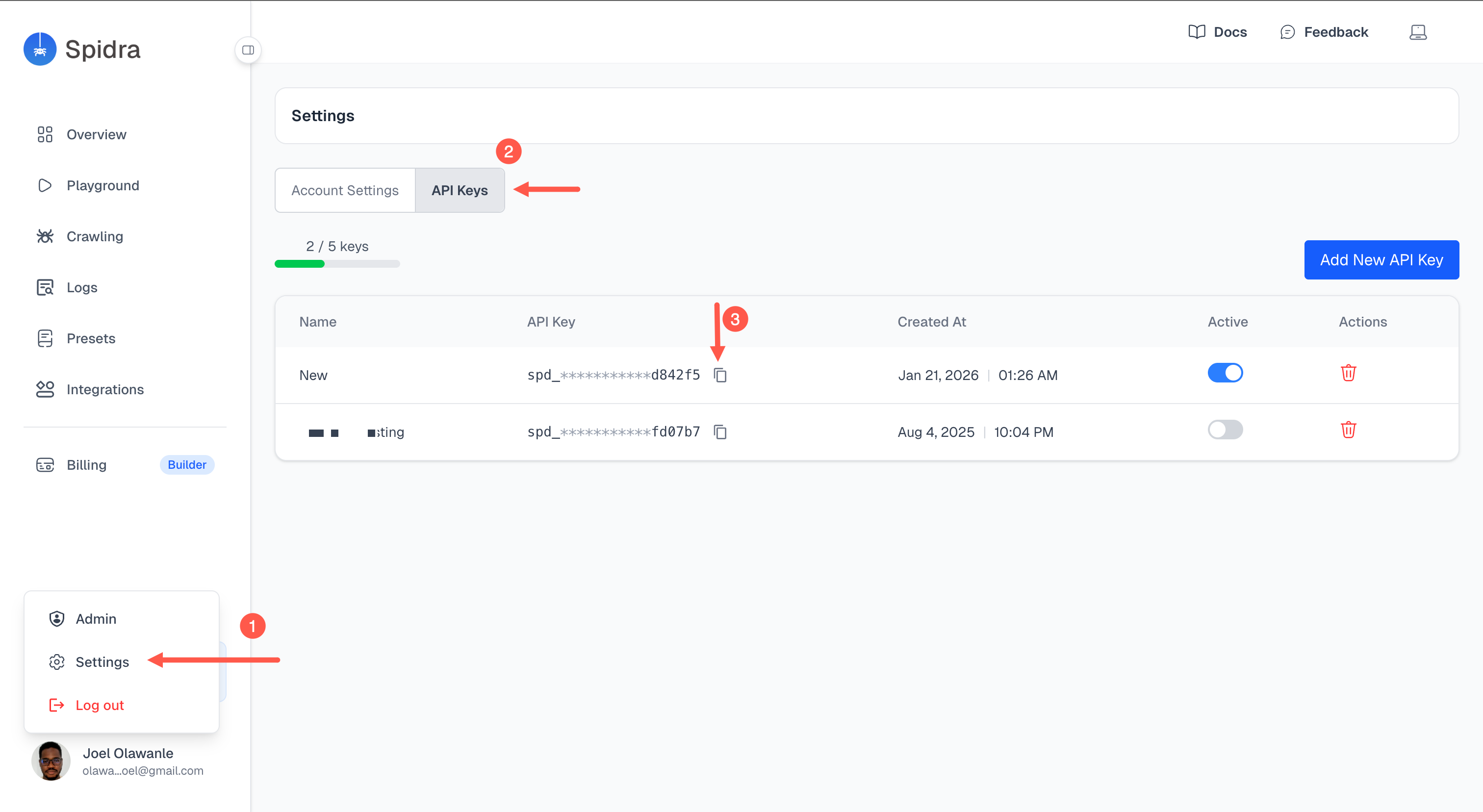
Sign up at spidra.io and create an API key from your dashboard. You'll use this key to authenticate every request.
Step 2: Understand the API Structure
Spidra's scrape endpoint accepts a JSON payload. The two most important fields are url (where to scrape) and prompt (what to extract, written in plain English). You can optionally specify the output format — JSON works best for structured data.
POST https://api.spidra.io/scrape
Authorization: Bearer YOUR_API_KEY
Content-Type: application/json
You see, we don't need selectors or HTML inspection. Just a URL and a description.
Here's the equivalent of our traditional scraper, written as an API call:
import requests
import json

API_KEY = "your_api_key_here"

payload = {
    "urls": [{"url": "https://books.toscrape.com/"}],
    "prompt": "Extract all books on this page. For each book, return the title, price, and star rating as a number from 1 to 5.",
    "output": "json"
}

response = requests.post(
    "https://api.spidra.io/scrape",
    headers={
        "Authorization": f"Bearer {API_KEY}",
        "Content-Type": "application/json"
    },
    json=payload
)

data = response.json()
print(json.dumps(data, indent=2))
That's the entire scraper. No BeautifulSoup, no selector logic, and no HTML parsing.
Step 4: Understand the Output
The API returns a structured JSON response. Each book is represented as an object with the fields you described:
{
  "results": [
    {
      "title": "A Light in the Attic",
      "price": "£51.77",
      "rating": 3
    },
    {
      "title": "Tipping the Velvet",
      "price": "£53.74",
      "rating": 1
    },
    {
      "title": "Soumission",
      "price": "£50.10",
      "rating": 1
    }
    ...
  ]
}
The model identified the star rating encoding (star-rating Three → 3) without being told how ratings are represented. It understood the intent of "star rating as a number from 1 to 5" and handled the mapping itself.
Step 5: Use Actions for Multi-Step Workflows
Where AI scraping starts to show its real advantages is with workflows that would require significant engineering in a traditional scraper.
Suppose you want to visit each book's detail page and extract the full description and availability status (not just what's visible on the listing page).
In a traditional scraper, this means building a follow-link loop, managing state, handling errors on each detail page, and maintaining separate selectors for the detail page's different structure. In an AI scraper like Spidra, you can mimic a real human interaction with browser actions:
{
  "urls": [{
    "url": "https://books.toscrape.com/catalogue/category/books/mystery_3/index.html",
    "actions": [{
      "type":            "forEach",
      "observe":         "Find all book cards in the product grid",
      "mode":            "inline",
      "captureSelector": "article.product_pod",
      "maxItems":        10,
      "itemPrompt":      "Extract the book title, price, and star rating (One/Two/Three/Four/Five). Return as JSON: {title, price, star_rating}"
    }]
  }]
}
The system navigates to each book's page, reads the new content, extracts the additional fields, and returns them as part of the same result set.
You can also configure how you want your data to be:
{
  "urls": [{ "url": "https://jobs.example.com/senior-engineer" }],
  "prompt": "Extract the job details",
  "schema": {
    "type": "object",
    "required": ["title", "company", "remote", "employment_type"],
    "properties": {
      "title":           { "type": "string" },
      "company":         { "type": "string" },
      "location":        { "type": ["string", "null"] },
      "remote":          { "type": ["boolean", "null"] },
      "salary_min":      { "type": ["number", "null"] },
      "salary_max":      { "type": ["number", "null"] },
      "employment_type": {
        "type": ["string", "null"],
        "enum": ["full_time", "part_time", "contract", null]
      },
      "skills": {
        "type": "array",
        "items": { "type": "string" }
      }
    }
  }
}
There is more to these AI scrapers, like batch scraping, AI crawling, and lots more.
Where AI Scraping Earns Its Keep
Now suppose the site updates its frontend. The class product_pod gets renamed to book-card. The price moves into a different element.
In the traditional scraper, you get zero results and no error until you notice the data is missing. You then re-inspect the page, update the selectors, test, and redeploy.
In the AI scraper, you run the same prompt. The model isn't looking for product_pod or price_color. It's looking for content that resembles a product listing with pricing information. The layout change is invisible to the extraction logic.
This is the core operational advantage of the AI approach: structural changes to a page don't automatically break your extraction.
Traditional Scraping vs AI Scraping: When to Use Each
At this point, the difference between the two approaches is clear. The more important question is when each one actually makes sense in practice.
A simple way to think about it is this:
| Scenario | Traditional Scraping | AI Scraping |
|---|---|---|
| Stable websites | ✅ Best choice | ✅ Works but may sometimes become an overkill |
| Frequently changing layouts | ❌ Breaks often | ✅ More resilient |
| Large-scale crawling | ✅ More cost-efficient | ✅ Efficient but can get expensive |
| Fast prototyping | ❌ Slower setup | ✅ Very fast |
| Non-technical users | ❌ Requires coding | ✅ More accessible |
| Full control & transparency | ✅ High control | ❌ Less transparent |
| Messy or inconsistent data | ❌ Hard to maintain | ✅ Easier to handle |
| Complex workflows (login, steps) | ⚠️ Possible but manual | ✅ Often built-in |
In practice, it's not a cut-and-dry choice between the two. Traditional scraping works best when everything is predictable and stable. AI scraping becomes useful when things are messy, dynamic, or time-sensitive. Most real-world systems combine both approaches rather than relying on one alone.
Wrapping up
Web scraping is not going away. What's changing is how we approach it.
Traditional scraping gives you control and precision, but it can be fragile and time-consuming to maintain. AI scraping makes things faster and more flexible, especially when dealing with messy or constantly changing pages, but it comes with less transparency.
In practice, most real-world workflows are starting to combine both.
We're also beginning to see AI scraping tools integrate into larger systems, especially with AI agents and MCP-style setups, where scraping becomes something that can be triggered on demand rather than built from scratch each time.
The key takeaway is simple. Traditional scraping tells the system where the data is. AI scraping tells the system what the data means.
Knowing when to use each is what actually matters.
Learn to code for free. freeCodeCamp's open source curriculum has helped more than 40,000 people get jobs as developers. Get started