






While many guides explain how to set up Continuous Integration pipelines, not very many show you how to debug them when things go wrong across multiple layers.
This is a common experience when contributing to open source: you make a small change, open a pull request, and suddenly everything fails.
Not just one check, but multiple:
Lint errors
YAML validation issues
Build failures
Deployment failures
Even more confusing, you may see errors in parts of the codebase you didn’t modify.
In this article, you'll learn how to debug these issues step by step. The goal is not just to fix one pull request, but to understand how CI systems validate your changes.
This guide is based on a real debugging experience from contributing to an open source documentation project.
While this example comes from a documentation project, the debugging workflow applies to many repositories that use CI pipelines, linting tools, and automated builds.
Table of Contents:
Prerequisites
To follow this guide, you should have:
Basic familiarity with Git and pull requests
A GitHub account
Some exposure to CI/CD concepts (helpful but not required)
Understanding the CI Pipeline (What’s Actually Happening)
In many projects, you will see the term CI/CD, which stands for Continuous Integration and Continuous Deployment (or Delivery).
In this guide, we'll focus specifically on the CI part – that is, Continuous Integration. This refers to the automated checks that run when you push code or open a pull request. These checks validate your changes before they're merged into the main codebase.
CD (Continuous Deployment/Delivery), on the other hand, typically handles what happens after those checks pass, such as deploying the application.
Understanding this distinction is important because most of the issues we debug in this guide happen during the CI stage.
Most repositories run multiple automated checks when you open a pull request:
Linting tools (for example, markdownlint, yamllint) enforce formatting rules
Build systems (for example, mdBook) validate structure and generate output
Deployment checks (for example, Netlify) ensure that the site can be built and served
Merge controllers (for example, Tide) enforce approval policies
A key point to remember: CI systems validate the entire set of files in your commit, not just the lines you changed.
How a CI Pipeline Processes Your Pull Request
When you push code or open a pull request, the CI pipeline runs several checks in sequence.
Let’s visualize how these checks are connected in a typical CI pipeline.
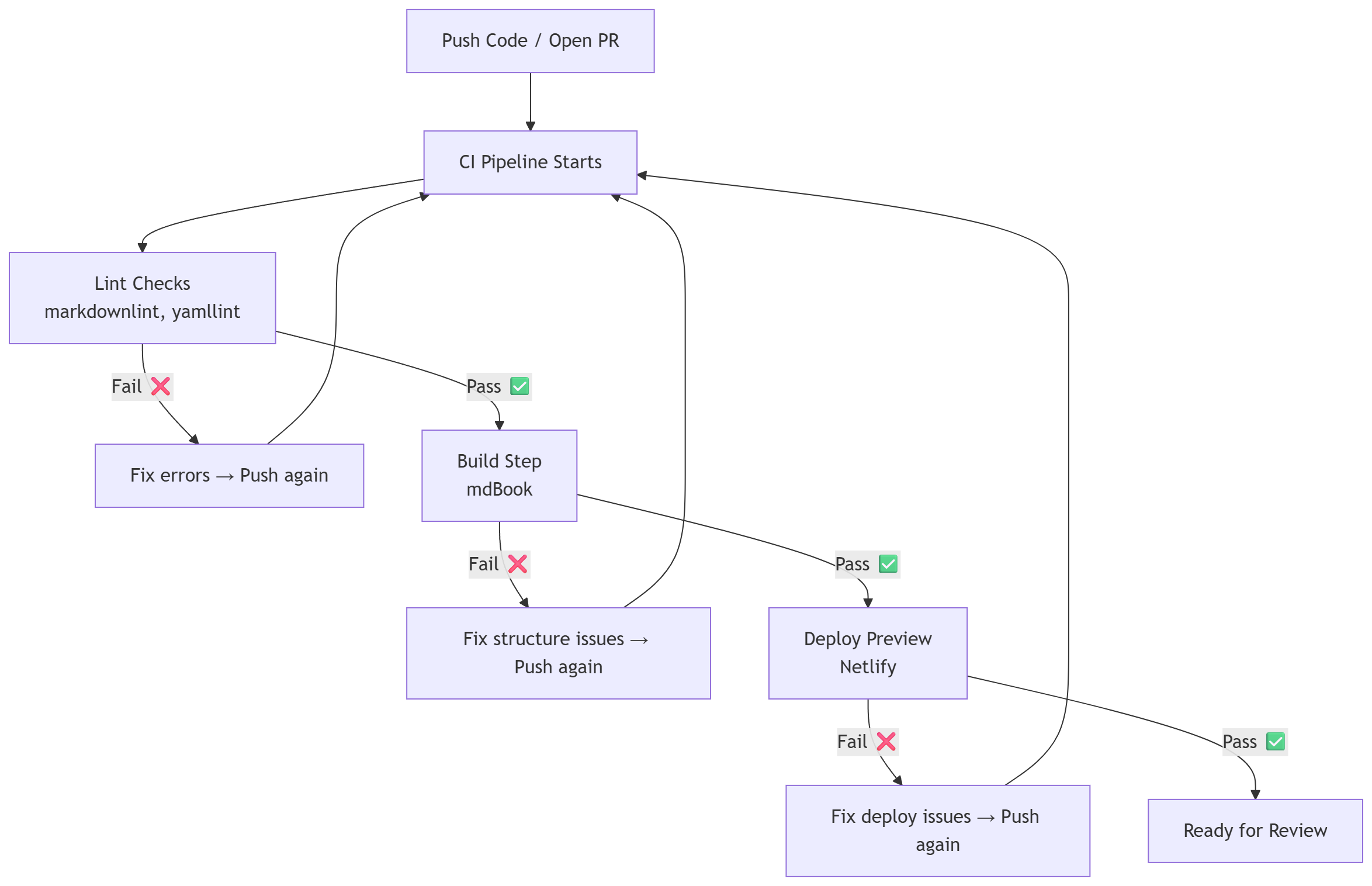
Figure: A simplified CI pipeline showing how linting, build, and deployment checks are executed sequentially.
The above diagram shows a sequential CI pipeline with feedback loops, where failures at any stage return you to fix the issue before continuing.
Let’s break down what this diagram shows:
You start by pushing code or opening a pull request.
The CI pipeline begins running automated checks.
The first set of checks typically includes linting tools like markdownlint or yamllint.
If linting fails, the pipeline stops, and you must fix formatting issues before continuing.
If linting passes, the pipeline moves to the build step (for example, mdBook in documentation projects).
If the build fails, it usually means there is a structural issue, such as duplicate entries or invalid references.
After a successful build, deployment checks (such as Netlify previews) run.
- If deployment fails, the issue is often related to configuration or build output.
If all steps pass, the pull request becomes ready for review.
A Practical Debugging Workflow
Step 1: Fix Authentication and Permission Issues
Before CI runs, your push can fail due to authentication errors.
Example error:
refusing to allow a Personal Access Token to create or update workflow
This happens because GitHub requires special permissions when your commit includes files under:
.github/workflows/
The solution is to regenerate your Personal Access Token (PAT) with:
repoaccessworkflowpermission
Step 2: Run Lint Checks Locally
Relying only on CI feedback slows you down because you have to push changes and wait for the pipeline to run before seeing errors.
Running checks locally allows you to catch issues immediately before pushing your code.
In practice, you should do both:
Run checks locally to catch errors early and reduce iteration time
Use CI as the final validation to ensure your changes meet the repository’s standards
Think of local checks as your first line of defense, and CI as the final gate before your code is accepted.
Here's an example (Markdown linting):
npm install -g markdownlint-cli2
markdownlint-cli2 docs/**/*.md
Step 3: Fix Common Markdown Lint Errors
Here are some common issues you may encounter:
1. Non-descriptive links
Non-descriptive links like "here" don't give readers any context about where the link leads. This makes documentation harder to understand and less accessible, especially for users relying on screen readers.
Instead of writing:
[here](https://example.com)
Use descriptive text like:
[command help documentation](https://example.com)
2. Line length violations
Many projects enforce a maximum line length (often around 80 characters) to improve readability across different devices and editors.
If a line is too long, you can split it into multiple lines without changing the meaning.
To do this, break the line at natural points such as spaces between words or after punctuation. Avoid breaking words or disrupting the sentence structure.
For example:
This is a long sentence that should be split across multiple
lines to satisfy lint rules.
3. List indentation issues
List indentation errors occur when nested list items aren't aligned consistently. This can break formatting and cause linting errors.
To avoid this, just make sure you use consistent spacing (usually 2 spaces per level).
Example (incorrect):
- Item 1
 - Subitem
Correct version:
- Item 1
  - Subitem
Step 4: Fix YAML Inside Markdown Code Blocks
YAML has strict formatting rules, including proper indentation, key-value structure, and consistent spacing.
Even when YAML appears inside a markdown code block, tools like yamllint still validate its structure.
Example (incorrect):
metadata:
annotations:
Correct version:
metadata:
  annotations:
    capi.metal3.io/unhealthy: "true"
In the incorrect example, annotations is not properly nested under metadata, and no key-value pair is defined.
In the corrected version:
annotationsis properly indented undermetadataa valid key-value pair is added (
capi.metal3.io/unhealthy: "true")
This structure satisfies YAML’s requirement for proper hierarchy and formatting.
Step 5: Fix Build Errors After Lint Passes
Passing lint checks doesn't guarantee that your build will succeed.
This is because linting focuses on syntax and formatting, while the build process validates the structure and integrity of the entire project.
Build failures often occur due to issues such as:
Duplicate entries in navigation files
Missing or incorrectly referenced files
Invalid configuration settings
Even if your syntax is correct, the build system ensures everything connects properly.
For example, in documentation projects using tools like mdBook, a duplicate entry in SUMMARY.md can cause the build to fail even when all files pass lint checks.
Step 6: Debug Cascading CI Failures
CI pipelines are layered. One failure can trigger multiple downstream failures.
For example, imagine a YAML indentation error:
YAML error → build fails → deploy fails → multiple checks fail
To fix this:
Identify the first failing step in the CI logs
Fix that issue
Re-run the pipeline
In this example, the YAML indentation error is the root cause. Once you fix the YAML formatting, the lint check passes, which allows the build to proceed and the deployment step to succeed.
This is why it is important to always fix the first failure in the pipeline rather than trying to address all errors at once.
Step 7: Handle Git Issues During CI Debugging
When working with updated branches, you may encounter:
Diverged branches
Rebase conflicts
Push rejections
To resolve these issues, you typically need to update your branch using one of two approaches:
Option 1: Rebase (clean history)
git pull --rebase
Rebasing rewrites your commit history so your changes appear on top of the latest version of the branch.
Use carefully:
Only rebase your own branches
Avoid rebasing shared branches
Option 2: Merge (safer)
git pull --no-rebase
Merging preserves the full commit history and is safer when working with others, but it may introduce additional merge commits.
Pushing your changes safely
After updating your branch, you may need to push changes:
git push --force-with-lease
Avoid using:
git push --force
The --force option can overwrite the other contributors’ work. The --force-with-lease option is safer because it only pushes if the remote branch has not changed unexpectedly.
Key Takeaways
CI validates your entire commit, not just the specific lines you changed
Linting and build systems enforce different rules
YAML inside markdown must be structurally correct
Documentation builds can fail due to structural issues
Running checks locally significantly reduces debugging time
Conclusion
Debugging a failing pull request isn't just about fixing syntax errors.
You also need to understand how different systems interact:
Version control
CI pipelines
Linting tools
Build processes
Once you understand how these systems work together, you can debug issues systematically instead of guessing.
The next time your pull request fails, you will know exactly where to start and how to fix it.
Debugging CI issues may feel overwhelming at first, but with a structured approach, you can turn failures into a clear path for improvement.
Learn to code for free. freeCodeCamp's open source curriculum has helped more than 40,000 people get jobs as developers. Get started