


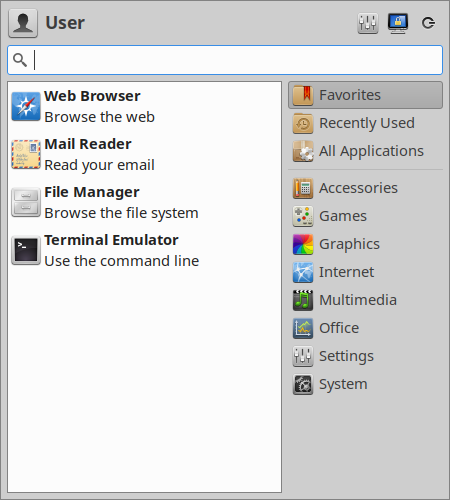
Whisker Menu is an alternate application launcher for Xfce. When you open it you are shown a list of applications you have marked as favorites. You can browse through all of your installed applications by clicking on the category buttons on the side. Top level categories make browsing fast, and simple to switch between. Additionally, Whisker Menu keeps a list of the last ten applications that you’ve launched from it.
Favorites are easy to add and reorder. When browsing through your applications, right-click on any of them and select “Add to Favorites”. Simply drag and drop your favorites list to arrange them to suit your needs. You can remove them at any time from another right-click option.
If you’re not sure exactly where a program is listed, instead of browsing through each category you can simply enter a search term. The search field is focused when opening the menu, so you can just start typing. Application descriptions as well as names are searched, which allows you to find a program by using a general word (such as “browser” to find all web browsers installed on your computer).
Download
Asturian, Esperanto, Georgian, Kazakh, Korean, Occitan (post 1500), Slovenian, Spanish, Thai

Dependencies: Xfce
Dependencies: Xfce
Size: 191.4 kB
SHA256: 8b5a777a5d9df1f1c39b109ba8b2d045cb2cc02c41a9a297aa00dcb2a4520530
PGP: ASCII armored signature
Dependencies: meson, GTK+ 3, Xfce >= 4.16 (exo, garcon, libxfce4panel, libxfce4ui, libxfce4util, xfconf), optionally AccountsService >= 0.6.45, and optionally GtkLayerShell >= 0.7
此内容由惯性聚合(RSS阅读器)自动聚合整理,仅供阅读参考。 原文来自 — 版权归原作者所有。