


After an update, Microsoft's app gatekeeping feature is more flexible but still lacks granular controls.
In the ever-evolving cybersecurity landscape, Microsoft has introduced various new features in Windows 11 designed to protect users from modern workplace threats. Among such features, Smart App Control (SAC) changes how Windows devices handle, and occasionally block, unwanted or potentially malicious applications.
But what exactly is Smart App Control? How does it work, who benefits most, and are there any caveats? In this story we’ll share some history and explain why SAC has been something of a stealth feature in Windows 11.
What is Smart App Control?
Smart App Control is a security feature in Windows 11 designed to block untrusted or potentially dangerous applications from running on a PC. Built directly into the operating system (through Windows Security), SAC leverages code signing, Microsoft’s intelligence cloud, and artificial intelligence to make real-time decisions about whether an app or application should be allowed to run. Its goal is to minimize the risk that malware, ransomware, and unwanted software could run on users’ systems — with minimal user intervention.
At its heart, Smart App Control is a kind of gatekeeper. When you attempt to run an app, SAC evaluates its trustworthiness. That evaluation is based on numerous criteria: Is the app digitally signed? Is it widely used and recognized as safe by Microsoft’s threat intelligence network? Has it been flagged previously for questionable behavior?
If an app fails one or more such checks and is found suspicious or untrustworthy, SAC blocks its execution, silently preventing a potential security event before it starts.
How does Smart App Control work?
SAC operates using a combination of cloud-based intelligence, local analysis, and digital signatures. Here’s a step-by-step breakdown of how it functions:
- App verification: When a user attempts to launch an application, SAC inspects the file. It first checks if the app is digitally signed by a trusted publisher, an important indicator of legitimacy.
- Cloud intelligence search: SAC then consults Microsoft’s extensive security databases in the cloud. These aggregate threat data from millions of Windows devices worldwide. If the app has been flagged already or is recognized as part of any malware campaign, it is blocked.
- AI-based analysis: For less clear-cut instances, SAC uses AI to evaluate an app’s behavior. That is, it looks for telltale signs of malware or unwanted code. Such a dynamic analysis helps catch emerging threats not yet known to the cloud.
When an app is blocked, the user gets a clear, informative notification. Usually, there’s no way to override SAC’s decision, which puts security ahead of convenience. It also ensures that users will quickly report false positives.
Smart App Control is designed to be simple and automatic. Unlike conventional antivirus or endpoint security, it requires no updates to definitions, nor manual scans. SAC works behind the scenes to block threats in real time. Because it uses both local and cloud-based intelligence, it’s always current.
On the downside, some legitimate apps, especially older or custom business software, may not be digitally signed, resulting in false positives. If SAC decides an app is unsafe, the only way to run the app is to turn SAC off.
Working with Smart App Control
Notably, Smart App Control is enabled by default — but only on “clean installs” of Windows 11 version 22H2 or later. Systems upgraded from older versions of Windows 11 will always show SAC in the “Off” state.
Microsoft made this decision to avoid potential compatibility issues with legacy or line-of-business applications. That means users can’t benefit from SAC unless they have a newer PC or somebody reinstalls Windows 11 from scratch on an older one. (See my Windows clean install tutorial for complete instructions.)
SAC prerequisites
To get granular: SAC requires that the following be present as Windows 11 comes up for the first time:
- Secure Boot, a security feature that allows only trusted, digitally signed software to run as Windows boots up
- A working chain of trust, including current CA-2023 boot certificates in Unified Extensible Firmware Interface (UEFI) and a CA-2023 compliant bootloader
Newer PCs — namely, those built in 2018 or later, with Windows 10 or 11 installed prior to delivery — routinely include UEFI-only boot and support Secure Boot from the get-go. Indeed, Secure Boot was introduced with Windows 8, and the original certificates came along in 2011 (Production PCA 2011, UEFI CA 2011, and KEK CA 2011). They’ve been shipped in firmware ever since.
As long as such machines get updated through Windows Update (or some managed equivalent, such as Microsoft Intune, Windows Autopilot, or Microsoft Configuration Manager), the new certificates and a proper chain of trust should be established on those PCs. (See FAQ: What you need to know about expiring Windows Secure Boot certificates for more information.) All this said, only Windows 11 imposes a working Secure Boot environment as a hard and fast system requirement as of 2021.
In short, Secure Boot and the chain of trust provide the essential foundation for SAC to start with a clean bill of health, security wise, and keep things that way. To learn more about Secure Boot and its various certificates and trappings, consult the Secure Boot and Windows Secure Boot Key Creation and Management Guidance pages on Microsoft Learn.
Modes of operation
SAC has three distinct modes:
- On: SAC actively monitors and blocks untrusted apps.
- Evaluation: SAC quietly observes your usage patterns and system needs before fully activating.
- Off: SAC is disabled and will not intervene.
SAC will normally start in Evaluation mode for up to a month, then turn itself On or Off depending on observed system behavior. Once turned on, SAC cannot be set back into Evaluation mode. Organizations or users who run custom software or specialized workflows should leave SAC in Evaluation mode to ensure that business functions keep working.
To check SAC’s status:
- Open the Windows Security app.
- Navigate to App & browser control.
- Look for the “Smart App Control” section. You’ll see the current status: On, Off, or Evaluation mode, as shown in Figure 1.
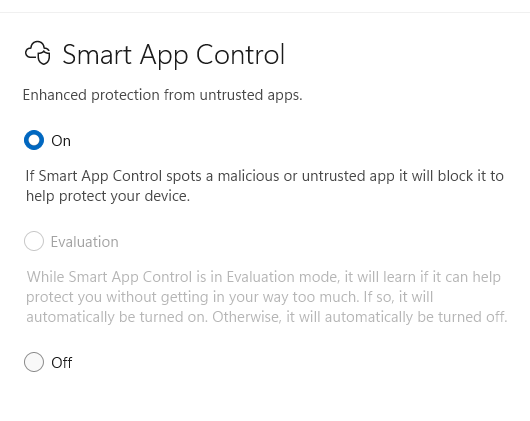
Figure 1: On this PC, the evaluation period is over and Smart App Control is enabled.
Ed Tittel / Foundry
Until recently, SAC could not be toggled off and on again — once it was turned off, you had to reinstall or reset Windows 11 to re-enable it. But with the April 2026 Patch Tuesday release of Windows 11 (KB5083769), admins and elevated users can turn SAC on or off as they see fit, as long as the initial setup conditions described above are met.
This toggling capability is a step forward for usability and safety, because it lets users with administrative privileges temporarily disable SAC in order to install, update, or uninstall certain unsigned apps, such as those that rely on Windows Installer Transform (MST) files, and then turn SAC back on immediately.
Note that this feature is being gradually rolled out, so you may not have access to it yet.
Smart App Control compared to other Windows 11 protections
Microsoft has long offered security features like Windows Defender, Controlled Folder Access, and Application Control. SAC differs in its general, automated approach. Rather than relying on static definitions, group policies, or user input, SAC leverages real-time intelligence and AI.
In many ways, SAC takes the best bits of Application Control (previously available through Device Guard and Windows Defender Application Control) and makes them accessible to a wider audience. It also involves little or no manual setup and few, if any, policy issues. Then again, as covered earlier in the story, SAC also functions as a black box: one either lives with its judgments, or does without it.
Real-world impact and industry reception
Feedback from the IT community has been mostly positive. Security researchers note SAC’s ability to block emerging threats before traditional antivirus solutions can respond. But SAC is hardly bullet-proof: a number of studies cite focused exploits or workarounds to bypass or trick SAC. For instance, Elastic Security Labs documented multiple techniques to break SAC in 2021, with follow-ons from Hacker News and TechRadar.
As always, a proactive approach to cybersecurity that includes teaching users to avoid trouble remains a key ingredient in establishing and maintaining a strong security posture.
For end users, SAC’s presence may go largely unnoticed — until, that is, it intercepts a malicious download or prevents installation of a suspicious or malicious program. Or, as the case may sometimes be, when users try to run old, unsigned software that SAC won’t allow.
Tips for IT administrators
For IT professionals considering deploying devices with SAC, certain best practices are worth implementing:
- Test SAC in Evaluation mode before rolling out widely, especially if your organization relies on custom or legacy software, or if anything important is unsigned.
- Educate users about SAC’s presence and purpose so they understand why certain apps may be blocked. Set up a procedure to request support and/or fixes, particularly if important software gets blocked. Possible workarounds include restricted VMs with SAC turned off to run unsigned applications.
- Maintain an up-to-date inventory of critical applications and ensure as many as possible are digitally signed by trusted publishers.
- Monitor Microsoft resources Learn, Support, and Answers forums for SAC updates, compatibility lists, and troubleshooting tips.
The future of Smart App Control
As threats continue to evolve, Microsoft should continue to expand SAC’s capabilities. Undoubtedly it will use more advanced AI models and deeper integration with Windows Defender and Microsoft 365 security. Future updates may introduce more granular controls for enterprise environments, including managed exceptions and better reporting tools.
For now, SAC represents a useful additional tool for Windows security. It’s intended to shift the balance in favor of the good guys in the ongoing war against malware. So far, it’s been a modest step forward. But it’s not unthinkable that SAC could offer more and better protection in upcoming Windows releases.
SUBSCRIBE TO OUR NEWSLETTER
From our editors straight to your inbox
Get started by entering your email address below.