
惯性聚合 高效追踪和阅读你感兴趣的博客、新闻、科技资讯
阅读原文 在惯性聚合中打开

推荐订阅源

Spread Privacy
Spread Privacy
P
Palo Alto Networks Blog
P
Proofpoint News Feed
AI
AI
Help Net Security
Help Net Security
S
Securelist
T
Troy Hunt's Blog
K
KPMG report finds enterprise disconnect between AI and its ROI | CIO
C
Cisco Blogs
Scott Helme
Scott Helme
Hacker News - Newest:
Hacker News - Newest: "LLM"
Vercel News
Vercel News
Exploit-DB.com RSS Feed
CTFtime.org: upcoming CTF events
B
Blog
GbyAI
GbyAI
Recent Commits to openclaw:main
D
Darknet – Hacking Tools, Hacker News & Cyber Security
P
Proofpoint News Feed
S
Security Affairs
Cisco Talos Blog
Cisco Talos Blog
AWS News Blog
AWS News Blog
T
Tenable Blog
H
Help Net Security
NISL@THU
NISL@THU
F
Fortinet All Blogs
博客园_首页
G
GRAHAM CLULEY
L
LINUX DO - 最新话题
P
Privacy International News Feed
G
Google Developers Blog
博客园 - Franky
Cyber Security Advisories - MS-ISAC
cs.CL updates on arXiv.org
Security Archives - TechRepublic
The Register - Security
L
LangChain Blog
aimingoo的专栏
aimingoo的专栏
T
Tor Project blog
P
Privacy & Cybersecurity Law Blog
量子位
C
Cyber Attacks, Cyber Crime and Cyber Security
Forbes - Security
Forbes - Security
S
Secure Thoughts
Simon Willison's Weblog
D
Docker
Recorded Future
Recorded Future
博客园 - 三生石上(FineUI控件)
L
Lohrmann on Cybersecurity
T
Tailwind CSS Blog

Google adds end-to-end Gmail encryption to Android, iOS devices for enterprises – Computerworld

Microsoft 365: A guide to the updates Windows 11 Insider Previews: What’s in the latest build? Windows 11: A guide to the updates Ask Jeeves bites the dust Apple can't make chips fast enough, but that's only part of the story AI-led job cuts don’t always mean stronger ROI — Gartner Microsoft, Google push AI agent governance into enterprise IT mainstream Microsoft now has more than 20M paying Copilot users AI is more accurate than doctors in emergency diagnoses — study Start small, but start now: How to bring AI into your small business Apple is preparing to spend, but not necessarily on AI 10 quick productivity tips for Microsoft 365 mobile apps Relying on LLMs is nearly impossible when AI vendors keep changing things Apple breaks records, admits it can’t make Macs fast enough Spotlight report: Transforming software development with AI - Whitepaper Repository - 25 great uses for an old Android device AI chatbots need ‘deception mode’ Friendlier chatbots can be less reliable, study says Gartner sees untamed growth in agentic AI Apple reportedly abandons Vision Pro AI venture funding to shoot up this year as bubble looms Scaling up a tech startup in Europe is hard — 'EU Inc.' aims to help Apple will be behind on AI — until it isn’t EU lawmakers fail to agree on watered-down AI Act, talks pushed to May Who’s the better CEO, Apple’s Tim Cook or Microsoft’s Satya Nadella? AWS unveils trio of key AI strategy announcements SAS makes AI governance the centerpiece of its agent strategy Can Apple’s new CEO turn things around? Enterprises need to think beyond GPUs for agentic AI, analysts say Fleet hopes to be the MDM provider for the AI Era Why simplicity is the silent driver of hybrid workplace success Why security matters in the meeting room Can everyday IT decisions turn sustainability from intent into impact? Why the meeting room has become the true test of hybrid work Why smart meeting rooms are becoming strategic IT assets How collaboration technology defines the next phase of hybrid work Microsoft, OpenAI change contract terms–again OpenAI plans its own ‘iPhone killer’ Your AI strategy is all wrong Agent Mode is now available in Microsoft Word, Excel, and PowerPoint Adobe bets on AI agents to stay at the center of marketing workflows Microsoft to offer voluntary retirement buyouts to about 7% of the US workforce Google Keep cheat sheet: How to get started The AI workplace paradox: Higher productivity, higher anxiety Gartner: Global IT spending to grow by 13.5% this year Apple may be the only laptop vendor to grow in 2026 Tim Cook’s legacy: a successful CEO who stumbled over AI Google Chat becomes an agent interface for Workspace Gemini Enterprise update brings AI agents into collaborative workflows Meta to track employee keystrokes, screen activity to train AI agents The smartest ways to sync your Android and computer clipboards Microsoft trims cloud desktop pricing, even as it boosts AI costs Adobe builds an ‘agentic content supply chain’ for the AI era You can now test and compare AI models on LinkedIn With John Ternus as CEO, expect Apple’s platforms to proliferate Apple CEO Tim Cook stepping down, to be replaced by John Ternus Global RAM shortage appears set to continue through 2027 Is this where Apple Silicon will be in 5 years? AI-ready skills are not what you think World ID expands its ‘proof of human’ vision for the AI era Microsoft's Patch Tuesday updates: Keeping up with the latest fixes Microsoft’s Patch Tuesday release for April is a whopper Robot Zuckerberg shows how IT can free up CEOs’ time UK wants to build sovereign AI — with just 0.08% of OpenAI’s market cap 20 tricks for more efficient Android messaging AI is finally delivering productivity — for remote employees Google should share search data to break its monopoly, European Commission suggests How to think about Apple Business Microsoft Teams cheat sheet: How to get started Reporter’s notebook: In Nepal and Sri Lanka, AI boom brings hope How to create your own custom Android air gesture Can Microsoft really meet its carbon-negative goal by 2030? About the Best Places to Work in IT Microsoft to cut Windows 365 price for SMBs Blancco confirms Mac adoption is accelerating Apple devices’ satellite link is under new ownership IBM’s government DEI settlement could increase pressure to avoid tech hiring diversity Microsoft is developing Copilot features inspired by Openclaw Global RAM shortage prompts Microsoft to hike Surface prices Apple Business rolls out to 200+ countries today Windows 10: A guide to the updates Nvidia’s Stephen Jones on the toolkit powering GPUs: ‘A wild ride’ The French government eyes alternatives to Windows Apple preps for the face race How to build your own AI agents with Google Workspace Studio Adobe Summit 2026: How Adobe hopes to redesign marketing and creativity with AI DARPA wants to help AI agents to talk to one another Apple unveiled a new high-end market opportunity this week Microsoft adds hidden feature flags to Windows Insider builds Meta moves fast toward a world where AI builds the software PC sales rise in Q1 despite memory shortage — IDC Agentic AI – Ongoing coverage of its impact on the enterprise Google’s new AI app is a glimpse of the future This problem might not need a solution: customer-service bots that code for free Chrome, Vivaldi, and the challenge of changing browsers The new M5-based MacBook Air is built to last — and perform Apple worst, Asus best for laptop repairability US court refuses to stay Pentagon’s ‘supply-chain risk’ blacklisting of Anthropic The top priority for Adobe’s next CEO? Prepping for the ‘age of agents’ It's iPhone speculation time: flips, flaps — and Fold
Android reminders, reinvented
2026-04-29 · via Google adds end-to-end Gmail encryption to Android, iOS devices for enterprises – Computerworld

Sometimes, the hardest part about getting stuff done is simply remembering what you have to do — and when.

And ironically, lots of the tools that exist to help us juggle our endless array of incoming tasks only seem to make it even more overwhelming. Truly, it doesn’t take much for the very act of managing your tasks — or maybe even just figuring out the best way to do it — to become a chore in and of itself.

Like many perpetually perplexed plebeians, I’ve exerted far too much energy on the impossible-seeming task of finding a system for tracking tasks that (a) actually works — and (b) doesn’t feel like a burden of its own. I’ve gone through more tasks and reminders systems than any sane person should ever encounter in a lifetime.

And lemme tell ya: At long last, I’ve encountered one that’s the perfect blend of simplicity and power.

It’s a brand new, off-the-beaten-path Android app you probably haven’t heard of but that absolutely should be on your radar. It’s both easier and more effective to use than most of the big-name tasks apps out there right now — and it almost, dare I say, even makes managing your to-dos enjoyable instead of exhausting.

Lemme show ya how it works.

[Keep the knowledge coming with my free Android Intelligence newsletter — three new things to try every Friday and my Android Notification Power-Pack as a special welcome bonus!] 

A new gold standard for Android reminders

My fellow memory-challenged marsupial, allow me to introduce you to the amusingly named Ruff Reminders.

Ruff Reminders is an Android-first creation that’s only been in the Play Store for a matter of hours now —  though I’ve had the opportunity to use it during its development for the past couple of months, as it’s progressed from a, well, rough framework into a polished and well-rounded place for storing all of your tasks both personal and professional and ensuring you never forget anything.

If the Ruff name sounds familiar, by the way, you might be thinking of the similarly themed Ruff Writing app — which puts a simple scrolling scratchpad right on your home screen for on-the-fly thought storing. I’ve featured it as one of my must-have Android widgets for some time now.

Ruff Reminders comes from the same source — an indie Android app developer named Bardi Golriz — and it exists as a perfect companion to its sibling’s scratchpad concept.

So let’s get into it: When you first open up Ruff Reminders, you’re greeted with a simple screen showing you the current day and a prompt to add any new reminders you need into the mix. The idea is that your focus belongs on the here and now — and starting with what you need to do today is the best way to actually get your tasks accomplished.
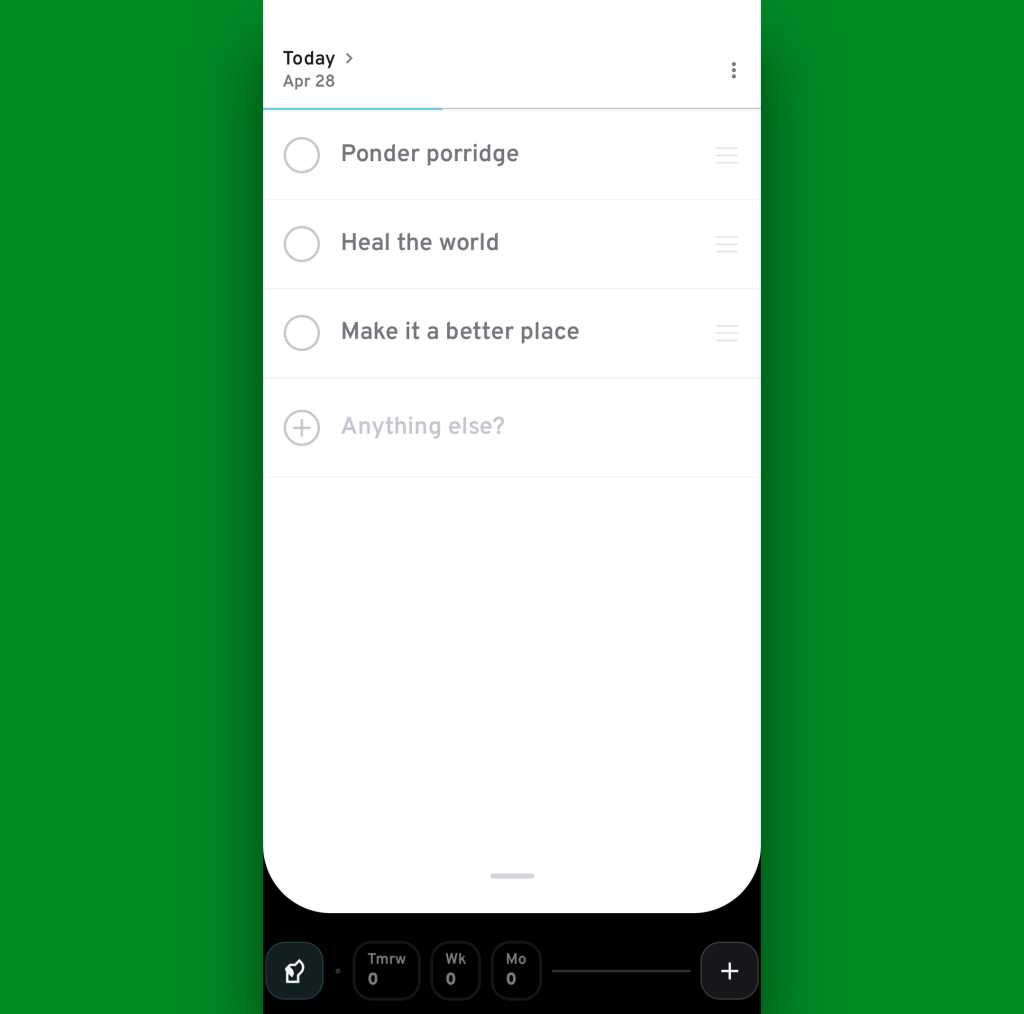
Android reminders app: Ruff Reminders today
Ruff Reminders always starts you with a view of your tasks for the current day.

JR Raphael, Foundry

Creating a new task is as easy as tapping the “quick entry” prompt toward the top of the screen and typing. You can also use the plus icon in the lower-right corner of the screen for a more elaborate and detail-oriented task creation mechanism — and that’s where some of Ruff Reminders’ most impressive powers come into play.

To wit: For any task you create, you can schedule yourself a reminder for…

  • A specific date and time
  • A dynamic date or time — as in every Monday, every weekend, the first day of each month, and so on
  • And (drumroll, please…) a specific location — if, say, you want to be reminded about something when you get to the office, when you get home, or maybe even when you walk into a particular store or business
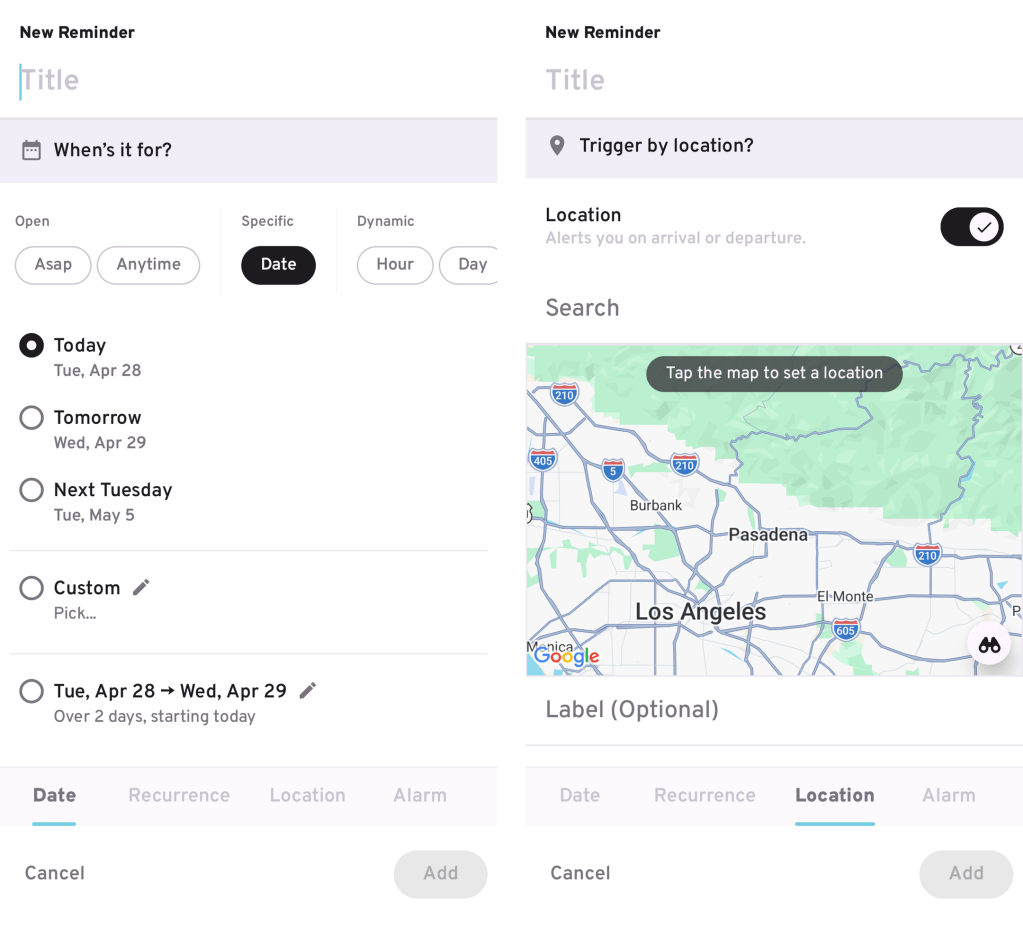
Android reminders app: Ruff Reminders location reminders
You can set all sorts of different reminders, including ones based on your physical location.

JR Raphael, Foundry

That last one in particular is a true treat to see. Like many Android-appreciating animals, I’ve been irked by Google’s ongoing retirement of location-based reminders all across the platform — first within the old Google Assistant system and then more recently within Google Keep as well. Ruff Reminders handily fills that void while offering a whole lot of other enticing extras that Assistant and Keep never provided.

For instance: For any location-based reminder, Ruff Reminders gives you the option to have a task pop up when you reach whatever location you specify either within a certain specific timeframe or anytime — and to have that reminder exist only once or as a recurring thing, every time you come or go from the location in question.

On that latter point, you can also set the reminder to trigger when you arrive at your chosen location or when you leave it — and you can choose exactly how wide of a radius the app uses to identify the spot — both of which add a whole other layer of flexibility and potential usefulness into the feature.
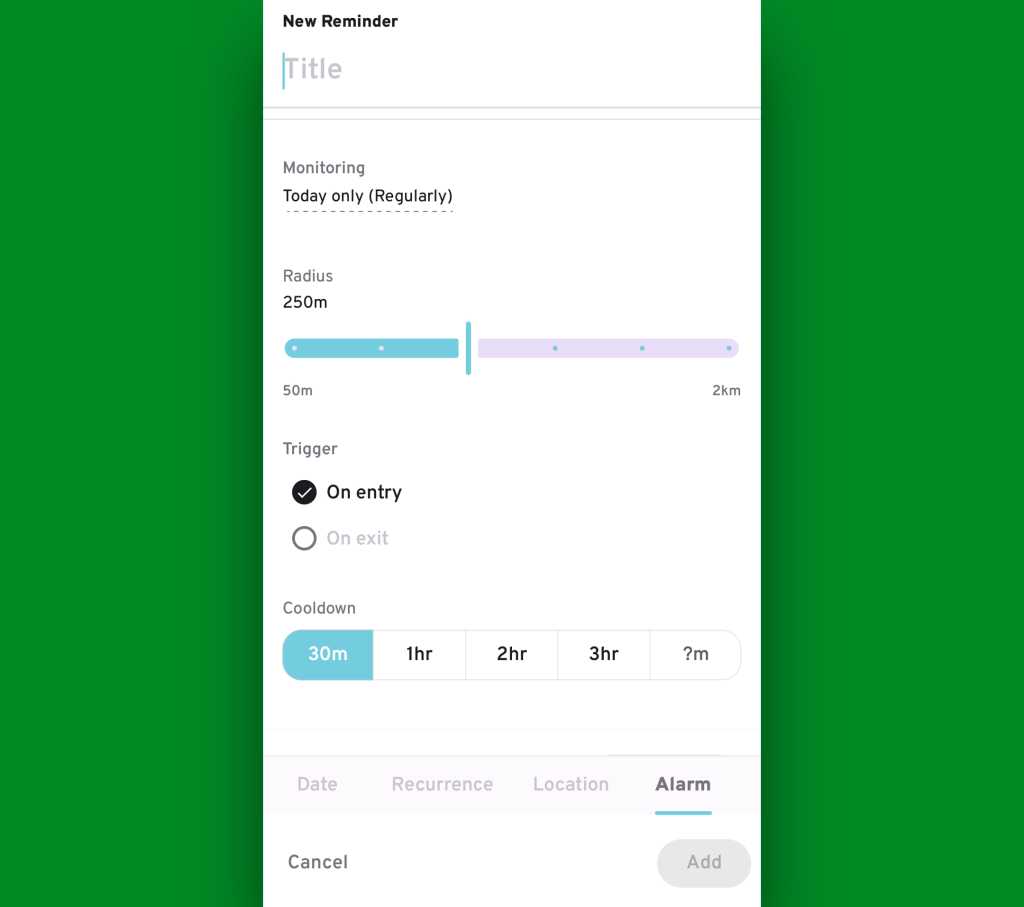
Android reminders app: Ruff Reminders location reminder
Ruff Reminders’ location reminders are especially versatile and powerful.

JR Raphael, Foundry

And all of that is still just the start.

Remembering — and beyond

Once you have tasks created, Ruff Reminders really does work to make sure you remember ’em. In addition to setting all of your own preferred reminder patterns for each new task you create, you can tell the app to always nudge you about still-pending tasks for the present day at specific times as well as to keep “chasing” you with more prominent alarms — even multiple alarms, if you want — for items you haven’t finished.

All of those options exist within the dog-shaped Ruff icon in the lower-left corner of the screen:
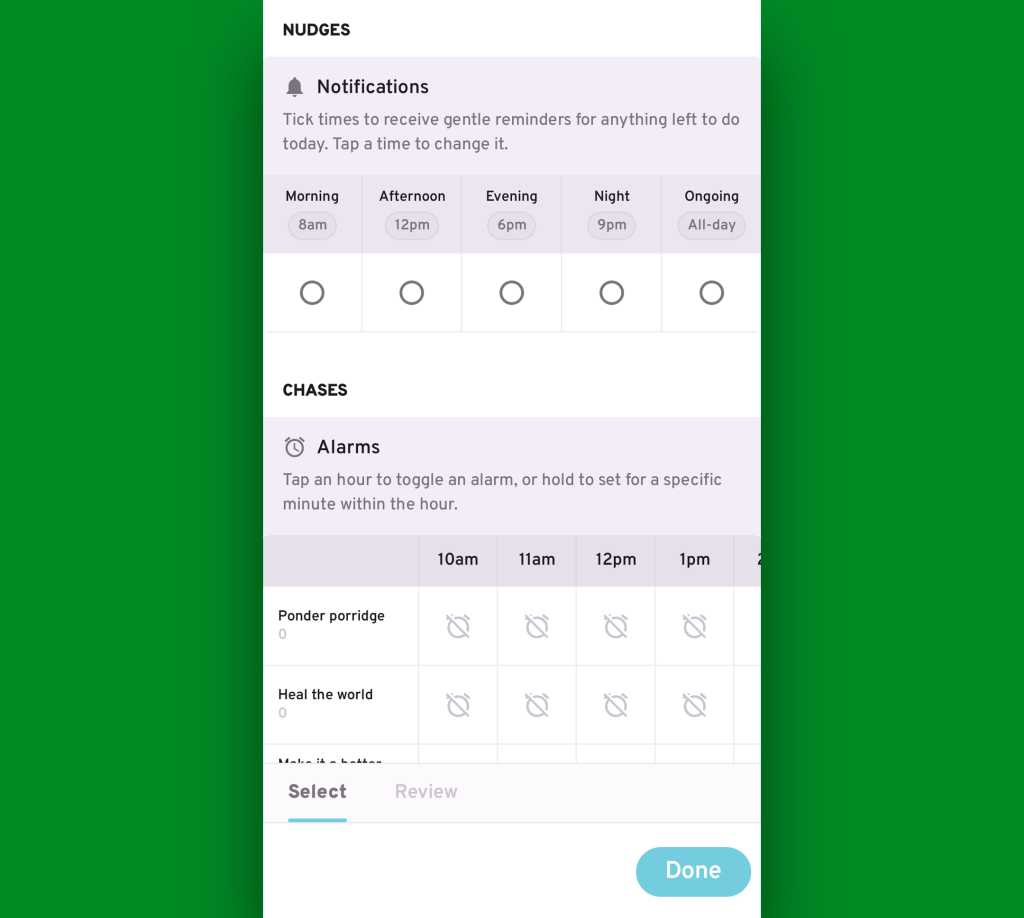
Android reminders app: Ruff Reminders notifications, alarms
Ruff’s “nudges” and “chases” add in even more flexibility and reliability with making sure you never forget anything important.

JR Raphael, Foundry

Once you’ve started a task, one tap on its line tells Ruff Reminders that it’s in progress and marks it accordingly. Another tap starts a full-screen timer (for any length you choose) to help you actually focus on the task. And pressing and holding the task marks it as finished.

You can also double-tap to reset an item’s status, if such a need ever arises.
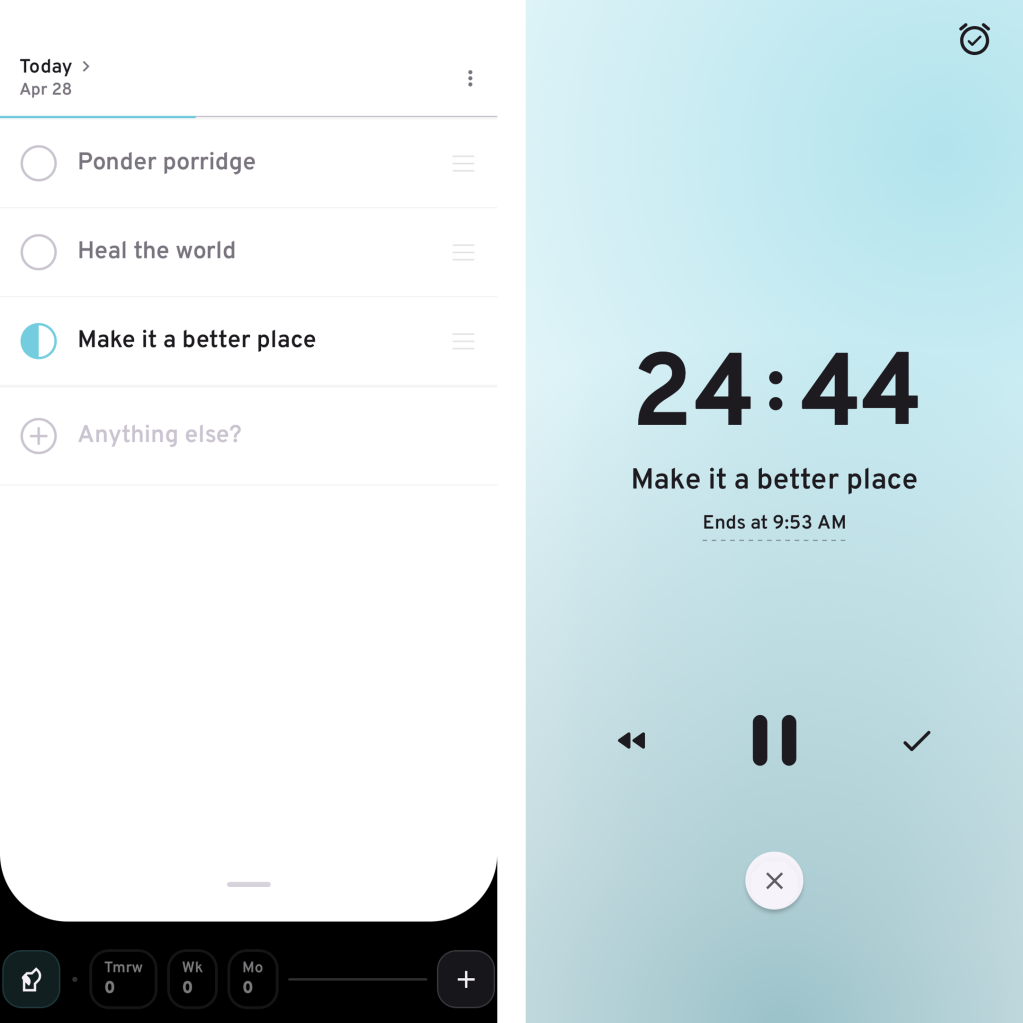
Android reminders app: Ruff Reminders in-progress, timer
Marking a task as in progress (left) exposes the option to begin a full-screen focus timer (right), if you want.

JR Raphael, Foundry

If something does still manage to slip by without getting completed, it’ll move down to the app’s command bar, at the bottom of the screen — where it shows up inside a red box with the number of unfinished past tasks front and center.

Android reminders app: Ruff Reminders command bar
The Ruff Reminders command bar shows you how many missed tasks are still active and pending.

JR Raphael, Foundry

You can always tap that box to revisit and reschedule any missed tasks — or you can find any past task via the app’s swipe-up-from-the-bottom search system. But even more helpful are the ongoing reminders the app will keep bringing front and center whenever you tell it to keep chasing you about any particular item.

Android reminders app: Ruff Reminders missed task
Tapping the double up arrows on a missed task moves it right back into your current “today” view.

JR Raphael, Foundry

What else? Let’s see — for any items you set as “ongoing,” Ruff will create a persistent notification so you can easily see what’s lingering on your list. And as you’d expect for any serious Android productivity app, Ruff Reminders has a widget that lets you look at all your tasks for the current day and add new tasks right then and there, on your home screen, without ever having to open anything up.
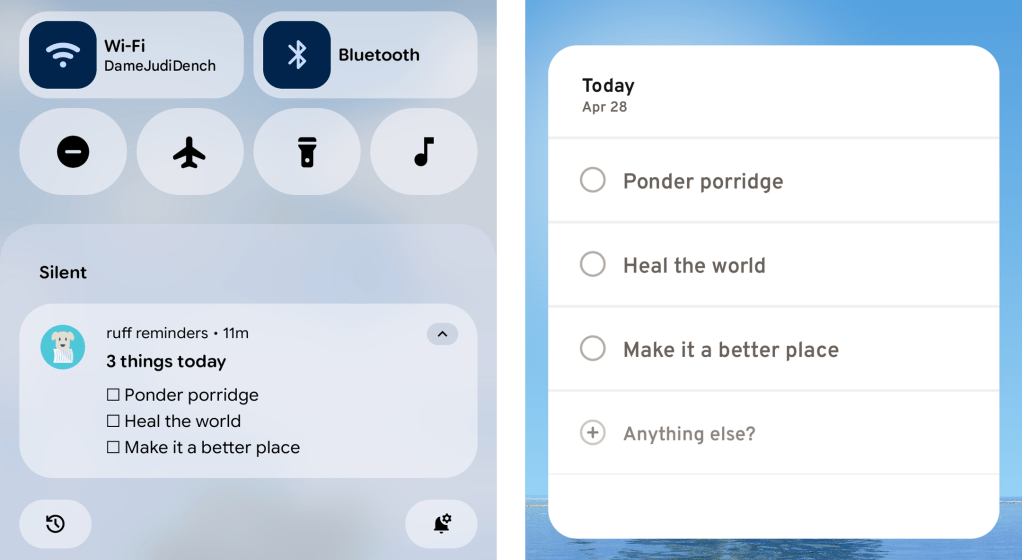
Android reminders app: Ruff Reminders ongoing notification, widget
Between Ruff Reminders’ persistent notification of ongoing tasks and its home screen widget showing today’s tasks, you’ve got no shortage of ways to keep important stuff front and center.

JR Raphael, Foundry

For the true productivity-obsessed power-user nerds among us, Ruff Reminders also has a whole host of step-saving gestures built into its interface. Like all of the app’s more advanced options, you absolutely don’t have to mess with ’em if you don’t want to — but if you’re the type of person who likes learning shortcuts and flying around your phone with taps and swipes, you’ll be delighted by all the possibilities this unlocks. 

The more you use it, the more thoughtful and useful little touches you keep discovering — again, if and only if you want to explore those types of options.
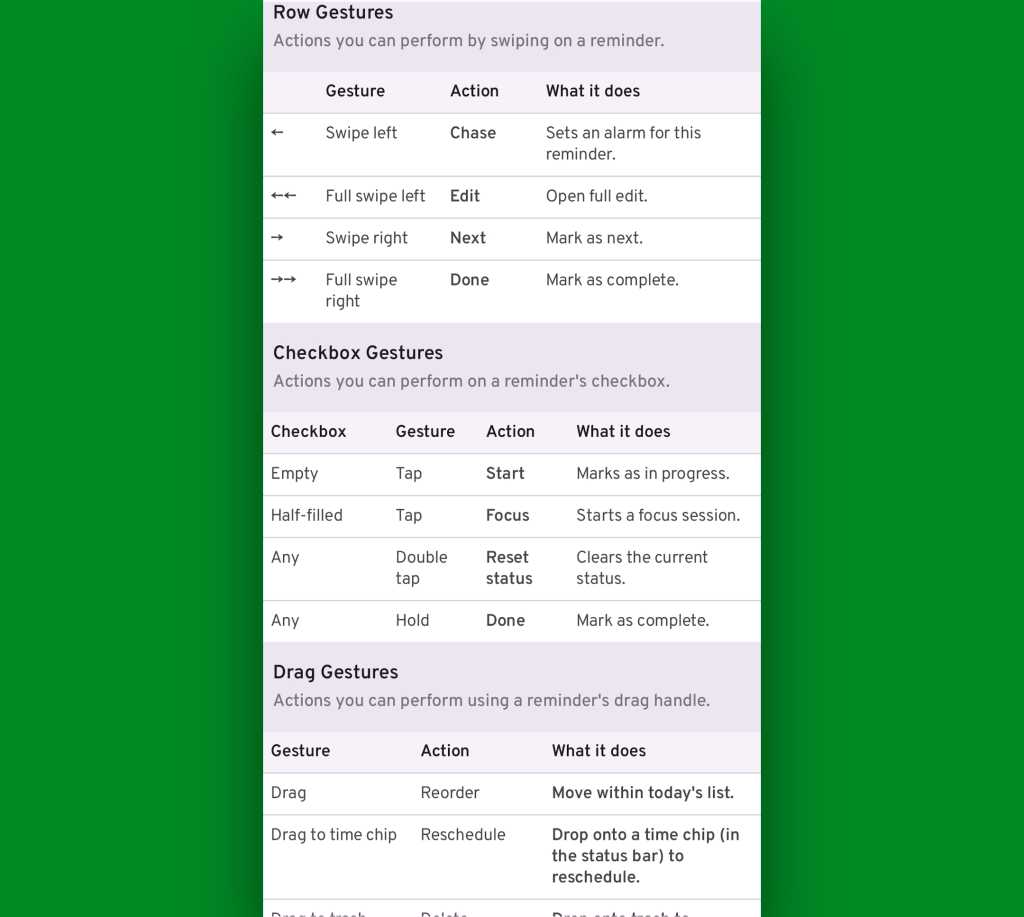
Android reminders app: Ruff Reminders gestures
Gestures galore await for the shortcut adorers among us.

JR Raphael, Foundry

What’s most interesting to me about Ruff Reminders is the space it fills between the everything-style, intensive-need to-do apps out there — things like Todoist or even all-purpose productivity tools like Notion, which are great for the right type of purpose and person but can be overwhelming overkill for more casual task tracking — and the super-simple, at times too-limited apps like Google Keep, which are fine for basic info-dumping but lacking in more powerful task management and reminder magic.

Ruff Reminders manages to be both simple and effective — an often overlooked middle-ground for those of us who want to track tasks and remember stuff in a way that goes beyond the most barebones basic approach but that doesn’t require an entire intricate platform to do it.

Oh, and as far as privacy goes, Ruff Reminder’s policy on that front is also refreshingly simple: It doesn’t collect or process any personally identifiable information. Period.

The app doesn’t have ads, either. Instead, it allows you to use its most fundamental setup for free and offers a paid subscription for its full set of features — three bucks a month or $20 per year, at the moment, with the latter price set to bump up to $30 after a while. (That pricing does also vary by country, so the rates will be slightly lower in certain parts of the world.)

For now, all you’ve gotta do is try it out and see if it works as well for you as it has been for me.

And if you need a helping hand to remind you, I know just the app to get the job done.

SUBSCRIBE TO OUR NEWSLETTER

From our editors straight to your inbox

Get started by entering your email address below.