





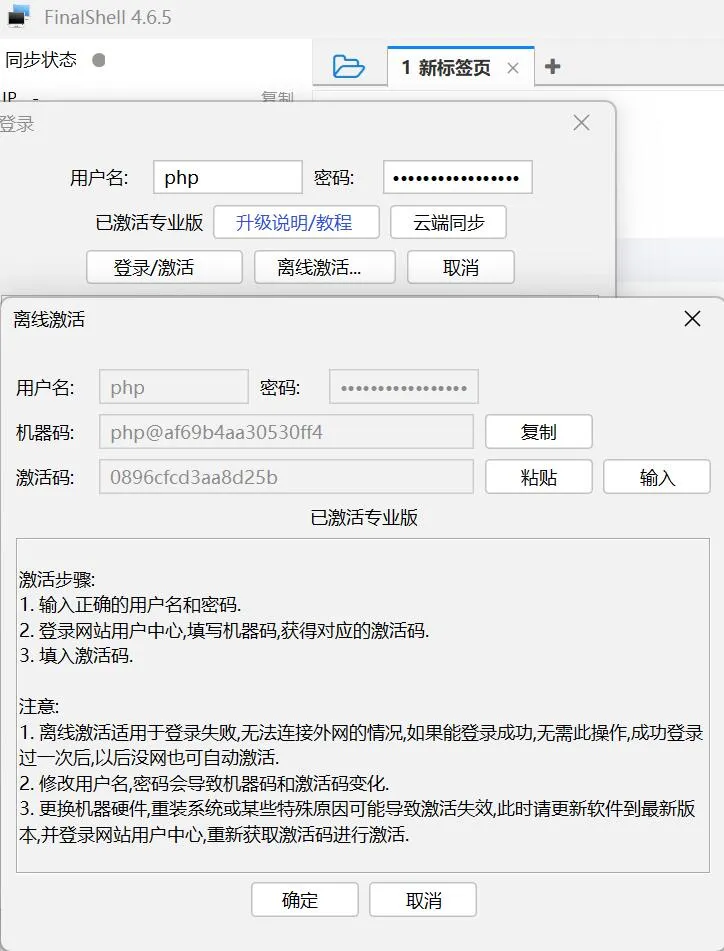
今天更新了FinalShell版本:4.6.5,发现去年激活的方法已经失效。
所有百度了一下,发现有最新算法。分享一下
<!DOCTYPE html>
<html lang="zh-CN">
<head>
  <meta charset="UTF-8" />
  <title>FinalShell 离线激活码生成</title>
  <script src="https://cdnjs.cloudflare.com/ajax/libs/crypto-js/4.2.0/crypto-js.min.js"></script>
  <style>
    body {
      font-family: sans-serif;
      padding: 2rem;
      background: #f5f5f5;
    }
    .box {
      background: white;
      padding: 2rem;
      border-radius: 8px;
      max-width: 500px;
      margin: auto;
      box-shadow: 0 0 10px rgba(0,0,0,0.1);
    }
    h2 {
      margin: 0 0 1rem 0;
      font-size: 1.25rem;
      color: #333;
    }
    input, button {
      padding: 0.5rem;
      width: 100%;
      margin-top: 1rem;
      font-size: 1rem;
      border: 1px solid #ccc;
      border-radius: 4px;
      box-sizing: border-box;
    }
    button {
      background: #333;
      color: white;
      border: none;
      cursor: pointer;
    }
    button:hover {
      background: #555;
    }
    .result {
      margin-top: 1.5rem;
      white-space: pre-wrap;
      font-family: monospace;
      font-size: 0.95rem;
      line-height: 1.6;
      color: #333;
    }
    .ver {
      color: #c0392b;
      font-weight: bold;
    }
    .type {
      color: #2980b9;
    }
  </style>
</head>
<body>
  <div class="box">
    <h2 id='pk-menu-3'>离线激活码生成器</h2>
    <input id="machineCode" type="text" placeholder="请输入机器码..." />
    <button onclick="generate()">生成授权码</button>
    <div class="result" id="output"></div>
  </div>

  <script>
    function md5(str) {
      return CryptoJS.MD5(str).toString();
    }

    function keccak384(str) {
      return CryptoJS.SHA3(str, { outputLength: 384 }).toString();
    }

    function generate() {
      const code = document.getElementById('machineCode').value.trim();
      const out = document.getElementById('output');
      if (!code) {
        out.textContent = '请输入机器码';
        return;
      }

      let res = '';

      res += '<span class="ver">FinalShell < 3.9.6</span>\n';
      res += '<span class="type">高级版:</span> ' + md5('61305' + code + '8552').slice(8, 24) + '\n';
      res += '<span class="type">专业版:</span> ' + md5('2356' + code + '13593').slice(8, 24) + '\n\n';

      res += '<span class="ver">FinalShell ≥ 3.9.6</span>\n';
      res += '<span class="type">高级版:</span> ' + keccak384(code + 'hSf(78cvVlS5E').slice(12, 28) + '\n';
      res += '<span class="type">专业版:</span> ' + keccak384(code + 'FF3Go(*Xvbb5s2').slice(12, 28) + '\n\n';

      res += '<span class="ver">FinalShell 4.5</span>\n';
      res += '<span class="type">高级版:</span> ' + keccak384(code + 'wcegS3gzA$').slice(12, 28) + '\n';
      res += '<span class="type">专业版:</span> ' + keccak384(code + 'b(xxkHn%z);x').slice(12, 28) + '\n\n';

      res += '<span class="ver">FinalShell 4.6</span>\n';
      res += '<span class="type">高级版:</span> ' + keccak384(code + 'csSf5*xlkgYSX,y').slice(12, 28) + '\n';
      res += '<span class="type">专业版:</span> ' + keccak384(code + 'Scfg*ZkvJZc,s,Y').slice(12, 28);

      out.innerHTML = res;
    }

    document.getElementById('machineCode').addEventListener('keypress', function(e) {
      if (e.key === 'Enter') generate();
    });
  </script>
</body>
</html>