PHP 7 使用新版的ZendEngine引擎,带来了许多新的特性。
PHP 7 相对于 php 5.x 版本在性能方面得到了极大的提高。
然而Vestacp面板一直是用php5.6,面对php7的性能提升,博主本人还是很想试试使用php7.1。

一、准备工作
1.一台安装了Vestacp的机器。
2.备份数据(防止出错后数据丢失)
二、升级php版本
Centos
Centos版本7.4
1.安装epel和remi源(这个不是必须的,先确定一下yum源里有这两个源)
ll /etc/yum.repos.d
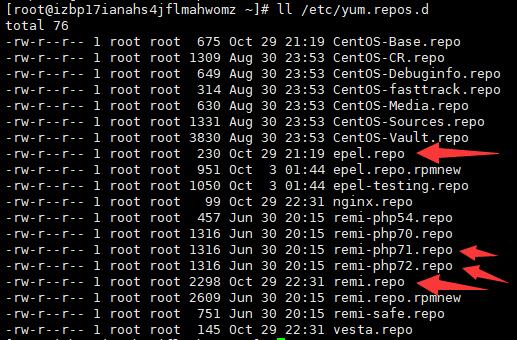
如果没有,需要以下命令来安装
 # 如果是CentOS 6的话,就把地址里的7改成6
 wget https://dl.fedoraproject.org/pub/epel/epel-release-latest-7.noarch.rpm
 wget http://rpms.remirepo.net/enterprise/remi-release-7.rpm
 rpm -Uvh remi-release-7.rpm epel-release-latest-7.noarch.rpm
 # 升级remi源
 yum -y --enablerepo=remi update remi-release
2.停止httpd并卸载旧版本php
#如果仅安装了nginx,那么要停掉php-fpm
service php-fpm stop
#如果安装了apache,那要停止httpd
service httpd stop
#卸载旧版本php
yum -y remove php
3.安装php7.1
yum -y --enablerepo=remi-php71 install php php-pear php-bcmath php-mysqlnd php-gd php-common php-fpm php-intl php-cli php-xml php-pecl-apcu php-pdo php-gmp php-process php-pecl-imagick php-devel php-mbstring
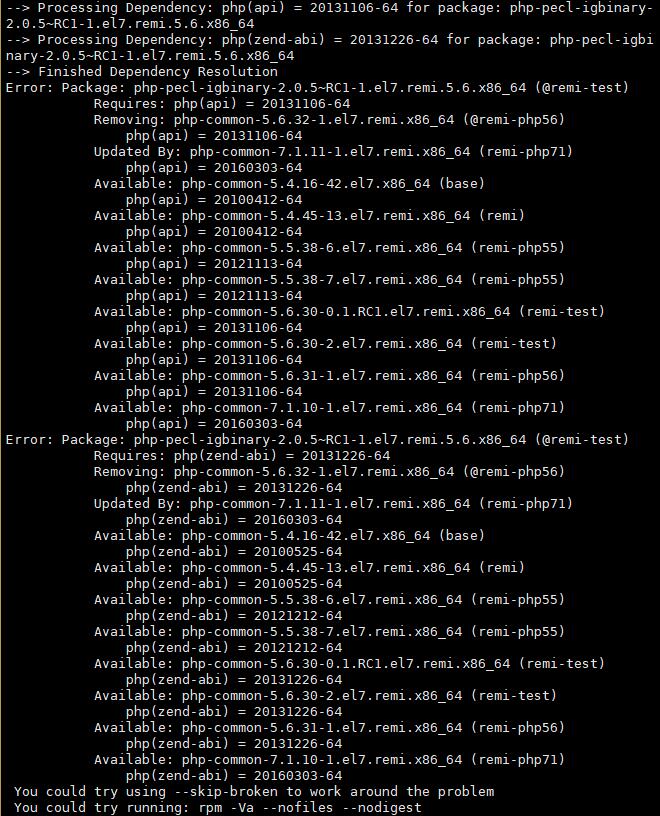
这个时候可能会遇到一个错误,如下图所示:
Error: Package: php-pecl-igbinary-2.0.5~RC1-1.el7.remi.5.6.x86_64 (@remi-test)
           Requires: php(api) = 20131106-64
           Removing: php-common-5.6.32-1.el7.remi.x86_64 (@remi-php56)
               php(api) = 20131106-64
           Updated By: php-common-7.1.11-1.el7.remi.x86_64 (remi-php71)
               php(api) = 20160303-64
           Available: php-common-5.4.16-42.el7.x86_64 (base)
               php(api) = 20100412-64
           Available: php-common-5.4.45-13.el7.remi.x86_64 (remi)
               php(api) = 20100412-64
           Available: php-common-5.5.38-6.el7.remi.x86_64 (remi-php55)
               php(api) = 20121113-64
           Available: php-common-5.5.38-7.el7.remi.x86_64 (remi-php55)
               php(api) = 20121113-64
           Available: php-common-5.6.30-0.1.RC1.el7.remi.x86_64 (remi-test)
               php(api) = 20131106-64
           Available: php-common-5.6.30-2.el7.remi.x86_64 (remi-test)
               php(api) = 20131106-64
           Available: php-common-5.6.31-1.el7.remi.x86_64 (remi-php56)
               php(api) = 20131106-64
           Available: php-common-7.1.10-1.el7.remi.x86_64 (remi-php71)
               php(api) = 20160303-64
Error: Package: php-pecl-igbinary-2.0.5~RC1-1.el7.remi.5.6.x86_64 (@remi-test)
           Requires: php(zend-abi) = 20131226-64
           Removing: php-common-5.6.32-1.el7.remi.x86_64 (@remi-php56)
               php(zend-abi) = 20131226-64
           Updated By: php-common-7.1.11-1.el7.remi.x86_64 (remi-php71)
               php(zend-abi) = 20160303-64
           Available: php-common-5.4.16-42.el7.x86_64 (base)
               php(zend-abi) = 20100525-64
           Available: php-common-5.4.45-13.el7.remi.x86_64 (remi)
               php(zend-abi) = 20100525-64
           Available: php-common-5.5.38-6.el7.remi.x86_64 (remi-php55)
               php(zend-abi) = 20121212-64
           Available: php-common-5.5.38-7.el7.remi.x86_64 (remi-php55)
               php(zend-abi) = 20121212-64
           Available: php-common-5.6.30-0.1.RC1.el7.remi.x86_64 (remi-test)
               php(zend-abi) = 20131226-64
           Available: php-common-5.6.30-2.el7.remi.x86_64 (remi-test)
               php(zend-abi) = 20131226-64
           Available: php-common-5.6.31-1.el7.remi.x86_64 (remi-php56)
               php(zend-abi) = 20131226-64
           Available: php-common-7.1.10-1.el7.remi.x86_64 (remi-php71)
               php(zend-abi) = 20160303-64
 You could try using --skip-broken to work around the problem
 You could try running: rpm -Va --nofiles --nodigest
解决办法是:remove掉错误的包,我remove掉第一个包后就正常了!
yum remove php-pecl-igbinary-2.0.5~RC1-1.el7.remi.5.6.x86_64
4.安装memcache客户端以及opcache
yum -y --enablerepo=remi-php71 install php-opcache php-memcache
5.重启php-fpm或是httpd
#启动php-fpm
service php-fpm start
#启动httpd
service httpd start
最后php-v查看一下php版本

微信扫描下方的二维码阅读本文