


Cerbos allows you to store your policies in a variety of ways. Oftentimes, the policies will be fairly "static", so using storage drivers which enable proper source control (for tracking and auditing policy changes) are very common. Whether that be via git drivers directly, or perhaps with an additional deployment pipeline that pushes those policies to disk or blob storage for later distribution.
Sometimes, however, there might a use-case for more dynamic management of your policies. Cerbos provides interfaces to various database backends (SQLite, Postgres, MySQL and SQL Server), which allow you to create, update, and retrieve policies and schemas via the Admin API.
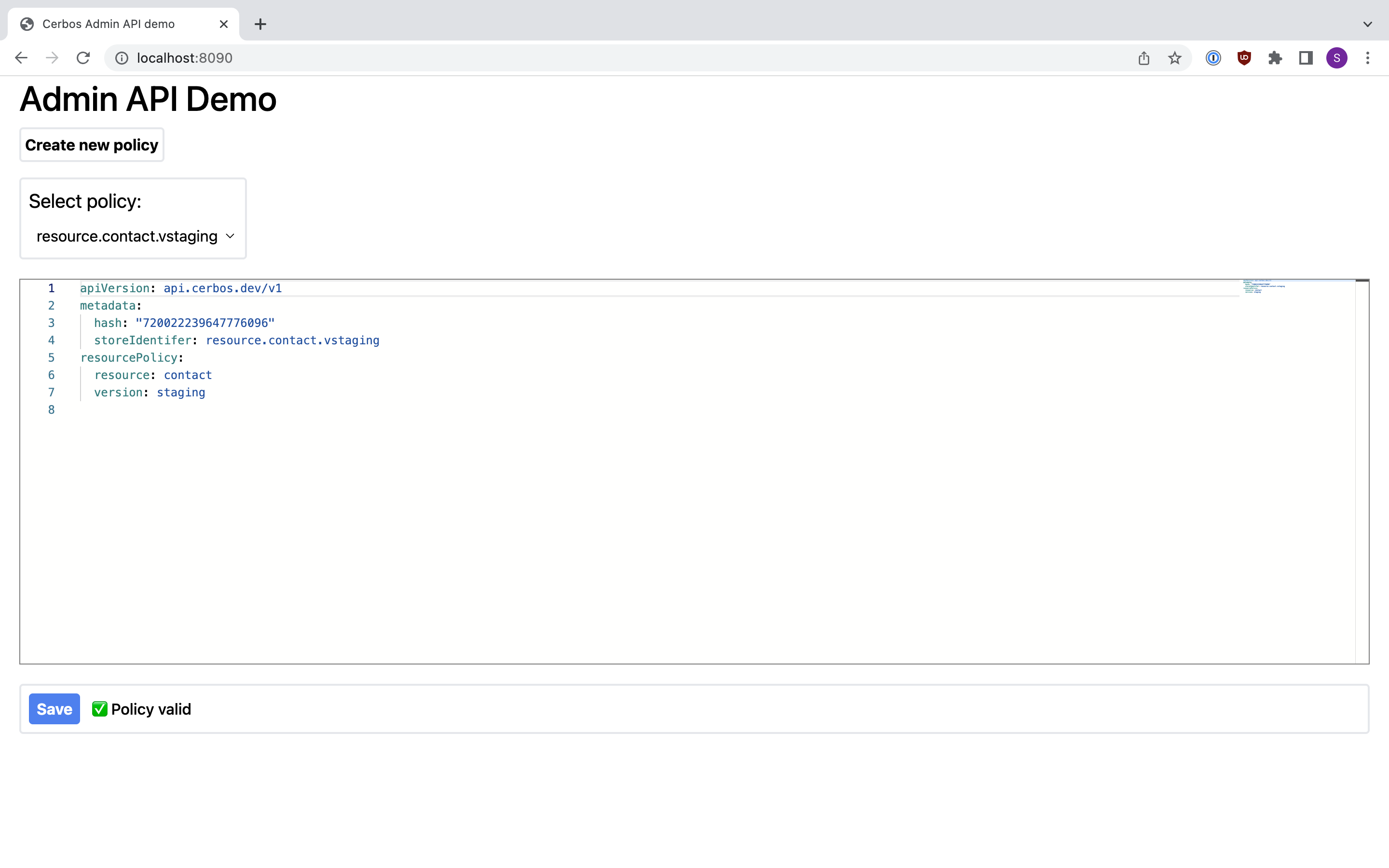
This demo shows a simple implementation of a backend Go service which interfaces with the Admin API, and provides a React-based front end with an editor for creating, validating, and updating policies. The full demo can be found here.
TL;DR: The front end source code is housed within the client/ subdirectory. From in there, npm run build builds and generates client/dist/index.html (and all related assets), which is then served by the Go server as a static file - main.go in the project root houses the server code with the static file handling, simple CRUD and validation endpoints.
The Admin API is not available by default. In order to enable, it you need to add the following to the cerbos config:
server:
  adminAPI:
    adminCredentials:
      passwordHash: JDJ5JDEwJGJWcFRKUzJKRzYxOTJERWs5SzZaS2VSb2Z1cXNSeTYzam9NR1U5UkVKM3BtZ1VLQUVuM0xlCgo= # passwordHash is the base64-encoded bcrypt hash of the password to use for authentication.
      username: cerbos # Username is the hardcoded username to use for authentication.
    enabled: true # Enabled defines whether the admin API is enabled.
We also configure an in-memory instance of SQLite, in which we will store our dynamic policies. To do this, we add the following:
storage:
  driver: "sqlite3"
  sqlite3:
    dsn: ":memory:"
Finally, we enable audit logging, by adding the following:
audit:
  enabled: true # Set to false to completely disable audit logging.
  accessLogsEnabled: true # Log API access attempts
  #decisionLogsEnabled: true # Log policy decisions
  backend: local # Audit backend to use.
  local: # Configuration for the local audit backend
    storagePath: /auditlogs # Path to store the data
    retentionPeriod: 168h # Records older than this will be automatically deleted
The Go SDK provides a client specifically for interacting with the Admin API, available through the client package:
go get github.com/cerbos/cerbos/client
import "github.com/cerbos/cerbos/client"

c, err := client.NewAdminClientWithCredentials(host, username, password, client.WithPlaintext())
if err != nil {
	http.Error(w, err.Error(), http.StatusInternalServerError)
	return
}
We can use this client as follows:
Listing policy IDs:
policyIds, err := c.ListPolicies(context.Background())
if err != nil {
	http.Error(w, err.Error(), http.StatusInternalServerError)
	return
}
Retrieving policy details:
import (
	yaml "github.com/goccy/go-yaml"
	"google.golang.org/protobuf/encoding/protojson"
)

policies, err := c.GetPolicy(context.Background(), ids...)
if err != err {
	http.Error(w, err.Error(), http.StatusInternalServerError)
	return
}

// Marshal into yaml, from protojson
var yamlPolicies []string
for _, p := range policies {
	jsonBytes, err := protojson.Marshal(p)
	if err != nil {
		http.Error(w, err.Error(), http.StatusInternalServerError)
		return
	}

	yamlBytes, err := yaml.JSONToYAML(jsonBytes)
	if err != nil {
		http.Error(w, err.Error(), http.StatusInternalServerError)
		return
	}

	yamlPolicies = append(yamlPolicies, string(yamlBytes))
}
Creating new policies:
ps := client.NewPolicySet()

// Create new policy from name, version, and scope (passed in request params)
switch policyType {
case "resource":
	p := client.NewResourcePolicy(name, version).WithScope(scope)
	ps = ps.AddResourcePolicies(p)
case "principal":
	p := client.NewPrincipalPolicy(name, version).WithScope(scope)
	ps = ps.AddPrincipalPolicies(p)
case "derivedRole":
	dr := client.NewDerivedRoles(name)
	ps = ps.AddDerivedRoles(dr)
default:
	http.Error(w, "`policyType` must be one of: "+strings.Join([]string{"resource", "principal", "derivedRole"}, ", "), http.StatusBadRequest)
	return
}

if err := c.AddOrUpdatePolicy(context.Background(), ps); err != nil {
	http.Error(w, err.Error(), http.StatusInternalServerError)
	return
}
Loading, validating and updating policies:
ps := client.NewPolicySet()
ps.AddPolicyFromReader(strings.NewReader(policyString))

if err := ps.Validate(); err != nil {
	http.Error(w, err.Error(), http.StatusBadRequest)
	return
}

if err := c.AddOrUpdatePolicy(context.Background(), ps); err != nil {
	http.Error(w, err.Error(), http.StatusInternalServerError)
	return
}
Audit logging
We enabled audit logging to capture access records and decisions made by the engine along with the associated context data. We can retrieve the logs like so:
gen, err := c.AuditLogs(context.Background(), client.AuditLogOptions{
	Type: client.AccessLogs,
	Tail: 100,
})
if err != nil {
	http.Error(w, err.Error(), http.StatusInternalServerError)
	return
}

var logs []string{}
for al := range gen {
	l, err := al.AccessLog()
	if err != nil {
		http.Error(w, err.Error(), http.StatusInternalServerError)
		return
	}
    logs = append(logs, l)
}
You can opt to build and run the demo locally, or you can use docker compose.
Locally:
cd cerbos
./start.sh
# from project root
cd client
npm i
npm run build
# from project root
go run main.go
Docker compose:
docker-compose up -d
Load it up:
Open a browser and navigate to localhost:8090:
As always, if you have any questions or feedback, or to just say "hello", please join our Slack community!
此内容由惯性聚合(RSS阅读器)自动聚合整理,仅供阅读参考。 原文来自 — 版权归原作者所有。