


step1:卸载可能会导致冲突的包
# for pkg in docker.io docker-doc docker-compose docker-compose-v2 podman-docker containerd runc; do sudo apt-get remove $pkg; done
step2:安装一些必要的系统工具
# sudo apt-get update
# sudo apt-get -y install apt-transport-https ca-certificates curl software-properties-common
step3: 安装 GPG 证书
# curl -fsSL https://mirrors.aliyun.com/docker-ce/linux/ubuntu/gpg | sudo apt-key add -
step4: 写入软件源信息
# sudo add-apt-repository "deb [arch=amd64] https://mirrors.aliyun.com/docker-ce/linux/ubuntu $(lsb_release -cs) stable"
step5:安装 Docker-CE(下面两步根据实际需要选择)
step5-1:安装最新版本 Docker-CE
# sudo apt-get -y update
# sudo apt-get -y install docker-ce
step5-2:安装指定版本
# 查找Docker-CE的版本:
# apt-cache madison docker-ce
docker-ce | 5:27.2.0-1~ubuntu.24.04~noble | https://mirrors.aliyun.com/docker-ce/linux/ubuntu noble/stable amd64 Packages
docker-ce | 5:27.1.2-1~ubuntu.24.04~noble | https://mirrors.aliyun.com/docker-ce/linux/ubuntu noble/stable amd64 Packages
docker-ce | 5:27.1.1-1~ubuntu.24.04~noble | https://mirrors.aliyun.com/docker-ce/linux/ubuntu noble/stable amd64 Packages
docker-ce | 5:27.1.0-1~ubuntu.24.04~noble | https://mirrors.aliyun.com/docker-ce/linux/ubuntu noble/stable amd64 Packages
docker-ce | 5:27.0.3-1~ubuntu.24.04~noble | https://mirrors.aliyun.com/docker-ce/linux/ubuntu noble/stable amd64 Packages
docker-ce | 5:27.0.2-1~ubuntu.24.04~noble | https://mirrors.aliyun.com/docker-ce/linux/ubuntu noble/stable amd64 Packages
docker-ce | 5:27.0.1-1~ubuntu.24.04~noble | https://mirrors.aliyun.com/docker-ce/linux/ubuntu noble/stable amd64 Packages
docker-ce | 5:26.1.4-1~ubuntu.24.04~noble | https://mirrors.aliyun.com/docker-ce/linux/ubuntu noble/stable amd64 Packages
docker-ce | 5:26.1.3-1~ubuntu.24.04~noble | https://mirrors.aliyun.com/docker-ce/linux/ubuntu noble/stable amd64 Packages
docker-ce | 5:26.1.2-1~ubuntu.24.04~noble | https://mirrors.aliyun.com/docker-ce/linux/ubuntu noble/stable amd64 Packages
docker-ce | 5:26.1.1-1~ubuntu.24.04~noble | https://mirrors.aliyun.com/docker-ce/linux/ubuntu noble/stable amd64 Packages
docker-ce | 5:26.1.0-1~ubuntu.24.04~noble | https://mirrors.aliyun.com/docker-ce/linux/ubuntu noble/stable amd64 Packages
docker-ce | 5:26.0.2-1~ubuntu.24.04~noble | https://mirrors.aliyun.com/docker-ce/linux/ubuntu noble/stable amd64 Packages
docker-ce | 5:26.0.1-1~ubuntu.24.04~noble | https://mirrors.aliyun.com/docker-ce/linux/ubuntu noble/stable amd64 Packages
docker-ce | 5:26.0.0-1~ubuntu.24.04~noble | https://mirrors.aliyun.com/docker-ce/linux/ubuntu noble/stable amd64 Packages

# 安装指定版本的Docker-CE: (VERSION例如上面的 5:27.2.0-1~ubuntu.24.04~noble)
# sudo apt-get -y install docker-ce=[VERSION]
step6:启动并验证
# systemctl start docker
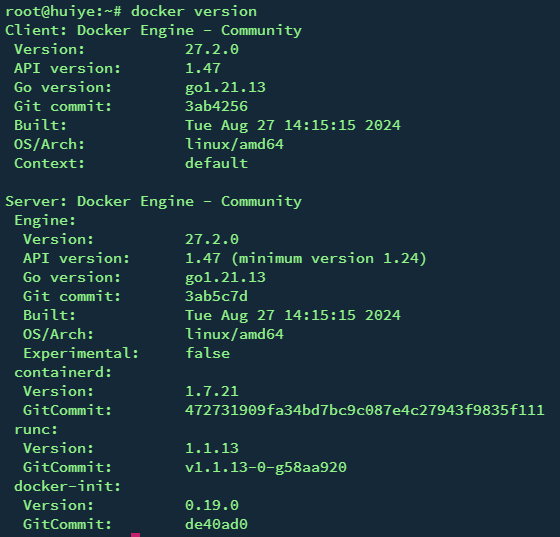
# docker version
此内容由惯性聚合(RSS阅读器)自动聚合整理,仅供阅读参考。 原文来自 — 版权归原作者所有。