


未完待续
之前提到过,大模型的训练语料库和现实世界相比,往往滞后,比如当下一些热门的话题大模型通常会不了解,一种解决这种问题的方式是,在发消息时将实时的相关的数据一并发送给它,对大模型的知识储备进行补充。
但是,实时的数据是海量的,不能将内容整个全部发送大模型,而且Token的限制也不允许这样做,我们只需要检索出和问题相关的片段然后拆分出来发送即可。
如何检索数据呢?用ES?答案是否定的,因为ES是一种全文检索,不能完美实现相关性检索,例如我们想要和大模型聊一下最近有哪些“国际争端”之类的话题,“柬泰边境冲突”肯定算一件,但是如果以“国际争端” “争端”为关键词简单的全文检索,无法将这个话题有关的内容全部查询命中,因为这种场景的检索要求的不是文字的匹配而是语义的匹配,于是这里就引入了一个概念:向量相似度。
首先理解向量,向量就是数学中代表一个既有大小又有方向的量,物理上也称为矢量,例如平面直角坐标系上从(0, 0)点到任意一点构成的线段就是一个向量,向量相似度指的就是两个向量是否相似,通过欧氏距离和余弦距离都可判断相似度,欧氏距离越小,相似度越高,余弦距离越大,相似度越高

计算机中的数据都是以数字的形式进行存储,如果根据内容含义将文字数据转换成空间中的坐标,就成功把文字信息向量化了,含义相似的文本,转换为点的距离越近,通过对比向量相似度即可获得语义相近的内容。
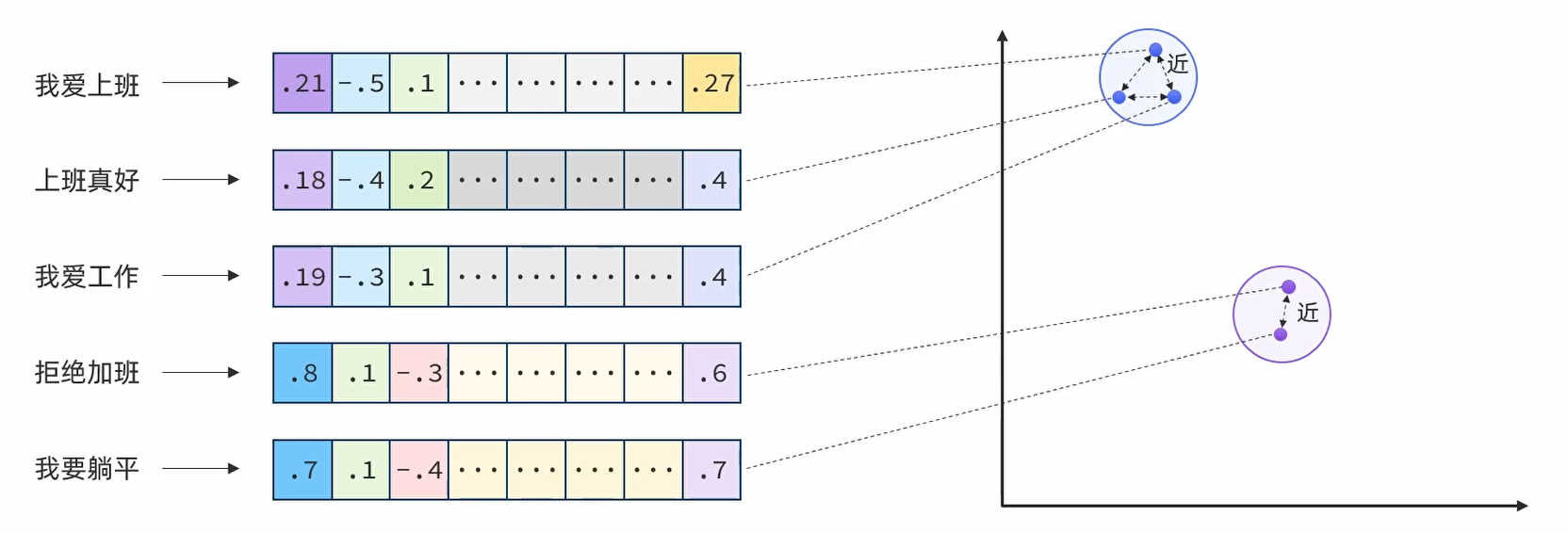
根据内容转换为向量的工作需要交由支持文本的嵌入模型来完成
嵌入(Embedding)是文本、图像或视频的数值表示,能够捕捉输入之间的关系,Embedding 通过将文本、图像和视频转换为称为向量(Vector)的浮点数数组来工作。这些向量旨在捕捉文本、图像和视频的含义,Embedding 数组的长度称为向量的维度。通过计算两个文本片段的向量表示之间的数值距离,应用程序可以确定用于生成嵌入向量的对象之间的相似性。
我用过常见的支持文本的嵌入模型有:
因为DeepSeek没有文本嵌入模型,因此这里采用阿里云百炼平台通义千问text-embedding-v4实现文本向量化。
基于jdk-21创建spring-boot项目,引入spring-boot依赖3.5.7,spring-ai依赖1.0.3,因为阿里云百炼平台兼容了OpenAI的协议,因此还需要引入spring-ai-starter-model-openai对接阿里云百炼平台
<parent>
    <groupId>org.springframework.boot</groupId>
    <artifactId>spring-boot-starter-parent</artifactId>
    <version>3.5.7</version>
</parent>


<dependencyManagement>
    <dependencies>
        <dependency>
            <groupId>org.springframework.ai</groupId>
            <artifactId>spring-ai-bom</artifactId>
            <version>1.0.3</version>
            <type>pom</type>
            <scope>import</scope>
        </dependency>
    </dependencies>
</dependencyManagement>


<dependencies>
    <dependency>
        <groupId>org.springframework.boot</groupId>
        <artifactId>spring-boot-starter-web</artifactId>
    </dependency>

    <dependency>
        <groupId>org.springframework.boot</groupId>
        <artifactId>spring-boot-starter-test</artifactId>
        <scope>test</scope>
    </dependency>

    <dependency>
        <groupId>org.springframework.ai</groupId>
        <artifactId>spring-ai-starter-model-openai</artifactId>
    </dependency>

    <!-- Lombok -->
    <dependency>
        <groupId>org.projectlombok</groupId>
        <artifactId>lombok</artifactId>
    </dependency>


</dependencies>

<build>
    <plugins>
        <plugin>
            <groupId>org.apache.maven.plugins</groupId>
            <artifactId>maven-compiler-plugin</artifactId>
            <configuration>
                <source>21</source>
                <target>21</target>
                <encoding>UTF-8</encoding>
            </configuration>
        </plugin>
    </plugins>
</build>application.yml中,将阿里云百炼text-embedding-v4配在openai下,而且URL后面的/v1必须去掉,否则无法连接成功
spring:
  ai:
    openai:
      base-url: https://dashscope.aliyuncs.com/compatible-mode
      api-key: sk-
      embedding:
        options:
          model: text-embedding-v4
          dimensions: 1024

logging:
  level:
    org.springframework.ai: debug
测试一下文本转向量
package org.example.test;

import jakarta.annotation.Resource;
import org.example.Main;
import org.junit.jupiter.api.Test;
import org.springframework.ai.openai.OpenAiEmbeddingModel;
import org.springframework.boot.test.context.SpringBootTest;

@SpringBootTest(classes = Main.class)
public class TestEmbedding {

    @Resource
    private OpenAiEmbeddingModel embeddingModel;


    @Test
    public void test() {
        String text = "今天是10月的最后一天";

        float[] embed = embeddingModel.embed(text);

        for (float v : embed) {
            System.out.print(v+" ");
        }
    }
}
得到System.out.print结果:
-0.03598024 -0.07856088 -0.023570947 -0.05446673 -0.016179034 0.028628573 0.006583633 -0.0021095797 0.012744679 0.011946459 0.0030872307 0.033162996 0.07281907 0.047088236 -0.02217574 0.017708397 -0.036033902 -0.061067134 -0.017466918 0.021961093 0.03321666 0.018821878 0.040943958 0.025355203 -0.036785167 0.00426276 -0.003155985 -0.031714126 0.0018714555 0.020539057 -0.0055271657 -0.028735897 -0.011765351 0.030587228 -0.04013903 0.0022303187 -0.04231233 0.07968778 0.0012048752 0.05672053 0.025288126 -0.015789986 -6.0411455E-4 0.004504238 0.009216415 0.044780776 0.012315384 -0.0024734738 0.009605463 0.008418196 0.01958656 -0.010101835 0.06536008 0.058115736 -0.015991218 -0.009887188 0.046041828 -0.0139789 -0.017909627 6.5064937E-4 -0.014891151 -0.014810658 -0.05677419 -0.07110189 0.007955363 -0.013220928 -0.04464662 -0.008082809 -0.016849807 -0.053930115 0.05731081 -0.006352216 -0.013173973 0.0062884926 -0.015025306 0.057632778 0.0033555396 0.067989506 -0.012536739 -0.103942916 -0.014448441 0.014770412 -0.0021229952 -0.013194096 0.0754485 0.030426243 -0.017627902 -0.0200561 0.019251173 0.057579115 0.01934508 -0.026696747 -0.0011495365 -0.043573387 -0.006570217 -0.031016523 -0.0570425 0.003638941 0.013871577 0.006305262 -6.152242E-5 0.06407219 -0.0048530395 -0.010195743 0.054627717 0.10490883 -0.04494176 0.019090187 0.003887127 -0.026066221 -0.044727113 -0.018419415 -0.0117452275 0.019559728 -0.011792182 0.061174456 -0.0058290134 0.025824744 0.0021162874 -0.0018446245 -0.012959326 0.024442952 -0.011282395 -0.044485636 0.009806694 -0.012825171 0.011161655 -0.015253368 0.05465455 0.012147691 0.016031465 -0.032599546 0.0017523933 -0.027743153 0.006915665 -0.0217062 0.01666199 0.027313858 -0.025033232 -0.0045780228 0.02766266 -0.0151728755 0.012496493 -0.013542898 -0.04247332 0.015937556 0.012147691 -0.06718458 -0.011926336 0.011322641 -0.008344411 -0.0033370934 -0.034933835 0.055432644 -0.018969448 -0.04005854 0.023101406 0.024939325 -0.025797913 0.018419415 0.03917312 0.017332762 0.03871699 0.010075004 0.031016523 -0.037080307 -0.025194218 -0.026844317 0.028896881 0.028789558 -0.010007926 0.042607475 -4.5151377E-4 0.0042862366 0.023839258 0.035175312 0.018687723 -0.029889625 0.0059933527 -0.008860906 0.04657845 -4.5235225E-4 0.0038904808 -0.014153301 -0.014971644 -0.014770412 0.0618184 -0.00426276 -0.05741813 -0.0048295623 2.8423988E-4 0.029835964 -7.8815775E-4 -0.004014574 0.015696079 -0.040300015 -0.038502347 0.043788034 0.0068888343 -0.013046526 0.015843648 0.03809988 0.0029027683 0.02067321 0.07303372 -0.019908529 0.0147435805 -0.0077407155 -0.013965485 -0.028574912 0.026978472 -0.014877736 0.012818464 -0.023409963 -0.038153544 0.031043354 -0.060852487 0.047893163 0.029513992 0.011181778 0.03364595 0.04220501 -0.021209829 -0.013884992 0.001418684 4.1105782E-4 -0.0018546862 0.047329713 -0.008941398 -0.00949814 0.0042795287 -0.026482102 -0.070565276 -0.02332947 -0.053983774 -0.0015067229 -0.0060268915 0.0076132687 -0.022309896 0.0060000606 0.013509359 0.022725774 8.9883525E-4 -0.009478017 -0.025355203 -0.018030366 -0.054332577 -0.060745165 -0.050361603 0.010282943 -0.024349043 -0.03235807 0.045880843 0.013952069 -0.011054331 -0.030748215 -0.035470452 0.013898407 0.0036490026 0.03834136 -0.014314286 0.02972864 -5.638682E-4 -0.041104943 -0.02530154 -0.024429537 0.030426243 0.06428684 -0.022846514 -0.013408744 -0.008418196 0.016836392 0.0109067615 -0.07893652 -0.046202812 0.032036096 -0.05076407 -0.006573571 -0.0034293248 0.014609426 -0.038475513 -0.017373009 -0.009571925 2.6555781E-5 -0.017641319 -0.020592717 -0.052856877 0.007143728 0.04641746 -0.0039038963 -0.027407767 0.012852002 -0.008062686 0.0014824073 0.040273186 -0.03335081 0.0540911 0.036677845 0.0097530335 0.0017507164 -0.053286172 -0.0029430147 -0.021035427 0.011175071 0.027421182 -0.009558509 -0.036892492 0.0724971 -0.024442952 -0.08891761 -0.03887798 -0.023758763 0.016031465 0.032250743 0.071745835 -0.012422708 -0.013730714 -0.02451003 0.00547015 -0.024335628 0.027582169 0.023946581 -0.03780474 -0.010859808 -0.0035618022 0.015132629 0.027877308 -0.025623512 0.013167266 -0.03149948 -0.04016586 0.008445026 -0.01471675 -0.0022101956 -9.407585E-4 -0.023248978 0.033458136 -0.017882796 -0.00967254 0.015991218 0.013113604 -0.043895356 0.008277333 0.045585703 0.0082236715 0.006684249 0.029970119 0.0042191595 -0.03217025 -0.001222483 0.007633392 0.012805048 0.044163667 0.01855357 -0.0058088903 -0.005282334 0.047624853 0.023020914 -0.04512958 0.027273612 -0.0013474143 -0.05049576 -0.008364534 0.008954814 0.03093603 -0.02094152 0.05347399 0.04987865 -0.0011704981 -0.021813523 0.05586194 -0.017453503 0.011731812 0.015239953 0.008740166 -0.014233794 0.026535762 0.0014245532 0.017708397 0.07534117 0.034907006 0.017238855 0.0029178606 -0.009109091 0.03783157 -0.0024298737 -0.021397645 -0.001357476 -0.003075492 -3.2532468E-4 -0.0055070426 -0.003152631 0.007096774 0.0079821935 0.05390328 -0.0042795287 -0.0202305 -0.0375096 0.016930299 -0.02822611 -0.047410205 0.005922922 -0.015803402 -0.0042594057 -0.001038859 -0.03869016 -0.03088237 0.021209829 -0.0076400996 0.020391487 0.0052186106 -0.057847425 0.074106954 0.0014438379 -0.03624855 1.7922204E-5 -0.007036404 -0.007774254 0.04075614 0.055808276 -0.035121653 0.009873772 0.033431303 -0.048644427 0.04842978 0.096698575 0.024684431 -0.03179462 -0.017681565 0.031901944 -0.011322641 -0.0019754253 0.025771081 0.014824074 0.057793763 -0.026280869 0.056613203 0.038851146 -0.044136833 0.0038737115 -0.013059942 0.034987498 -0.030184766 -0.004108482 -0.006191231 0.045075916 0.05586194 -0.0335118 -0.007090066 -0.023906333 0.052830048 -0.015937556 0.01560217 -9.608817E-4 0.0015553539 0.029809132 0.052776385 -0.001125221 -0.021397645 0.019532897 0.022631867 3.7709996E-4 -0.014045977 0.011792182 -0.009343862 0.045907672 -0.001883194 -0.014944812 0.056398556 0.007217513 0.007512653 -0.0023175192 0.056183908 -0.009679248 0.022336727 0.044378314 0.0079084085 0.061335444 0.001137798 0.069116406 0.017077869 0.001785932 -0.04220501 -0.009404232 -0.052481245 -0.044673454 0.015937556 -0.03302884 0.06128178 0.0030671076 0.018674308 -0.061442766 -0.034263063 -0.011718397 -0.016447343 0.011644612 -0.03123117 0.06273065 -0.008941398 -0.039360933 -0.035631437 0.017212024 -0.05108604 -0.007573022 0.036785167 0.016796146 -0.059296295 -0.011067747 -0.02852125 -0.031338494 0.021692785 -0.008787121 0.011416549 -0.013871577 0.024751507 0.003518202 0.019760959 -0.0030855539 -0.007230928 -0.010148789 -0.032841023 0.027877308 -0.007626684 0.050066464 0.006358924 -0.06466247 -0.043627046 0.010282943 0.062516004 -0.0027367522 0.02094152 -0.016447343 0.036972985 0.0123288 0.025838159 0.052266598 -0.007673638 -0.012657478 -0.018164521 -0.055808276 -0.03410208 0.038448684 -0.016621744 0.012134275 0.016568081 0.034611866 -0.033967923 0.015615585 -0.0070766504 -0.004316421 -0.011953167 -0.00802244 -0.015682662 0.0045880843 -0.011517165 -0.020485394 0.0040749433 0.05020062 0.01884871 0.012013537 -0.028279772 0.011631196 -0.004296298 0.023074577 -0.03450454 -0.015722908 -0.03388743 -0.038448684 -0.0037227878 0.03394109 -0.033967923 0.0036825414 0.0035114943 0.029192021 7.2946516E-4 -0.017855966 -0.033565458 0.014381364 0.06895542 -0.038824316 -0.0030771692 -0.011456795 -0.008881029 -0.019921945 -0.0099207265 -0.023155069 -0.001333999 -0.006436063 0.01265077 0.034746017 0.01660833 0.020606132 -0.030077443 0.026468685 0.028655404 -0.02822611 0.018808464 -0.028977375 0.029218853 -0.014730166 -0.026039392 -0.050388437 0.03353863 0.04598817 0.026388193 -0.04483444 0.0290847 -0.01621928 6.7370717E-4 -0.022524543 -0.004400268 -0.026589425 0.0084852725 -0.0109403 -0.0037529725 -0.019103603 -0.0023695042 -0.05390328 -0.0077541308 -0.010249405 -0.018030366 -0.009853649 0.02320873 -0.019251173 0.028628573 0.012724555 -0.018687723 -0.013777669 0.029594485 0.0066808946 0.018030366 0.04311726 -0.03147265 -0.011684858 -0.012234892 0.0052487953 -0.07185315 -0.0023393193 -0.05291054 -0.003102323 -0.0083913645 0.030855538 0.024496615 0.01144338 -0.031258002 -0.0024114274 -0.072014146 -0.02212208 0.026106467 0.0036121102 0.008364534 -0.04429782 0.017923042 0.03324349 0.040273186 0.046444293 0.014622842 -0.03149948 0.009243246 0.012053783 -0.04875175 0.015333861 -0.028896881 -0.04759802 0.012603817 -0.010490883 -0.033726446 -0.031633634 0.009598755 0.037375446 -0.06342825 -0.022658696 -0.026696747 0.0478395 0.028091954 -0.0057787057 -0.00426276 0.025824744 -0.010276236 0.006818403 0.03270687 0.061979383 0.018942617 0.026495516 -0.04547838 -0.007988901 -0.036436364 0.08151228 0.0067949262 0.018473076 -0.0026344592 -0.0217062 -0.010356728 0.0043398985 0.020659795 0.020109762 -0.052561738 0.007190682 -0.007438868 4.2761752E-4 -0.0850003 0.0050006094 -0.0049268245 -0.023557533 -0.019801207 -0.0014958228 0.03149948 -0.020445148 0.0035014327 -0.0356851 0.011798889 0.035443623 0.012852002 -0.013274589 -0.018634062 0.043492895 0.032492224 0.022846514 -0.02173303 -0.0043398985 -0.05494969 -0.0059061525 0.009618878 -0.009169461 0.06493078 0.0049268245 0.039012134 -0.007774254 -0.01315385 0.015763156 -0.06557473 -0.048483443 -5.299103E-4 4.33906E-4 0.023517286 0.010879931 -0.026656501 -0.019895114 -0.006137569 -0.03745594 -0.029353008 0.013569729 0.011181778 -0.001982133 0.107752904 0.04700774 0.008015732 -0.022055002 -0.06986767 0.035711933 0.022189157 -0.03300201 -0.019036526 0.012878833 -0.0139252385 -0.023959996 0.079634115 0.0098268185 -0.027474845 -0.055164337 0.016594913 -0.019278003 0.029513992 -0.0052420874 0.038260866 0.022403803 0.004500884 0.023839258 -0.0031844927 0.023718517 -0.031714126 -0.014636258 -0.0014119763 0.029916456 -0.01577657 -0.016326604 0.012053783 0.026817488 0.0070296964 -0.05972559 -0.036329042 0.026025975 -0.082263544 -0.0279578 0.013361789 0.024925908 0.04510275 -0.0040715896 0.028172448 -0.025288126 0.059832912 0.045290563 0.040917125 -0.031016523 -0.0013775992 -0.009310323 0.001955302 0.115265556 -0.017855966 -0.04247332 0.02347704 -0.035604607 0.07367766 -0.028279772 0.010430513 0.020539057 -0.04368071 0.011027501 0.019895114 -0.03262638 0.0088206595 3.9240194E-4 0.017963288 0.002003933 0.0064226473 -0.016541252 0.00426276 -2.3770503E-4 -0.011658027 -0.0043130675 0.0033639243 -0.00293463 -0.0147435805 -0.01120861 -0.010859808 0.01855357 0.0033656014 0.023101406 -0.043922186 0.010484175 0.032250743 0.0021531798 0.013804499 0.017762057 -0.0022940421 0.023383131 0.047061402 -0.003254924 0.014072808 0.0011218671 -0.009934141 0.013207512 -0.014019147 -0.02261845 -0.017708397 0.026830902 -0.016594913 -0.0033773398 -0.04928837 -0.028118785 -0.035819255 0.0012769833 -0.0342094 0.002465089 0.061120797 -0.020015853 0.0141667165 0.022578204 -0.030721383 0.040541492 0.006204646 0.008143179 -0.013489236 -0.0075663147 -0.008753582 0.004957009 0.0419367 -0.006110738 -0.01070553 0.042097688 0.034638695 0.11472894 -0.011919629 0.04005854 -0.027769985 -0.014528934 -0.02067321 0.0023057808 -0.041990362 -0.03895847 0.071745835 0.03061406 -9.935818E-4 -0.017466918 0.04365388 0.0046786387 -0.030184766 0.03694615 -0.02559668 0.0695457 0.027005304 -0.009759741 -0.052078784 0.03388743 0.008237087 0.0062147076 0.0039038963 0.018392583 0.035926577 0.015025306 -0.0045545455 -0.012483077 0.008310872 0.0040179277 -0.010926885 0.0058055366 -0.0060939686 -0.005590889 -0.028306602 -0.02377218 -0.009303615 -0.058115736 -0.015400938 -0.025180802 0.013817915 -0.008639551 0.02320873 -0.06986767 -4.8337548E-4 0.014448441 -0.030855538 0.004222513 0.028977375 -0.031982437 0.03305567 0.017077869 0.054600887 0.0019653635 0.043009937 -0.018982863 0.043519724 0.029889625 -0.010933593 0.010504298 -0.033726446 0.0075864377 0.0058357213 -0.012322092 0.06965302 -0.014327702 0.010168912 -0.03453137 -0.048000485 -0.007653515 0.04070248 0.015696079 0.017587656 0.011966582 0.010873224 -0.05827672 -0.01734618 -0.009102384 -0.014408194 0.0010044819 0.0076602227 0.027287029 0.03957558 0.021062259 0.010517714 -0.02471126 0.08231721 0.053071525 -0.0013633452 -0.01592414 -0.04131959 0.014032562 -0.035550945 0.03147265 -0.017641319 -5.18591E-4 -0.04875175 -0.03093603 -0.0014639611 -0.020887857 -0.013764253 -0.08033172 -0.023409963 0.0053997193 -0.14016463 -0.01949265 -0.048027314 -0.005798829 0.046229646 0.026374778 -0.028655404 -0.026924811 0.034021586 0.025234465 -0.009223123 -0.0021951033 -0.017279102 0.015857063 0.07399963 0.0077340077 0.0017373009 0.007834624 0.0055405814 -0.012825171 0.0570425 -0.014072808 0.027367521 -0.022940421 0.008163302 -0.013247758 -0.0064159394 0.014555764 -0.037482772 0.0077071767 -0.056076586 0.053581312 0.059242632 3.047823E-4 -0.05288371 0.0017339471 -0.0077943774 0.018956034 -0.007190682 0.011175071 0.004765839 0.040970787 -0.040621985 0.054037437 0.07421428 -0.023020914 怎样知道这个嵌入模型转换的向量值准不准呢,做一个小测试:查询list中的每个话题和“体育赛事”这个话题的相似度,并将模型计算的结果进行欧氏距离判断,看看是不是话题越相似,距离越短。
@Test
public void test() {

    float[] embed1 = embeddingModel.embed("体育赛事");

    List<String> list = Arrays.asList(
        "中国河北发生滦河第一号洪水",
        "菲律宾和中国就南海问题进行交涉",
        "武大靖被韩国人在ins上谩骂",
        "日本政府决定将核污染水进行排海",
        "中华人民共和国全运会在天津开幕",
        "在中国的调节下,沙特和伊朗和解",
        "谷爱凌在2022北京冬奥会上获得滑雪冠军",
        "缅甸曼德勒发生8.0级地震",
        "无法忍受北约东扩,俄罗斯进攻乌克兰",
        "湘潭大学周立人因投毒被判处死刑",
        "全红婵在东京奥运会获得跳水金牌"
    );

    for (String s : list) {
        float[] embed2 = embeddingModel.embed(s);
        System.out.println(s +"=" +euclideanDistance(embed2, embed1));
    }
}


/**
 * 计算欧氏距离 (Euclidean Distance)
 * @param vector1 第一个向量
 * @param vector2 第二个向量
 * @return 欧氏距离
 */
public static double euclideanDistance(float[] vector1, float[] vector2) {
    if (vector1 == null || vector2 == null) {
        throw new IllegalArgumentException("输入向量不能为null");
    }
    if (vector1.length != vector2.length) {
        throw new IllegalArgumentException("向量维度必须相同");
    }
    if (vector1.length == 0) {
        throw new IllegalArgumentException("向量不能为空");
    }

    double sum = 0.0;
    for (int i = 0; i < vector1.length; i++) {
        double diff = vector1[i] - vector2[i];
        sum += diff * diff;
    }
    return Math.sqrt(sum);
}
得到结果显示,“全红婵在东京奥运会获得跳水金牌”,“武大靖被韩国人在ins上谩骂”,“谷爱凌在北京冬奥会上获得滑雪冠军”,“中华人民共和国全运会在天津开幕”和关键词的距离都是1.0,1.1左右,小于其他的1.2!
中国河北发生滦河第一号洪水=1.2565409585119849
菲律宾和中国就南海问题进行交涉=1.2780262570947603
武大靖被韩国人在ins上谩骂=1.1504923215307303
日本政府决定将核污染水进行排海=1.2980210701931219
中华人民共和国全运会在天津开幕=1.0548370809772176
在中国的调节下,沙特和伊朗和解=1.2655944458999424
谷爱凌在2022北京冬奥会上获得滑雪冠军=1.1482314969126597
缅甸曼德勒发生8.0级地震=1.2719576699963044
无法忍受北约东扩,俄罗斯进攻乌克兰=1.273157362706503
湘潭大学周立人因投毒被判处死刑=1.2694025438988223
全红婵在东京奥运会获得跳水金牌=1.1600613375770383之前提到,如果实时的数据是海量的,不能将内容整个全部发送大模型,而且Token的限制也不允许这样做,我们需要检索出和问题相关的片段然后拆分出来发送给大模型,而且是通过将文本转换成向量并根据向量相似度来进行匹配,这样,海量数据的储存和检索就需要向量数据库来完成。
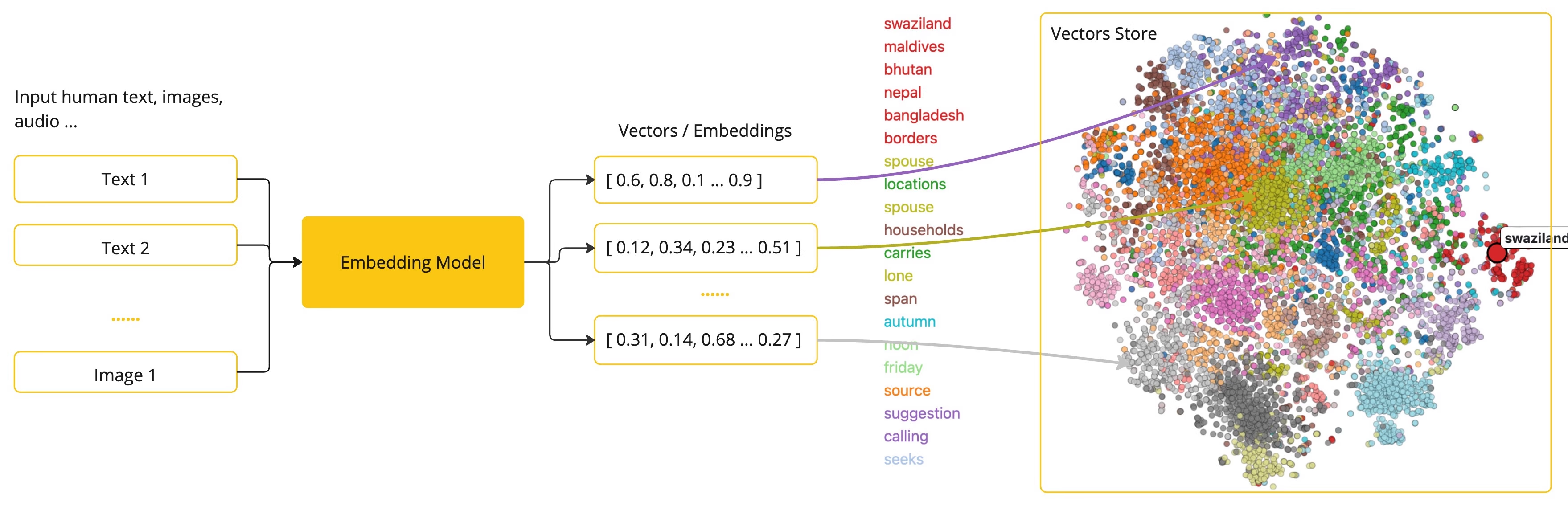
Spring AI支持的向量数据库有很多,且对操作向量数据库制定了统一的接口标准org.springframework.ai.vectorstore.VectorStore(https://docs.spring.io/spring-ai/reference/api/vectordbs.html#_vectorstore_implementations),这里就以支持向量的Redis (Redis Stack)为例
pom.xml
<dependency>
    <groupId>org.springframework.ai</groupId>
    <artifactId>spring-ai-starter-vector-store-redis</artifactId>
</dependency>
新增向量数据库的配置
spring:
  ai:
    vectorstore:
      redis:
        initialize-schema: false #不自动初始化索引结构,因为可能不能满足我们的查询要求
        index-name: custom-index #向量库索引名
        prefix: "doc:" #key前缀
  data:
    redis:
      host: 192.168.228.104
      port: 6379
      database: 0
用Docker启动一个Redis Stack实例用于测试
docker run -d --name redis-stack -p 6379:6379 -p 8001:8001 redis/redis-stack:latest手动设置redis-stack的custom-index索引结构,主要是为了将user_id设置为TAG,才能在Spring AI中进行==查询,当前版本Spring AI自动生成的索引是TEXT型
FT.CREATE custom-index ON JSON PREFIX 1 "doc:" SCHEMA $.user_id AS user_id TAG $.content AS content TEXT $.embedding AS embedding VECTOR HNSW 6 TYPE FLOAT32 DIM 1024 DISTANCE_METRIC COSINE新建测试类,可以直接注入并使用VectorStore操作向量数据库
package org.example.test;

import jakarta.annotation.Resource;
import org.example.Main;
import org.junit.jupiter.api.Test;
import org.springframework.ai.document.Document;
import org.springframework.ai.vectorstore.VectorStore;
import org.springframework.boot.test.context.SpringBootTest;

import java.util.Arrays;

@SpringBootTest(classes = Main.class)
public class VectorStoreTest {

    @Resource
    private VectorStore vectorStore;

    @Test
    public void test() {
        Document document = new Document("1", "一段测试信息", new HashMap<>());
        vectorStore.add(Arrays.asList(document));

    }
}
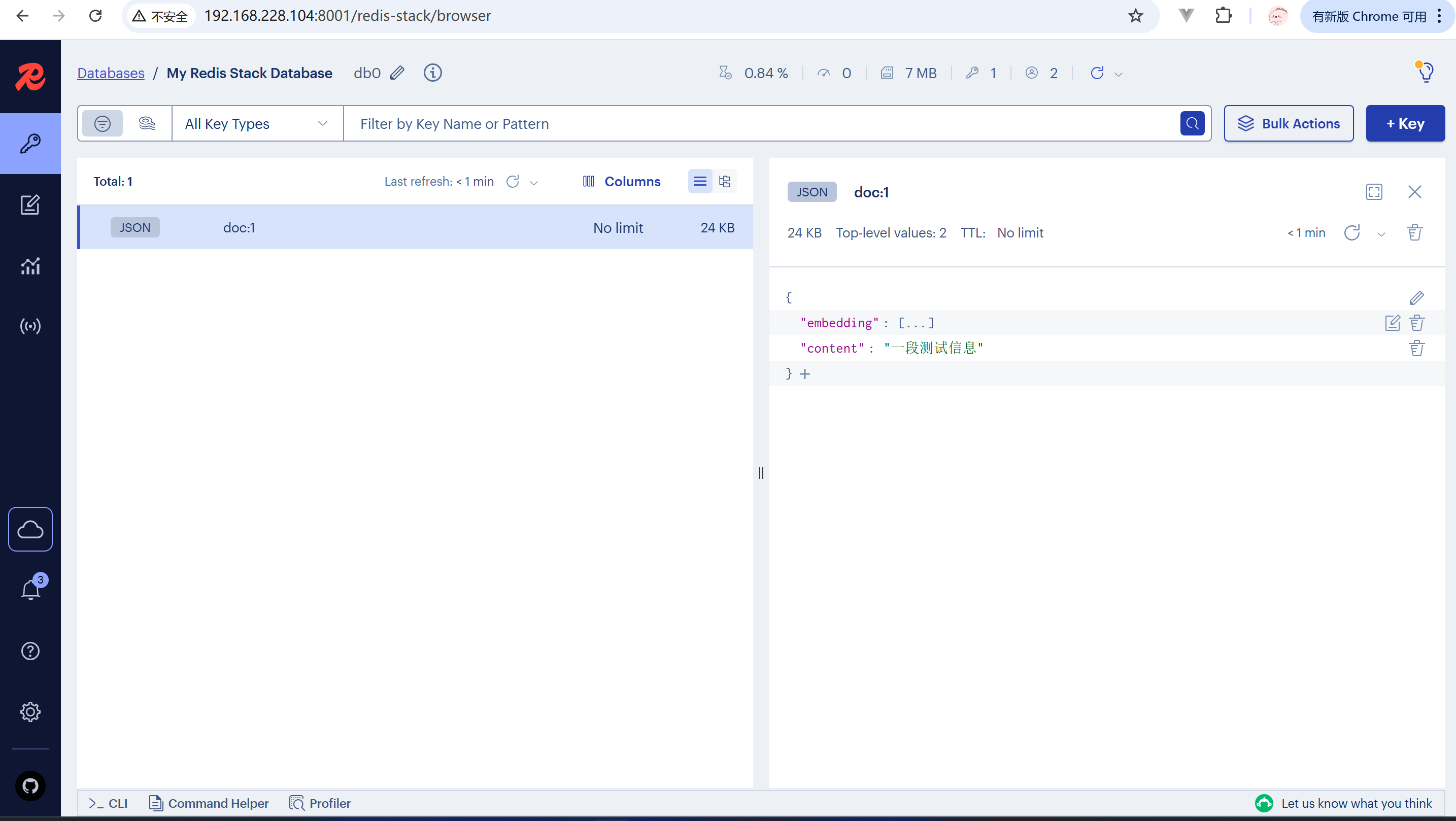
打开8001端口的redis-stack管理页面,可以看到文本数据及转换后的向量数据保存到了redis-stack中
还可以将PDF文档向量化,保存进向量数据库,需要借助spring-ai-pdf-document-reader工具,这里以我的本科毕业答辩PPT转成PDF为例测试
 <dependency>
    <groupId>org.springframework.ai</groupId>
    <artifactId>spring-ai-pdf-document-reader</artifactId>
</dependency>
package org.example.test;
import jakarta.annotation.Resource;
import org.example.Main;
import org.junit.jupiter.api.Test;
import org.springframework.ai.document.Document;
import org.springframework.ai.reader.ExtractedTextFormatter;
import org.springframework.ai.reader.pdf.PagePdfDocumentReader;
import org.springframework.ai.reader.pdf.config.PdfDocumentReaderConfig;
import org.springframework.ai.vectorstore.VectorStore;
import org.springframework.boot.test.context.SpringBootTest;
import java.util.List;
@SpringBootTest(classes = Main.class)
public class VectorStoreTest {
@Resource
private VectorStore vectorStore;
@Test
public void test() {
PagePdfDocumentReader reader = new PagePdfDocumentReader(
"file:///C:/Users/lzj20/Desktop/答辩.pdf",
PdfDocumentReaderConfig.builder()
.withPageExtractedTextFormatter(ExtractedTextFormatter.defaults())
.withPagesPerDocument(1)
.build()
);
List<Document> documents = reader.read();
for (Document document : documents) {
document.getMetadata().put("user_id", "001");
}
vectorStore.add(documents);
}
}
数据保存成功

还可以搜索相关性高的内容
@Test
public void search() {
    SearchRequest request = SearchRequest.builder()
            .query("服务器配置")
            .topK(3) //相似度最高的前几名
            //.filterExpression("user_id == '001'") //可以根据metadata中的内容过滤
            .build();

    List<Document> documents = vectorStore.similaritySearch(request);
    for (Document document : documents) {
        System.out.println(document.getText());
        System.out.println(document.getScore());
    }
}最后一步,利用保存了我们自己上传了文档的向量数据库,作为大模型对话的知识库,对大模型尚未了解的内容进行补充,首先先将之前用过的对话模型DeepSeek的依赖和配置添加进去
spring:
  ai:
    deepseek:
      base-url: https://api.deepseek.com
api-key: ${DEEPSEEK_KEY}<dependency>
<groupId>org.springframework.ai</groupId>
<artifactId>spring-ai-starter-model-deepseek</artifactId>
</dependency>再添加Spring AI对RAG功能支持的advisor
<dependency>
    <groupId>org.springframework.ai</groupId>
    <artifactId>spring-ai-advisors-vector-store</artifactId>
</dependency>
配置一个支持知识库自动检索的ChatClient,并关联向量数据库vectorStore
package org.example;

import org.springframework.ai.chat.client.ChatClient;
import org.springframework.ai.chat.client.advisor.MessageChatMemoryAdvisor;
import org.springframework.ai.chat.client.advisor.SimpleLoggerAdvisor;
import org.springframework.ai.chat.client.advisor.vectorstore.QuestionAnswerAdvisor;
import org.springframework.ai.chat.memory.ChatMemory;
import org.springframework.ai.deepseek.DeepSeekChatModel;

import org.springframework.ai.vectorstore.SearchRequest;
import org.springframework.ai.vectorstore.VectorStore;
import org.springframework.context.annotation.Bean;
import org.springframework.context.annotation.Configuration;

@Configuration
public class ModelConfig {

    @Bean
    public ChatClient ragClient(DeepSeekChatModel model, ChatMemory chatMemory, VectorStore vectorStore) {
        return ChatClient.builder(model)
                .defaultAdvisors(
                        SimpleLoggerAdvisor.builder().build(),
                        MessageChatMemoryAdvisor.builder(chatMemory).build(),
                        QuestionAnswerAdvisor.builder(vectorStore)
                                .searchRequest(
                                        SearchRequest.builder()
                                        .similarityThreshold(0.6)
                                        .topK(2)
                                        .build()
                                ).build()
                    ).build();
    }

}controller中使用ragClient,并使用advisor.param(QuestionAnswerAdvisor.FILTER_EXPRESSION, "user_id == '001'")区分不同用户的文档,实际项目中,用户ID应该从后端登录信息获得
package org.example.controller;

import jakarta.annotation.Resource;
import org.springframework.ai.chat.client.ChatClient;
import org.springframework.ai.chat.client.advisor.vectorstore.QuestionAnswerAdvisor;
import org.springframework.ai.chat.memory.ChatMemory;

import org.springframework.web.bind.annotation.GetMapping;
import org.springframework.web.bind.annotation.RequestMapping;
import org.springframework.web.bind.annotation.RestController;
import reactor.core.publisher.Flux;

@RestController
@RequestMapping("ai")
public class ChatController {

    @Resource
    private ChatClient ragClient;

    @GetMapping(value = "rag-stream", produces = "text/html;charset=utf-8")
    public Flux<String> rag(String msg, String chatId) {

        return ragClient.prompt()
                .user(msg)
                .advisors(advisor -> advisor.param(ChatMemory.CONVERSATION_ID, chatId))
                .advisors(advisor -> advisor.param(QuestionAnswerAdvisor.FILTER_EXPRESSION, "user_id == '001'"))
                .stream()
                .content();

    }
}
通过测试,可以看到大模型回答它不知道的问题时,已经有检索知识库了

此内容由惯性聚合(RSS阅读器)自动聚合整理,仅供阅读参考。 原文来自 — 版权归原作者所有。