





未完待续
基于Spring AI 1.1.0版本,实现三种MCP Server
引入依赖spring-ai-starter-mcp-server-webmvc
<parent>
    <groupId>org.springframework.boot</groupId>
    <artifactId>spring-boot-starter-parent</artifactId>
    <version>3.5.7</version>
</parent>

<dependencyManagement>
    <dependencies>
        <dependency>
            <groupId>org.springframework.ai</groupId>
            <artifactId>spring-ai-bom</artifactId>
            <version>1.1.0</version>
            <type>pom</type>
            <scope>import</scope>
        </dependency>
    </dependencies>
</dependencyManagement>


<dependencies>
    <dependency>
        <groupId>org.springframework.boot</groupId>
        <artifactId>spring-boot-starter-web</artifactId>
    </dependency>

    <dependency>
        <groupId>org.springframework.boot</groupId>
        <artifactId>spring-boot-starter-test</artifactId>
        <scope>test</scope>
    </dependency>

    <dependency>
        <groupId>org.springframework.ai</groupId>
        <artifactId>spring-ai-starter-mcp-server-webmvc</artifactId>
    </dependency>

    <!-- Lombok -->
    <dependency>
        <groupId>org.projectlombok</groupId>
        <artifactId>lombok</artifactId>
    </dependency>

</dependencies>

<build>
    <plugins>
        <plugin>
            <groupId>org.apache.maven.plugins</groupId>
            <artifactId>maven-compiler-plugin</artifactId>
            <configuration>
                <source>21</source>
                <target>21</target>
                <encoding>UTF-8</encoding>
            </configuration>
        </plugin>
    </plugins>
</build>
application.yml下配置server有关的配置
spring:
  application:
    name: spring-ai-mcp-server
  ai:
    mcp:
      server:
        name: spring-ai-mcp-server
        version: 1.0.0
        type: async
        sse-endpoint: /sse
        protocol: sse
server:
  port: 8080
编写工具方法,通过Tool注解声明为工具方法
package org.example.mcp.tools;

import lombok.extern.slf4j.Slf4j;
import org.springframework.ai.tool.annotation.Tool;
import org.springframework.stereotype.Component;

import java.time.LocalDateTime;
import java.time.format.DateTimeFormatter;

@Component
@Slf4j
public class DateTimeTool {

    @Tool(description = "获取当前日期和时间(GMT+8)")
    public String current() {
        return LocalDateTime.now().format(DateTimeFormatter.ISO_DATE_TIME);
    }
}
通过ToolCallbackProvider将工具类放入MCP Server
package org.example.config;

import org.example.mcp.tools.DateTimeTool;
import org.springframework.ai.tool.ToolCallbackProvider;
import org.springframework.ai.tool.method.MethodToolCallbackProvider;
import org.springframework.context.annotation.Bean;
import org.springframework.context.annotation.Configuration;

@Configuration
public class McpConfig {

    @Bean
    public ToolCallbackProvider provider(DateTimeTool dateTimeTool) {
        return MethodToolCallbackProvider.builder().toolObjects(
                dateTimeTool
        ).build();
    }

}
集成MCP Server到Cherry Studio,配合大模型进行调用
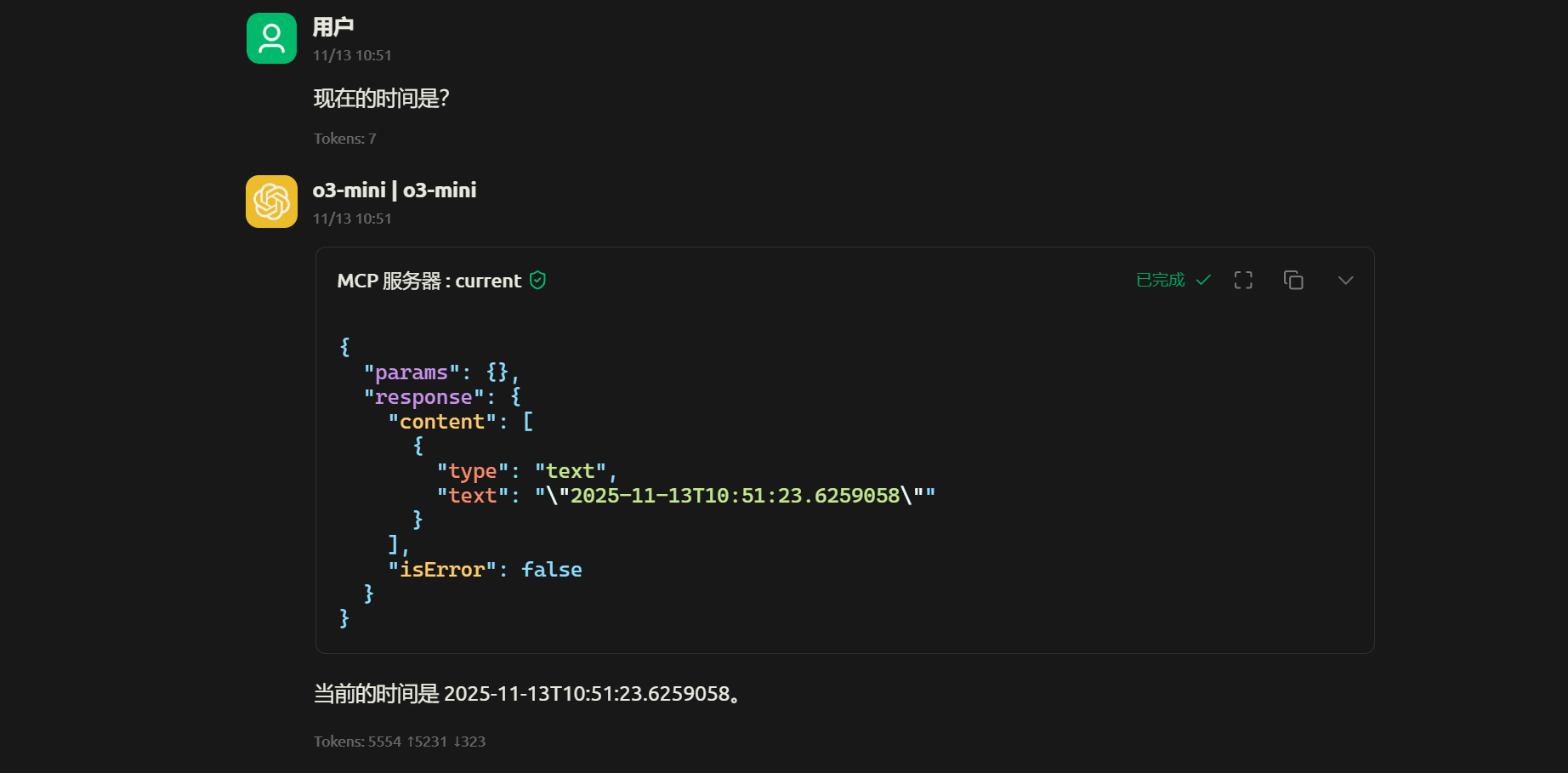
当采用Streamable-HTTP协议时,将配置更改为这样即可,Cherry Studio配置也需要同步更改
spring:
  application:
    name: spring-ai-mcp-server
  ai:
    mcp:
      server:
        name: spring-ai-mcp-server
        version: 1.0.0
        type: async
        protocol: streamable
        streamable-http:
mcp-endpoint: /mcp-endpoint此内容由惯性聚合(RSS阅读器)自动聚合整理,仅供阅读参考。 原文来自 — 版权归原作者所有。