










博主和芋道源码作者及其官方开发团队无任何关联
芋道(又名yudao,ruoyi-vue-pro)是一个基于spring-boot框架的单体Java后端开源项目,拥有基于RBAC模型的组织架构管理、CRM、ERP、商城、代码生成、AI等多个功能模块。封装了多租户、数据权限、工作流、OAuth,邮件、短信、定时任务、日志、链路追踪等多种技术和业务组件。其在GitHub上的地址是:https://github.com/YunaiV/ruoyi-vue-pro
因工作中会用到这个开源项目,为了更好的定制和更新功能,所以决定把它的源码核心部分都通读并运行调试一遍,并把过程通过博客记录下来,内容持续更新,边学习,边输出,做知识积累整理。
本文基于2.4.0-jdk8-SNAPSHOT版本的源码,并fork了该版本的代码
后端:https://gitee.com/changelzj/ruoyi-vue-pro/tree/2.4.0/
前端:https://gitee.com/changelzj/yudao-ui-admin-vue3/tree/2.4.0/
项目基于传统的maven构建,大致结构如下,整个项目是多模块结构,分为1个父模块和多个子模块。
ruoyi-vue-pro [yudao]
    │
    ├── yudao-dependencies
    │     └── pom.xml
    │
    ├── yudao-framework
    │     ├── yudao-common
    │     │       ├── src
    │     │       └── pom.xml
    │     ├── yudao-spring-boot-starter-biz-xxxxxxx
    │     │       ├── src
    │     │       └── pom.xml
    │     ├── yudao-spring-boot-starter-xxxxxxx
    │     │       ├── src
    │     │       └── pom.xml
    │     └── pom.xml
    │
    │── yudao-module-aaa
    │     ├── yudao-module-aaa-api
    │     │       ├── src
    │     │       └── pom.xml
    │     ├── yudao-module-aaa-biz
    │     │       ├── src
    │     │       └── pom.xml
    │     └── pom.xml
    │
    │── yudao-module-bbb
    │     ├── yudao-module-bbb-api
    │     │       ├── src
    │     │       └── pom.xml
    │     ├── yudao-module-bbb-biz
    │     │       ├── src
    │     │       └── pom.xml
    │     └── pom.xml
    │
    │── yudao-server
    │     ├── src
    │     └── pom.xml
    │
    └── pom.xml
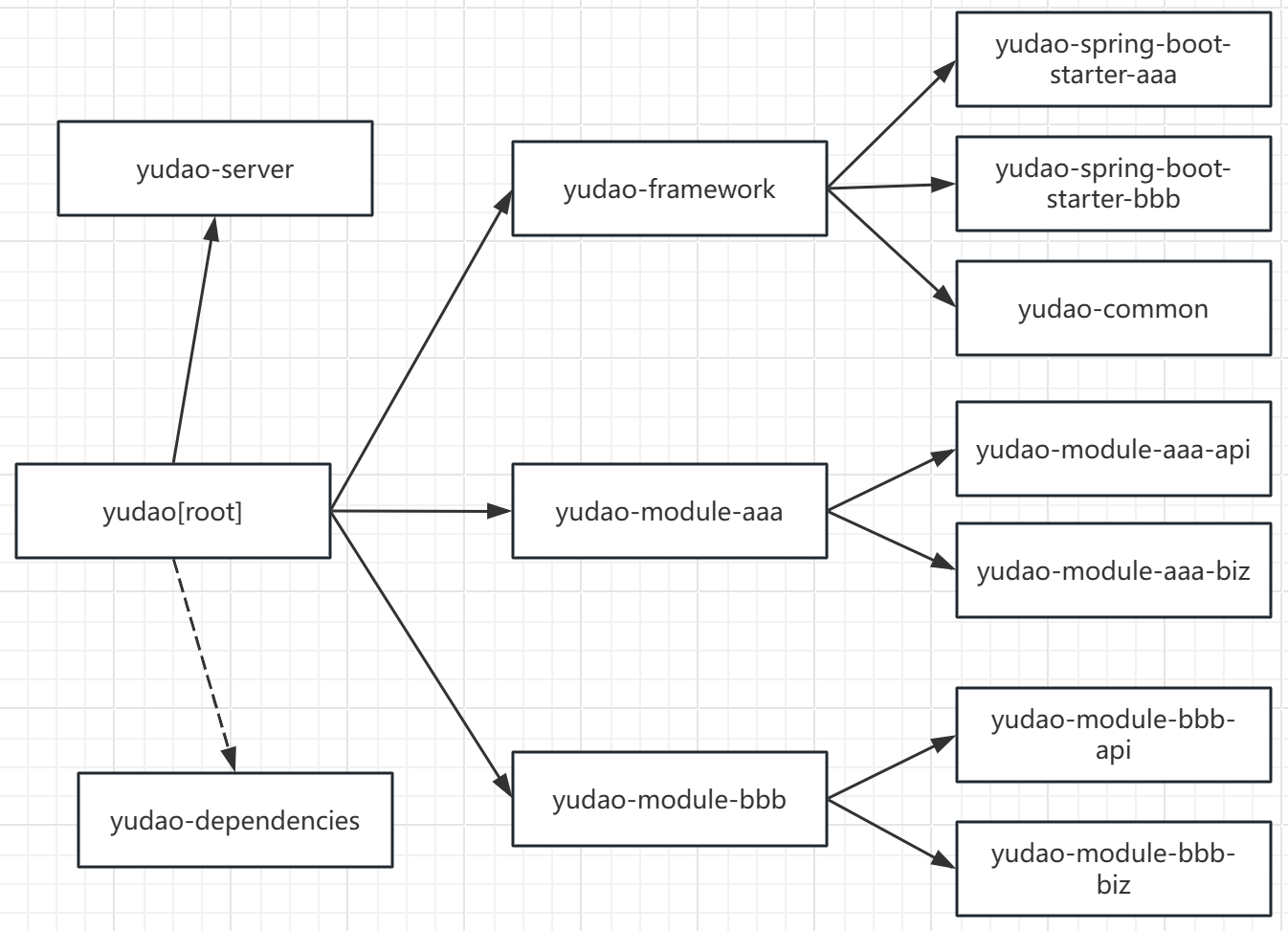
1.最外层的/pom.xml作为root模块的配置,通过<modules/>包含了yudao-framework,yudao-module-xxxxxx,yudao-server,yudao-dependencies等众多模块。
<?xml version="1.0" encoding="UTF-8"?>
<project xmlns="http://maven.apache.org/POM/4.0.0"
         xmlns:xsi="http://www.w3.org/2001/XMLSchema-instance"
         xsi:schemaLocation="http://maven.apache.org/POM/4.0.0 http://maven.apache.org/xsd/maven-4.0.0.xsd">
    ......
    <modules>
        <module>yudao-dependencies</module>
        <module>yudao-framework</module>
        <!-- Server 主项目 -->
        <module>yudao-server</module>
        <!-- 各种 module 拓展 -->
        <module>yudao-module-system</module>
        <module>yudao-module-infra</module>
    </modules>
    ......
</project>
2.root模块通过引用负责统一依赖版本的模块yudao-dependencies来将依赖的版本号传递给所有子模块,从而统一整个项目的依赖版本
<?xml version="1.0" encoding="UTF-8"?>
<project xmlns="http://maven.apache.org/POM/4.0.0"
         xmlns:xsi="http://www.w3.org/2001/XMLSchema-instance"
         xsi:schemaLocation="http://maven.apache.org/POM/4.0.0 http://maven.apache.org/xsd/maven-4.0.0.xsd">


    ... ...

    <dependencyManagement>
        <dependencies>
            <dependency>
                <groupId>cn.iocoder.boot</groupId>
                <artifactId>yudao-dependencies</artifactId>
                <version>${revision}</version>
                <type>pom</type>
                <scope>import</scope>
            </dependency>
        </dependencies>
    </dependencyManagement>

    ... ...

</project>3.root模块使用<version>${revision}</version>来设置自身的版本号,子模块的<version/>如果也设置为${revision}的话,就继承了root模块的版本号了,子模块的子模块也是一样的道理,这样整个工程所有子孙模块的版本号就都统一起来了,需要升级版本时,只需要在root模块的pom.xml文件中,把<properties/>里面的版本号一改,整个工程所有子孙模块的版本号便全部跟着变了。
例:
/pom.xml
<?xml version="1.0" encoding="UTF-8"?>
<project xmlns="http://maven.apache.org/POM/4.0.0"
         xmlns:xsi="http://www.w3.org/2001/XMLSchema-instance"
         xsi:schemaLocation="http://maven.apache.org/POM/4.0.0 http://maven.apache.org/xsd/maven-4.0.0.xsd">

    <groupId>cn.iocoder.boot</groupId>
    <artifactId>yudao</artifactId>
    <version>${revision}</version>
    <packaging>pom</packaging>

    ... ...

    <properties>
        <revision>2.4.0-jdk8-SNAPSHOT</revision>
    </properties>

    ... ...
</project>
yudao-module-system/pom.xml
<?xml version="1.0" encoding="UTF-8"?>
<project xmlns="http://maven.apache.org/POM/4.0.0"
         xmlns:xsi="http://www.w3.org/2001/XMLSchema-instance"
         xsi:schemaLocation="http://maven.apache.org/POM/4.0.0 http://maven.apache.org/xsd/maven-4.0.0.xsd">
    <parent>
        <groupId>cn.iocoder.boot</groupId>
        <artifactId>yudao</artifactId>
        <version>${revision}</version>
    </parent>
    <modelVersion>4.0.0</modelVersion>
    <modules>
        <module>yudao-module-system-api</module>
        <module>yudao-module-system-biz</module>
    </modules>
    <artifactId>yudao-module-system</artifactId>
    <packaging>pom</packaging>

    <name>${project.artifactId}</name>
    <description>
        system 模块下,我们放通用业务,支撑上层的核心业务。
        例如说:用户、部门、权限、数据字典等等
    </description>

</project>
yudao-module-system/yudao-module-system-api/pom.xml
<?xml version="1.0" encoding="UTF-8"?>
<project xmlns="http://maven.apache.org/POM/4.0.0"
         xmlns:xsi="http://www.w3.org/2001/XMLSchema-instance"
         xsi:schemaLocation="http://maven.apache.org/POM/4.0.0 http://maven.apache.org/xsd/maven-4.0.0.xsd">

    <parent>
        <groupId>cn.iocoder.boot</groupId>
        <artifactId>yudao-module-system</artifactId>
        <version>${revision}</version>
    </parent>
    <modelVersion>4.0.0</modelVersion>
    <artifactId>yudao-module-system-api</artifactId>
    <packaging>jar</packaging>

    <name>${project.artifactId}</name>
    <description>
        system 模块 API,暴露给其它模块调用
    </description>

    ......

</project>
4.通过插件org.codehaus.mojo:flatten-maven-plugin来防止项目拆分后版本号无法传递的问题
如果将此项目进行拆分,将业务模块(yudao-module-xxxxx)和框架模块(yudao-framework)等进行切割分离,形成两个或更多个独立的maven工程,就会出现版本号无法通过${revision}传递的问题。
例如A工程的pom.xml通过${revision}将版本同步给A工程的子模块B,新建的另一个独立工程C如果依赖了B会报错找不到B的父工程A,因为C工程会将"${revision}"这个字符串作为A的版本号,而不是取${revision}代表的值,所以如果要把该项目拆分成一个个单独的服务,A工程需要引入org.codehaus.mojo:flatten-maven-plugin插件进行特殊处理,引入这个插件后,执行mvn install命令时,打入本地仓库的坐标版本号就是${revision}代表的值,mvn deploy到远程仓库同理。
导致这个问题出现的原因是拆分后Maven依赖的优先级发生了改变,如果不拆分,在同一个工程下的话,依赖会从工程自身的模块开始查找,找到了就不再访问本地仓库和远程仓库,这时由于是同一个工程下${revision}是能互相访问到的。但是一旦被拆分,被拆分出去的工程无法在工程自身的模块中查找依赖了(因为根本没有),便会用本地或远程仓库寻找依赖,被依赖的模块没有使用flatten-maven-plugin插件的话,其mvn install, mvn deploy到仓库时,版本号就是错的,无法被正确引用。
<?xml version="1.0" encoding="UTF-8"?>
<project xmlns="http://maven.apache.org/POM/4.0.0"
         xmlns:xsi="http://www.w3.org/2001/XMLSchema-instance"
         xsi:schemaLocation="http://maven.apache.org/POM/4.0.0 http://maven.apache.org/xsd/maven-4.0.0.xsd">

    ... ...

    <build>
        <pluginManagement>
            <plugins>
                <plugin>
                    <groupId>org.apache.maven.plugins</groupId>
                    <artifactId>maven-surefire-plugin</artifactId>
                    <version>${maven-surefire-plugin.version}</version>
                </plugin>

                <plugin>
                    <groupId>org.apache.maven.plugins</groupId>
                    <artifactId>maven-compiler-plugin</artifactId>
                    <version>${maven-compiler-plugin.version}</version>
                    <configuration>
                        <annotationProcessorPaths>
                            <path>
                                <groupId>org.springframework.boot</groupId>
                                <artifactId>spring-boot-configuration-processor</artifactId>
                                <version>${spring.boot.version}</version>
                            </path>
                            <path>
                                <groupId>org.projectlombok</groupId>
                                <artifactId>lombok</artifactId>
                                <version>${lombok.version}</version>
                            </path>
                            <path>
                                <groupId>org.mapstruct</groupId>
                                <artifactId>mapstruct-processor</artifactId>
                                <version>${mapstruct.version}</version>
                            </path>
                        </annotationProcessorPaths>
                    </configuration>
                </plugin>
                <plugin>
                    <groupId>org.codehaus.mojo</groupId>
                    <artifactId>flatten-maven-plugin</artifactId>
                </plugin>
            </plugins>
        </pluginManagement>

        <plugins>
            <plugin>
                <groupId>org.codehaus.mojo</groupId>
                <artifactId>flatten-maven-plugin</artifactId>
                <version>${flatten-maven-plugin.version}</version>
                <configuration>
                    <flattenMode>oss</flattenMode>
                    <updatePomFile>true</updatePomFile>
                </configuration>
                <executions>
                    <execution>
                        <goals>
                            <goal>flatten</goal>
                        </goals>
                        <id>flatten</id>
                        <phase>process-resources</phase>
                    </execution>
                    <execution>
                        <goals>
                            <goal>clean</goal>
                        </goals>
                        <id>flatten.clean</id>
                        <phase>clean</phase>
                    </execution>
                </executions>
            </plugin>
        </plugins>

    </build>

    ... ...

</project>这个模块内仅有一个pom.xml文件,该模块的作用仅仅是统一整个项目的依赖版本,因为yudao-dependencies模块没有指定<parent/>,因此不能从父(即root)模块继承${revision},需要在自己的<properties/>里面维护自己的${revision}版本供自己引用,版本号的值一般要与root模块中的版本号要保持一致。
严格来讲,yudao-dependencies模块并不是root模块的子模块,因为如果root模块成了yudao-dependencies的父模块的同时还引用了子模块yudao-dependencies的话,就会导致循环引用,因此yudao-dependencies没有指定<parent/>,只是由root模块通过<modules/>包含进去进行代管,root模块构建时,yudao-dependencies会一并构建,但不能继承root的</properties>,<version>${revision}</version>,</dependency>和</plugin>等。
<?xml version="1.0" encoding="UTF-8"?>
<project xmlns="http://maven.apache.org/POM/4.0.0"
         xmlns:xsi="http://www.w3.org/2001/XMLSchema-instance"
         xsi:schemaLocation="http://maven.apache.org/POM/4.0.0 http://maven.apache.org/xsd/maven-4.0.0.xsd">
    <groupId>cn.iocoder.boot</groupId>
    <artifactId>yudao-dependencies</artifactId>
    <version>${revision}</version>
    <packaging>pom</packaging>

    ... ...

    <properties>
        <revision>2.4.0-jdk8-SNAPSHOT</revision>
    </properties>
    ... ...
</project>yudao-dependencies里面只有一个pom.xml文件,其使用<dependencyManagement/>声明了整个项目所需要的依赖,并被root模块引入,从而统一整个工程的依赖版本。
yudao-dependencies不仅通过引用springframework,spring-boot-dependencies等type为pom的依赖项来继承第三方框架的版本,还规定了项目自身封装的一些框架(yudao-framework)的版本号。
<?xml version="1.0" encoding="UTF-8"?>
<project xmlns="http://maven.apache.org/POM/4.0.0"
         xmlns:xsi="http://www.w3.org/2001/XMLSchema-instance"
         xsi:schemaLocation="http://maven.apache.org/POM/4.0.0 http://maven.apache.org/xsd/maven-4.0.0.xsd">

    ... ...

    <dependencyManagement>
        <dependencies>
            <dependency>
                <groupId>org.springframework</groupId>
                <artifactId>spring-framework-bom</artifactId> <!-- JDK8 版本独有:保证 Spring Framework 尽量高 -->
                <version>${spring.framework.version}</version>
                <type>pom</type>
                <scope>import</scope>
            </dependency>
            <dependency>
                <groupId>org.springframework.security</groupId>
                <artifactId>spring-security-bom</artifactId> <!-- JDK8 版本独有:保证 Spring Security 尽量高 -->
                <version>${spring.security.version}</version>
                <type>pom</type>
                <scope>import</scope>
            </dependency>
            <dependency>
                <groupId>org.springframework.boot</groupId>
                <artifactId>spring-boot-dependencies</artifactId>
                <version>${spring.boot.version}</version>
                <type>pom</type>
                <scope>import</scope>
            </dependency>

            <dependency>
                <groupId>cn.iocoder.boot</groupId>
                <artifactId>yudao-spring-boot-starter-biz-tenant</artifactId>
                <version>${revision}</version>
            </dependency>
            <dependency>
                <groupId>cn.iocoder.boot</groupId>
                <artifactId>yudao-spring-boot-starter-biz-data-permission</artifactId>
                <version>${revision}</version>
            </dependency>
            <dependency>
                <groupId>cn.iocoder.boot</groupId>
                <artifactId>yudao-spring-boot-starter-biz-ip</artifactId>
                <version>${revision}</version>
            </dependency>

            <dependency>
                <groupId>cn.iocoder.boot</groupId>
                <artifactId>yudao-common</artifactId>
                <version>${revision}</version>
            </dependency>

            ... ...

        </dependencies>
    </dependencyManagement>

    ... ...

</project>同理,需要通过插件org.codehaus.mojo:flatten-maven-plugin来防止项目拆分后版本号无法传递的问题
<?xml version="1.0" encoding="UTF-8"?>
<project xmlns="http://maven.apache.org/POM/4.0.0"
         xmlns:xsi="http://www.w3.org/2001/XMLSchema-instance"
         xsi:schemaLocation="http://maven.apache.org/POM/4.0.0 http://maven.apache.org/xsd/maven-4.0.0.xsd">

    ... ...

    <build>
        <plugins>
            <!-- 统一 revision 版本 -->
            <plugin>
                <groupId>org.codehaus.mojo</groupId>
                <artifactId>flatten-maven-plugin</artifactId>
                <version>${flatten-maven-plugin.version}</version>
                <configuration>
                    <flattenMode>bom</flattenMode>
                    <updatePomFile>true</updatePomFile>
                </configuration>
                <executions>
                    <execution>
                        <goals>
                            <goal>flatten</goal>
                        </goals>
                        <id>flatten</id>
                        <phase>process-resources</phase>
                    </execution>
                    <execution>
                        <goals>
                            <goal>clean</goal>
                        </goals>
                        <id>flatten.clean</id>
                        <phase>clean</phase>
                    </execution>
                </executions>
            </plugin>
        </plugins>
    </build>

    ... ...

</project>该模块内主要是需要用到的公共依赖和一些对常用框架和功能组件的封装,大致结构如下
yudao-framework
      │
      │── yudao-common
      │     ├─ src
      │     │   └─ main
      │     │       └─ java
      │     │            └─ cn.iocoder.yudao.framework.common
      │     │                  ├─ core
      │     │                  ├─ enums
      │     │                  ├─ exception
      │     │                  ├─ pojo
      │     │                  ├─ util
      │     │                  └─ validation
      │     │
      │     └─ pom.xml
      │
      │── yudao-spring-boot-starter-xxxxxx
      │     ├─ src
      │     │   └─ main
      │     │       ├─ java
      │     │       |    ├─ cn.iocoder.yudao.framework.xxxxxx
      │     │       |    │     ├─ config
      │     │       |    │     ├─ core
      │     │       |    │     └─ aaa
      │     │       |    │
      │     │       |    └─ bbb.ccc.ddd
      │     │       │
      │     │       └─ resources
      │     │            └─ META-INF.spring
      │     │                  └─ org.springframework.boot.autoconfigure.AutoConfiguration.imports
      │     │
      │     └── pom.xml
      │
      └── pom.xml
yudao-framework下没有其他依赖,只是简单的将所有封装的组件聚合起来
yudao-framework/pom.xml
<?xml version="1.0" encoding="UTF-8"?>
<project xmlns="http://maven.apache.org/POM/4.0.0"
         xmlns:xsi="http://www.w3.org/2001/XMLSchema-instance"
         xsi:schemaLocation="http://maven.apache.org/POM/4.0.0 http://maven.apache.org/xsd/maven-4.0.0.xsd">
    <modelVersion>4.0.0</modelVersion>
    <parent>
        <artifactId>yudao</artifactId>
        <groupId>cn.iocoder.boot</groupId>
        <version>${revision}</version>
    </parent>
    <packaging>pom</packaging>
    <modules>
        <module>yudao-common</module>
        <module>yudao-spring-boot-starter-mybatis</module>
        <module>yudao-spring-boot-starter-redis</module>
        <module>yudao-spring-boot-starter-web</module>
        <module>yudao-spring-boot-starter-security</module>
        <module>yudao-spring-boot-starter-websocket</module>

        <module>yudao-spring-boot-starter-monitor</module>
        <module>yudao-spring-boot-starter-protection</module>
        <module>yudao-spring-boot-starter-job</module>
        <module>yudao-spring-boot-starter-mq</module>

        <module>yudao-spring-boot-starter-excel</module>
        <module>yudao-spring-boot-starter-test</module>

        <module>yudao-spring-boot-starter-biz-tenant</module>
        <module>yudao-spring-boot-starter-biz-data-permission</module>
        <module>yudao-spring-boot-starter-biz-ip</module>
    </modules>

    <artifactId>yudao-framework</artifactId>
    <description>
        该包是技术组件,每个子包,代表一个组件。每个组件包括两部分:
            1. core 包:是该组件的核心封装
            2. config 包:是该组件基于 Spring 的配置

        技术组件,也分成两类:
            1. 框架组件:和我们熟悉的 MyBatis、Redis 等等的拓展
            2. 业务组件:和业务相关的组件的封装,例如说数据字典、操作日志等等。
        如果是业务组件,Maven 名字会包含 biz
    </description>
    <url>https://github.com/YunaiV/ruoyi-vue-pro</url>

</project>
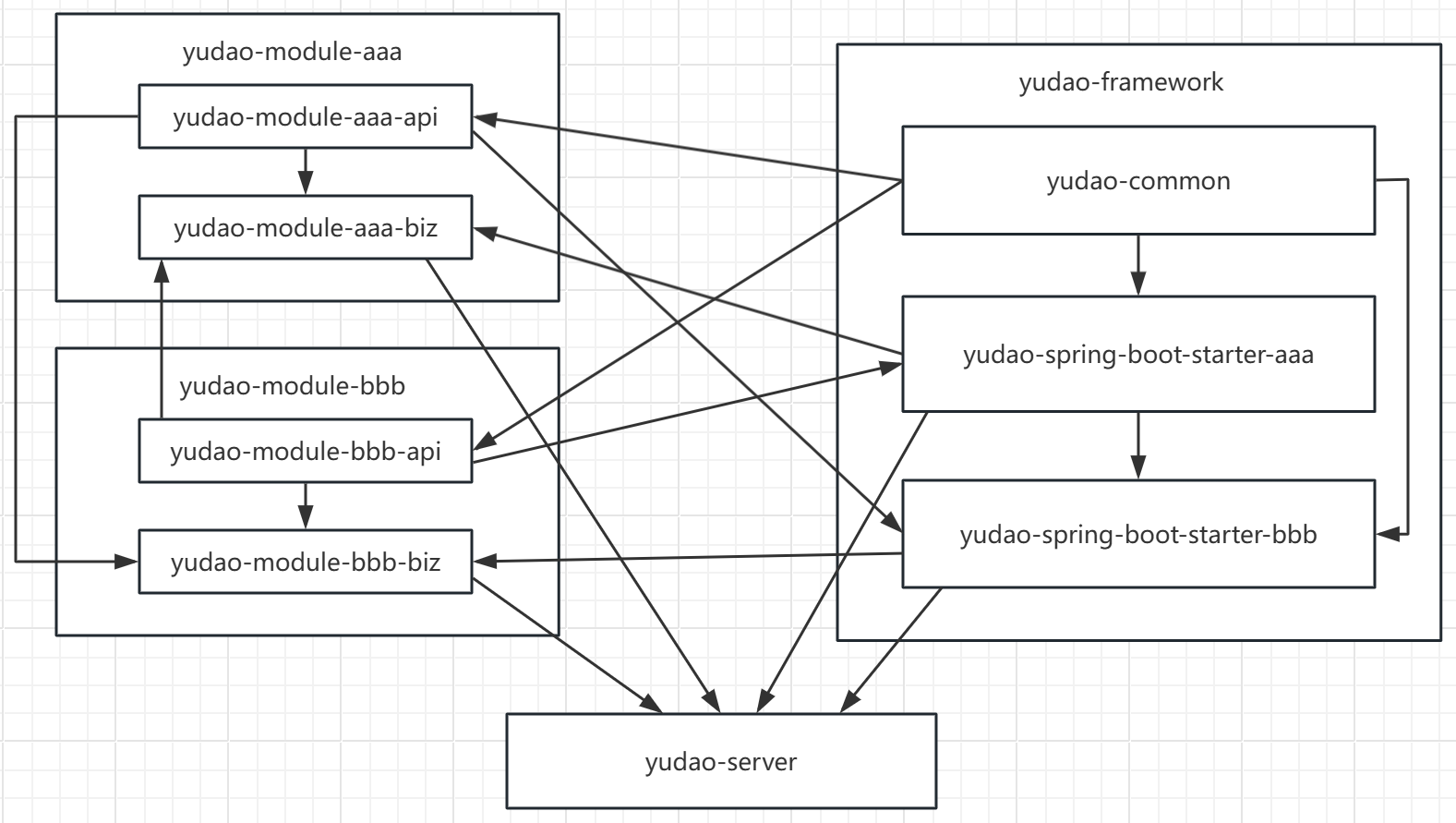
yudao-common模块封装了一些项目公共的枚举类,异常类,公共的实体类,和一些工具类,在这个项目中通常会被其他组件模块(yudao-spring-boot-starter-xxxx)和业务模块的api模块(yudao-module-xxxxx-api)所引用。
除了yudao-common外其余的都是封装的框架功能模块,模块名格式为yudao-spring-boot-starter-xxxx,分为业务组件和技术组件。技术组件模块名中没有biz,业务组件是有的。业务组件通常会引用业务模块的api模块(yudao-module-xxxxx-api)
例如数据权限yudao-spring-boot-starter-biz-data-permission组件依赖了系统管理业务模块的api:yudao-module-system-api
<?xml version="1.0" encoding="UTF-8"?>
<project xmlns="http://maven.apache.org/POM/4.0.0"
         xmlns:xsi="http://www.w3.org/2001/XMLSchema-instance"
         xsi:schemaLocation="http://maven.apache.org/POM/4.0.0 http://maven.apache.org/xsd/maven-4.0.0.xsd">
    <parent>
        <artifactId>yudao-framework</artifactId>
        <groupId>cn.iocoder.boot</groupId>
        <version>${revision}</version>
    </parent>
    <modelVersion>4.0.0</modelVersion>
    <artifactId>yudao-spring-boot-starter-biz-data-permission</artifactId>
    <packaging>jar</packaging>

    ......

    <dependencies>
        <dependency>
            <groupId>cn.iocoder.boot</groupId>
            <artifactId>yudao-common</artifactId>
        </dependency>

        .........

        <!-- 业务组件 -->
        <dependency>
            <groupId>cn.iocoder.boot</groupId>
            <artifactId>yudao-module-system-api</artifactId> <!-- 需要使用它,进行数据权限的获取 -->
            <version>${revision}</version>
        </dependency>

        .........

</project>
该模块下的包名都以cn.iocoder.yudao.framework开头,后面是组件名称,然后再往下大多又分成config和core两个包,config包下是spring-boot的配置类,与组件本身的配置有关,core包下是组件具体功能的实现代码,需要注意的是config包下的配置类会配合resources/META-INF.spring下的org.springframework.boot.autoconfigure.AutoConfiguration.imports文件使用,配置类的类路径只有配在这个文件中,才会被spring扫描到,然后将组件注入spring容器中,供其他业务模块使用。
framework模块之间也可以引用,例如yudao-spring-boot-starter-biz-data-permission就依赖了yudao-spring-boot-starter-security,yudao-spring-boot-starter-mybatis和yudao-spring-boot-starter-test,但不能互相引用,因为必然导致maven循环引用错误。
<?xml version="1.0" encoding="UTF-8"?>
<project xmlns="http://maven.apache.org/POM/4.0.0"
         xmlns:xsi="http://www.w3.org/2001/XMLSchema-instance"
         xsi:schemaLocation="http://maven.apache.org/POM/4.0.0 http://maven.apache.org/xsd/maven-4.0.0.xsd">
    <parent>
        <artifactId>yudao-framework</artifactId>
        <groupId>cn.iocoder.boot</groupId>
        <version>${revision}</version>
    </parent>
    <modelVersion>4.0.0</modelVersion>
    <artifactId>yudao-spring-boot-starter-biz-data-permission</artifactId>
    <packaging>jar</packaging>

    <name>${project.artifactId}</name>
    <description>数据权限</description>
    <url>https://github.com/YunaiV/ruoyi-vue-pro</url>

    <dependencies>
        <dependency>
            <groupId>cn.iocoder.boot</groupId>
            <artifactId>yudao-common</artifactId>
        </dependency>

        <!-- Web 相关 -->
        <dependency>
            <groupId>cn.iocoder.boot</groupId>
            <artifactId>yudao-spring-boot-starter-security</artifactId>
            <optional>true</optional> <!-- 可选,如果使用 DeptDataPermissionRule 必须提供 -->
        </dependency>

        <!-- DB 相关 -->
        <dependency>
            <groupId>cn.iocoder.boot</groupId>
            <artifactId>yudao-spring-boot-starter-mybatis</artifactId>
        </dependency>

        <!-- 业务组件 -->
        <dependency>
            <groupId>cn.iocoder.boot</groupId>
            <artifactId>yudao-module-system-api</artifactId> <!-- 需要使用它,进行数据权限的获取 -->
            <version>${revision}</version>
        </dependency>

        <!-- Test 测试相关 -->
        <dependency>
            <groupId>cn.iocoder.boot</groupId>
            <artifactId>yudao-spring-boot-starter-test</artifactId>
            <scope>test</scope>
        </dependency>
    </dependencies>

</project>
yudao-framework模块下业务组件的实现原理,并解读部分源码:
1.业务组件
| 序号 | 文章名 | 概述 |
|---|---|---|
| 1 | 芋道源码解读之数据权限 | biz-data-permission:限制用户可访问的数据范围 |
| 2 | 芋道源码解读之多租户 | biz-tenant:Web,DB,Redis,MQ等场景的租户隔离 |
yudao-module-xxxxx模块是实现具体业务的模块,具体结构如下:
(xxxxx为业务名,aaa,bbb为业务下的具体功能名)
yudao-module-xxxxx
    │
    │── yudao-module-xxxxx-api
    │     ├─ src
    │     │   └─ main
    │     │       └─ java
    │     │            └─ cn.iocoder.yudao.module.xxxxx
    │     │                ├─ api
    │     │                │   ├─ aaa
    │     │                │   │    ├─ dto
    │     │                │   │    │   └─ AaaRespDTO.java
    │     │                │   │    └─ AaaApi.java
    │     │                │   └─ bbb
    │     │                │        ├─ dto
    │     │                │        │   └─ BbbRespDTO.java
    │     │                │        └─ BbbApi.java
    │     │                └─ enums
    │     │                    ├─ aaa
    │     │                    │    ├─ AaaCccEnum.java
    │     │                    │    └─ AaaDdddEnum.java
    │     │                    ├─ bbb
    │     │                    │    ├─ BbbCccEnum.java
    │     │                    │    └─ BbbDdddEnum.java
    │     │                    │
    │     │                    ├─ AaaTypeConstants.java
    │     │                    └─ BbbTypeConstants.java
    │     │
    │     └─ pom.xml
    │
    │── yudao-module-xxxxx-biz
    │     ├─ src
    │     │   └─ main
    │     │       ├─ java
    │     │       |    └─ cn.iocoder.yudao.module.xxxxx
    │     │       |        ├─ api
    │     │       |        │   ├─ aaa
    │     │       |        │   │   └─ AaaApiImpl.java
    │     │       |        │   └─ bbb
    │     │       |        │       └─ BbbApiImpl.java
    │     │       |        │
    │     │       |        ├─ controller
    │     │       |        │   ├─ admin
    │     │       |        │   │   ├─ aaa
    │     │       |        │   │   │   ├─ vo
    │     │       |        │   │   │   │   └─ AaaReqVO.java
    │     │       |        │   │   │   └─ AaaController.java
    │     │       |        │   │   └─ bbb
    │     │       |        │   │       ├─ vo
    │     │       |        │   │       │   └─ BbbReqVO.java
    │     │       |        │   │       └─ BbbController.java
    │     │       |        │   │
    │     │       |        │   └─ app
    │     │       |        │       └─ aaa
    │     │       |        │           ├─ vo
    │     │       |        │           │   └─ AaaAppReqVO.java
    │     │       |        │           └─ AaaAppController.java
    │     │       |        │
    │     │       |        ├─ convert
    │     │       |        │   ├─ aaa
    │     │       |        │   │   └─ AaaConvert.java
    │     │       |        │   └─ bbb
    │     │       |        │       └─ BbbConvert.java
    │     │       |        │
    │     │       |        ├─ framework
    │     │       |        ├─ job
    │     │       |        ├─ mq
    │     │       |        ├─ service
    │     │       |        │   ├─ aaa
    │     │       |        │   │   ├─ AaaService.java
    │     │       |        │   │   └─ AaaServiceImpl.java
    │     │       |        │   └─ bbb
    │     │       |        │       ├─ BbbService.java
    │     │       |        │       └─ BbbServiceImpl.java
    │     │       |        │
    │     │       |        │
    │     │       |        └─ dal
    │     │       |            ├─ dataobject
    │     │       |            │   ├─ aaa
    │     │       |            │   │   └─ AaaDO.java
    │     │       |            │   └─ bbb
    │     │       |            │       └─ BbbDO.java
    │     │       |            └─ mysql
    │     │       |                ├─ aaa
    │     │       |                │   └─ AaaMapper.java
    │     │       |                └─ bbb
    │     │       |                    └─ BbbMapper.java
    │     │       │
    │     │       └─ resource
    │     │            └─ mapper
    │     │                 ├─ aaa
    │     │                 │   └─ AaaMapper.xml
    │     │                 └─ bbb
    │     │                     └─ BbbMapper.xml
    │     └── pom.xml
    │
    └── pom.xml
整个项目的Controller, Service, Mapper都封装在业务模块里,业务模块是根据具体的业务来建立的。
每个业务模块都由yudao-module-xxxxx-api和yudao-module-xxxxx-biz两个子模块组成。yudao-module-xxxxx-api模块中是开放给其他业务模块或业务组件调用的接口代码和一些公共的枚举和常量,yudao-module-xxxxx-biz模块中是具体业务的实现代码,因为api定义的接口是biz实现的,因此biz模块首先要依赖它自己要实现的api模块。
模块内包名都是固定前缀cn.iocoder.yudao加module再加业务模块名的形式,例如:cn.iocoder.yudao.module.xxxxx,在此基础上根据所属层级建立下一级包名,例如cn.iocoder.yudao.module.xxxxx.controller.admin,cn.iocoder.yudao.module.xxxxx.service,然后根据具体业务功能再建立更深层级的包名和包下的类,例如:cn.iocoder.yudao.module.xxxxx.controller.admin.aaa.vo。
包名解释:
yudao-module-xxxxx-api
cn.iocoder.yudao.module.xxxxx.api 包存放业务模块需要对外暴漏的接口,以及用于传输数据的DTO对象。
cn.iocoder.yudao.module.xxxxx.enums 包存放该业务模块的枚举类和常量类,既供自己使用,也供调用方使用。
yudao-module-xxxxx-biz
cn.iocoder.yudao.module.xxxxx.api 包存放对api模块定义的接口类的实现(***ApiImpl),实现类为Spring容器管理,被Spring注入到调用者引用的Api接口上,ApiImpl和Controller一样,接收到调用后再调用业务层Service代码。
cn.iocoder.yudao.module.xxxxx.controller 分为admin和app两个子包,分别放置管理员接口和会员接口,包中存放Controller类及接收和生成JSON的实体类VO,接收http请求并返回数据。
cn.iocoder.yudao.module.xxxxx.service 包下是具体的Service业务接口和实现类。
cn.iocoder.yudao.module.xxxxx.dal 包是负责数据库访问的DAO层,分为dataobject和mysql两个包,dataobject包内存放的是DO对象,mysql包内存放的是Mybatis/Mybatis-Plus的Mapper类,Java代码无法实现的复杂SQL,可在resources文件夹内定义”*Mapper.xml”文件实现。
cn.iocoder.yudao.module.xxxxx.convert 包功能比较简单,用于存放mapstruct转换器类,用于各种不同类型的实体类对象之间的深拷贝互相转换。
cn.iocoder.yudao.module.xxxxx.mq 消息发送接收。
cn.iocoder.yudao.module.xxxxx.job 定时任务。
cn.iocoder.yudao.module.xxxxx.framework 配合yudao-framework模块封装的框架和功能来实现一些更高级的功能,例如文档生成,数据权限等等。
……
业务模块biz之间是相互独立的,如biz模块间要相互调用,只要互相引用对方的api模块坐标到自己biz的pom.xml即可,这样的模块依赖方式完美遵循依赖倒置原则,如果是biz直接引用biz不但违背依赖倒置原则,而且可能还会导致maven构建时报出循环引用的错误。本项目中后续还会出现业务组件框架模块(yudao-spring-boot-starter-biz-xxxxxxxx)依赖具体业务模块的情况,同样也是需要引用业务模块的api。
例:
<?xml version="1.0" encoding="UTF-8"?>
<project xmlns="http://maven.apache.org/POM/4.0.0"
         xmlns:xsi="http://www.w3.org/2001/XMLSchema-instance"
         xsi:schemaLocation="http://maven.apache.org/POM/4.0.0 http://maven.apache.org/xsd/maven-4.0.0.xsd">

    <parent>
        <groupId>cn.iocoder.boot</groupId>
        <artifactId>yudao-module-system</artifactId>
        <version>${revision}</version>
    </parent>

    <modelVersion>4.0.0</modelVersion>
    <!-- 业务模块 -->
    <artifactId>yudao-module-system-biz</artifactId>
    <packaging>jar</packaging>

    ... ...

    <dependencies>
        <dependency>
            <groupId>cn.iocoder.boot</groupId>
            <!-- 自身业务的api -->
            <artifactId>yudao-module-system-api</artifactId>
            <version>${revision}</version>
        </dependency>
        <dependency>
            <groupId>cn.iocoder.boot</groupId>
            <!-- 要调用的其他业务模块的api -->
            <artifactId>yudao-module-infra-api</artifactId>
            <version>${revision}</version>
    </dependency>

    ... ...

</project>
yudao-server是启动项目的模块,里面有spring-boot主启动类cn.iocoder.yudao.server.YudaoServerApplication,缺省的请求处理类cn.iocoder.yudao.server.controller.DefaultController,不同环境的配置文件application-*.yml,还有一个logback的日志配置文件logback-spring.xml。
yudao-server
    |
    ├─ src
    |   └─ main
    |        ├─ java
    |        |    └─ cn.iocoder.yudao.server
    |        |        ├─ controller
    |        |        |   └─ DefaultController.java
    |        |        └─ YudaoServerApplication.java
    |        |
    |        └─ resources
    |             ├─ application.yaml
    |             ├─ application-dev.yaml
    |             ├─ application-local.yaml
    |             └─ logback-spring.xml
    |
    └─ pox.xml
yudao-server模块汇聚了所有的业务模块,打包上线的可执行jar包就是这个模块编译而成的,该模块聚合了所有的业务模块的biz模块(yudao-module-***-biz)以及一些需要直接引用的starter,需要启用哪个业务模块就可以按需引入哪个业务模块。
/yudao-server/pom.xml中,引入了项目最核心的两个业务模块:系统管理yudao-module-system-biz和服务保障yudao-module-infra-biz,默认不引入其他业务模块从而加快编译速度,还引入了一些其他的starter,最后通过spring-boot-maven-plugin插件将此模块代码打包为可执行的jar包,从而启动整个项目。
<?xml version="1.0" encoding="UTF-8"?>
<project xmlns="http://maven.apache.org/POM/4.0.0"
         xmlns:xsi="http://www.w3.org/2001/XMLSchema-instance"
         xsi:schemaLocation="http://maven.apache.org/POM/4.0.0 http://maven.apache.org/xsd/maven-4.0.0.xsd">

    <parent>
        <groupId>cn.iocoder.boot</groupId>
        <artifactId>yudao</artifactId>
        <version>${revision}</version>
    </parent>
    <modelVersion>4.0.0</modelVersion>

    <artifactId>yudao-server</artifactId>
    <packaging>jar</packaging>

    <name>${project.artifactId}</name>
    <description>
        后端 Server 的主项目,通过引入需要 yudao-module-xxx 的依赖,
        从而实现提供 RESTful API 给 yudao-ui-admin、yudao-ui-user 等前端项目。
        本质上来说,它就是个空壳(容器)!
    </description>
    <url>https://github.com/YunaiV/ruoyi-vue-pro</url>

    <dependencies>
        <dependency>
            <groupId>cn.iocoder.boot</groupId>
            <artifactId>yudao-module-system-biz</artifactId>
            <version>${revision}</version>
        </dependency>
        <dependency>
            <groupId>cn.iocoder.boot</groupId>
            <artifactId>yudao-module-infra-biz</artifactId>
            <version>${revision}</version>
        </dependency>

        <!-- spring boot 配置所需依赖 -->
        <dependency>
            <groupId>org.springframework.boot</groupId>
            <artifactId>spring-boot-configuration-processor</artifactId>
            <optional>true</optional>
        </dependency>

        <!-- 服务保障相关 -->
        <dependency>
            <groupId>cn.iocoder.boot</groupId>
            <artifactId>yudao-spring-boot-starter-protection</artifactId>
        </dependency>

    </dependencies>

    <build>
        <!-- 设置构建的 jar 包名 -->
        <finalName>${project.artifactId}</finalName>
        <plugins>
            <!-- 打包 -->
            <plugin>
                <groupId>org.springframework.boot</groupId>
                <artifactId>spring-boot-maven-plugin</artifactId>
                <version>${spring.boot.version}</version>
                <executions>
                    <execution>
                        <goals>
                            <goal>repackage</goal> <!-- 将引入的 jar 打入其中 -->
                        </goals>
                    </execution>
                </executions>
            </plugin>
        </plugins>
    </build>

</project>
cn.iocoder.yudao.server.YudaoServerApplication是整个项目的主启动类,通过注解@SpringBootApplication(scanBasePackages = {"${yudao.info.base-package}.server", "${yudao.info.base-package}.module"})将cn.iocoder.yudao.module下的包列入Spring扫描范围,用于实例化module模块中的类,并纳入Spring容器管理,这也是业务模块(yudao-module-xxx-xxx)下的子包和类必须放在cn.iocoder.yudao.module包下的原因。
package cn.iocoder.yudao.server;

import org.springframework.boot.SpringApplication;
import org.springframework.boot.autoconfigure.SpringBootApplication;

/**
 * 项目的启动类
 * @author 芋道源码
 */
@SuppressWarnings("SpringComponentScan") // 忽略 IDEA 无法识别 ${yudao.info.base-package}
@SpringBootApplication(scanBasePackages = {"${yudao.info.base-package}.server", "${yudao.info.base-package}.module"})
public class YudaoServerApplication {

    public static void main(String[] args) {
        SpringApplication.run(YudaoServerApplication.class, args);
    }

}
controller包下定义了一个缺省的cn.iocoder.yudao.server.controller.DefaultController类,如果被调用的接口所在的模块没有被yudao-server引入,就会被这个类中带着路径通配符的接口方法“兜底”,给出对应的错误提示,这个也是芋道源码中比较精巧的设计之一。
package cn.iocoder.yudao.server.controller;

import cn.iocoder.yudao.framework.common.pojo.CommonResult;
import org.springframework.web.bind.annotation.RequestMapping;
import org.springframework.web.bind.annotation.RestController;

import static cn.iocoder.yudao.framework.common.exception.enums.GlobalErrorCodeConstants.NOT_IMPLEMENTED;

/**
 * 默认 Controller,解决部分 module 未开启时的 404 提示。
 * 例如说,/bpm/** 路径,工作流
 *
 * @author 芋道源码
 */
@RestController
public class DefaultController {

    @RequestMapping("/admin-api/bpm/**")
    public CommonResult<Boolean> bpm404() {
        return CommonResult.error(NOT_IMPLEMENTED.getCode(),
                "[工作流模块 yudao-module-bpm - 已禁用][参考 https://doc.iocoder.cn/bpm/ 开启]");
    }

    @RequestMapping("/admin-api/mp/**")
    public CommonResult<Boolean> mp404() {
        return CommonResult.error(NOT_IMPLEMENTED.getCode(),
                "[微信公众号 yudao-module-mp - 已禁用][参考 https://doc.iocoder.cn/mp/build/ 开启]");
    }

    @RequestMapping(value = {"/admin-api/product/**", // 商品中心
            "/admin-api/trade/**", // 交易中心
            "/admin-api/promotion/**"})  // 营销中心
    public CommonResult<Boolean> mall404() {
        return CommonResult.error(NOT_IMPLEMENTED.getCode(),
                "[商城系统 yudao-module-mall - 已禁用][参考 https://doc.iocoder.cn/mall/build/ 开启]");
    }

    @RequestMapping("/admin-api/erp/**")
    public CommonResult<Boolean> erp404() {
        return CommonResult.error(NOT_IMPLEMENTED.getCode(),
                "[ERP 模块 yudao-module-erp - 已禁用][参考 https://doc.iocoder.cn/erp/build/ 开启]");
    }

    @RequestMapping("/admin-api/crm/**")
    public CommonResult<Boolean> crm404() {
        return CommonResult.error(NOT_IMPLEMENTED.getCode(),
                "[CRM 模块 yudao-module-crm - 已禁用][参考 https://doc.iocoder.cn/crm/build/ 开启]");
    }

    @RequestMapping(value = {"/admin-api/report/**"})
    public CommonResult<Boolean> report404() {
        return CommonResult.error(NOT_IMPLEMENTED.getCode(),
                "[报表模块 yudao-module-report - 已禁用][参考 https://doc.iocoder.cn/report/ 开启]");
    }

    @RequestMapping(value = {"/admin-api/pay/**"})
    public CommonResult<Boolean> pay404() {
        return CommonResult.error(NOT_IMPLEMENTED.getCode(),
                "[支付模块 yudao-module-pay - 已禁用][参考 https://doc.iocoder.cn/pay/build/ 开启]");
    }

    @RequestMapping(value = {"/admin-api/ai/**"})
    public CommonResult<Boolean> ai404() {
        return CommonResult.error(NOT_IMPLEMENTED.getCode(),
                "[AI 大模型 yudao-module-ai - 已禁用][参考 https://doc.iocoder.cn/ai/build/ 开启]");
    }

    @RequestMapping(value = {"/admin-api/iot/**"})
    public CommonResult<Boolean> iot404() {
        return CommonResult.error(NOT_IMPLEMENTED.getCode(),
                "[IOT 物联网 yudao-module-iot - 已禁用][参考 https://doc.iocoder.cn/iot/build/ 开启]");
    }

}
1.依赖关系,箭头由被引用模块指向引用模块
2.继承关系,箭头由父级指向子级
此内容由惯性聚合(RSS阅读器)自动聚合整理,仅供阅读参考。 原文来自 — 版权归原作者所有。