
惯性聚合 高效追踪和阅读你感兴趣的博客、新闻、科技资讯
阅读原文 在惯性聚合中打开

推荐订阅源

Vercel News
Vercel News
Recorded Future
Recorded Future
CTFtime.org: upcoming CTF events
The GitHub Blog
The GitHub Blog
Application and Cybersecurity Blog
Google DeepMind News
cs.AI updates on arXiv.org
Microsoft Azure Blog
K
KPMG report finds enterprise disconnect between AI and its ROI | CIO
M
MIT News - Artificial intelligence
云风的 BLOG
云风的 BLOG
Y
Y Combinator Blog
N
News | PayPal Newsroom
freeCodeCamp Programming Tutorials: Python, JavaScript, Git & More
Help Net Security
Help Net Security
博客园 - Franky
SecWiki News
SecWiki News
Recent Announcements
T
Troy Hunt's Blog
The Register - Security
The Last Watchdog
The Last Watchdog
Webroot Blog
Webroot Blog
S
Security Affairs
博客园 - 司徒正美
S
Schneier on Security
I
InfoQ
博客园_首页
www.infosecurity-magazine.com
T
Threat Research - Cisco Blogs
Forbes - Security
Forbes - Security
腾讯CDC
N
Netflix TechBlog - Medium
N
News and Events Feed by Topic
Cloudbric
Cloudbric
T
The Exploit Database - CXSecurity.com
P
Proofpoint News Feed
A
About on SuperTechFans
Engineering at Meta
Engineering at Meta
Recent Commits to openclaw:main
B
Blog
V
Vulnerabilities – Threatpost
C
Check Point Blog
Google DeepMind News
Google Online Security Blog
C
Cyber Attacks, Cyber Crime and Cyber Security
Hacker News - Newest:
Hacker News - Newest: "LLM"
C
Cisco Blogs
Schneier on Security
O
OpenAI News
K
Kaspersky official blog

Chivier's Blog

Agentic Coding 2025 AI 使用总结 27 lines of code for LLM inference Tiling in AI Compilation - From Theory to Hardware Acceleration Comprehensive Cerebras Note 1 - Go From A Simple Example WaferLLM:分布式 AI 系统的循环与突破 Breaking the GPU Paradigm - A Systems Thinker's Guide to Wafer Scale Computing Breaking the GPU Paradigm - A Systems Thinker's Guide to Wafer Scale Computing AI Industry Comprehensive Analysis - June 2025 State of Development Modern LLM and VLM Training Methods - Comprehensive 2025 Guide Lanno Version 1 Lanno 正式版本发布 深深梦几许,猎猎青云中 —— DeepSeek 和无意义的变革 大道求索,无问西东 - 从 DeepSeek 看 MLSys 的 2025 DeepRead 开发笔记 Brief AI Accelerator History 2D Mesh QA Fake empty data generator O2H auto publish 从 2024 Google IO 看下一场竞争
Tenstorrent GraySkull Note
Chivier Humber · 2025-05-08 · via Chivier's Blog

This section outlines the system requirements, physical installation instructions, and initial software set-up for Grayskull™ e75 and e150 Tensix Processor add-in boards.

NOTE: Software support for Grayskull has been discontinued. The last supported versions of Tenstorrent’s software for Grayskull are as follows:

  • TT-Firmware: fw_pack-80.14.0.0.fwbundle
  • TT-KMD: ttkmd_1.31
  • TT-Buda: v0.19.3
  • TT-Metalium: v0.55

Installation

Based on: https://docs.tenstorrent.com/tt-metal/latest/tt-metalium/installing.html#prerequisites

[!important]

  1. Use python 3.10

TT-KMD driver install

  • DKMS must be installed:
OS Command
Ubuntu / Debian apt install dkms
Fedora dnf install dkms
Enterprise Linux Based dnf install epel-release && dnf install dkms
  • Install the latest TT-KMD version:
1
2
3
4
5
6
7
git clone https://github.com/tenstorrent/tt-kmd.git
cd tt-kmd
# checkout to v1.31
git checkout ttkmd-1.31
sudo dkms add .
sudo dkms install tenstorrent/1.31
sudo modprobe tenstorrent

Update Device TT-Firmware with TT-Flash

Be sure to align the FW version with the compatible version in the table above for your particular configuration.

  • Install TT-Flash:

    1
    pip install git+https://github.com/tenstorrent/tt-flash.git
  • Reboot to load changes.

  • Download and install the TT-Firmware version according to the table above. We will use latest here as example:

1
2
3
4
git clone https://github.com/tenstorrent/tt-firmware
cd tt-firmwarte
git checkout v80.14.0.0
tt-flash flash --fw-tar fw_pack-18.14.0.0.fwbundle

Install System Management Interface (TT-SMI)

A display with device information, telemetry, and firmware will appear:
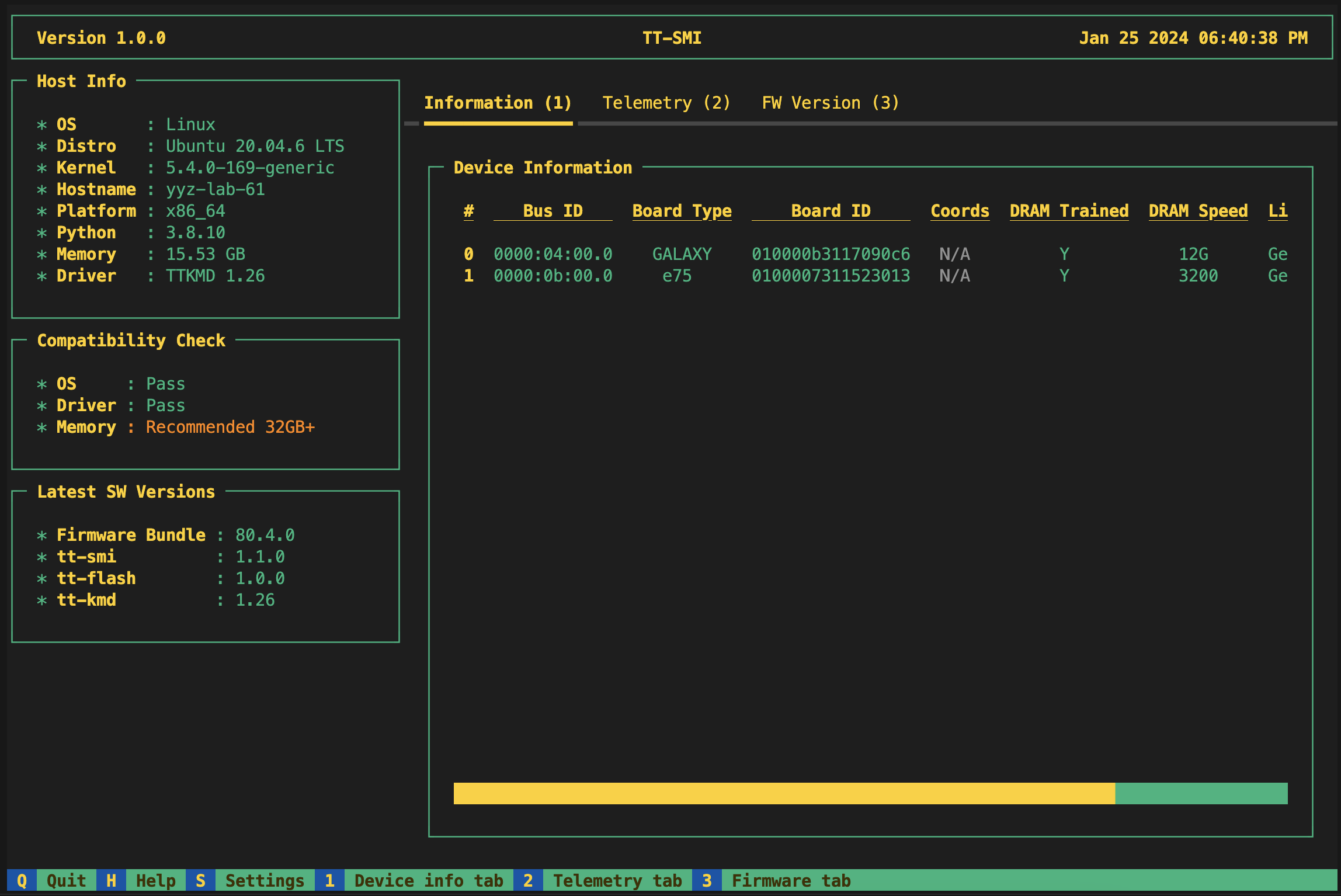
image
If the tool runs without error, your system has been configured correctly.

Install TT-Metal!

[!warning]
Switch your Python to 3.10 version in this step

Clone tt-metal repo, switch to correct version:

1
2
3
4
git clone https://github.com/tenstorrent/tt-metal.git --recurse-submodules
cd tt-metal
git checkout v0.55.0
git submodule update --init --recursive

Some Pre-requests:

1
2
3
4
sudo apt install libboost-all-dev
sudo apt install lld
sudo apt install pandoc libtbb-dev libcapstone-dev pkg-config
sudo bash install_dependencies.sh

[!note]
Also, install latest cmake as well.

Add this into second line of CMakeLists.txt:

1
set(CMAKE_BUILD_WITH_INSTALL_RPATH TRUE)

Set environment variables:

1
2
3
export ARCH_NAME=grayskull
export TT_METAL_HOME=$(pwd)

Then build the library:

1
./build_metal.sh

If you have YAML error, download this file: grayskull_120_arch.yaml

Install TTNN

After TT-Metal is compiled, in the same directory, use:

1
pip install .