






Today, we’re announcing a new release management capability in AWS DevOps Agent that is now available in preview. AWS DevOps Agent is your always-available teammate that spans software changes and operations across AWS, multicloud, and on-premises environments. The practice of DevOps aims to make software change and operations smooth and increasingly autonomous, and AWS DevOps Agent delivers on both by leveraging its deep understanding of your environment, your services, their dependencies, and how they behave in production. Already generally available for post-deployment operations, it autonomously investigates incidents, provides root cause analysis and mitigation steps, and delivers targeted recommendations to prevent recurring issues. With today’s preview, AWS DevOps Agent adds release readiness review of code changes and autonomous release testing. These new features verify every change against the natural language standards you give to the DevOps Agent and run change-specific tests in production-like environments. AWS DevOps Agent now supports teams from code creation to production, helping reviewers and testers keep pace with the volume of AI-generated code.
As development teams adopt AI coding tools, the volume of pull requests moving through delivery pipelines has increased faster than review and testing processes can handle. When teams are under pressure to keep up, reviews are approved without thorough examination, and test environments drift from production. The value that coding agents generate sits waiting in review queues instead of reaching end users. At the same time, AI models are increasingly capable of catching functional and security issues that human reviewers might miss under time pressure, making speedy and safe delivery a requirement rather than a tradeoff.
The release readiness review feature evaluates every code change against production requirements, dependency safety, and the standards and best practices you provide to the DevOps Agent. The agent checks cross-repository dependency risks that could affect other services, access control changes against AWS Well-Architected Framework best practices, and compliance with any standards you have defined. When no standards are provided, the agent applies general best practices. As part of the review, the agent also runs your software in an AWS-managed isolated environment, executing lightweight user journey tests to verify the software builds, runs, and passes basic functional checks before the change enters the pipeline. Findings appear in the AWS DevOps Agent console and as comments on pull requests in GitHub or GitLab. You can also invoke reviews directly from your IDE through the Kiro power or Claude Code plugin, so developers can identify and fix dependency risks, standards violations, and access control issues before the change is committed to version control.
The autonomous release testing feature goes further, generating and running change-specific test plans for web and API-based applications in customer-provisioned, production-like environments before the change merges. Rather than running a static test suite, the agent reasons about what the change does and constructs tests tailored to it, covering functional correctness, behavioral regressions, and integration scenarios that a manually maintained test plan might not anticipate. Every test run produces structured artifacts including metrics, logs, traces, and an execution summary, giving reviewers a consistent record of what was tested and what the results were.
Getting started with AWS DevOps Agent release management
This walkthrough shows how to run an on-demand release readiness review using the AWS DevOps Agent web app. Before you begin, confirm that you have at least one GitHub or GitLab repository connected to your Agent Space. Once your repositories are connected, AWS DevOps Agent will index your code and build a knowledge graph of cross-repository and cloud dependencies.
To open the web app, navigate to the AWS DevOps Agent console, select your Agent Space, and choose the Web app tab. Choose Operator access to open the web app.
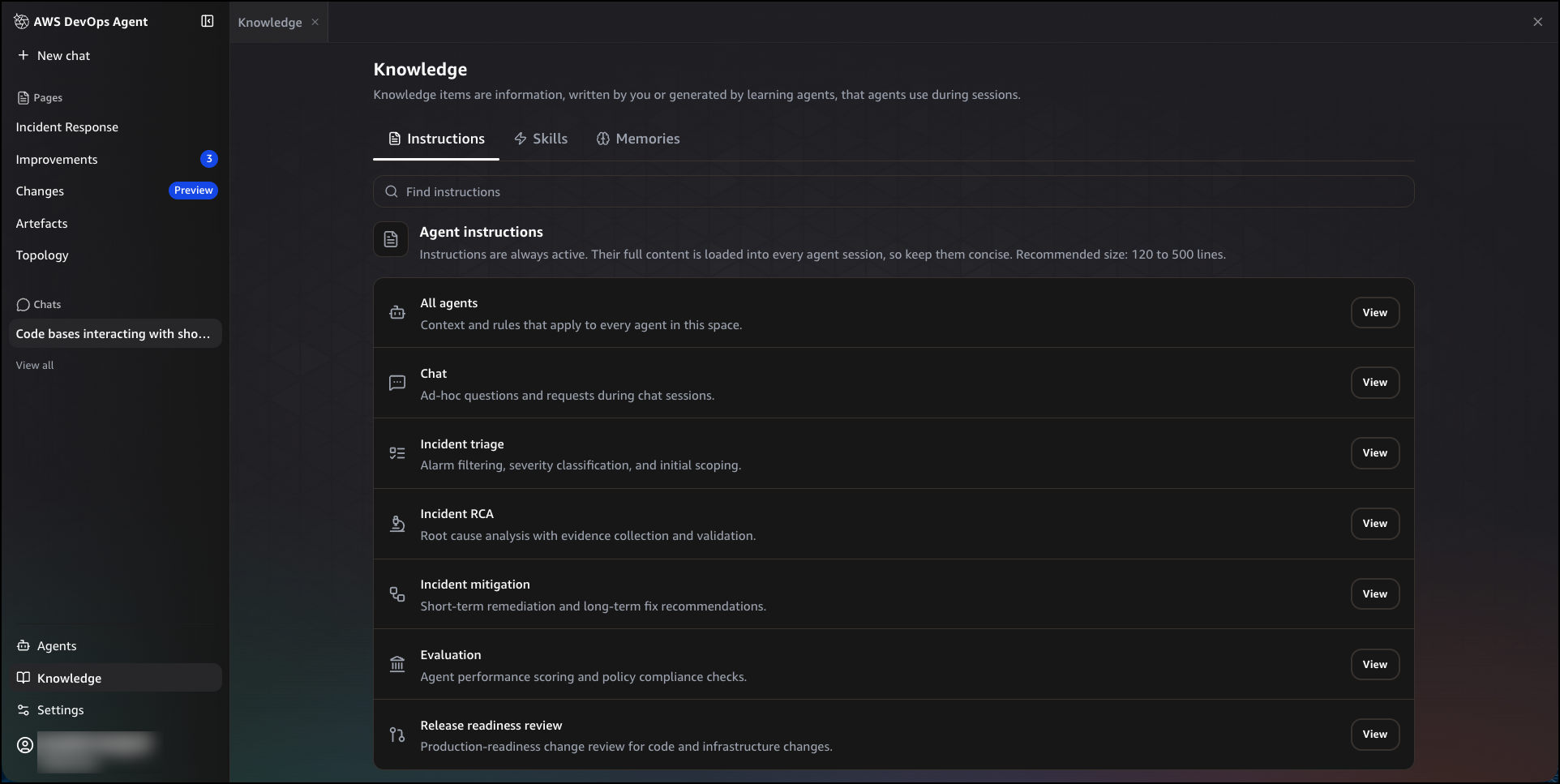
Without standards configured, the agent applies general best practices. To tailor reviews to your internal standards, navigate to Knowledge, then choose the Instructions tab. You will see a list of instruction sets, each scoped to a specific agent or task. Choose View next to Release readiness review to edit the instructions for production-readiness change review. Write your internal standards in plain English. For example, you can define infrastructure and data standards on encryption or network access rules, best practices that warn without blocking such as logging and observability requirements, and sensitive data classification best practices that identify applications or resources requiring higher security measures. To apply instructions across all agents in your space, choose View next to All agents.
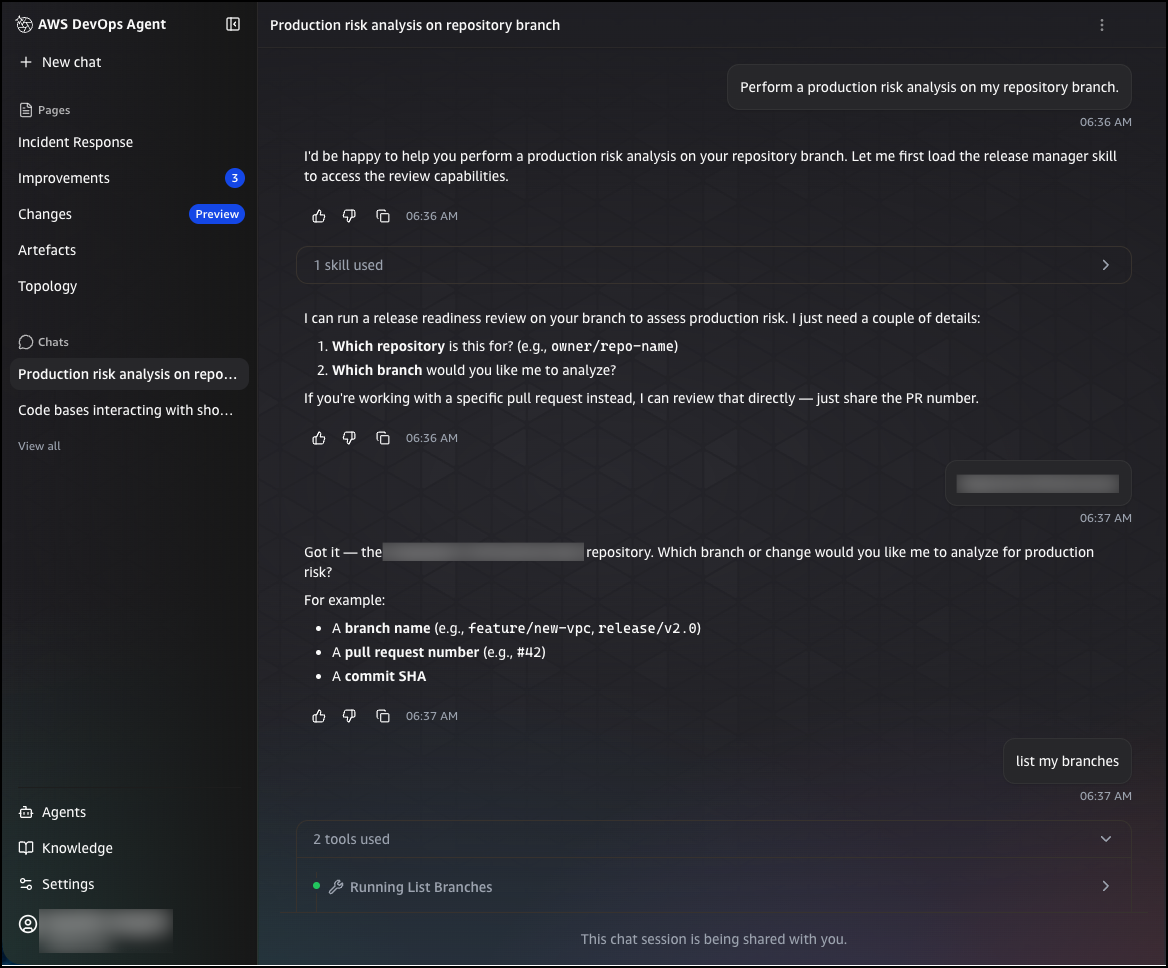
You can trigger a release readiness review in two ways: by submitting a pull request to a connected repository, or by entering an on-demand query in the chat interface. To run an on-demand review from chat, choose New chat and enter a request such as:
Perform a production risk analysis on my repository branch
The agent will ask for the repository and branch you want to analyze. You can provide a branch name, a pull request number, or a commit SHA. Once you confirm your selection, the agent queues the review and analyzes the change for production risks, including infrastructure impacts, configuration changes, and potential issues.
After the review completes, you can ask follow-up questions directly in the chat to explore the findings in more detail. For example, you can ask which downstream consumers a change affects, and the agent will return a structured breakdown of in-repository and cross-repository consumers that will break, the specific files and line numbers affected, and the recommended steps to resolve the issue before deployment.
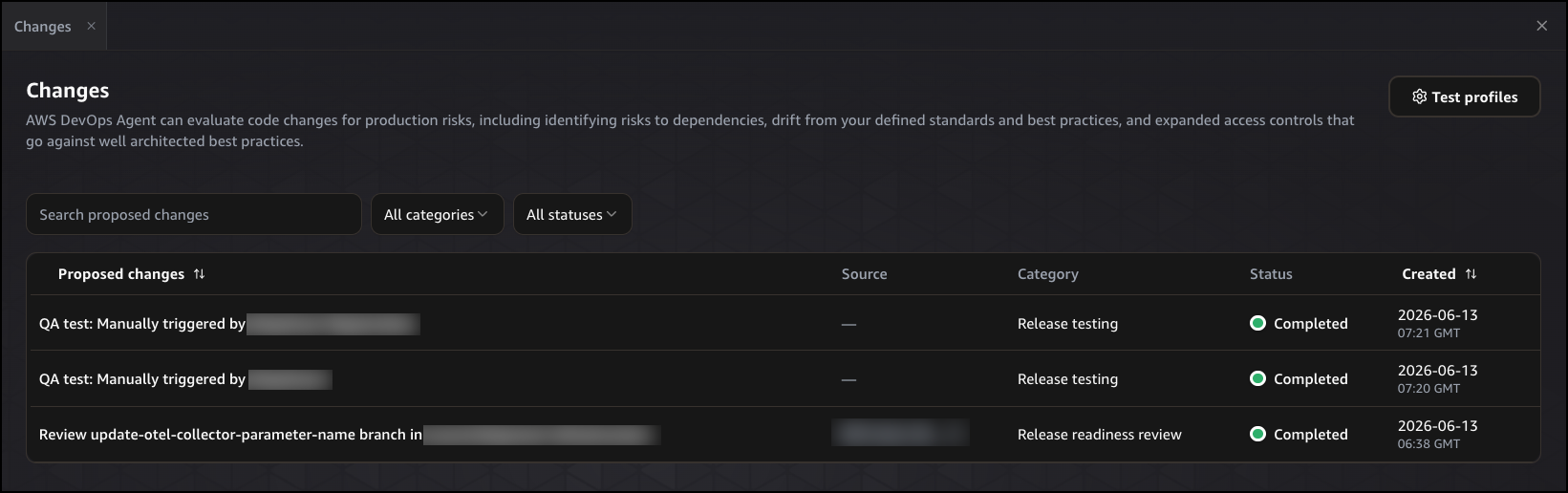
After submitting a review request, navigate to Changes in the left navigation pane. The Proposed changes table shows each review that has run, including the proposed change description, its source, category, status, and when it was created. You can filter by category or status to find specific reviews, or search by name using the search bar. Choose any entry to open the full execution detail.
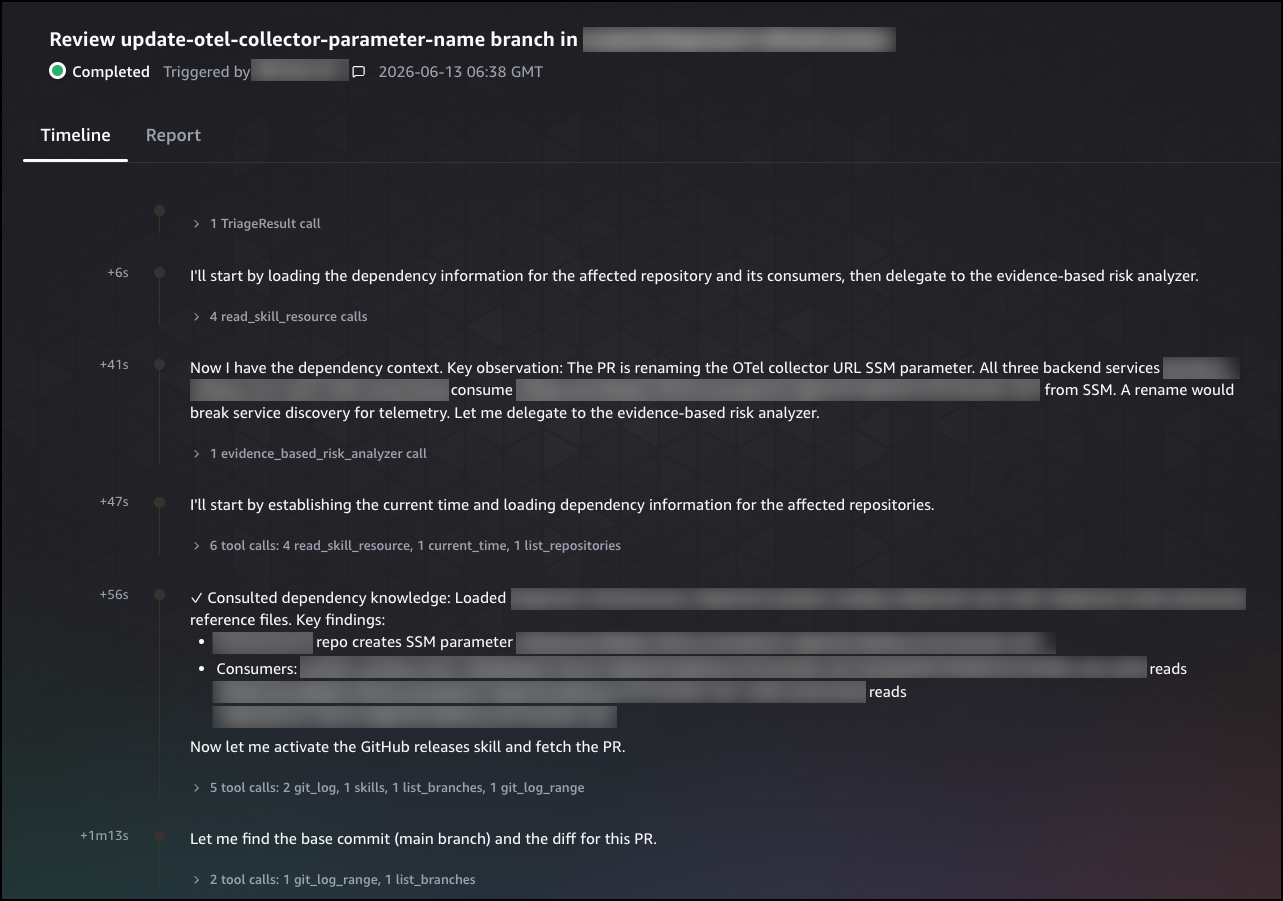
The Timeline tab shows the agent’s step-by-step reasoning process, including the tools it called, the dependencies it consulted, and the observations it made at each step. Each entry is timestamped, giving you a complete record of how the agent built its understanding of the change and reached its conclusion.
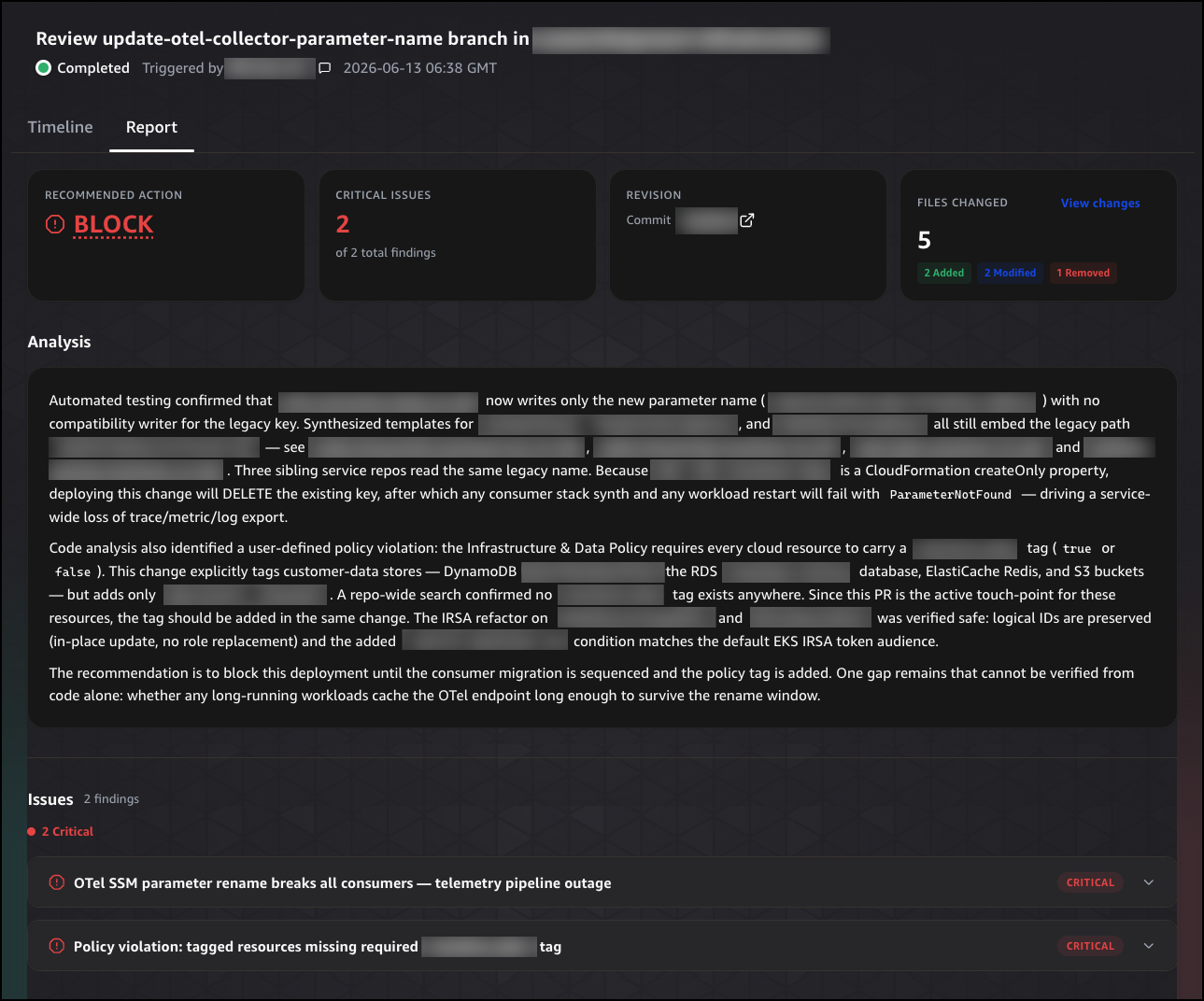
Choose the Report tab to see the final recommendation. The report opens with a summary header showing the recommended action, the number of critical issues found, the commit revision, and the number of files changed. The recommended action is either BLOCK, Proceed with Caution, or Safe to Release.
Below the summary header, the Analysis section explains why the recommendation was made, citing specific risks and the evidence the agent found to support its conclusion. The Issues section lists each finding by severity, giving you a prioritized view of what needs to be addressed before the change can proceed. The Recommendations section provides specific, actionable steps the developer can take to resolve each issue. Finally, the Changes section lists each file that was modified, with the type of change, the category it falls under, and a description of what was changed, so reviewers have a complete picture of what the change does before it merges.
You can also invoke the autonomous release testing feature directly from the chat interface. To run an autonomous release test on a web or API-based application, choose New chat and enter a query such as:
Run a release test on my application deployed at [application URL]
The agent generates a change-specific test plan and executes it in your provisioned environment. Results appear in Changes, where you can review the execution steps and a structured summary of what was tested.
Get started today
The release readiness review and autonomous release testing features for AWS DevOps Agent are available in preview. These features are available at no additional cost during preview in the US East (N. Virginia) Region. For pricing information on other AWS DevOps Agent features, visit the AWS DevOps Agent pricing page.
For configuration details, visit the AWS DevOps Agent user guide.
— Esra