








AWS WAF now includes AI traffic monetization capability that gives digital content owners and publishers a way to charge AI bots and agents for access to protected web content directly at the network edge. The capability helps content owners and publishers set per-request pricing by content path, bot category, or verification tier without modifying their origin infrastructure or writing application code. Content owners can define granular access policies per agent type, collect payments in stablecoins to their preferred wallet, and monitor revenue and bot activity from a single dashboard.
AI bot traffic now accounts for more than 50% of web traffic for many content providers, with AI-specific crawlers growing more than 300% year-over-year. Unlike traditional search engine crawlers, which index content and return measurable referral traffic back to publisher websites, AI bots consume the same content to generate summaries and responses in AI interfaces, with little to no traffic sent back to the original source. Publishers bear the infrastructure costs of serving that traffic without the page views, ad impressions, or subscription conversions that typically offset those costs. AWS WAF Bot Control already gives customers visibility into bot activity and the ability to block or rate-limit traffic, but setting pricing and collecting payment from AI agents has not been possible until now. AI traffic monetization is a new Bot Control capability that closes that gap, giving content owners and publishers a way to configure pricing rules directly through the AWS WAF console and collect payments from AI agents through third-party payment integrations, without building custom payment infrastructure or negotiating individual licensing agreements. Payment settlement and verification flows are provided by Coinbase’s x402 Facilitator. Integration with Stripe for direct account payments and Machine Payments Protocol (MPP) support is coming soon.
Getting Started with AI Traffic Monetization
Before configuring monetization, confirm that AWS WAF Bot Control is enabled at Common or Targeted level on the web ACL associated with your CloudFront distribution. Bot Control provides the agent classification that monetization rules depend on. If you have not set this up yet, visit Adding the AWS WAF Bot Control managed rule group to your web ACL documentation. In the AWS Management Console, go to WAF & Shield and choose Protection packs (web ACLs) in the left navigation pane to get started.
A protection pack is the core configuration unit for AI traffic monetization. It defines which content paths are monetized, what each agent verification tier is charged, which payment methods you accept, and what license terms apply. To create one, choose Create protection pack (web ACL).
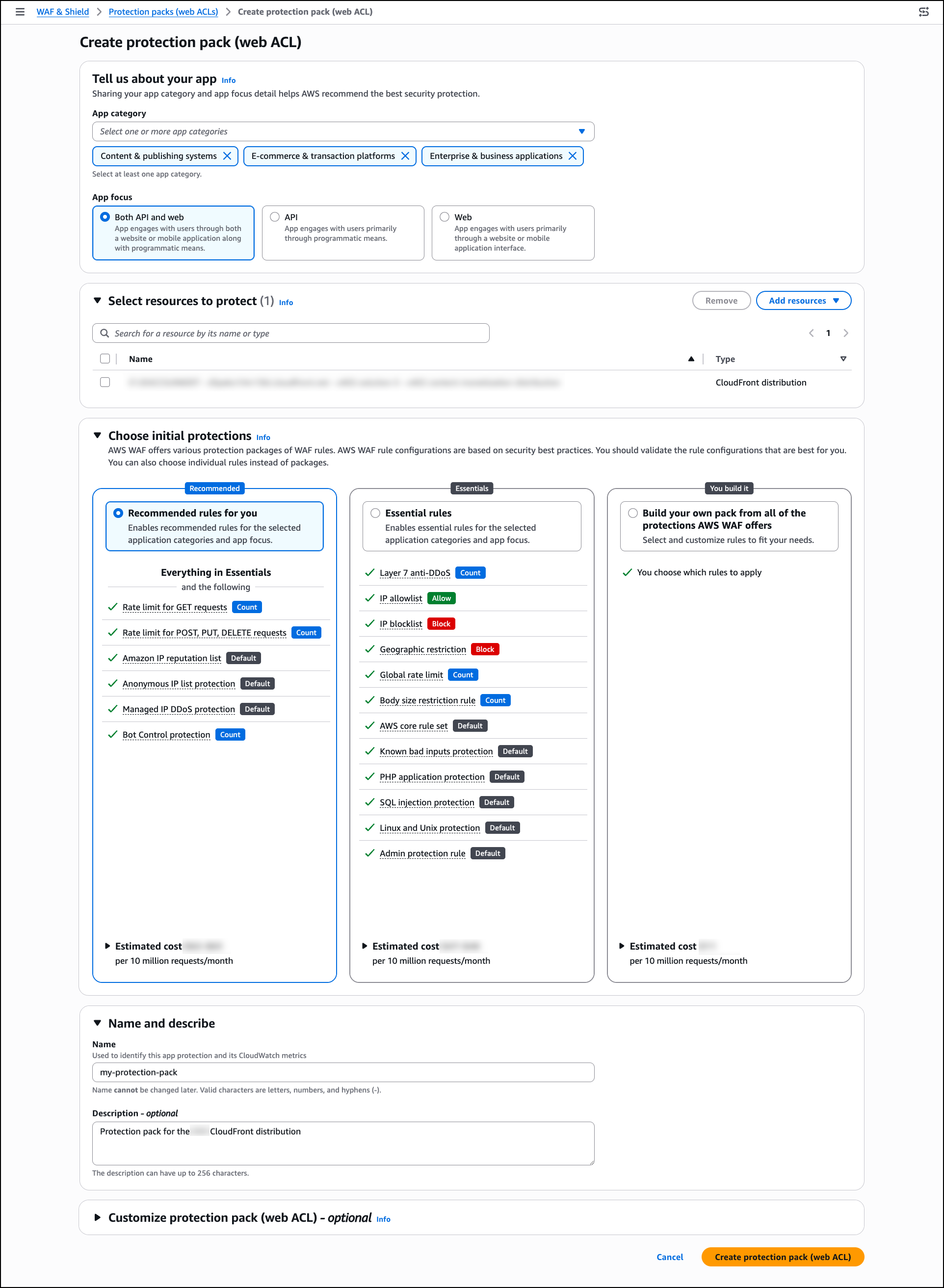
In Tell us about your app, select one or more app categories that describe your content (for example, Content & publishing systems, E-commerce & transaction platforms, or Enterprise & business applications), and choose an App focus. AWS WAF uses these selections to recommend suitable security protections for your configuration.
In Select resources to protect, choose Add resources to associate regional or global resources such as CloudFront distributions with this protection pack. You can skip this step and add resources later.
In Choose initial protections, select from AWS WAF managed rule packages based on your app category and resource selections. You can also choose individual rules instead of packages.
In Name and describe, provide a name and optional description for the protection pack.
Optionally, expand Customize protection pack (web ACL) to configure additional settings including pricing tiers, payment methods, content scope, and license terms.
When finished, choose Create protection pack (web ACL).
Once your protection pack is in place, review the AI traffic analysis dashboard to understand the impact of AI bot traffic on your content before setting your pricing strategy. In the WAF & Shield console, go to AI traffic analysis in the left navigation pane. Select your protection pack (web ACL) from the dropdown to populate the dashboard.
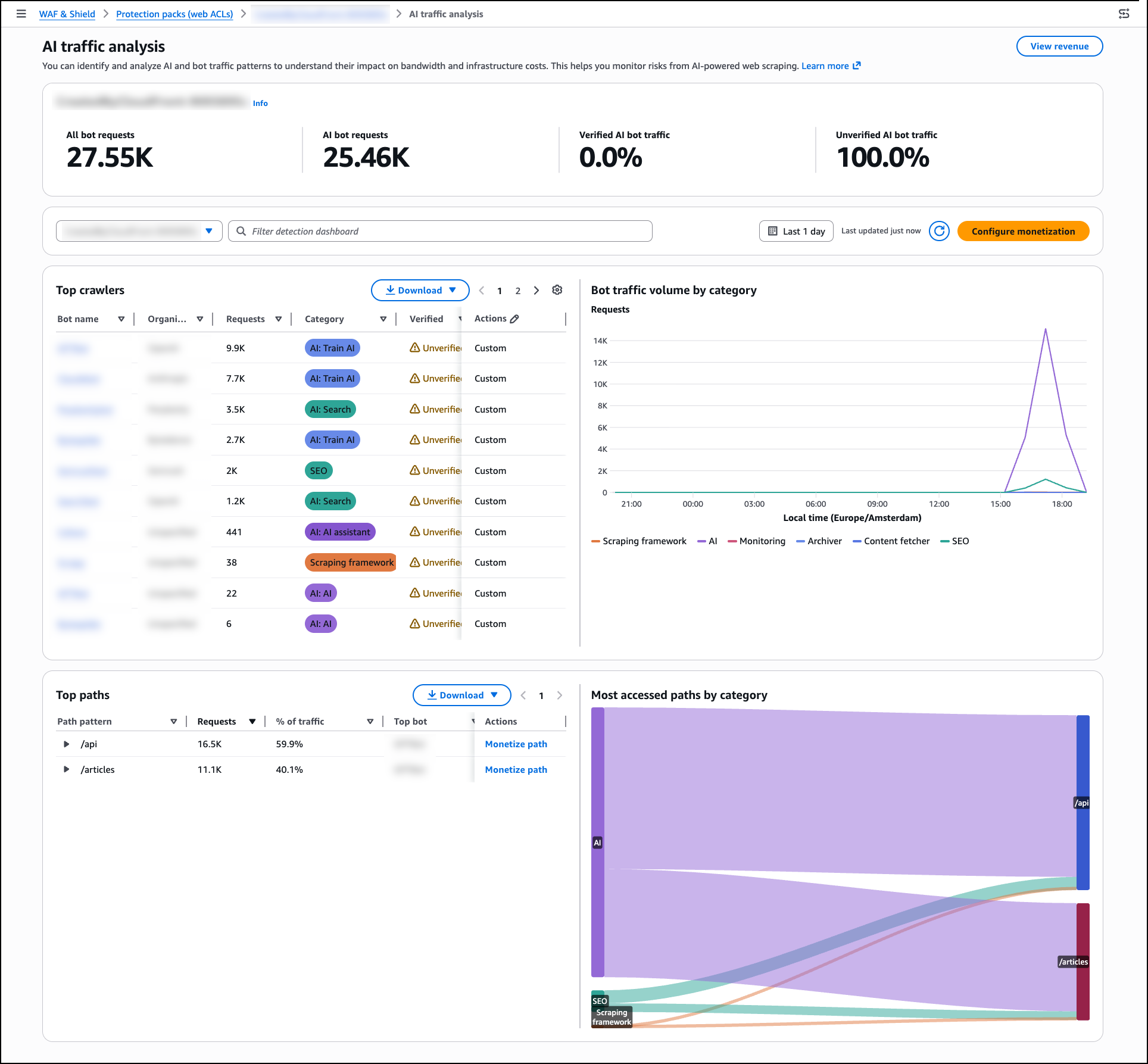
The AI traffic analysis dashboard breaks down traffic into four categories visible in the bot traffic overview panel: All bot requests, AI bot requests, Verified AI bot traffic, and Unverified AI bot traffic. The dashboard surfaces infrastructure impact metrics including bandwidth consumed, estimated monthly cost, and peak request rates. A per-path heatmap shows which content paths receive the most AI bot activity by hour, giving you the data you need to make informed pricing decisions.
AWS WAF Bot Control classifies over 650 distinct AI bot and agent types including GPTBot, Claude-Web, and Perplexity-Bot, and assigns each a verification tier:
- Verified — Agent identity confirmed through Web Bot Auth (WBA) Ed25519 cryptographic signature, or sourced from a documented IP range with a known set of user-agents and domain names.
- Unverified — Agent recognized through user-agent matching, behavioral fingerprinting, and IP reputation, but identity not cryptographically confirmed.
Once you have reviewed your traffic patterns, return to Protection packs (web ACLs), select your protection pack from the list, and choose Configure AI monetization from the right panel to set pricing and access policies. Each protection pack defines the pricing, agent policies, accepted payment methods, and license terms that apply to a defined set of content paths. You can create multiple protection packs and apply different pricing to different content zones within the same distribution. Once created, associate the protection pack with your web ACL by opening the web ACL and choosing Add protection pack.
For each agent verification tier within the pack, you can assign one of six actions: Monetize (return a 402 with pricing), Allow (grant free access), Block (deny access entirely), Count (log without charging), CAPTCHA (present a puzzle to verify a human sender), or Challenge (run a silent check to verify the client is a browser, not a bot).
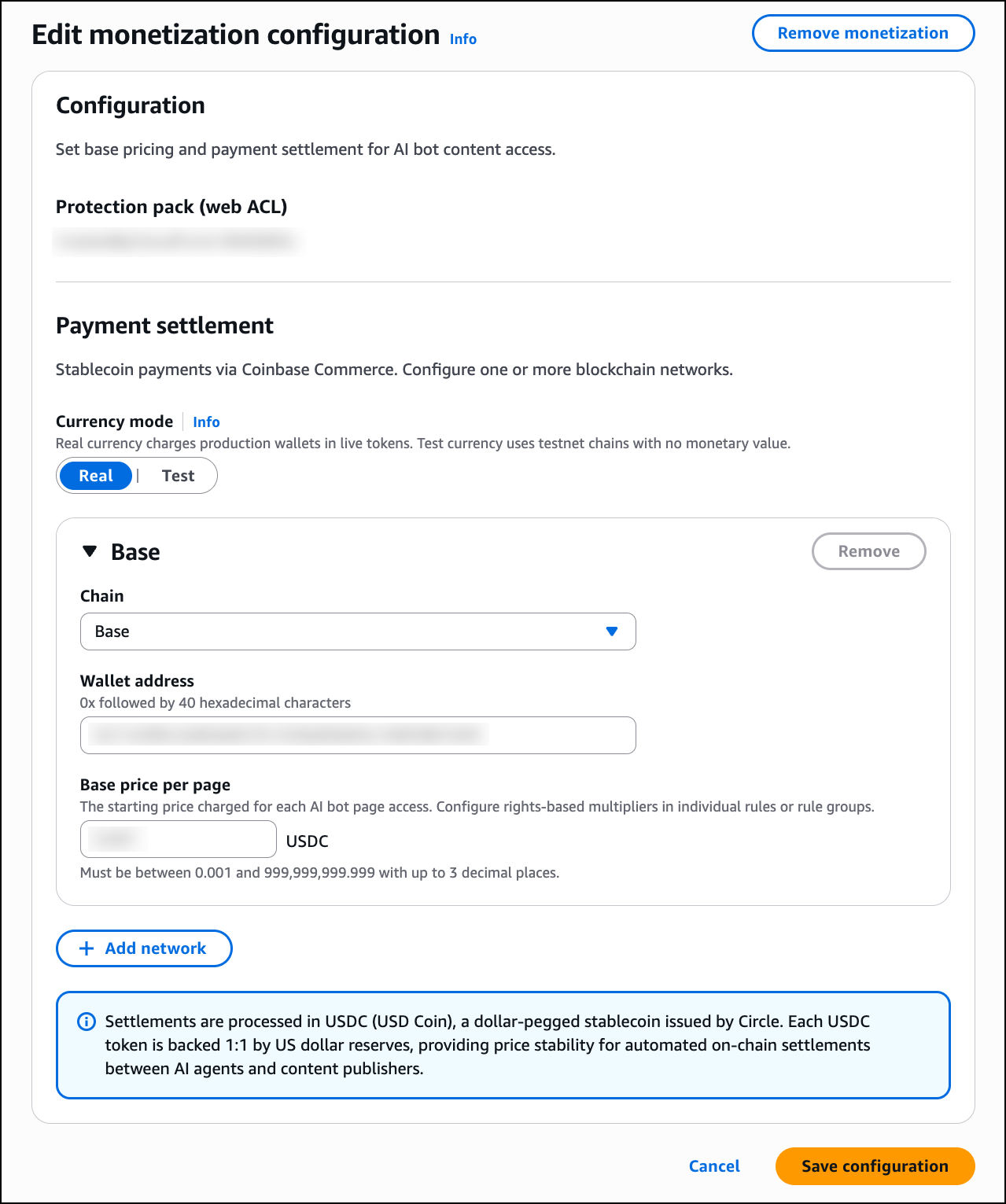
In the Edit monetization configuration page, configure the following:
Under Payment settlement, select one or more blockchain networks for stablecoin payments. Any wallet address on the supported networks is accepted, whether self-managed or hosted by a wallet provider such as Coinbase. For each network, provide your wallet address and set a Base price per page in USDC. You can add multiple networks using Add network. AWS does not process payments or take a fee on content revenue; disbursement is self-managed or managed by your wallet provider.
When a Monetize rule matches an incoming request, AWS WAF returns an HTTP 402 Payment Required response. The response body contains a machine-readable price manifest in JSON format using the x402 open protocol for machine-to-machine payments. The manifest includes the content price in USDC, accepted blockchain networks such as Base and Solana, the destination wallet address, the maximum payment timeout, and the payment scheme.
Any x402-compatible agent runtime can complete this flow autonomously. The client submits a signed payment authorization on their payment network of choice. AWS WAF verifies it, fetches the content, integrates with third-party facilitator services for settling the payment on-chain, and serves the response.
Note that the Monetize action is supported exclusively for web ACLs associated with Amazon CloudFront distributions. Adding a Monetize rule to a regional web ACL is not supported.
Since the Currency mode toggle is available directly in the monetization configuration page, you can switch between Real and Test mode at any time. Before going live, use test mode on non-production traffic to validate pricing, wallet configuration, and x402 payment flows. Note that test mode still enforces x402 payments, but those payments can be made on testnets such as Base Sepolia or Solana Devnet using test funds obtained from faucets such as faucet.circle.com. To activate test mode, toggle Currency mode to Test in your protection pack configuration. AWS WAF returns real price manifests and runs the full payment flow identically to production on the configured test chain. All events are logged with CurrencyMode: TEST. When satisfied with the configuration, toggle Currency mode back to Real to begin processing real payments.
Once you have switched Currency mode to Real, navigate to AI access monetization in the left navigation pane to track monetization outcomes in real time. Note that the AI access monetization dashboard only reflects activity from real currency mode and does not display test transactions.
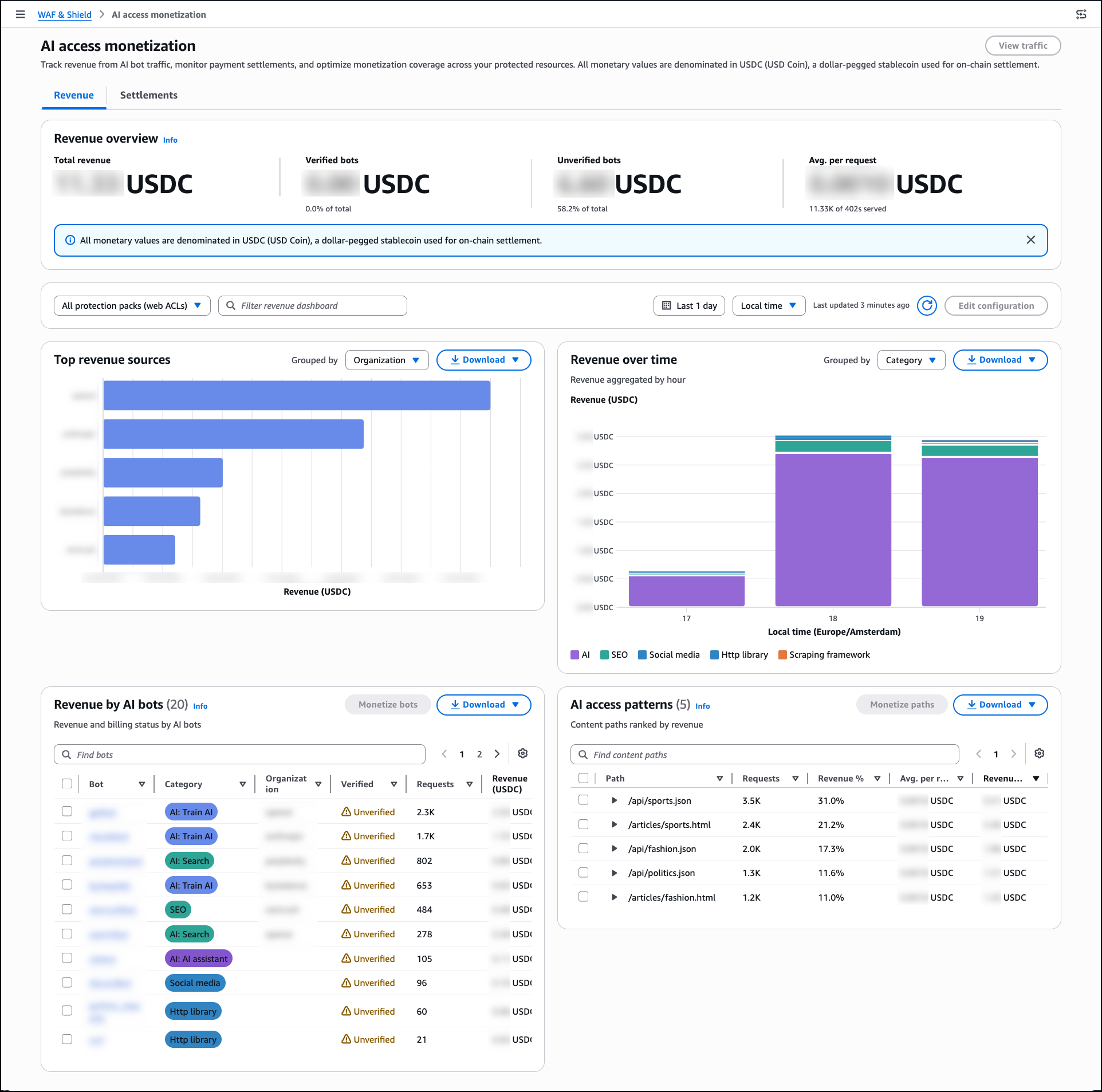
The Revenue dashboard shows Total revenue, revenue broken down by Verified bots and Unverified bots, and Avg. per request. The Top revenue sources panel groups earnings by bot category, and the AI access patterns panel ranks content paths by revenue generated. Use the Settlements tab to reconcile payments by provider and review payment method distribution and failed payment attempts.
Now Available
AI traffic monetization is available now for Amazon CloudFront customers at no additional charge beyond standard AWS WAF pricing. The capability is available in all edge locations where AWS WAF web ACLs are associated with Amazon CloudFront distributions.
To learn more about AI traffic monetization, see the AWS WAF Developer Guide.
— Esra