







Found a great soundtrack buried inside a YouTube rip? Need the voiceover from a screen recording as a standalone file? Or maybe you just want to turn a music video into an MP3 for your playlist. Extracting audio from video is one of those tasks that sounds trivial until you actually need to do it.
Most tools force you to upload the entire video first. That is slow, wastes bandwidth, and feels ridiculous when all you want is the sound. We built an audio extractor that runs entirely in your browser. Drop a video in, pick your format, and download the audio track. The video file never leaves your machine.
Why Do Audio Extraction in the Browser?
Audio extraction is actually a perfect fit for client-side processing:
- No upload needed: Why send a 500MB video to a server just to strip out a 5MB audio track?
- Instant start: No queue, no waiting behind other users' jobs.
- Privacy: Your video stays local. We never see it, hear it, or store it.
- Pick your format: MP3 for compatibility, WAV for editing, FLAC for archiving — you choose.
- Works offline: Once FFmpeg.wasm is cached, you can extract audio without an internet connection.
The only real limit is your device's memory. But since we are only dealing with the audio stream, even large videos process surprisingly fast.
The Full Flow
Here is what happens from upload to audio download:
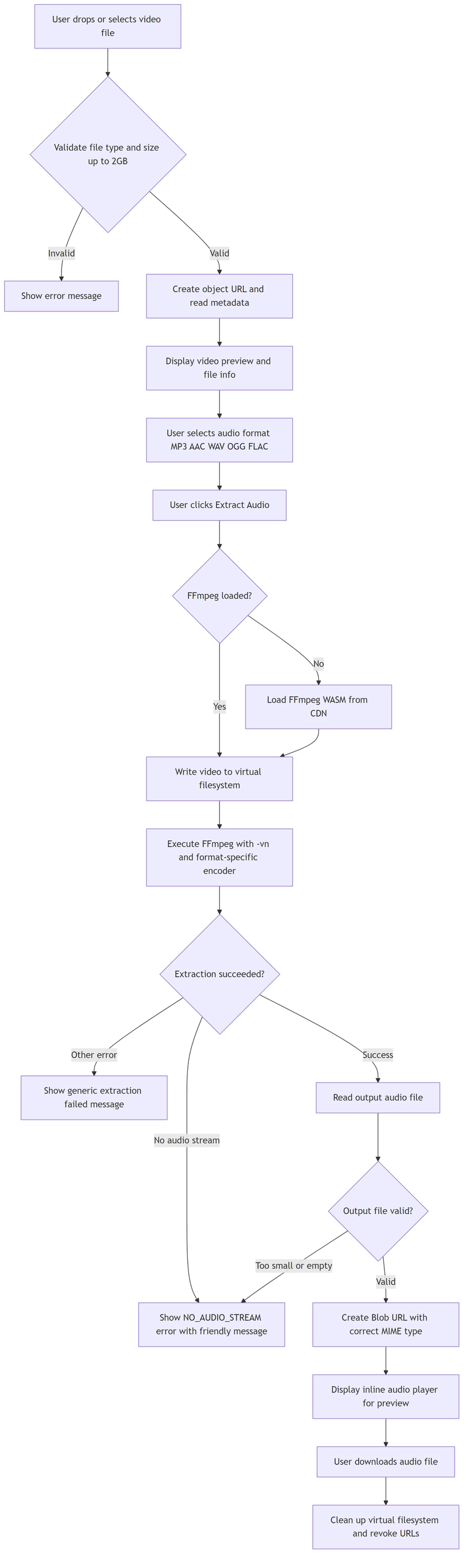
The Data Model
We track the video file and whether it actually has an audio stream:
interface VideoFile {
  id: string;
  file: File;
  previewUrl: string;
  audioUrl?: string;
  audioFileName?: string;
  hasAudio?: boolean;
  audioCodec?: string;
  error?: string;
  processing?: boolean;
  progress?: number;
  videoWidth?: number;
  videoHeight?: number;
  duration?: number;
}
The hasAudio field matters because not every video file actually contains an audio track. Screen recordings without mic input, raw camera footage, and certain downloaded clips might be video-only. We handle that gracefully instead of throwing a cryptic error.
Five Audio Formats, Five Different Strategies
We support the formats people actually use:
const AUDIO_FORMATS = [
  { value: "mp3", label: "MP3", extension: "mp3", mimeType: "audio/mpeg" },
  { value: "aac", label: "AAC", extension: "aac", mimeType: "audio/aac" },
  { value: "wav", label: "WAV", extension: "wav", mimeType: "audio/wav" },
  { value: "ogg", label: "OGG", extension: "ogg", mimeType: "audio/ogg" },
  { value: "flac", label: "FLAC", extension: "flac", mimeType: "audio/flac" },
];
Each format gets its own encoder settings because one-size-fits-all does not work for audio.
MP3: The Universal Format
case "mp3":
  ffmpegArgs = [
    "-i", inputName,
    "-vn",
    "-c:a", "libmp3lame",
    "-q:a", "2",
    "-y",
    outputName
  ];
  break;
-
libmp3lame: The standard MP3 encoder. Works everywhere. -
-q:a 2: Variable bitrate mode, high quality (0 is best, 9 is worst). Level 2 strikes a good balance — roughly 190-250 kbps, which is transparent for most content. -
-vn: Disables video. This is the key flag that tells FFmpeg to extract only the audio stream.
AAC: The Efficiency King
case "aac":
  ffmpegArgs = [
    "-i", inputName,
    "-vn",
    "-c:a", "aac",
    "-b:a", "192k",
    "-y",
    outputName
  ];
  break;
AAC at 192 kbps generally sounds better than MP3 at the same bitrate. It is the format used by Apple Music, YouTube, and most streaming services. If you want small files without noticeable quality loss, AAC is the way to go.
WAV: The Editor's Choice
case "wav":
  ffmpegArgs = [
    "-i", inputName,
    "-vn",
    "-c:a", "pcm_s16le",
    "-ar", "44100",
    "-ac", "2",
    "-y",
    outputName
  ];
  break;
-
pcm_s16le: Uncompressed 16-bit PCM audio. No quality loss whatsoever. -
-ar 44100: Standard CD sample rate. -
-ac 2: Stereo output.
WAV files are huge but perfect for importing into DAWs, video editors, or any situation where you need pristine audio quality.
OGG: The Open Source Option
case "ogg":
  ffmpegArgs = [
    "-i", inputName,
    "-vn",
    "-c:a", "libvorbis",
    "-q:a", "4",
    "-y",
    outputName
  ];
  break;
OGG Vorbis is royalty-free and offers excellent compression. Quality level 4 is roughly equivalent to 128-160 kbps MP3 but typically sounds better.
FLAC: The Archivist's Format
case "flac":
  ffmpegArgs = [
    "-i", inputName,
    "-vn",
    "-c:a", "flac",
    "-y",
    outputName
  ];
  break;
FLAC is lossless compression — you get the exact same audio data as WAV, but the file is typically 40-60% smaller. Perfect for archiving music or audio you might need to transcode later.
Detecting Silent Videos
Not every video has audio. We handle this in two ways:
First, we try to detect audio tracks when loading the video metadata using browser APIs:
video.onloadedmetadata = () => {
  const hasAudio = (video as any).mozHasAudio !== false ||
                   Boolean((video as any).webkitAudioDecodedByteCount) ||
                   Boolean((video as any).audioTracks?.length);

  setSelectedFile({
    id: `${file.name}-${Date.now()}`,
    file,
    previewUrl: videoUrl,
    videoWidth: video.videoWidth,
    videoHeight: video.videoHeight,
    duration: video.duration,
    hasAudio: undefined,
  });
};
But browser detection is unreliable across different formats. So we also catch FFmpeg errors and translate them into a friendly message:
try {
  await ffmpeg.exec(ffmpegArgs);
} catch (execErr: any) {
  const errorMessage = String(execErr);

  if (errorMessage.includes("Stream map") ||
      errorMessage.includes("does not contain") ||
      errorMessage.includes("No audio") ||
      errorMessage.includes("Output file #0 does not contain any stream")) {
    throw new Error("NO_AUDIO_STREAM");
  }

  throw new Error(`FFmpeg execution failed: ${errorMessage}`);
}
And after reading the output, we sanity-check the file size:
if (uint8Data.length < 100) {
  throw new Error("NO_AUDIO_STREAM");
}
A legitimate audio file should never be under 100 bytes. If it is, something went wrong — usually because the source video had no audio to extract.
When we detect a silent video, we show a clear error state instead of a generic failure message:
if (err.message === "NO_AUDIO_STREAM") {
  setError("This video file does not contain an audio stream");
  setSelectedFile(prev => prev ? {
    ...prev,
    error: "NO_AUDIO_STREAM",
    hasAudio: false,
    processing: false
  } : null);
}
The UI then shows a friendly "No Audio Detected" screen with a button to try another video.
Preview Before Download
After extraction, we embed a native HTML5 audio player so users can preview the result before downloading:
{selectedFile.audioUrl && (
  <div className="bg-green-50 dark:bg-green-900/20 rounded-lg p-4">
    <div className="flex items-center gap-3 mb-4">
      <Music className="w-8 h-8 text-green-600" />
      <div>
        <h3 className="font-medium text-green-800">Audio Extraction Complete!</h3>
        <p className="text-sm text-green-600">{selectedFile.audioFileName}</p>
      </div>
    </div>
    <audio src={selectedFile.audioUrl} controls className="w-full" />
  </div>
)}
This is a small touch but it saves users from downloading a file, realizing it sounds wrong, and starting over.
Loading FFmpeg on Demand
As with all our tools, FFmpeg loads lazily:
// utils/ffmpegLoader.ts
import { fetchFile, toBlobURL } from "@ffmpeg/util";

let ffmpeg: any = null;
let fetchFileFn: any = null;

export async function loadFFmpeg() {
  if (ffmpeg) return { ffmpeg, fetchFile: fetchFileFn };

  const { FFmpeg } = await import("@ffmpeg/ffmpeg");

  ffmpeg = new FFmpeg();
  fetchFileFn = fetchFile;

  const baseURL = "https://cdn.jsdelivr.net/npm/@ffmpeg/core@0.12.6/dist/umd";

  await ffmpeg.load({
    coreURL: await toBlobURL(`${baseURL}/ffmpeg-core.js`, "text/javascript"),
    wasmURL: await toBlobURL(`${baseURL}/ffmpeg-core.wasm`, "application/wasm"),
  }, {
    corePath: await toBlobURL(`${baseURL}/ffmpeg-core.js`, "text/javascript"),
  });

  return { ffmpeg, fetchFile };
}
Dynamic import keeps the initial bundle small. Blob URLs avoid CORS issues. Caching the instance means subsequent extractions start faster.
Progress and Cleanup
We track FFmpeg progress:
ffmpeg.on("progress", ({ progress }: { progress: number }) => {
  setSelectedFile(prev => prev ? { ...prev, progress: Math.round(progress * 100) } : null);
});
And clean up properly:
const reset = useCallback(() => {
  if (selectedFile) {
    URL.revokeObjectURL(selectedFile.previewUrl);
    if (selectedFile.audioUrl) URL.revokeObjectURL(selectedFile.audioUrl);
  }
  setSelectedFile(null);
  setError(null);
  setAudioFormat("mp3");
}, [selectedFile]);
Plus filesystem cleanup after each extraction:
await ffmpeg.deleteFile(inputName);
await ffmpeg.deleteFile(outputName);
What We Learned
Building this tool revealed a few interesting edge cases:
- Not all videos have audio: We assumed every video had at least an audio stream. Nope. Screen recordings without system audio, certain camera formats, and some downloaded clips are video-only. Catching the "NO_AUDIO_STREAM" case gracefully was essential.
-
Browser audio detection is unreliable:
mozHasAudio,webkitAudioDecodedByteCount, andaudioTracksall exist on different browsers with different behaviors. We use all three as hints, but the real check is whether FFmpeg can actually extract something. -
MP3 quality levels are confusing:
-q:a 0through-q:a 9is the LAME VBR scale, but it is inverted — 0 is best, 9 is worst. We picked level 2 as the default because it is roughly equivalent to 256 kbps VBR, which is transparent for virtually all content. - WAV files are surprisingly large: A 3-minute WAV extracted from a video can easily hit 30MB. Users sometimes expect the audio file to be tiny. We added the format descriptions to set expectations — WAV is uncompressed, FLAC is lossless compression, MP3/OGG/AAC are lossy compression.
-
-vnis your friend: This single flag disables video processing entirely. Without it, FFmpeg might try to re-encode the video stream even when you only want audio, making extraction take ten times longer.
Give It a Try
Got a video with a soundtrack you want to save? Or a voiceover you need as a separate file? You can extract it right now.
Upload your video, pick your format, preview the result, and download. MP3, AAC, WAV, OGG, or FLAC — your choice. Your video never leaves your browser.