










This is a submission for the OpenClaw Writing Challenge
before you install anything
straight in - you need three things ready before you even touch a terminal.
-
AI model API key
openclaw works with multiple model providers.
you're not locked to one.
here's what's available right now:- and my pick - anthropic (claude) - the best overall for agents. opus 4.6 is the smartest model available and what i recommend for setup. sonnet 4.6 is cheaper and handles everyday tasks well. console.anthropic.com
- openai (GPT-5.4) - strong alternative. great tool calling, solid all-rounder. a lot of people switched here last week when anthropic cut off subscription access - also where the founder of OpenClaw now works. platform.openai.com
- google (gemini 2.5 pro) - good for long context tasks. generous free tier to get started. worth having as a backup or starting point if budget is tight. aistudio.google.com
- *ollama *(local models) - run gemma 4 or other open source models directly on your machine. completely free. not frontier quality but handles routine agent tasks without breaking a sweat
- *deepseek *- strong reasoning model from china. very competitive pricing. worth looking at if you want a cheaper alternative to opus for complex tasks
my recommendation: start with anthropic (opus 4.6) as your primary. it's the king of models for agent work. load $250 in API credits to get from zero to fully operational without hitting rate limits - new API customers get lower limits by default and putting real money in upfront avoids that bottleneck while you're building. even $50 gets you started if budget is tight.
a groq API key (for voice notes)
this is separate from your main model. groq powers the voice note transcription through the whisper plugin - it's how your agent understands your voice messages on telegram. you'll use this constantly.
it's free. sign up at console.groq.com and grab your API key.a web search API key
your agent needs to search the internet. here are your options:
brave search - ~$5/month. reliable, fast, best value for money. my recommendation. brave.com/search/api
tavily - has a free tier. built specifically for AI agents. tavily.com
firecrawl - search plus full page scraping in one tool. firecrawl.dev
SearXNG - completely free. self-hosted. more setup work but zero cost forever
my recommendation: brave search. it's been the most reliable and the best bang for your buck in my experience. if you want completely free, tavily's free tier works.
installing openclaw
open terminal and run:
- on windows (powershell):
iwr -useb https://openclaw.ai/install.ps1 | iex - if you're on a brand new mac mini or mac device, you might need to install homebrew first, using this terminal prompt:
/bin/bash -c "$(curl -fsSL https://raw.githubusercontent.com/Homebrew/install/HEAD/install.sh)"
once openclaw is installed, run the setup wizard:
openclaw onboard
this walks you through everything step by step. here's what to pick:
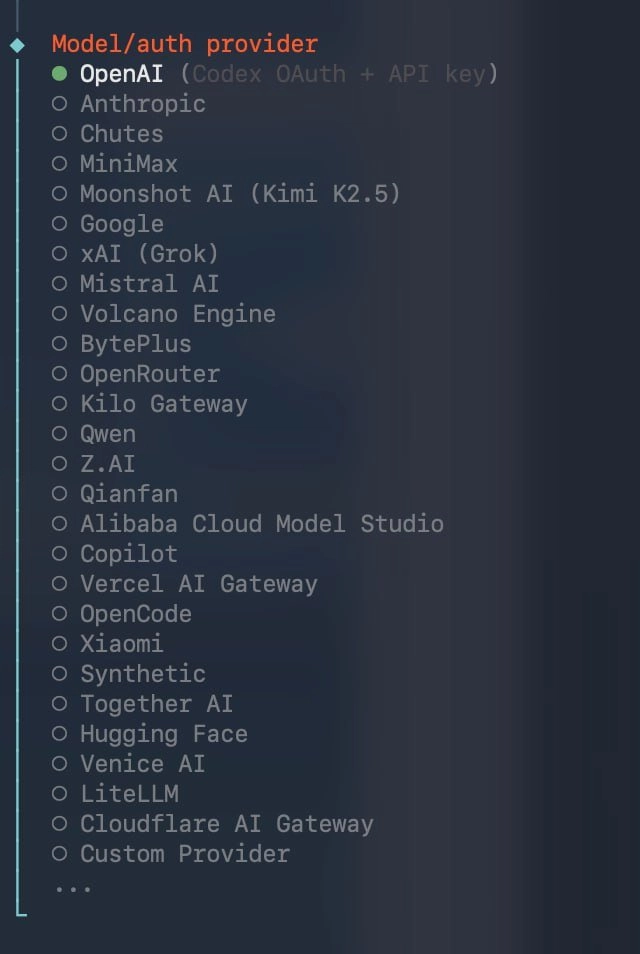
provider: select anthropic and paste your API key.
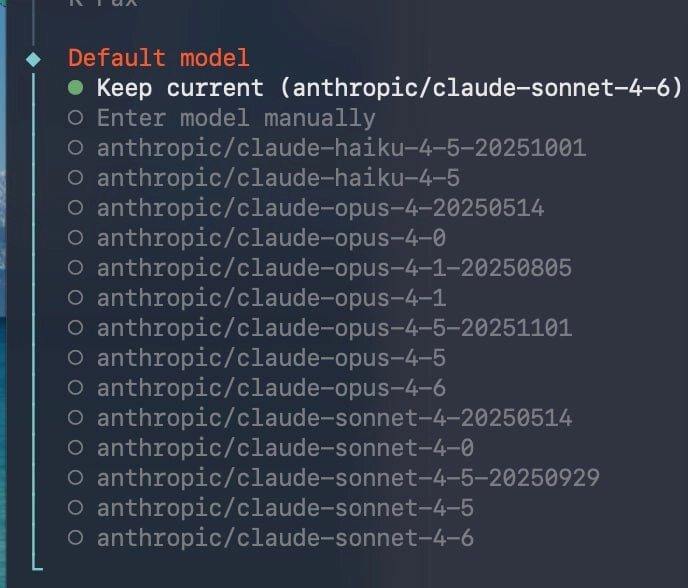
model: select opus 4.6. or whichever model you're choosing - but opus is what i recommend for the setup phase. you want the smartest brain available while you're building the foundations.
communications: you'll be asked to set up a messaging platform. for this guide we're going with telegram - it's honestly the easiest. but you can skip this step if you want. i actually find it easier to do the telegram part manually in its own step later since you need to pair it anyway.
skills to preload: this is where most guides just say "install clawhub" and move on. don't do that. install these:
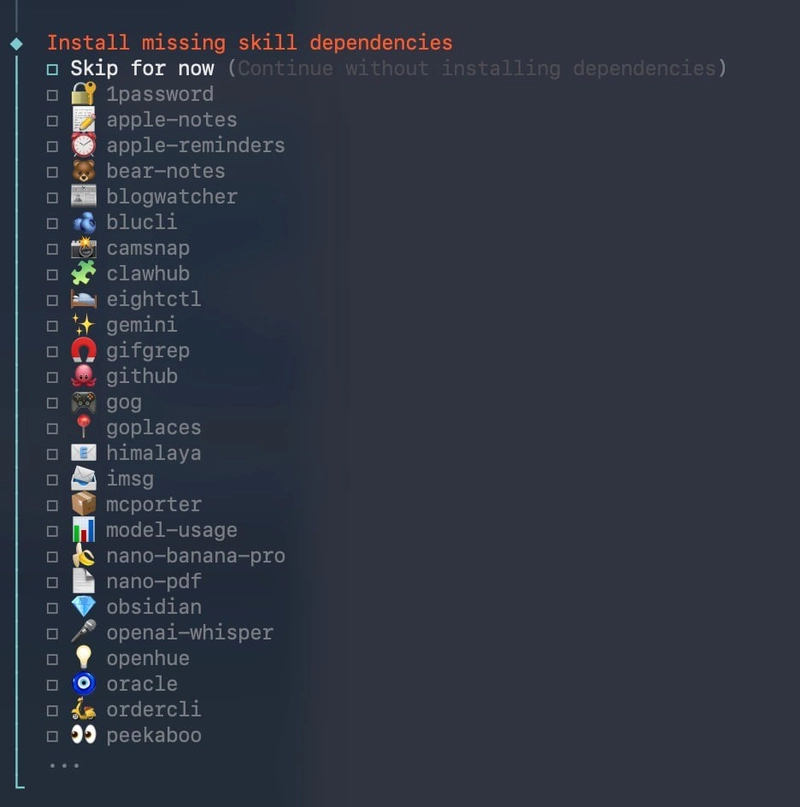
- clawhub - the skill marketplace
- mcporter - MCP tool routing
- openai-whisper - voice transcription (essential for voice notes)
- model-usage - track what your agent is spending
- github - if you use git at all, get this in now
- nano-pdf - PDF reading and processing additional APIs (notion, elevenlabs, etc): skip all of these. you don't need them yet. hooks: enable all four:
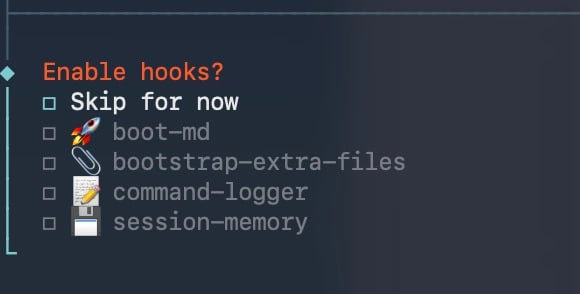
- boot-md - loads your config files on startup
- bootstrap extra files - sets up your workspace structure
- command-logger - tracks what your agent runs
- session-memory - remembers context across sessions once you continue through these steps, you should see the option to hatch in TUI. this is the moment your agent comes to life in the terminal chat window. do it.
say hello. give it a name. watch it respond.
that first reply is a proper magic moment. enjoy it.
connecting telegram
now you've got a living agent in your terminal. but you don't want to live in the terminal. you want it on your phone.
here's the move. tell your agent exactly this:
"okay [agent name], we're going to use telegram to finish setting up and onboarding. next i will send you the API key for my telegram bot and you can install the telegram communication skill for me using it."
now go set up the bot:

- open telegram and message @botfather
- send /newbot
- pick a name and username for your bot
- BotFather gives you an API key - copy it go back to your agent in the TUI and paste the API key in with the message above (or right after it). your agent will install the telegram plugin for you. once it's done, head to telegram and open your new bot. click start - you'll see a PAIR code. copy that pair code and paste it back to your agent in the TUI. it handles the rest - pairing, syncing, connecting everything. now go back to telegram and send "hi." watch your agent reply. welcome to a much better and cleaner way to communicate with your agent from anywhere and everywhere. this is how i run everything now.
the best and most practical way to set up your agent from birth
now you have telegram connected, we're going to run through the setup that actually matters. in this order:
- install kickstart i built a skill called kickstart that saves you the first 4 hours of pain in openclaw. it's free on clawhub. tell your agent: install the kickstart skill by jordymaui from clawhub here's what it gives you:
- SOUL.md - your agent's personality file. who it is, how it talks, what it cares about. without this your agent sounds like every other generic chatbot
- USER.md - information about you. your name, timezone, preferences, what platforms you use. your agent reads this so it knows who it's helping
- AGENTS.md - the operating manual. rules for how your agent behaves, when to speak, when to stay quiet, how to handle memory
- TOOLS.md - local notes about your specific setup. camera names, API details, device info - anything unique to your environment
- HEARTBEAT.md - a checklist your agent reviews periodically to stay proactive instead of just waiting for you to ask things
- kickstart doesn't just create these files - it guides your agent through filling them out properly. go ahead, install it and move to the next step.
install QMD
next up - making sure you have QMD installed.
install the QMD skill from clawhub
QMD upgrades your agent's memory system with semantic search. instead of your agent scanning through flat text files trying to find what you said three weeks ago, it can actually search by meaning. "what did i say about the budget?" just works. without QMD, your agent's memory is a filing cabinet with no labels. with it, everything is indexed and searchable.your onboarding session
this is the most exciting part and honestly the step that makes the biggest difference.
here's what i always recommend - from brand new beginners to the companies i've consulted for building openclaw systems. send your agent this:
before we do anything else, i need you to understand who i am and what we're building together. create a questionnaire - no more than 20 direct questions - covering who i am, what i do, how i work, what i need from you, and what your role is going to be. keep the questions short and clear. i'm going to answer all of them in one voice note so make sure they flow naturally as a conversation. after i reply, write everything you learn into your memory files so you never have to ask again.
your agent will come back with a list of questions. now here's the important bit:
reply with a voice note. not text. voice.
talk off the cuff. be casual. pause when you need to think. your agent picks up on how you communicate, what you care about, and what's actually on your mind.
if you're not sure what the agent's use case is yet - just say that. talk to it like it's a mate and you're thinking through potential ideas together. there is genuinely no wrong answer here as long as you're open, honest, and giving it real context about your life.
this one voice note will give your agent more useful information than weeks of typed messages. i learned that the hard way.
best practices from 500+ hours of daily use
model routing
don't run everything on opus. it's the best model but you don't need the best for every task.
set up your config so opus handles the complex stuff - reasoning, multi-step tasks, creative work. sonnet or groq handles the routine stuff - calendar checks, simple lookups, monitoring, notifications.
this alone cut my monthly cost in half. your agent routes automatically once it's configured.
keep CLAUDE.md short
this file gets re-injected every single message your agent processes. the leaked claude code source confirmed it. if yours is 2000 words of life story, you're burning tokens and confusing your agent on repeat.
mine is 6 lines. name, role, communication style, three rules. everything else lives in skills and memory files where the agent pulls it when it needs it.
split agents by job
if you're doing more than 3-4 different things, use separate agents. one agent scanning twitter, managing data, writing content, handling emails, and running cron jobs - it works for about two weeks before context starts bleeding between tasks and everything slows down.
dedicated agents for dedicated jobs. cleaner context, faster responses, fewer mistakes.
read your memory files
your agent writes notes about you after every conversation. check them weekly. you'll catch when it has the wrong idea about something before it acts on it. it's like reading your assistant's diary - sometimes spot on, sometimes hilariously wrong.
update regularly
nine CVEs dropped for openclaw in one week last month. one scored 9.9 out of 10. run openclaw update weekly. not optional.