






This article was written by Adrian Payong (AI Consultant and Technical Writer) and edited by Shaoni Mukherjee (AI Technical Writer, DigitalOcean)
Key Takeaways
- Persistent Memory Enhances Agents: LangGraph agents will persist memory between conversations that you can use to customize your interactions from session to session. Agents will remember who you are and learn about you over time.
- Memory vs Context Window: Context window provides short-term contextual memory that expires at the end of the session. Long-term memory (Mem0) stores user-specific facts persistently. RAG augments both short-term and long-term memory by retrieving external knowledge.
- LangGraph Structure: LangGraph's graph structure makes adding memory nodes straightforward. Define a State with mem0_user_id and build your chatbot node to perform a search/index of memories, then add that memory each turn.
- Mem0 Capabilities: Mem0 allows extracting semantic memory and offers flexible persistent storage. It’s compatible with any LLM and enables you to define your own memory functionality, unlike closed systems like OpenAI Memory.
- Memory System Design: Use semantic search to retrieve facts, filter or consolidate memories to avoid duplicates, and balance detail vs summary for efficiency. Choosing the right vector DB and indexing strategy is crucial.
- Production Concerns: Plan for privacy, retention policies, and scalability. Memory greatly reduces token usage and improves response relevance, but adds a layer of storage and computation.
Traditional AI agents use short-term context (aka the current conversation window) and often forget previous sessions after a chat ends. But what if we could give agents long-term memory? Building agents with memories of user preferences, facts, and history allows us to build more personalized and capable agents. This can be done by combining LangGraph – a stateful graph-based agent framework – with Mem0, a purpose-built memory layer. Using memories, an LLM agent can “remember” past information and leverage it.
When combining LangGraph with Mem0, you get context-aware agents. Since Mem0 will store and retrieve memories, each new session with LangGraph can add a summary of relevant previous interactions to the prompt. This allows building agents that can have longer, more personal, coherent conversations with users over time. In this article, we cover the main types of memory, walk through the LangGraph+Mem0 workflow, provide code examples, compare different memory strategies (rag vs memory), and discuss things to consider at scale (vector DBs, privacy, cost).
AI memory: Short-term vs retrieval vs long-term
AI agents use different memory types depending on scope:
- Short-term (Session) Memory: Also known as window memory, this refers to your current chat history in a single conversation thread. This thread-scoped state is automatically handled by LangGraph. However, after the conversation ends, that window is closed. If you ask your agent to “list my previously saved documents”, it can only recall documents you’ve provided during that same chat session. When operating directly on raw chat history (past messages), you’re limited by the LLM context window, which causes prompt bloat and higher costs.
- Retrieval Memory (RAG): This refers to the process of retrieving information from external sources, such as documents or a database. Retrieval-Augmented Generation pipelines leverage a vector database to dynamically retrieve related information based on the user’s current query. You can think of RAG as your agent “reading” external documents each time.
- Long-term (Persistent) Memory: This is a stable, user-specific memory that persists across sessions. Long-term memory allows you to store distilled facts, preferences, and experiences about the user that can be recalled in later conversations. Unlike RAG, which only brings in generic info, long-term memory stores personalized context about the user.
In short, short-term memory handles the current conversation, RAG augments with external data, and long-term memory (Mem0) provides a continuity of user-specific context.
Overview of LangGraph
LangGraph is a framework for building stateful graph-based agents. Instead of a linear chain, a LangGraph lets you construct nodes and edges that represent your agent's workflow. Nodes handle small pieces of functionality, such as calling an LLM, performing calculations, or retrieving data from memory, and then return their updated state. Edges are conditionally executed based on the current state and are responsible for routing flow between nodes. There is a central StateGraph object that maintains the agent's shared state throughout the workflow. Key points about LangGraph:
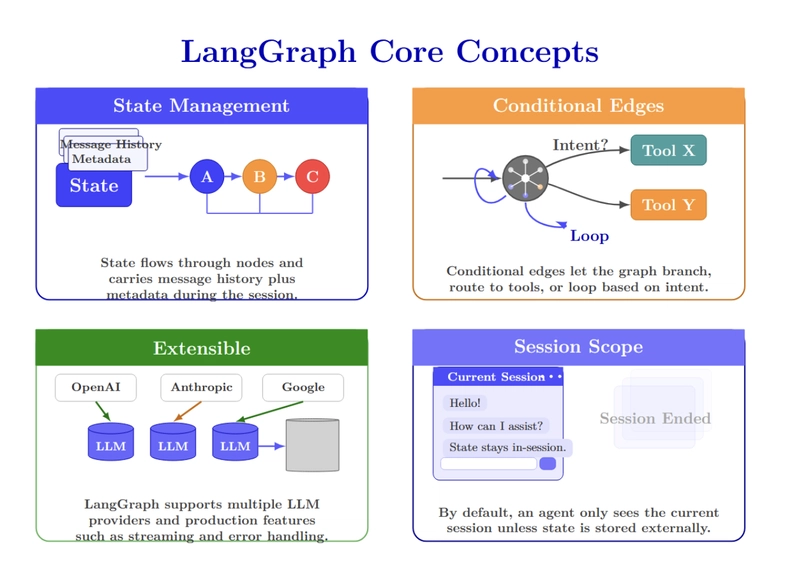
- State Management: LangGraph maintains conversation state in a State object, which flows through nodes. This contains all message history as well as any metadata you want to associate with the user. You can persist state across nodes via checkpointing, but by default, it’s only retained within a single session.
- Conditional Edges: Edges can be conditioned, so instead of simply chaining nodes, a LangGraph can branch or even loop. For example, you can route to different tools based on user intent.
- Extensible: You want to use a different LLM provider? (OpenAI? Anthropic? Google? ...) You can do it!. It is designed with production in mind. Supports streaming, error handling, and more.
- Session Scope: By default, if you build a LangGraph agent, it will only have access to the context of the current session. Once the chat “ends,” the state is cleared unless you store it externally.
What Mem0 provides
Mem0 is a persistent memory solution for AI agents. Think of it as a semantic memory layer: Mem0 extracts, stores, and retrieves information from conversations & facts you tell it about your users. Mem0 is not an LLM. It is a database + search layer built specifically for “AI memory”. Key features of Mem0 include:
- Semantic Memory: Mem0 extracts only the factual knowledge from each raw chat message and stores it in short memory phrases. Ex: “I love pizza” → Stored memory “Loves pizza”. This helps keep the overall memory size small.
- Multi-Level Memory: Mem0 has several levels of namespaces you can define (user-level, session-level, agent-level). You can isolate each user’s memories or share global agent facts.
- Smart Retrieval: Given a query (ex, the user’s latest message), Mem0 will search via vector similarity and return the most relevant stored memories. It scopes by default to a user ID, so you only access that user’s stored history.
- Flexible Storage: Connect mem0 to any storage backend. Use SQLite for local testing, or connect it to vector databases like Qdrant, Pinecone, Weaviate, and more. In the cloud version, Mem0 manages this for you.
- Open Source + Cloud: There’s an open-source client library for self-hosting, and a cloud platform ( app.mem0.ai ) for easy setup.
Integration architecture
Bringing it all together, the integration follows a clear flow:
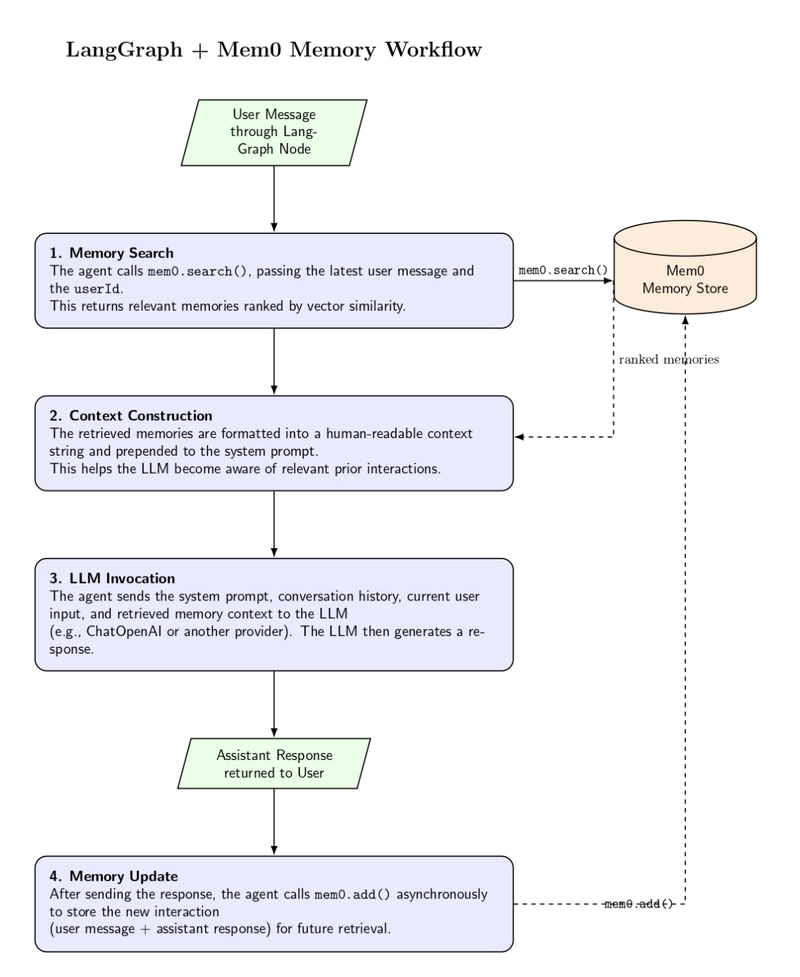
- Message reception – your agent gets a user message through the LangGraph node (e.g., chatbot).
- Memory search – The node calls mem0.search(), providing the latest user message and their userId. This returns a list of memories likely to contain relevant memories, ranked by vector similarity.
- Context construction – the memory list is formatted into a human‑readable context string, which is prepended to the system prompt. This allows the LLM to be "aware" of past messages when formulating its response.
- LLM invocation – the agent feeds the system message and conversation history into the LLM (ChatOpenAI, or other provider). The response includes the current user input along with any memories supplied.
- Memory update – once the response has been sent to the user, the agent calls mem0.add() asynchronously to store the interaction (user message and assistant response) for later retrieval.
LangGraph maintains state across iterations, and Mem0 persists long‑term storage. Below is a code sketch example:
def chatbot(state: State):
    messages = state["messages"]
    user_id = state["mem0_user_id"]
    try:
        # 1. Retrieve relevant memories with user filter
        memories = mem0.search(
            messages[-1].content,
            filters={"user_id": user_id},
            version="v2"
        )
        memory_list = memories.get('results', [])
        # 2. Build context string
        context = "Relevant information from previous conversations:\n"
        for memory in memory_list:
            context += f"- {memory['memory']}\n"
        # 3. Prepend system message
        system_message = SystemMessage(content=f"""
            You are a helpful assistant. Use the provided context to personalize your response.
            {context}
        """)
        full_messages = [system_message] + messages
        # 4. Generate response
        response = llm.invoke(full_messages)
        # 5. Store interaction with explicit user_id
        interaction = [
            {"role": "user", "content": messages[-1].content},
            {"role": "assistant", "content": response.content}
        ]
        mem0.add(interaction, filters={"user_id": user_id})

        return {"messages": [response]}
    except Exception as e:
        # Fallback without memory
        response = llm.invoke(messages)
        return {"messages": [response]}
Memory extraction, filtering, and summarization strategies
This diagram illustrates conceptual memory architecture at a high level for AI applications. Reliable persistent memory is built through three controls: defining what should be stored, specifying how memory should be updated over time, and filtering writes to preserve accuracy and usefulness.
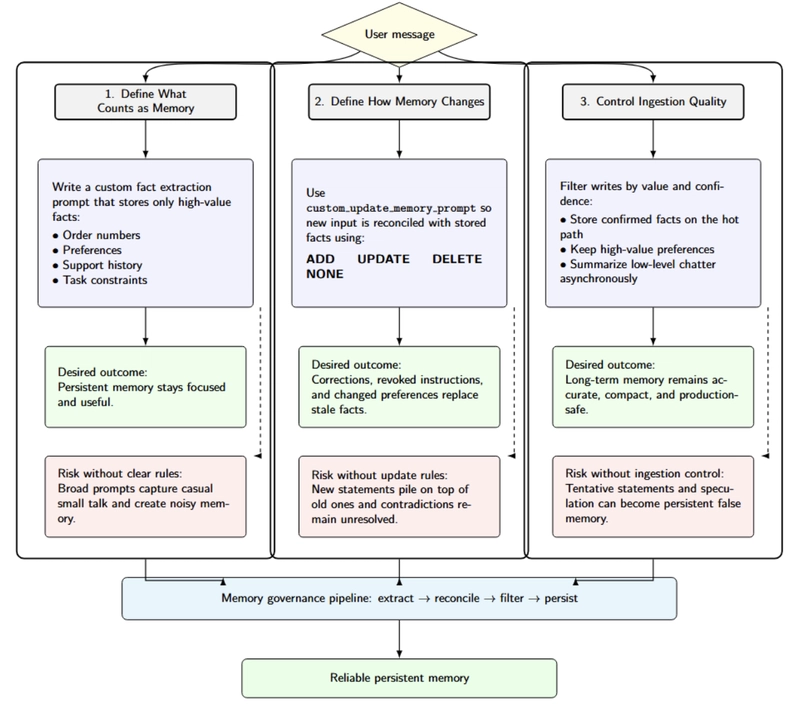
First, define what counts as memory. Mem0’s framework for writing custom fact extraction prompts encourages you to clearly define exactly what facts should be stored. This is valuable if you want order numbers, preferences, support history, or task constraints written to persistent memory, but don’t want casual small talk entering long-term storage. The documentation clearly explains how broad prompts lead to noisy memory.
Second, define how memory changes over time. Mem0 also provides a configurable custom_update_memory_prompt instructing the LLM to choose among ADD, UPDATE, DELETE, or NONE actions when new facts must be reconciled with existing memory. Without this level of instruction, when users correct themselves, change preferences, or revoke earlier instructions, the system will simply layer stale facts on top of each other indefinitely.
Third, control ingestion quality. Uncontrolled writing can store speculation as fact. For example, if an AI assistant stores every user message without filtering, temporary questions, misunderstandings, or incomplete information may become permanent memory entries. This can lead to incorrect assumptions in future interactions. A healthy production practice is to store only verified facts and important preferences in real time, while processing less critical conversational data asynchronously.
Trade‑offs between memory approaches
Integrating long‑term memory into an agent introduces trade‑offs:
- Storage vs latency – storing full conversations allows perfect recall, but comes at the cost of higher storage requirements and latency when retrieving memories. Summarization can reduce storage and increase retrieval at the expense of precision.
- Privacy vs personalization – memory solutions must protect user privacy. Mem0 isolates memories by user ID by scoping them, but you should also consider applying data retention policies and allowing users to delete memories via the API.
- Accuracy vs cost – retrieving too many memories can confuse the LLM, while retrieving too few may leave out critical information. You’ll need to tune max_memories and the relevance threshold for your use case.
- Database choice – a vector database like pgvector, Pinecone, or Weaviate, differs in scalability and cost. Mem0 ships with pgvector in its reference implementation, but you can replace it with a different backend or managed service if you prefer.
Understanding these trade‑offs will help you design a memory system that balances performance, cost, and user experience.
A step-by-step overview of the Mem0–LangGraph integration
Here's a quick-start guide to connect Mem0 to LangGraph. This is a summary of the official documentation with some tips on how to optimize it.
1. Install dependencies
Install the required libraries:
pip install langgraph langchain-openai mem0ai python-dotenv
Create a .env file with your API keys:
OPENAI_API_KEY=sk-your-openai-key
MEM0_API_KEY=your-mem0-key
Set the embedding provider, model, and dimensions based on your preference.
2. Initialize LangGraph and Mem0
Create a State class that holds the conversation messages and a user ID. Initialize StateGraph and define the chatbot node:
import os
from typing import Annotated, TypedDict, List
from dotenv import load_dotenv
from langgraph.graph import StateGraph, START
from langgraph.graph.message import add_messages
from langchain_openai import ChatOpenAI
from langchain_core.messages import SystemMessage, HumanMessage, AIMessage
from mem0 import MemoryClient
load_dotenv()
class State(TypedDict):
    messages: Annotated[List[HumanMessage | AIMessage], add_messages]
    mem0_user_id: str
llm = ChatOpenAI(model="gpt-4o")
mem0 = MemoryClient()  # No API key needed for local/serverless mode
graph = StateGraph(State)
The above code:
- Imports packages necessary for state management, messages, OpenAI chat, and Mem0 memory.
- Loads environment variables from .env.
- Initializes a State object with conversation history and a Mem0 user ID.
- Initializes a GPT-4o chat model and a Mem0 client.
- Creates a LangGraph state graph, which will be used to build the agent workflow.
You will define th*e chatbot* function as shown earlier to search for memories, build context, generate a response, and store the interaction.
3. Build the conversation graph
Add the chatbot node and edges:
graph.add_node("chatbot", chatbot)
graph.add_edge(START, "chatbot")
graph.add_edge("chatbot", "chatbot")
compiled_graph = graph.compile()
The above code builds a basic LangGraph workflow that has the chatbot node set as the starting execution point. It specifies the chatbot function as the primary step to run and then loops back to itself for each turn of conversation; finally graph.compile() translates that graph definition into an executable app.
4. Create a conversation runner
Write a run_connversation function that streams events from the compiled graph:
def run_conversation(user_input: str, mem0_user_id: str):
   config = {"configurable": {"thread_id": mem0_user_id}}
   state = {"messages": [HumanMessage(content=user_input)], "mem0_user_id": mem0_user_id}
   for event in compiled_graph.stream(state, config, stream_mode="values"):
       last_message = event["messages"][-1]
       if isinstance(last_message, AIMessage):
           return last_message.content
# Main interaction loop
def main():
   user_id = input("Enter your user ID: ")
   print("Chatbot ready! Type 'quit' to exit.")
   while True:
       user_input = input("\nYou: ")
       if user_input.lower() == 'quit':
           break
       response = run_conversation(user_input, user_id)
       print(f"Bot: {response}")
The code executes the chatbot, passing the user's message, assembling the root conversation state, and streaming through the compiled LangGraph workflow to receive the AI's response. The main() function creates a basic command-line chat loop, prompting the user for input and displaying the bot's response until the user types to quit.
5. Deploy and monitor
Deploy the agent in your preferred environment. Store memories in a vector database (pgvector, Pinecone, Weaviate, etc). Keep track of memory growth. Adjust cleanup frequencies. Tune retrieval settings to balance personalization, relevance, and system performance.
Production considerations
There are a few things you may want to think about when running a LangGraph+Mem0 agent in production:
| Topic | Main idea | Practical notes |
|---|---|---|
| Vector Database | Mem0 uses SQLite by default for quick testing, but production systems usually need a vector database. | Ensure the database has an index on user_id. Managed options such as Mem0 Cloud can handle this, while self-hosting is also possible. The database choice, such as Qdrant or Pinecone, affects cost, speed, and available features. |
| Data Privacy & Retention | Memory systems store user data, so privacy and retention must be handled carefully. | Encrypt sensitive fields when needed, remove memories after a defined period, and obtain user consent before storing personal data. Mem0 APIs can help delete or export data. DigitalOcean VPC can improve protection for the vector store. |
| Cost & Performance | Adding memory lowers LLM token usage because prompts stay smaller, but it introduces database lookups. | Semantic search is usually very fast and can be batched. Mem0 reports about 90% token savings and 91% lower p95 latency versus a full-context method. Benchmark your own LLM setup to confirm latency. |
| Reliability | The memory database and LangGraph state should be designed for fault tolerance. | Use LangGraph checkpoints to recover from crashes and maintain backups for memory storage. As the vector database grows, monitor usage and plan for scaling. |
| Security | The Mem0 API key and database must be protected. | Restrict write access so only the agent can modify memory. In multi-agent or multi-tenant systems, isolate namespaces to improve security and separation. |
Conclusion
Pairing LangGraph with Mem0 is one potential path towards transitioning from session-based agents to agents with persistent, long-lived memory scoped to individual users. LangGraph offers structured orchestration and short-lived conversation state management, while Mem0 enables persistent semantic memories that can be retrieved across sessions to increase continuity, personalization, and relevance. Carefully architected (e.g., selective extraction and retention, privacy controls, retrieval settings, etc.), this combined approach enables developers to create more powerful agents that remain efficient at scale, without relying on inflated chat history or generic document retrieval.
In addition to local examples, a production-ready memory architecture also requires deployment infrastructure. DigitalOcean's Langchain gradient integration allows connecting LangChain-powered workflows to the Gradient AI Platform. This provides developers with access to various models using GPU-accelerated serverless inference with a path to scale AI apps beyond the prototype phase.