




We tried running Docker inside a microVM. It failed before the first container even started.
The error wasn’t helpful:
cgroup mountpoint does not exist
On a normal EC2 instance, Docker just works. Same binary, same commands. Here, it couldn’t even initialize.
This wasn’t a Docker issue. It wasn’t a kernel bug either. It was something more subtle: we were relying on parts of Linux that weren’t there anymore.
The part nobody thinks about
On a normal Linux system, you don’t start from zero. By the time you SSH into a machine and type docker run, a lot has already happened. You SSH in, run Docker, and it works. If it doesn’t, it’s usually your fault , a wrong command or wrong config.
Here, it didn’t feel like our mistake. It felt like something fundamental was missing. So instead of poking Docker, we started looking at the system itself.
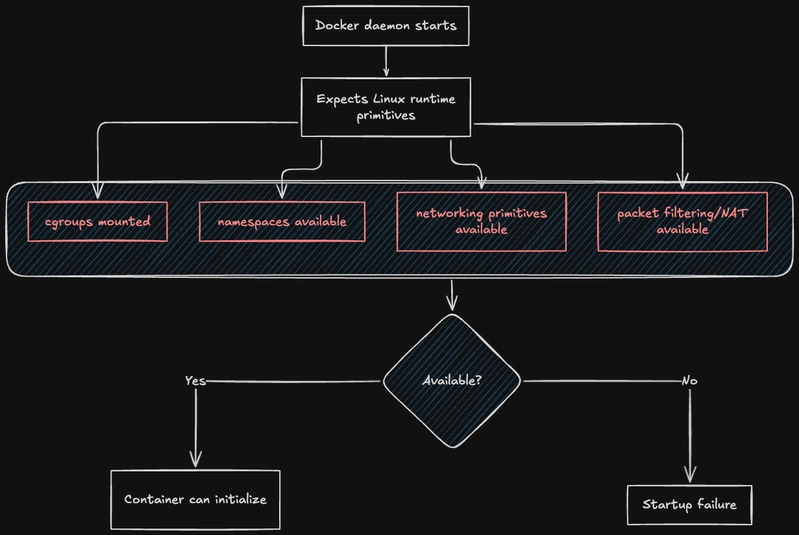
The error mentioned cgroups. So we checked:
ls /sys/fs/cgroup
Nothing useful.
Then:
mount | grep cgroup
Nothing.
That’s when it clicked, this wasn’t misconfigured. It just wasn’t there.
This is where the mental model breaks
On a normal Linux system, /sys/fs/cgroup exists. Always. You don’t create it. You don’t mount it. It’s just… part of the system.
Except it’s not, Something mounts it during boot. You just never see it happen.
Inside the microVM, nothing had done that step so Docker tried to create its cgroup hierarchy, and the kernel basically said: “there’s no interface here”.
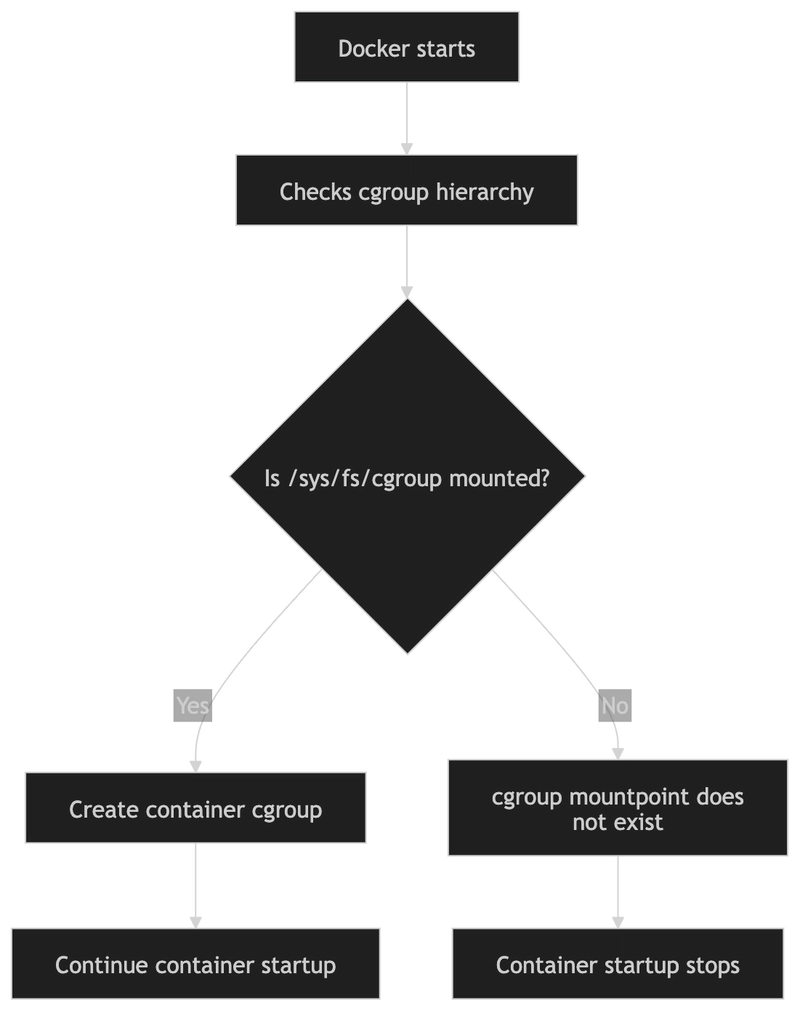
We mounted it manually:
mount -t cgroup2 none /sys/fs/cgroup
Ran Docker again and it got further and ........ then it failed again.
That pattern kept repeating
Fix one thing and then hit the next wall. That’s when the debugging strategy changed for us .
Instead of asking:
“Why is Docker failing?”
We started asking:
“What is Docker assuming exists right now?”
Because clearly, a lot of those assumptions were wrong.
Realizing what systemd normally hides
On a full distro, systemd does a lot of work before you ever log in. You don’t notice it, but it:
mounts
/proc,/sys,/devsets up cgroups
initializes parts of networking
prepares the runtime environment
In a microVM, none of that is guaranteed. There’s no systemd unless you put it there. Which means if something like /proc or /sys is missing or incomplete, nothing fixes it later.
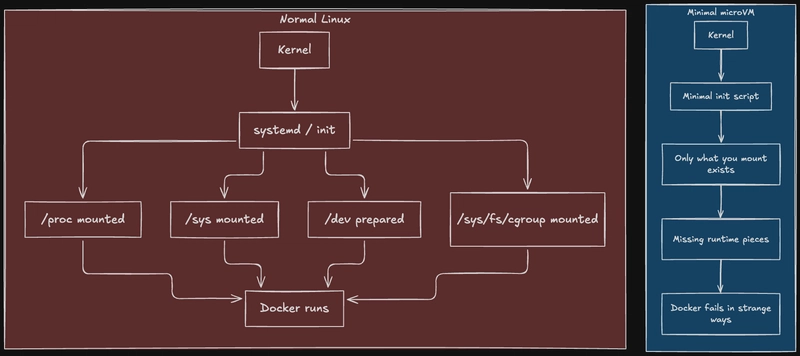
You are effectively writing the boot process. We weren’t thinking about it that way initially. We were treating the microVM like a small server but that assumption kept breaking.
Docker is not as “self-contained” as it looks
Before this, I would’ve said Docker is pretty self-sufficient. It bundles a lot of things, abstracts a lot of complexity. That’s only true at the application layer.
Underneath, it leans heavily on the kernel:
cgroups for resource control
namespaces for isolation
networking primitives
packet filtering
If any of those aren’t wired up properly, Docker doesn’t degrade gracefully. It just stops.
The cgroup issue was just the first place it crashed.
Networking was where things got confusing
After fixing the basic mounts, Docker started initializing containers. Then networking broke.
At that point, it helps to step back and ask a very simple question:
How does a container actually reach the internet?
It sounds obvious, but if you try to answer it precisely, things get fuzzy.
Inside a container:
it has its own IP (something like
172.17.x.x)it doesn’t share the host interface
it’s isolated in its own namespace
So how does a packet actually leave?
Rebuilding that understanding from scratch
We ended up tracing it step by step.
When Docker starts a container, it creates a new network namespace. That part is straightforward, it’s basically a separate network stack. Then it creates a veth pair. One side stays on the host, the other moves into the container.

That gives the container an interface. But it’s still not connected to anything useful.
So Docker plugs the host side into a bridge (docker0). Now containers can talk to each other.
But still no internet........
The last part is NAT. When a packet leaves the container:
it goes through the veth
hits the bridge
gets routed toward the host interface
But the source IP is something like 172.17.x.x, which doesn’t work outside.
So the kernel rewrites it to the host’s IP. That’s what actually lets containers talk to the outside world.
The extra layer we didn’t account for
All of that happens inside a normal VM. In our setup, there was another boundary.
The container was inside a microVM. That VM itself had a virtual NIC, backed by a tap device on the host.
So the path looked like this:
container → bridge → VM eth0 → virtual NIC → host → internet
That’s two networking environments stacked on top of each other. If anything is missing at either level, packets don’t behave the way you expect. And the errors don’t tell you which layer is broken.
Where this goes next
Once Docker got past initialization, it hit this:
iptables: Failed to initialize nft: Protocol not supported
That looks like a small issue. Change a setting, maybe switch a backend. But by this point, it was clear this wasn’t going to be a one-line fix.
That error sits on top of:
how packet filtering works in the kernel
how iptables talks to it
and what your kernel was actually compiled with
That’s where the real debugging started.
The takeaway from Part 1
The biggest shift wasn’t technical. It was mental. We stopped treating the microVM like a normal machine.
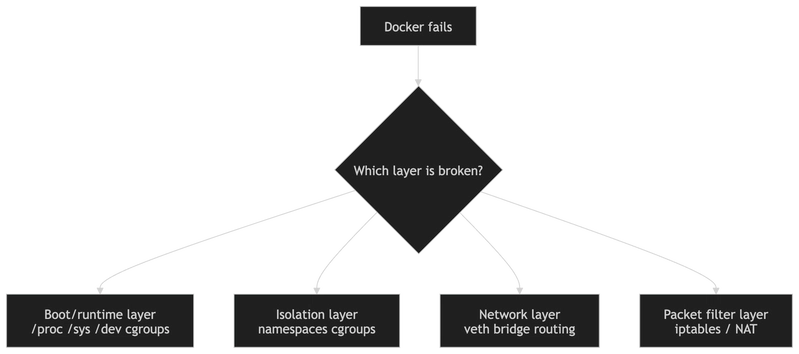
Instead:
nothing is assumed to exist
every layer has to be verified
and every fix reveals the next dependency
You’re not debugging Docker. You’re discovering what a “working Linux environment” actually consists of.
Part 2 is where we will discuss how that mental model pays off, because the iptables failure only makes sense once you see all the layers underneath it.