




The DGRM.net online whiteboard stores data in PNG images. With attachments, the files become large. I’ll explain how data is stored in PNG files.

Fig. 1. DGRM.net opens diagrams from PNG images
PNG file format
A PNG file consists of blocks. These blocks contain various information. For example, the tIME block contains the editing date.
At the end comes the required IEND block. After the IEND, you can append your own data to the file without breaking the image. This is what DGRM uses: it appends its data to the end of the PNG file.
The resulting file looks like this: Figure 2.
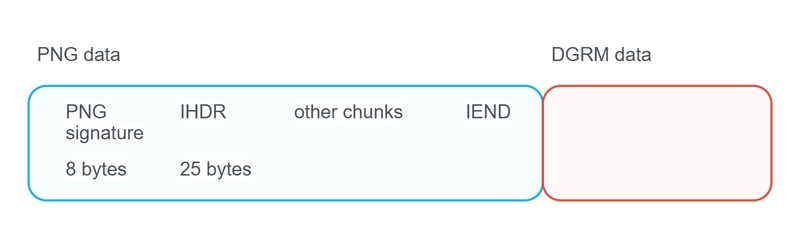
Fig. 2. Image file with DGRM data
PNG block structure — Fig. 3.
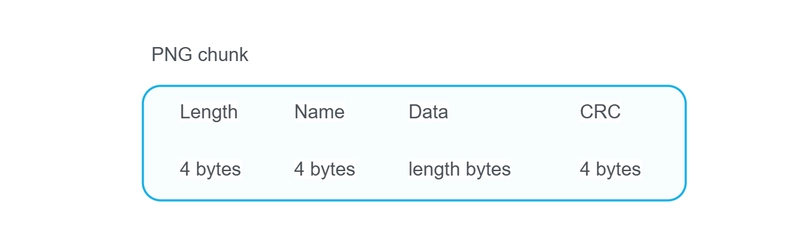
Fig. 3. PNG block structure
Storage in DGRM Data is also organized into blocks, albeit in a slightly different format. The first block is for JSON figures, followed by attachments.
Reading from a file without loading the entire file into memory
You can get a reference to a file on the user’s device using HTMLInputElement. This method will not load the file data into memory (Listing 1).
/**
 * @param {string} accept
 * @param {FileCallback} callBack
 * @param {(evt:Event)=>void} cancelCallBack
 */
const fileInputOpen = (accept, callBack, cancelCallBack) => {
    const input = document.createElement('input');
    input.type = 'file';
    input.multiple = false;
    input.accept = accept;
    input.style.display = 'none';
    document.body.appendChild(input);

    const dispose = () => input?.remove();

    input.oncancel = evt => {
        cancelCallBack(evt);
        dispose();
    };
    input.onchange = () => {
        callBack((!input.files?.length) ? null : input.files[0]);
        dispose();
    };

    input.click();
}
Listing 1. Getting a link to a file
When opening a file, you need to find where the DGRM data begins, i.e., the IEND block.
To search, you need to iterate through the blocks from the beginning of the file to the desired block. However, it’s not advisable to load the entire file into memory.
The pngChunkDataPositionGet function reads only 8 bytes at a time (length + header) and scrolls to the next block until it finds the desired one (Listing 2).
// IEND
const PNG_CHUNK_END_NAME_UINT32 = 1229278788;

/**
 * @param {Blob} pngFile, @param {number} chankNameUint32
 * @returns {Promise<[startBytePosition:number, endBytePosition:number]>}
 */
const pngChunkDataPositionGet = async (pngFile, chankNameUint32) => {
    /** @param {number} pos */
    const uint32Get =
        async pos => uint32From4BytesBlob(pngFile.slice(pos, pos + 4));

    /** @type {number} */ let chunkPosition = 8; // 8 byte - png signature
    /** @type {number} */ let chunkLenght;
    /** @type {number} */ let chunkName;
    /** @type {number} */ let chunkDataStart;
    /** @type {number} */ let chunkDataEnd;

    do {
        chunkLenght = await uint32Get(chunkPosition);
        chunkName = await uint32Get(chunkPosition + 4);
        chunkDataStart = chunkPosition + 8;
        chunkDataEnd = chunkDataStart + chunkLenght;

        if (chunkName === chankNameUint32) {
            return [chunkDataStart, chunkDataEnd];
        }

        chunkPosition = chunkDataEnd + 4;
    } while (chunkName !== PNG_CHUNK_END_NAME_UINT32);

    // looking for end chunk
    if (chunkName === chankNameUint32) {
        return [chunkDataStart, chunkDataEnd];
    }

    return null;
};
Listing 2. Searching for a block in a PNG file
Scrolling large PNGs to the IEND is slow. Therefore, it makes sense to add a custom block at the beginning of the file. In this block, specify the number of bytes to the end of the DGRM Data, i.e., the size of the PNG image without the additional DGRM Data.
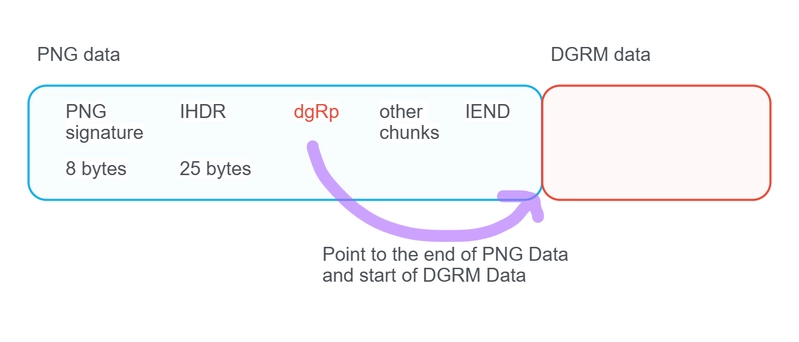
Figure 4. Custom dgRp block at the beginning of the PNG file. Indicates the beginning of the DGRM data
In DGRM Data, the first block is JSON figures, then come the attachment blocks — Fig. 5.
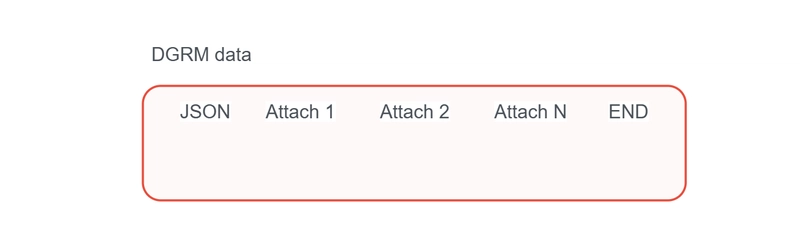
Figure 5. DGRM Data blocks
The JSON block is loaded into memory in its entirety. Attachments are loaded only if they aren’t in the cache.
Attachments can be large, so loading them entirely into memory is also not recommended. More details in the second part of the article.
The second part of the article discusses generating large files in the browser.