


Introduction
If you're getting into data science, data analytics or business intelligence, you've probably heard of Power BI. Power BI is a powerful data visualization tool developed by Microsoft that allows you to turn raw data into interactive dashboards and reports.
But you only make Power BI powerful by feeding data into it. One cannot work perfectly without the other and that`s where SQL databases come in handy.
Businesses connect Power BI directly to their databases to analyze live or updated data.
In this article, we will go through:
- Connecting Power BI to a local PostgreSQL database
- Connecting Power BI to an Aiven PostgreSQL database
- Loading and modeling data
- And lastly why SQL is essential when visualizing with Power BI
Connecting Power BI to a Local PostgreSQL Database
Let’s assume you already have your PostgreSQL database set up with tables like:
customersproductssalesinventory
Step 1: Open Power BI Desktop
Launch Power BI Desktop.
Step 2: Click “Get Data”

From the Home ribbon: Click Get Data
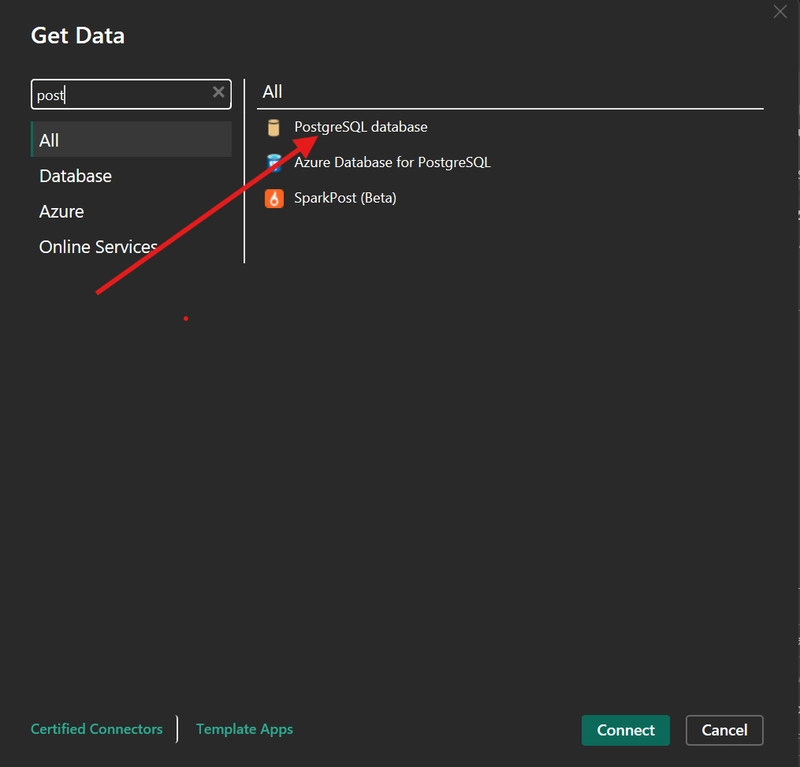
Step 3: Select PostgreSQL Database
Search for PostgreSQL Database and select it.
Step 4: Enter Connection Details
-
Server:
localhost -
Database: your database name (e.g.
assignment)
Click OK
Step 5: Enter Credentials
- Username (e.g.
avaadmin) - Password
Choose Database authentication
Step 6: Load Tables
You’ll now see your tables:
- customers
- products
- sales
- inventory
Select all and click Load
Connecting Power BI to Aiven PostgreSQL (Cloud)
Step 1: Get Connection Details from your Aiven account
From your Aiven dashboard, collect:
- Host
- Port
- Database name
- Username
- Password
Step 2: Download SSL Certificate
Ensure that SSL = require
Download the CA certificate file (.pem).
SSL ensures:
- Data is encrypted
- No one can intercept your connection
- There is secure communication between Power BI and the database
Step 3: Connect in Power BI
We go back to Power BI:
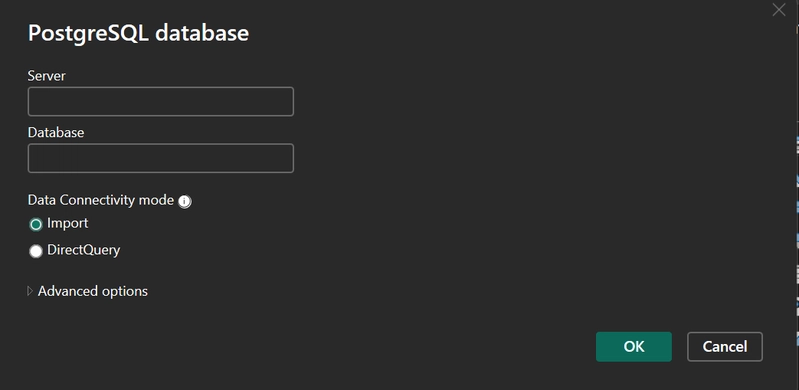
- Server:
host:portExample:
plaintext

  mydb.aivencloud.com:12345
- Database: your database name
Example
defaultdb
Step 4: Advanced Options (SSL)
In some setups, Power BI may require:
- Enabling SSL mode
- Referencing the certificate file
Step 5: Authenticate and Load Data
Use your Aiven credentials, connect and proceed to Click Load
Loading and Modeling Your Data
After loading:
Assume these is your tables,
- customers
- products
- sales
- inventory
Power BI will show them in the Model view
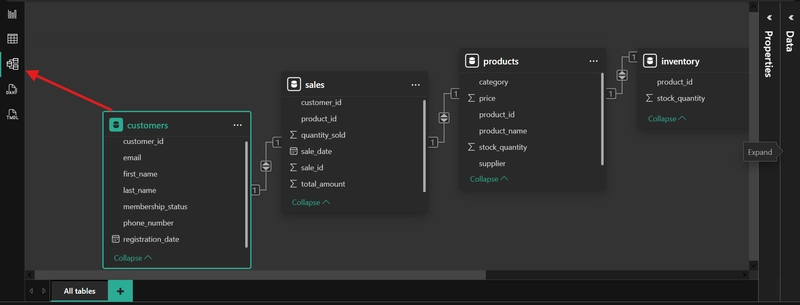
In the above tables if you select a customer, Power BI can show:
- Their purchases
- Total spending
- Products bought
Understanding Data Modeling
Think of data modelling like this:
- Customers -> Who buys
- Products -> What is sold
- Sales -> the transactions that happened in between
- Inventory -> What’s in stock that available to be sold
The sales table acts as the bridge connecting everything.
This is called a star schema, and it’s widely used in analytics.
Importance of SQL for Power BI Analysis
Power BI is a great visualization tool but it is SQL that makes it more powerful.
Importance of SQL:
- Retrieve data efficiently
- Filter large datasets
- Perform aggregations (SUM, AVG, COUNT)
- Clean and prepare data before visualization
Example from your dataset:
sql

SELECT customer_id, SUM(total_amount) AS total_spent

FROM sales

GROUP BY customer_id;
This helps you:
- Identify top customers
- Build dashboards faster
Real-World Use Case
Using your tables:
- Find top-selling products
- Analyze customer spending behavior
- Track inventory vs sales
-
Build dashboards:
- Sales trends
- Customer segmentation
- Product performance