


Real-time applications often start with a simple promise: push data from the server to the client as it happens. You install Socket.IO, set up a namespace, and start calling socket.emit(). It works perfectly in development and even in early production with a few dozen clients. But as you scale to hundreds or thousands of concurrent users, things start to break in ways that aren't immediately obvious.
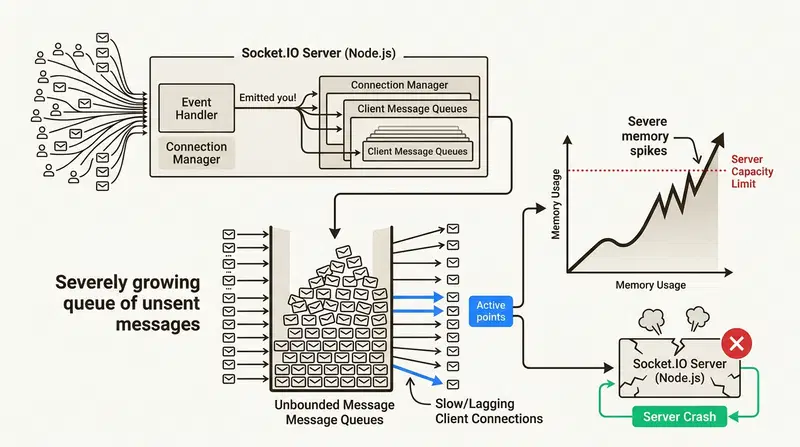
You might notice your Node.js process memory usage slowly climbing. Then it spikes. Eventually, the process crashes with an out-of-memory error. You check your logs and see nothing but the aftermath of a restart. The culprit isn't usually a classic memory leak in your code. It's often unbounded queue growth.
The problem with silent failures in production
The core of the issue is how Socket.IO handles data delivery. When you call socket.emit(), the library attempts to send the message over the current transport (usually WebSockets). If the client is on a slow mobile connection or the browser's main thread is blocked, the message can't be sent immediately.
Socket.IO handles this by buffering outgoing packets in memory when they cannot be sent immediately. Here's the catch: calling socket.emit() does not mean the client has already received or processed the message. It only schedules the packet through Socket.IO's transport path. In a high-frequency environment like a stock ticker or a live feed, you might be pushing 50 messages per second. If a slow client can only keep up with 10 messages per second, the remaining messages can accumulate in the server's memory unless your application has its own delivery control, queue limits, or overflow policy.
Multiply this by a thousand clients on varying network qualities, and you have a recipe for disaster. The server holds onto these messages indefinitely, leading to massive memory spikes and garbage collection thrashing. Socket.IO gives you the transport, but it doesn't give you delivery control.
What backpressure actually means for WebSockets
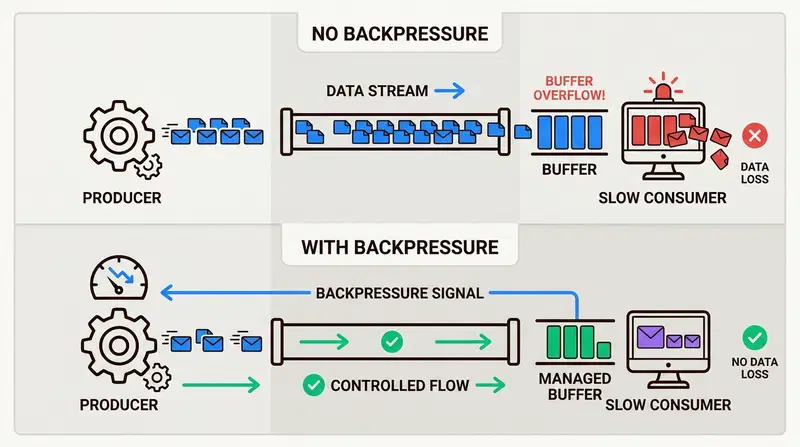
Backpressure is the mechanism by which a slow consumer signals to a producer that it needs to slow down. It's a feedback loop that prevents a system from being overwhelmed.
In a WebSocket context, implementing backpressure means having:
- Per-client queue limits: A cap on how many messages or bytes can be queued for a single user.
- Overflow policies: A defined decision on what to do when that cap is hit - drop the oldest data, reject new messages, or spill to disk.
- Visibility: Metrics that show you exactly which clients are lagging and which queues are filling up.
Node.js developers are usually familiar with backpressure in the context of streams. When you use .pipe(), the stream handles the drain event automatically to keep memory usage stable [Source: https://medium.com/@jayphelps/backpressure-explained-the-flow-of-data-through-software-2350b3e77ce7]. However, Socket.IO's event-based architecture doesn't natively enforce this logic at the application layer. You are responsible for deciding what happens when the buffer fills up.
The naive DIY attempt at flow control
When developers first encounter this problem, they often try to roll their own solution. A common pattern involves keeping a manual Map of queues for every connected client.
// naive approach, unbounded in-memory queue per client
const clientQueues = new Map<string, unknown[]>();

io.on('connection', (socket) => {
  clientQueues.set(socket.id, []);

  socket.on('disconnect', () => {
    clientQueues.delete(socket.id);
  });
});

function publish(event: string, data: unknown) {
  for (const [socketId, queue] of clientQueues) {
    queue.push(data);
    // who drains this? what if the client is gone? what's the limit?
  }
}
This looks simple, but it's riddled with production-stopping gaps. There is no queue size limit, so you're still at risk of an OOM crash. There is no overflow policy, which means you have to manually code the logic for dropping messages when the queue is full.
Even worse, this approach lacks any observability. You can't see your queue depth in Prometheus, making it impossible to set up alerts before a crash happens. It also doesn't account for critical messages that must be delivered at least once. You could build a robust version of this - it takes weeks of engineering effort and careful edge-case handling. Most teams still miss the retry path for reliable delivery.
Is there no way to limit the receiving buffer size and drop old messages?
streamfence-js: drop-in delivery control for Socket.IO
streamfence-js fills this specific gap in the Node.js ecosystem. Instead of rewriting your transport layer or switching to a different framework, you wrap your existing Socket.IO server with a delivery control layer.
It does not replace Socket.IO. Socket.IO still handles the transport, connection lifecycle, and reconnection behavior. streamfence-js adds the delivery-control layer on top: per-client queue limits, overflow policies, retry behavior, and observability.
You don't need to change your client-side transport logic. You just define how you want your data delivered.
npm install streamfence-js
BEST_EFFORT delivery for high-frequency feeds
For data like price tickers or sensor feeds, you usually care more about the latest value than ensuring every single historical tick arrives. BEST_EFFORT mode lets you set a message limit and drop the oldest data when a client falls behind.
import { StreamFenceServerBuilder, NamespaceSpec } from 'streamfence-js';

const server = new StreamFenceServerBuilder()
  .host('0.0.0.0')
  .port(3000)
  .namespace(
    NamespaceSpec.builder('/feed')
      .topic('prices')
      .deliveryMode('BEST_EFFORT')
      .maxQueuedMessagesPerClient(100)
      .overflowAction('DROP_OLDEST')
      .build()
  )
  .buildServer();

await server.start();

// Your app just calls publish - the library handles queuing, drain, and overflow
server.publish('/feed', 'prices', { AAPL: 189.42 });
AT_LEAST_ONCE delivery for critical alerts
When you're sending order confirmations or critical system alerts, AT_LEAST_ONCE mode ensures messages are acknowledged by the client. If an acknowledgement doesn't arrive within the timeout, the server automatically retries.
const server = new StreamFenceServerBuilder()
  .host('0.0.0.0')
  .port(3001)
  .namespace(
    NamespaceSpec.builder('/alerts')
      .topic('order-confirmed')
      .deliveryMode('AT_LEAST_ONCE')
      .maxRetries(5)
      .ackTimeoutMs(3000)
      .overflowAction('SPILL_TO_DISK') // messages persist to disk if queue fills
      .build()
  )
  .buildServer();
On the client side, your code emits an ack event back to confirm receipt:
// client
socket.on('order-confirmed', (envelope) => {
  // handle the message
  socket.emit('ack', { topic: envelope.metadata.topic, messageId: envelope.metadata.messageId });
});
The library handles the rest automatically:
- Per-client queues: Each user gets their own isolated queue with configurable byte and message limits.
- Non-blocking drain: Messages are drained via a microtask queue, keeping the event loop responsive.
-
Five overflow actions:
DROP_OLDEST,REJECT_NEW,COALESCE,SNAPSHOT_ONLY, andSPILL_TO_DISK. - Spill to disk: When memory pressure is high, excess messages are written to disk via async non-blocking I/O and transparently recovered once the in-memory queue drains.
The two-server pattern for production stability
A practical architectural choice is running two separate StreamFence servers within the same Node.js process - one for high-frequency best-effort traffic, one for low-frequency reliable traffic.
// feed server - high frequency, loss tolerant
const feedServer = new StreamFenceServerBuilder()
  .port(3000)
  .namespace(NamespaceSpec.builder('/prices').topic('tick').deliveryMode('BEST_EFFORT').build())
  .buildServer();

// control server - low frequency, must deliver
const controlServer = new StreamFenceServerBuilder()
  .port(3001)
  .namespace(NamespaceSpec.builder('/alerts').topic('alert').deliveryMode('AT_LEAST_ONCE').build())
  .buildServer();

await Promise.all([feedServer.start(), controlServer.start()]);
Mixing these workloads on a single port causes reliable-path queue pressure to affect broadcast latency. Separating them lets you tune each server independently for its workload.
Observability out of the box with Prometheus
You can't manage what you can't measure. streamfence-js integrates with your existing prom-client setup - no extra port required.
Pass your existing Prometheus registry in. streamfence-js registers its counters there. Mount the route wherever you want.
import { register } from 'prom-client';
import { PromServerMetrics } from 'streamfence-js';

const server = new StreamFenceServerBuilder()
  .metrics(new PromServerMetrics(register)) // your existing registry
  .buildServer();

// Mount on your existing Express app - no extra port
app.get('/metrics', async (req, res) => {
  res.set('Content-Type', register.contentType);
  res.end(await register.metrics());
});
Metrics exposed:
-
streamfence_messages_published_total- total outbound messages -
streamfence_queue_overflow_total- labeled by reason (DROP_OLDEST,REJECT_NEW, etc.) -
streamfence_messages_retried_total- insight into network instability -
streamfence_messages_spilled_total- how often you're hitting disk during traffic spikes
Integrates directly with your existing Grafana dashboards. If you have multiple prom-client registries, just pass the right one in.
Final thoughts
Socket.IO remains one of the best tools for WebSocket transport in Node.js. It's mature, handles reconnections well, and has wide browser support. But it is a transport library, not a delivery control system - it won't protect you from running out of memory when clients are slow.
streamfence-js is that missing layer. Per-client queues, overflow policies, retry, and Prometheus - drop-in, no architectural rewrite required.
npm install streamfence-js
Full docs: github.com/MoshPe/StreamFenceJs
In the next post, we’ll take a deeper look at SPILL_TO_DISK: how async disk persistence works, when to use it, and what trade-offs it introduces under extreme load.