





What I Built
I built a fully automated daily campaign‑letter summarizer running on an Azure VM using OpenClaw. Every morning at 9am, my AI agent scans a folder of campaign letters, summarizes them, and writes a clean daily report.
The most interesting part?
I didn't write any .claw files, YAML, or Python glue code manually.
Instead, I discovered that OpenClaw can create skills and cron tasks directly through conversation, which turned out to be the most reliable way to build automation.
This project became my first step toward a "one‑person AI company", a system that runs tasks for me automatically, every day.
How I Used OpenClaw
1. Setting Up the Azure VM
I deployed an Ubuntu VM on Azure to host OpenClaw. This gave me a stable, always‑on environment for scheduled tasks.
2. Installing WSL + Ubuntu
Inside the VM, I used WSL to create a clean Ubuntu environment.
This kept OpenClaw isolated and easy to reset.
wsl --install
3. Installing OpenClaw
I installed OpenClaw using the official script:
curl "fsSL https://get.openclaw.ai/install.sh | bash
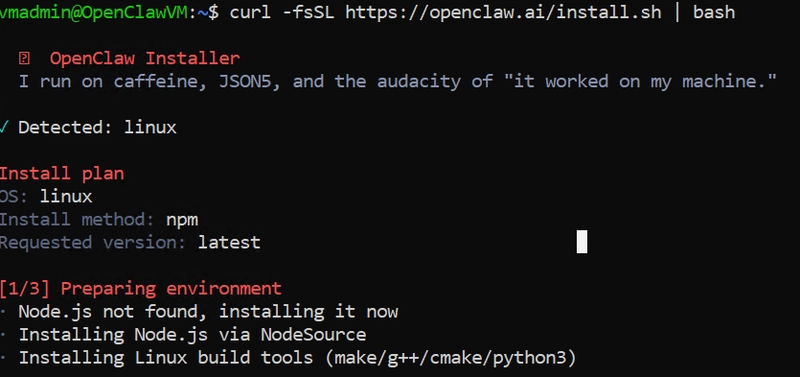
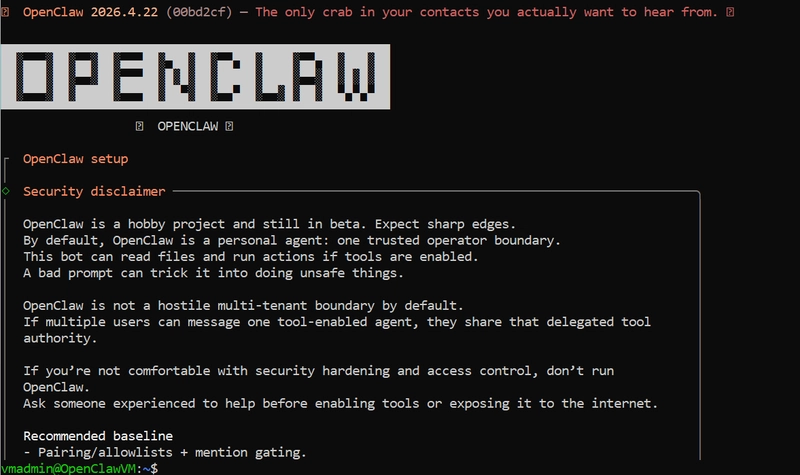
Then launched the TUI:
openclaw tui
This dropped me into the interactive agent environment.
4. Upgrading Ollama to Cloud Pro
Free Ollama API key caused authentication and provider errors.
Switching to Ollama Cloud Pro solved everything instantly (I paid for a month for this POC (˵ ͡° ͜ʖ ͡°˵)).
My agent now runs on:
ollama/kimi-k2.5:cloud
Then in TUI:
/model ollama/kimi-k2.5:cloud
5. Creating the Skill (Just by Asking)
At first, I tried to follow the docs and create skills manually-writing Python files and placing them under:
~/.openclaw/workspaces/main/skills/
Those never loaded properly in my environment.
The real breakthrough came when I stopped fighting the filesystem and simply asked the agent in chat:
"Create the skill that summarizes campaign letters from a folder."
and showed him the example:
from claw import skill
import os

@skill
def summarize_campaign_letters(folder: str = "~/openclaw/campaign_letters"):
    folder = os.path.expanduser(folder)
    summaries = []

    for filename in os.listdir(folder):
        path = os.path.join(folder, filename)
        if not os.path.isfile(path):
            continue

        with open(path, "r", encoding="utf-8") as f:
            content = f.read()

        summary = skill.llm(
            f"Summarize the following campaign letter in 5 bullet points:\n\n{content}"
        )

        summaries.append(f"## {filename}\n{summary}\n")

    if not summaries:
        return "No campaign letters found."

    return "\n".join(summaries)
Then OpenClaw generated the "skill", and the /skill command just worked:
/skill summarize_campaign_letters "~/openclaw/campaign_letters"
Under the hood, the Python script that actually runs lives at:
~/.npm-global/lib/node_modules/openclaw/skills/summarize-campaign-letters/scripts/summarize.py
6. Creating the Daily Automation (Cron via Chat)
My agent didn't have a /schedule command, so OpenClaw offered to create a cron job instead.
I simply chatted:
Yes, create one.
Daily summary at 9am
run /skill summarize_campaign_letters
OpenClaw generated the cron entry automatically.
Reminder: Gateway is running but in read-only mode. The cron job needs write capability to create jobs.
Now every morning at 9am (HKT), the agent runs:
/skill summarize_campaign_letters
and writes the output into my reports folder.
Demo
Here's how the system behaves:
" I place text files into the ~/openclaw/campaign_letters folder
" At 9am, the cron job runs
" OpenClaw summarizes each letter
" A new campaign"summary.md appears in my reports folder
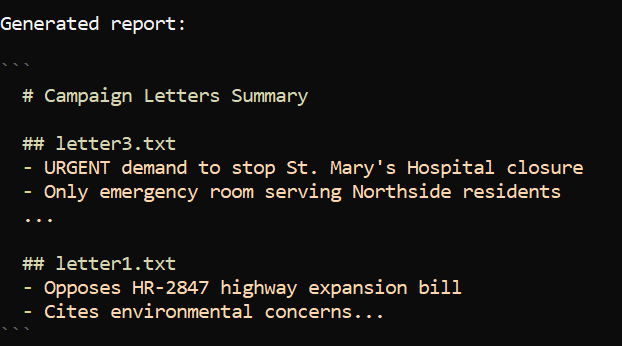
This can easily be extended to:
" Email delivery
" Slack notifications
" PDF OCR
" Multi‑step workflows
But even the basic version already saves me time every morning.
What I Learned
1. Chat‑Driven Creation Beats Manual Files
I tried to manually place Python skills under ~/.openclaw/workspaces/main/skills/ and reload them. That path, plus bootstrap and loading behavior, made things fragile.
Simply describing what I wanted in natural language and letting the agent use its own skill-creator flow was:
- Faster
- More robust
- Less error‑prone
2. Cron Is the Real Scheduler in My Setup
My agent didn't have /schedule, but it did know how to:
- Inspect existing cron jobs
- Propose new ones
- Write them for me
So instead of fighting for a missing command, I let the agent set up cron directly.
3. You Can Build Real Automation with Zero Manual Code
The most surprising part:
I ended up with a working, daily automation system without manually writing:
-
.clawfiles - Schedules
- Skill boilerplate
I just described what I wanted, answered questions, and let OpenClaw wire everything together.
ClawCon Michigan
I didn't attend ClawCon Michigan, but I followed the event online and enjoyed seeing how others used OpenClaw creatively. This challenge pushed me to build something practical and automated, and I'm glad I did.
Love AI!