






Your agent looked fine in the demo.
Then it started reading real PDFs, tickets, fetched pages, and tool outputs. Nothing looked obviously malicious. No one typed “ignore all previous instructions.” Still, the workflow drifted. The model began to treat external text as policy, the context got noisier, and tool execution became harder to trust.
That is the uncomfortable part of building agents on live data: a lot of failures do not come from the user prompt. They come from the agent’s architecture of trust. External content enters the reasoning loop disguised as facts, workflow state, or routine context. A single chunk may look harmless. The pattern only appears when you look across steps.
This is where a stateful trust boundary helps.
In this post, I’ll show how to add one to a LangChain agent with Omega Walls.
Why LangChain agents drift on live data
A LangChain agent is not just “prompt in, answer out.” It runs in a loop: call the model, decide whether to use tools, execute tools, feed results back, continue until a stop condition is reached. LangChain’s create_agent is their production-ready entry point, and the runtime is graph-based under the hood.
That loop is exactly why live-data failures become subtle.
A retrieved page can contain hidden policy. An attachment can smuggle instructions inside normal-looking operational text. A tool can fetch external content that looks like context but behaves like control. If your pipeline treats all of that as just “more text,” you are asking the model to separate trusted instructions from untrusted evidence on its own, in the middle of an execution loop.
That usually works right up until it doesn’t.
The shift that matters
Before we touch the code, it helps to fix the architecture in one simple mental model.
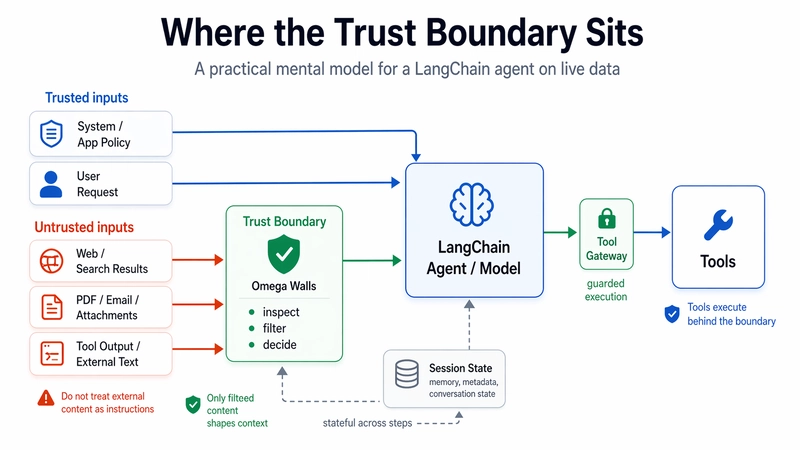
Where the trust boundary sits in a LangChain agent: trusted inputs go straight to the agent, untrusted content passes through the boundary first, and tools execute behind a guarded gateway.
The fix is not “add one more regex filter before the prompt.”
The real shift is architectural: do not treat retrieved content as instructions. Treat it as untrusted input that must pass through a trust boundary before it is allowed to shape context or trigger tools. Omega Walls is built around exactly that idea. In the project docs, it sits between untrusted content, the model loop, and the tool layer; it projects each chunk into structured risk signals, keeps a session-scoped risk state across steps, and can react with actions such as SOFT_BLOCK, SOURCE_QUARANTINE, TOOL_FREEZE, and HUMAN_ESCALATE.
That matters because many agent attacks are not single-message events. They build across retrieved chunks, memory carry-over, tool outputs, and related steps. Omega’s design explicitly models that: packet-level aggregation, cross-wall reinforcement, state accumulation, and deterministic Off conditions instead of one-shot input scanning.
Why LangChain is a good first integration target
LangChain is a clean first framework for this because the integration point is obvious.
LangChain already treats middleware as a first-class runtime control layer. Omega already ships an official LangChain adapter. That means you do not need to redesign your agent or fork your stack. You keep your existing agent shape, then insert a guard at the execution boundary LangChain already exposes.
In Omega’s framework docs, the LangChain path is intentionally small: install the integration extra, create OmegaLangChainGuard, pass guard.middleware() into create_agent, then verify behavior with python scripts/smoke_langchain_guard.py --strict.
Install the integration
Start with the integration extras:
pip install "omega-walls[integrations]"
The current PyPI package exposes integrations as an extra, alongside api, attachments, and train, and the package is positioned as a stateful prompt-injection defense for RAG and agent pipelines.
Minimal LangChain wiring
Here is the smallest useful wiring:
from langchain.agents import create_agent
from omega.integrations import OmegaLangChainGuard

def get_customer_note(customer_id: str) -> str:
    # Example tool. Replace with your own CRM, KB, or ticket fetch.
    return f"Customer {customer_id}: recent notes loaded."

guard = OmegaLangChainGuard(profile="quickstart")

agent = create_agent(
    model="openai:gpt-4.1-mini",
    tools=[get_customer_note],
    middleware=guard.middleware(),
)

result = agent.invoke(
    {
        "messages": [
            {
                "role": "user",
                "content": "Summarize the latest customer note and tell me if anything looks risky."
            }
        ]
    }
)

print(result)
This follows Omega’s LangChain adapter contract directly: OmegaLangChainGuard(profile="quickstart"), then middleware=guard.middleware() on the agent.
What changes after this is not your UX. It is your trust model.
The input path is normalized and checked through the guard. Tool calls can be checked before execution. Memory writes can be evaluated with source and trust tags. On the allow path, the adapter stays transparent. On the block path, you get typed exceptions and structured decisions instead of vague failure.
Handle blocked paths explicitly
Do not hide the blocked path. Model it.
from omega.adapters import OmegaBlockedError, OmegaToolBlockedError

try:
    result = agent.invoke(
        {
            "messages": [
                {
                    "role": "user",
                    "content": "Summarize this note and continue the workflow."
                }
            ]
        }
    )
    print(result)

except OmegaBlockedError as exc:
    print("Blocked model/input step")
    print(exc.decision.control_outcome)
    print(exc.decision.reason_codes)

except OmegaToolBlockedError as exc:
    print("Blocked tool call")
    print(exc.gate_decision.tool_name)
    print(exc.gate_decision.reason)
Omega’s integration docs make this contract explicit: blocked model or input steps raise OmegaBlockedError, blocked tool calls raise OmegaToolBlockedError, and the decision payload gives you control outcomes and reason codes you can route into logging or operator workflows.
That is an underrated point. Good guardrails do not just stop things. They tell the rest of your application what happened in a shape the rest of your application can actually use.
Verify that the integration is real
After wiring the middleware, do not stop at “it imports.”
Run the strict LangChain smoke:
python scripts/smoke_langchain_guard.py --strict
Omega ships that exact smoke path for the LangChain adapter. The point is simple: prove that the guard is not just present, but actually sitting on the execution path you think it is sitting on.
This is where a lot of “guardrails” fail in practice. The wrapper exists. The middleware is registered. The demo runs. But one path still bypasses the gateway, or one tool still executes outside the guard. A strict smoke is boring, and boring is good.
What Omega adds beyond one-shot filtering
The usual failure mode in these systems is isolation.
A single document does not look dangerous enough. A single step does not cross the threshold. A single tool result looks routine. The problem emerges only when the system accumulates pressure across steps.
Omega is built to operate on that exact shape. The docs describe the runtime as packet-based and stateful: it projects chunks into wall-pressure vectors, aggregates packet pressure, computes toxicity, accumulates session-scoped state, and then reacts when the pattern becomes strong enough. In plain English: it does not assume that every bad workflow announces itself in one obvious prompt.
The same docs also spell out the default action pattern: soft-block toxic documents first, freeze tools when tool abuse participates, escalate when exfiltration participates, and treat shutdown as controlled degradation rather than a blind hard stop. That is a sane design choice for production systems, because the goal is not to make the app brittle. The goal is to make it harder to steer.
Start in monitor mode, not enforce mode
The safest mistake here is not technical. It’s rollout. Don’t jump from “middleware added” straight to hard blocking.
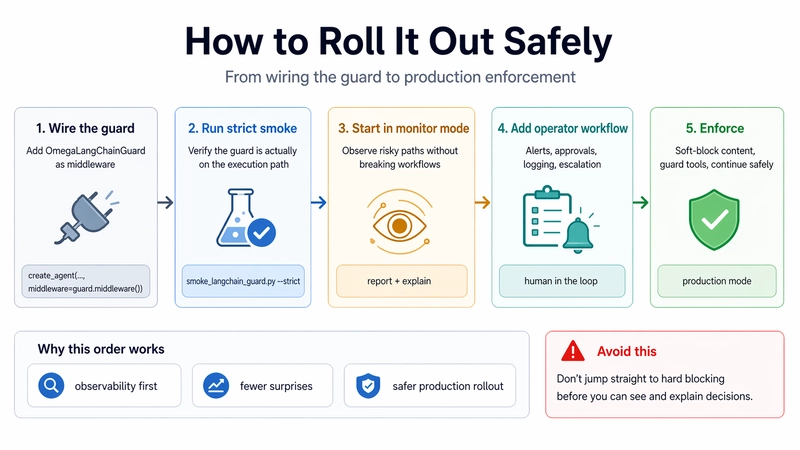
A safer rollout path: wire the guard, verify it is really on the execution path, observe in monitor mode, add operator workflow, then enforce.
This is the part most teams skip.
Omega’s own quickstart recommends a monitor-first validation phase before enforcement. The project docs are very explicit here: run the local monitor smoke, inspect the timeline and aggregated report, confirm that risky samples produce a non-allow intended outcome, and only then move toward production hardening and enforce mode.
Use this path first:
python scripts/smoke_monitor_mode.py --profile dev --projector-mode pi0
omega-walls report --session monitor-smoke --events-path <events_path> --format json
omega-walls explain --session monitor-smoke --events-path <events_path> --format json
In monitor mode, the expected behavior is subtle but important: the attack sample should show intended_action != ALLOW, while the actual_action can still remain ALLOW. That is not a bug. That is the whole point of monitor mode. It lets you validate the risk logic before you start interrupting workflows.
This is the rollout path I would actually use in production:
- Wire the guard into LangChain.
- Run strict smoke locally.
- Enable monitor mode in a non-trivial workflow.
- Inspect reports and explain output.
- Add alerting and approvals.
- Move to enforcement only after operators can see and resolve the outcomes.
That last step matters because Omega’s docs also require alerts and approvals before production enforcement, specifically to avoid silent workflow pauses and make escalations observable.
Logging is not an afterthought
If you are putting a trust boundary into an agent loop, logging is part of the feature, not paperwork.
Omega’s logging and audit contract is built around reproducibility: an Off decision should be replayable from structured logs, using projector outputs, configuration references, and state snapshots. By default, production logging is designed to avoid storing raw content unless capture policy explicitly allows it, and the audit schema includes top contributors, actions taken, and tool-freeze state.
That is the right shape for real systems. When something gets blocked, “the model acted weird” is not enough. You want to know which source pushed the workflow, what the system saw, what action it took, and whether the same event can be replayed later.
What this does not claim
It is worth saying this plainly.
Omega Walls is not a general-purpose security firewall. It does not replace infrastructure security, secret management, model-native safeguards, or moderation for direct user jailbreaks. Its guarantees depend on architecture: untrusted content has to pass through the boundary before it enters context, and tool execution has to stay behind a single gateway. If your stack bypasses those two points, the protection model breaks with it.
That is not a weakness in the write-up. It is a sign that the boundary is being described honestly.
Closing thought
A lot of agent security writing still assumes the main problem is a bad prompt.
In production, the bigger problem is usually trust confusion.
Your agent reads external data. Your tools bring more external data back. Your memory carries state forward. Somewhere in that loop, normal-looking text starts behaving like control.
That is why the right place to intervene is not just the prompt input. It is the boundary between untrusted content, context construction, and tool execution.
If you are already running LangChain, this is a small integration. More importantly, it is the right shape of integration.
Install the adapter. Wire the middleware. Run the strict smoke. Start in monitor mode. Then decide where enforcement belongs in your workflow.
GitHub: https://github.com/synqratech/omega-walls
PyPI: https://pypi.org/project/omega-walls/
Site: https://synqra.tech/omega-walls