








If you've followed along from Part 1, we have built five separate scanning
workflows. This final part replaces them with a single unified pipeline —
one YAML file, one run, everything in the right order.
The pipeline structure
The five individual workflow files are deleted and replaced with one:
.github/workflows/devsecops-pipeline.yml
name: DevSecOps Pipeline

on:
  push:
    branches: ["**"]
  pull_request:
    branches: ["**"]

jobs:

  secret-scan:
    name: Secret Scanning - Gitleaks
    runs-on: ubuntu-latest
    steps:
      - uses: actions/checkout@v4
        with:
          fetch-depth: 0
      - name: Run Gitleaks
        uses: gitleaks/gitleaks-action@v2
        env:
          GITHUB_TOKEN: ${{ secrets.GITHUB_TOKEN }}

  sast:
    name: SAST - Bandit
    runs-on: ubuntu-latest
    needs: secret-scan
    steps:
      - uses: actions/checkout@v4
      - uses: actions/setup-python@v5
        with:
          python-version: '3.11'
      - name: Install Bandit
        run: pip install bandit
      - name: Run Bandit
        run: bandit -r app.py --severity-level high -f json -o bandit-report.json
      - name: Upload Report
        uses: actions/upload-artifact@v4
        if: always()
        with:
          name: bandit-report
          path: bandit-report.json

  sca:
    name: SCA - pip-audit
    runs-on: ubuntu-latest
    needs: secret-scan
    steps:
      - uses: actions/checkout@v4
      - uses: actions/setup-python@v5
        with:
          python-version: '3.11'
      - name: Install pip-audit
        run: pip install pip-audit
      - name: Run pip-audit
        run: pip-audit -r requirements.txt -f json -o pip-audit-report.json
      - name: Upload Report
        uses: actions/upload-artifact@v4
        if: always()
        with:
          name: pip-audit-report
          path: pip-audit-report.json

  iac:
    name: IaC - Checkov
    runs-on: ubuntu-latest
    needs: secret-scan
    steps:
      - uses: actions/checkout@v4
      - uses: actions/setup-python@v5
        with:
          python-version: '3.11'
      - name: Install Checkov
        run: pip install checkov
      - name: Run Checkov
        run: checkov -d terraform/ -o json > checkov-report.json
      - name: Upload Report
        uses: actions/upload-artifact@v4
        if: always()
        with:
          name: checkov-report
          path: checkov-report.json

  container-scan:
    name: Container Scan - Trivy
    runs-on: ubuntu-latest
    needs: [sast, sca, iac]
    steps:
      - uses: actions/checkout@v4
      - name: Build Docker image
        run: docker build -t devsecops-demo:${{ github.sha }} .
      - name: Run Trivy
        uses: aquasecurity/trivy-action@master
        with:
          image-ref: devsecops-demo:${{ github.sha }}
          format: json
          output: trivy-report.json
          severity: CRITICAL,HIGH
          exit-code: 1
      - name: Upload Report
        uses: actions/upload-artifact@v4
        if: always()
        with:
          name: trivy-report
          path: trivy-report.json
The logic is deliberate:
- Secret scanning runs first. If credentials are found in the code, nothing else runs. There's no value in scanning code that's already compromised.
- SAST, SCA, and IaC run in parallel after secrets pass. These are independent checks — no reason to run them sequentially. Running in parallel keeps the pipeline fast.
- Container scanning runs last. It only runs if the three parallel scans all pass. If the code has known vulnerabilities, there's no point building and scanning the image.
What the pipeline run looks like
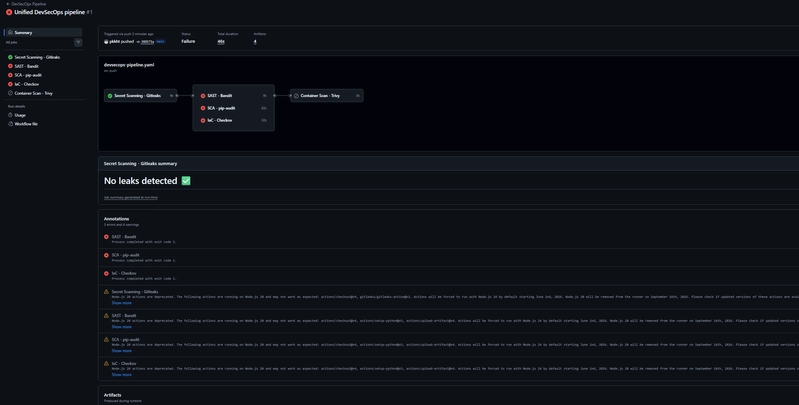
Secret Scanning passed — no leaks detected. SAST, SCA, and IaC all failed
because the demo app is deliberately broken. Container Scan was skipped.
That skipped Trivy stage is worth explaining. It's not a failure — it's the pipeline working correctly. GitHub Actions skips a job when its dependencies fail. Trivy needed Bandit, pip-audit, and Checkov to all pass before it would run. They didn't, so it didn't. There's no point scanning a container image built from code you already know is vulnerable.
In a real project where the code is clean, all five stages would run and the pipeline would either pass completely or fail at Trivy if the image has CVEs.
What this pipeline catches
Across the five parts of this series, the pipeline found:
- Secrets — AWS access keys hardcoded in app.py, caught before commit and at push time
- Code vulnerabilities — SQL injection, eval() on user input, debug=True in Flask, all flagged by Bandit
- Vulnerable dependencies — 37 known CVEs across 6 packages in requirements.txt, caught by pip-audit
- Infrastructure misconfigurations — 18 failed Checkov checks including a public S3 bucket, unencrypted EBS, and no IMDSv2 enforcement
- Container CVEs — 1,747 vulnerabilities in the Docker image, 185 of them CRITICAL, caught by Trivy
None of this required a security expert. Each tool is open source, free,
and wired into a standard GitHub Actions workflow.
What this pipeline doesn't catch
- DAST — Dynamic Application Security Testing scans a running application for vulnerabilities. Nothing here does that. Tools like OWASP ZAP fill this gap.
- Runtime security — once the container is running in production, nothing here monitors it. Tools like Falco watch for suspicious behaviour at runtime.
- Secrets in git history — Gitleaks scans current files and recent commits. A secret committed years ago and deleted may still be in history.
- Logic flaws — no static analysis tool catches business logic vulnerabilities. Those require manual review.
The repo
Everything built across this series is at
https://github.com/pkkht/devsecops-demo — the vulnerable Flask app, the Terraform, the Dockerfile, and all the GitHub Actions workflows.
Clone it, run the pipeline, break things deliberately, and see what gets caught.