










How’s the craic?
If you’ve ever heard the term Raspberry Pi and wondered what it actually is, you’re not alone.
Despite the playful name, the Raspberry Pi is a serious piece of technology that has changed how people learn programming, build hardware projects, and explore computing.
I remember the first time I heard the term Raspberry Pi.
I thought it was some weird AI gadget or maybe a tiny Arduino clone and turns out… it’s none of those.
In this guide, you’ll learn what a Raspberry Pi is, how it works, and what you can do with it, even if you’re a complete beginner.
🧠 What is a Raspberry Pi?
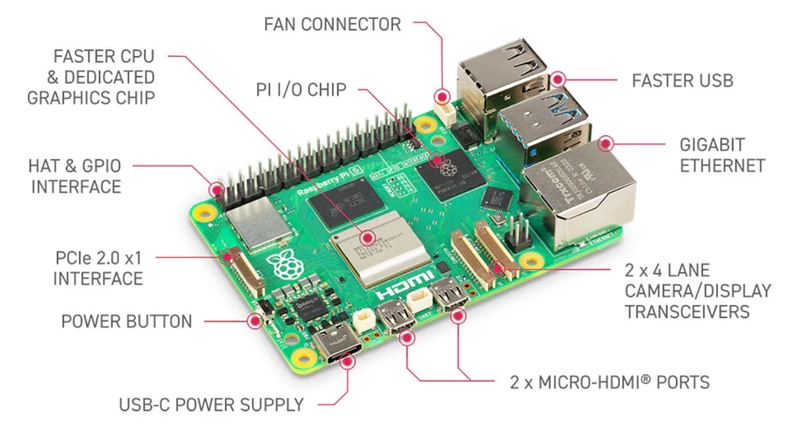
A Raspberry Pi is a small, affordable, single-board computer designed to help people learn programming and build digital projects.
It is roughly the size of a credit card but works like a full computer.
You can:
- Connect it to a monitor and keyboard
- Install an operating system (usually Linux-based)
- Run software like a normal PC
👉 In simple terms:
A Raspberry Pi is a tiny computer you can program, modify, and use for electronics projects.
💥 The moment it clicked for me
The first time I powered one on, I expected something limited.
Instead, I got:
- a full desktop environment
- a terminal
- Wi-Fi connectivity
- and the ability to SSH into it like a server
And suddenly I realized:
“This isn’t just hardware. This is a playground for engineers.”
⚙️ How Does a Raspberry Pi Work?
A Raspberry Pi includes all the basic components of a computer:
- CPU (processor)
- RAM (memory)
- USB ports
- HDMI output
- Wi-Fi / Bluetooth (on most models)
- Storage via microSD card
Instead of a traditional hard drive, the Raspberry Pi runs its operating system from a microSD card.
Most users install:
- Raspberry Pi OS (official system)
- Or other Linux distributions
🔌 What is GPIO on Raspberry Pi?
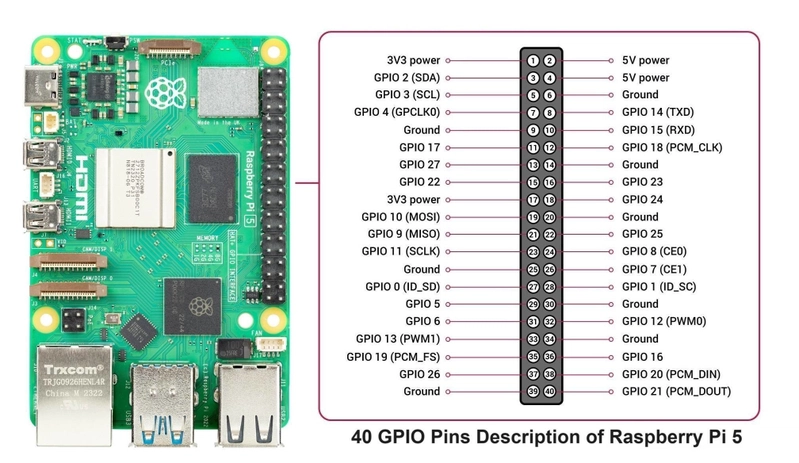
One of the most powerful features of the Raspberry Pi is its GPIO pins (General Purpose Input/Output).
These pins allow you to connect:
- LEDs
- Sensors
- Motors
- Buttons
👉 This is what makes Raspberry Pi popular for IoT and electronics projects.
Unlike a normal computer, you can directly interact with physical hardware.
🚀 What Can You Do with a Raspberry Pi?
This is where things get exciting.
A Raspberry Pi can be used for hundreds of projects. Here are the most popular ones:
- 🏠 Smart Home Projects
- 📺 Media Center
- 🌡️ IoT and Sensors
- 📷 Security Systems
- 💡 Learning Platform
🧪 Popular Raspberry Pi Models
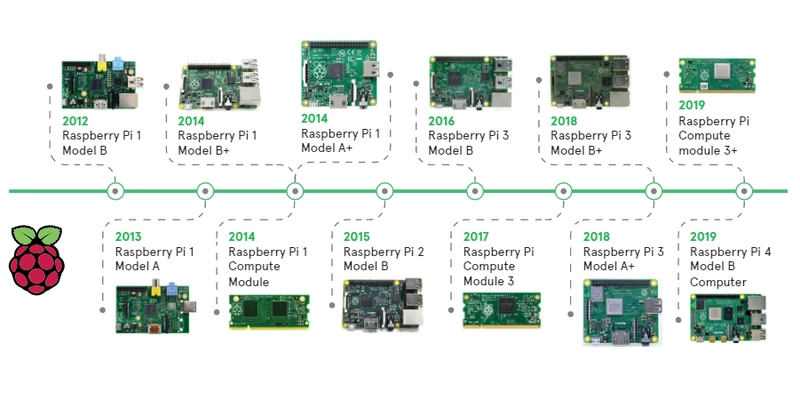
There are several versions of Raspberry Pi, including:
- Raspberry Pi 4 – widely used and powerful
- Raspberry Pi 5 – latest generation with better performance
- Raspberry Pi Zero – ultra-small and low cost
Each model is suited for different levels of projects.
🧑💻 Who Should Use Raspberry Pi?
Raspberry Pi is perfect for:
- Beginners learning programming
- Students exploring computer science
- Engineers building IoT systems
- Hobbyists creating DIY electronics projects
- Developers experimenting with backend + hardware integration
⚡ Why Raspberry Pi is So Popular
Raspberry Pi has become extremely popular because:
- It is very affordable (often under $100)
- It has a huge global community
- It supports many programming languages
- It combines software + hardware learning
- It is perfect for real-world experimentation
🔥 First Project You Should Try
If you're starting out, here are simple beginner projects:
- Blink an LED using GPIO pins
- Build a simple web server
- Create a temperature sensor system
- Run a basic chatbot or script
These projects help you understand both software and hardware fundamentals.
🏛️ Raspberry Pi Foundation (and what it actually does)

Another common confusion is thinking that the Raspberry Pi Foundation builds only the Raspberry Pi hardware itself. While they are the creators of the Raspberry Pi, their mission goes far beyond manufacturing devices.
The Raspberry Pi Foundation is a UK-based educational charity focused on improving access to computer science education worldwide. Their goal is to help people learn programming, digital skills, and computational thinking — especially students and beginners.
👉 In other words:
- The Foundation = education + open-source learning mission
- Raspberry Pi = one of the tools they created to support that mission
So while they are closely related, the Foundation is not “just a hardware company” — it is primarily an education-driven organization.
Raspberry Jam community
Raspberry Pi jams are social events held all over the world where people who are interested in Raspberry Pi come together to share their knowledge, learn new things, and meet other Pi enthusiasts. These events are generally attended by teachers, students, enthusiasts, developers, and hobbyists, and are organized either in person or by different organizations. However, I believe the initiative has become somewhat less active or has slowed down in recent years, with fewer events and less visibility compared to its earlier momentum.
Supporting and growing the Raspberry Jam community
A very funny incident that happened to me.
On the day I went to get my second COVID vaccine here in Dublin, the nurse noticed I was wearing a Raspberry Jam t-shirt. She didn’t really understand the reference and said, “Nice shirt—so is that your favorite jam?”

⚙️ Microcomputer vs Microcontroller (and why Raspberry Pi is NOT an Arduino)
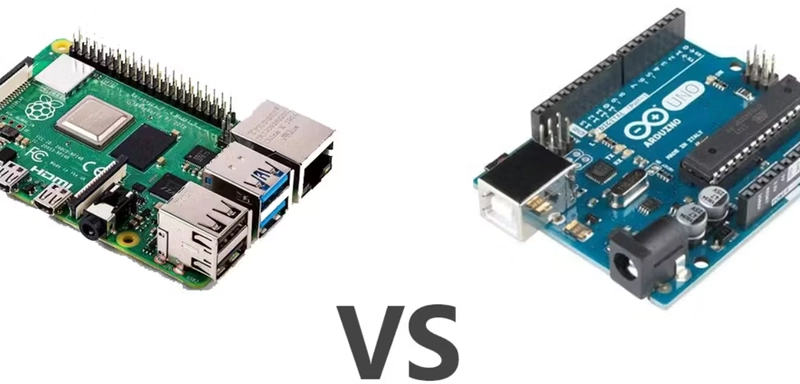
One of the most common misconceptions is comparing Raspberry Pi to Arduino.
They are actually very different things.
A Raspberry Pi is a microcomputer, meaning it is essentially a full Linux-based computer. It has a CPU, RAM, storage (via microSD), and can run an operating system, multitask, and execute complex software like databases, web servers, and backend applications.
An Arduino, on the other hand, is a microcontroller. It is designed for very specific, low-level tasks like reading sensors, controlling motors, or blinking LEDs. It does not run an operating system and executes a single program in a loop.
👉 Simple way to think about it:
- Raspberry Pi = a small PC
- Arduino = a programmable electronic chip for hardware control
This difference is important because Raspberry Pi sits between traditional software engineering and hardware, while Arduino is focused purely on embedded electronics.
👉 In practice, Raspberry Pi is often used for high-level logic, while microcontrollers like Arduino handle real-time hardware control.
Raspberry Pi Pico (the microcontroller side of the ecosystem)
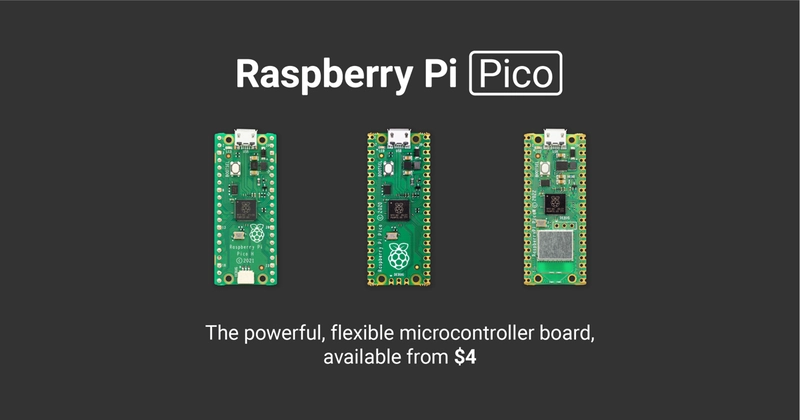
Interestingly, the Raspberry Pi ecosystem also includes a completely different type of device: the Raspberry Pi Pico.
Unlike the standard Raspberry Pi, the Pico is a microcontroller, not a microcomputer.
It is based on the RP2040 chip and is designed for:
- low-level hardware control
- real-time embedded systems
- ultra low-power applications
👉 Key difference:
- Raspberry Pi (classic models) = microcomputer (runs Linux, multitasking)
- Raspberry Pi Pico = microcontroller (runs a single embedded program)
This means the Pico is actually much closer to an Arduino or ESP32 than it is to a traditional Raspberry Pi.
So within the same ecosystem, you have:
- Raspberry Pi → full computer for software + systems
- Raspberry Pi Pico → microcontroller for embedded hardware projects
💸 A quick reality check: prices and controversies
One important thing to mention is that Raspberry Pi is no longer as cheap as it used to be. In recent years, global memory (RAM) shortages and supply chain pressures have significantly increased component costs. As a result, many Raspberry Pi models have become noticeably more expensive than their original launch prices.
👉 This means that while Raspberry Pi is still relatively affordable compared to traditional computers, it is no longer the ultra-low-cost device it once was. For some use cases, especially hobby projects, this price increase has pushed people to also consider alternatives like used mini PCs or other SBCs (single-board computers).
Still, despite the price changes, Raspberry Pi remains extremely popular due to its ecosystem, community support, and versatility.
During the COVID-19 pandemic, the project faced controversy due to a global shortage of silicon and electronic components, which significantly limited production and led to a prioritization of corporate and industrial clients over the hobbyist and educational community that had historically supported its growth. This decision sparked criticism, as many saw it as a shift away from the original mission of accessibility and the democratization of technology.
The Raspberry Pi's 15-year reign is quietly ending—here's why
🧠 Final Thoughts
Raspberry Pi is more than just a small computer.
It is a powerful learning tool that bridges the gap between software development and hardware engineering.
Whether you are a beginner or an experienced developer, Raspberry Pi gives you the freedom to experiment, build, and innovate.
The Raspberry Pi isn’t impressive because of its specs. It’s impressive because it removes barriers. It says: “Here’s a full computer. Now go break things and learn.” And honestly? That’s how the best engineers are made.
Links
https://opensource.com/resources/raspberry-pi
https://picockpit.com/raspberry-pi/what-is-a-raspberry-pi-and-what-can-i-do-with-it/
https://www.nextpcb.com/blog/what-is-raspberry-pi-models-features-and-uses