


Introduction
Azure Monitor is a powerful cloud-based monitoring solution that provides full visibility into the performance, health, and activity of applications and infrastructure in Microsoft Azure. As organizations increasingly rely on cloud services, the ability to track system behavior, detect issues early, and respond quickly becomes essential.
This solution collects and analyzes data from various sources, including virtual machines, applications, and network resources, allowing users to gain real-time insights and make informed decisions. Through features such as metrics, logs, and alerts, Azure Monitor helps ensure systems run efficiently, securely, and without interruption.
This environment provides a foundation for implementing Azure Monitor, enabling the collection of performance data, logs, and metrics from different resources. The configured setup allows for effective monitoring, analysis, and management of cloud resources in a controlled and structured manner.
Step 1: Prepare your bring-your-own-subscription (BYOS)
This set of lab exercises assumes that you have global administrator permissions to an Azure subscription.
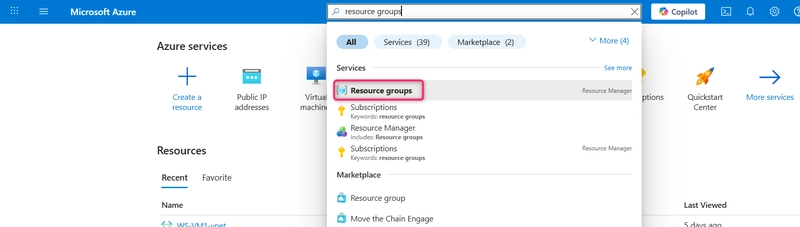
- In the Azure Portal, Search for and select Resource Groups.
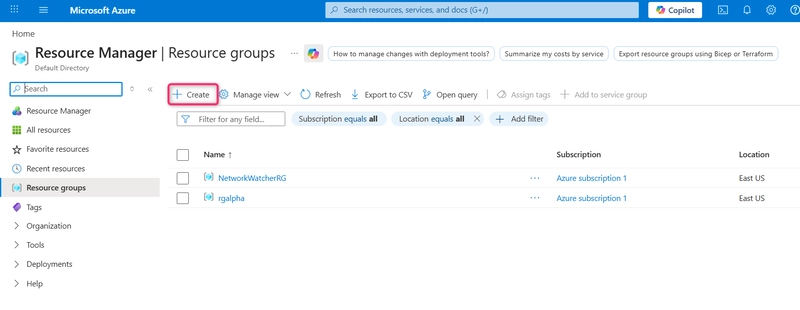
- On the Resource Groups page, select Create.
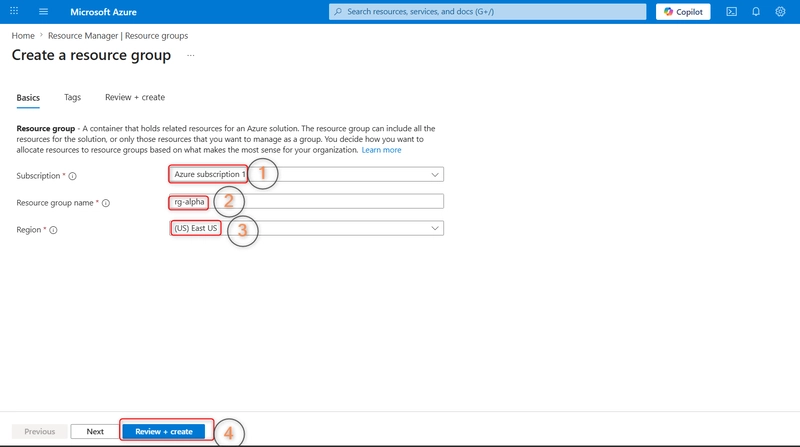
- On the Create a Resource Group page, select your subscription and enter the name rg-alpha. Set the region to East US, choose Review + Create, and then choose Create.
Step 2: Create App Log Examiners security group
This part enables you to create Entra ID security group.
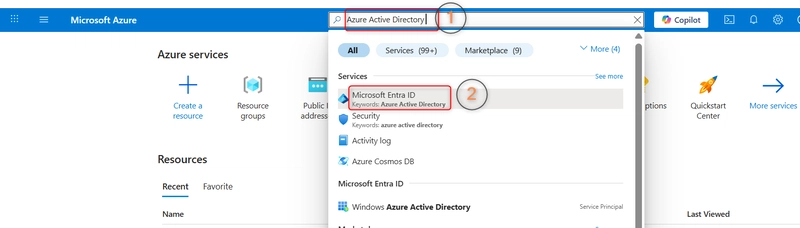
- In the Azure Portal, search for and select Azure Active Directory (or Entra ID).
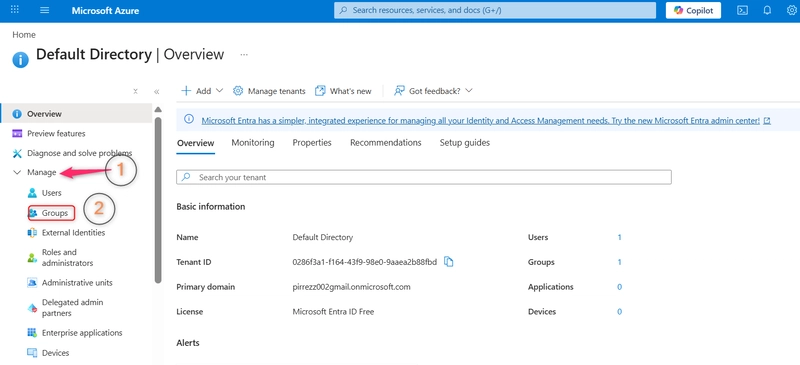
- On the Default Directory page, navigate through manage then select Groups.
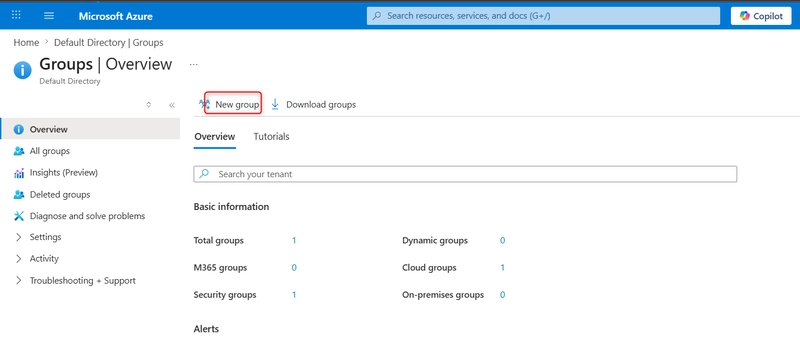
- On the Groups page, choose New Group.
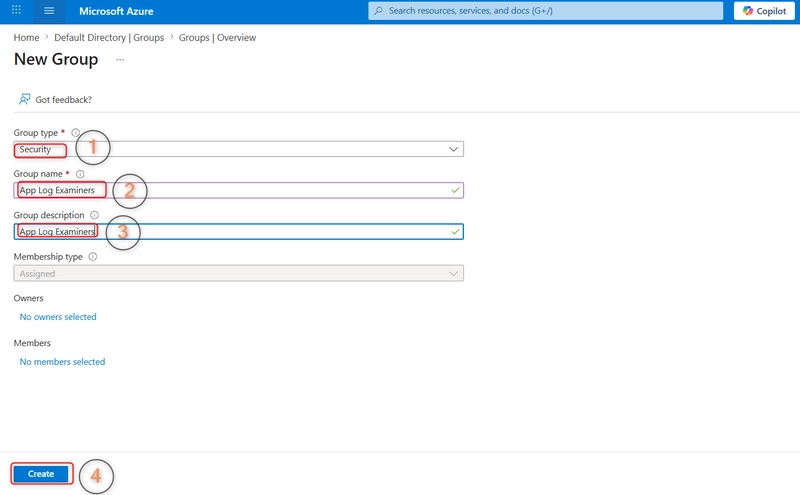
- On the New Group page, enter Value as Property, Security as Group type, App Log Examiners as Group name, App Log Examiners as Group description, and then select Create.
Step 3: Deploy and configure WS-VM1
This part will enable you to deploy and configure a Windows Server virtual machine.
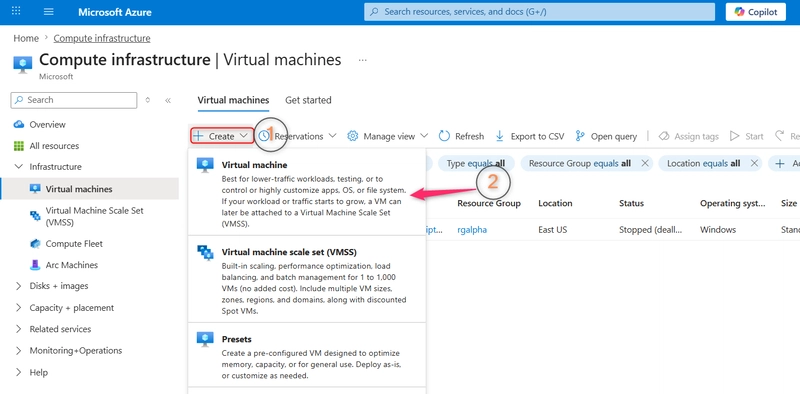
- In the Azure Portal, search for and select Virtual Machines from the list of results.
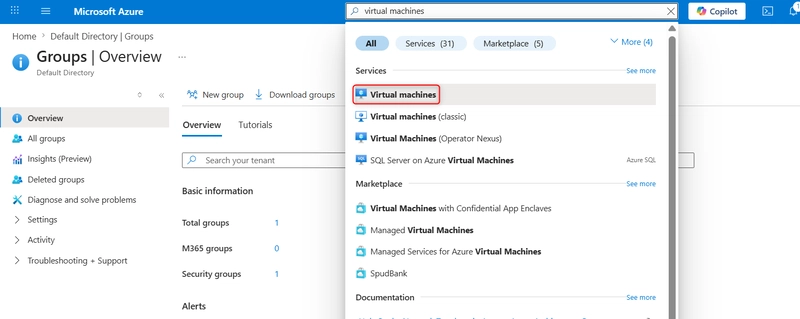
- On the Virtual Machines page, choose Create and select Azure Virtual Machine.
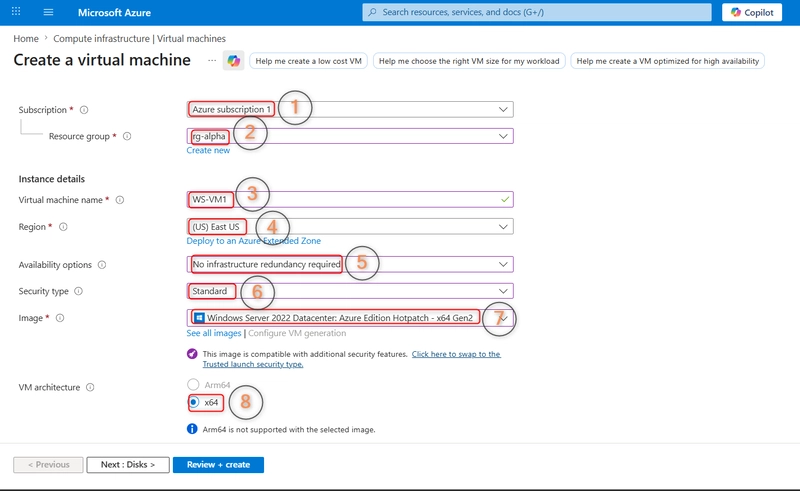
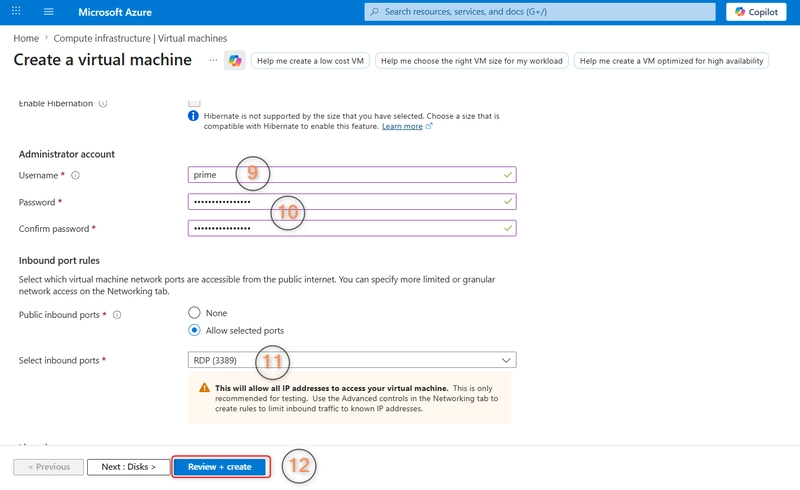
- On the Basics page of the Create A Virtual Machine wizard, select the following settings and then choose Review + Create and create.
| Property | Value |
|---|---|
| Subscription | Your subscription |
| Resource Group | rg-alpha |
| Virtual machine name | WS-VM1 |
| Region | East US |
| Availability options | No infrastructure redundancy required |
| Security type | Standard |
| Image | Windows Server 2022 Datacenter: Azure Edition – x64 Gen2 |
| VM architecture | x64 |
| Size | Standard_D4s_v3 – 4 vcpus, 16 GiB memory |
| Administrator account | prime |
| Password | P@ssw0rdP@ssw0rd |
| Inbound ports | RDP 3389 |
- Wait for the deployment to complete. Once deployment completes choose Go to resource.
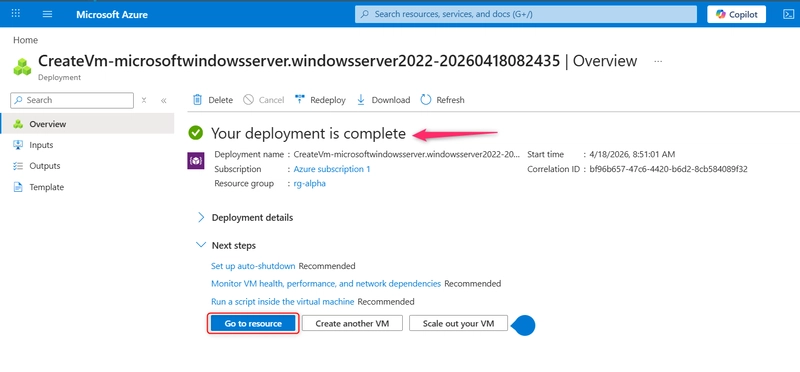
- On the WS-VM1 properties page, choose Networking, select the RDP rule. Change the Source to My IP address and choose Save.
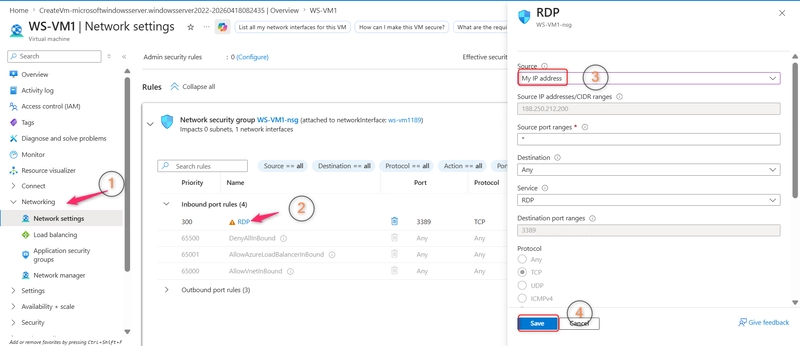
This restricts incoming RDP connections to the IP address you’re currently using.
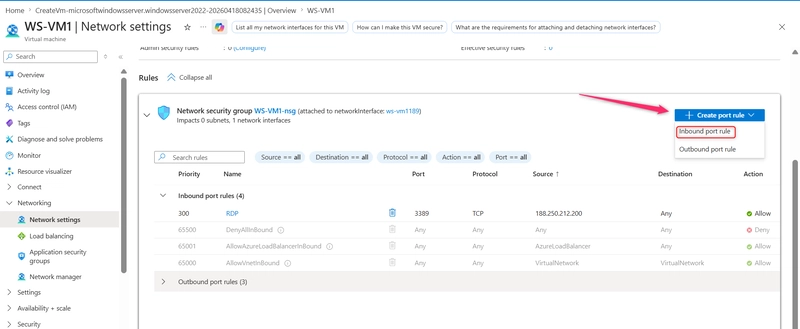
- On the Networking page, choose + Create port rule, then choose inbound port rule.
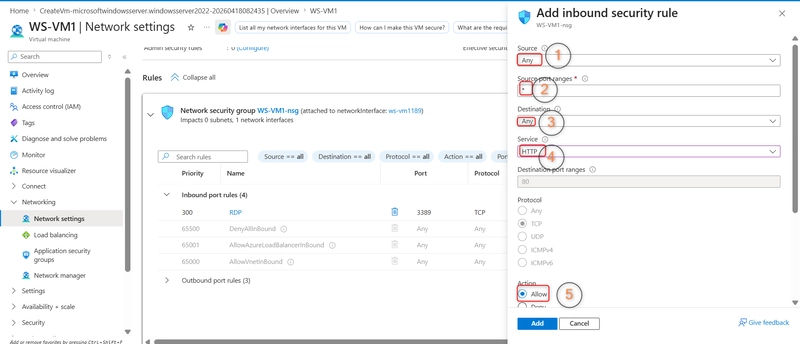
- On the Add inbound security rule page, configure the following settings and choose Add.
| Property | Value |
|---|---|
| Source | Any |
| Source port ranges | * |
| Destination | Any |
| Service | HTTP |
| Action | Allow |
| Priority | 310 |
| Name | AllowAnyHTTPInbound |
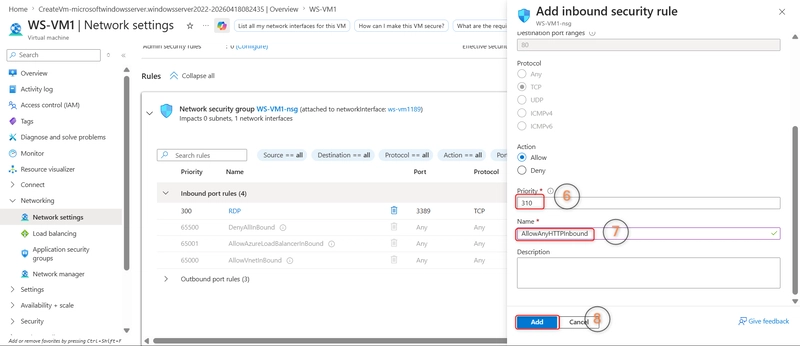
- Wait for the rule to create, then on the WS-VM1 page, choose Connect and Download RDP file.
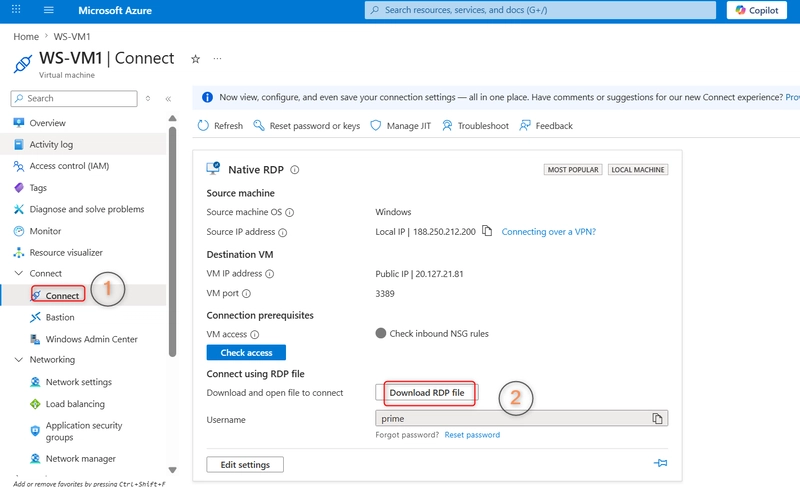
Open the downloaded file. On opening the RDP file opens the Remote Desktop Connection dialog box.
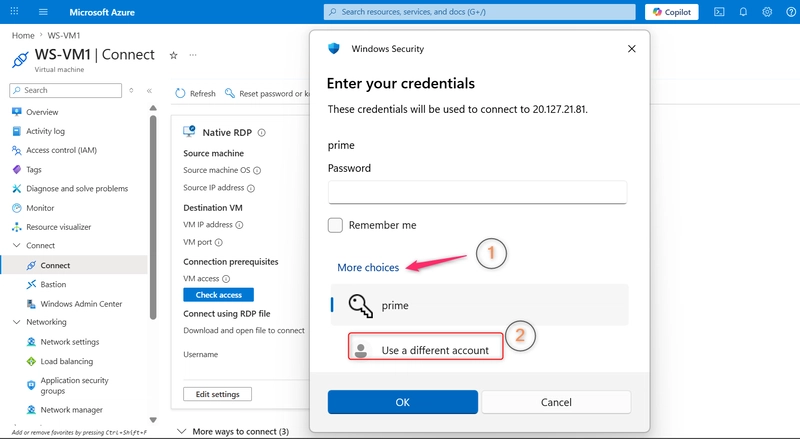
On the Windows Security dialog box, choose More Choices and then choose Use a different account.
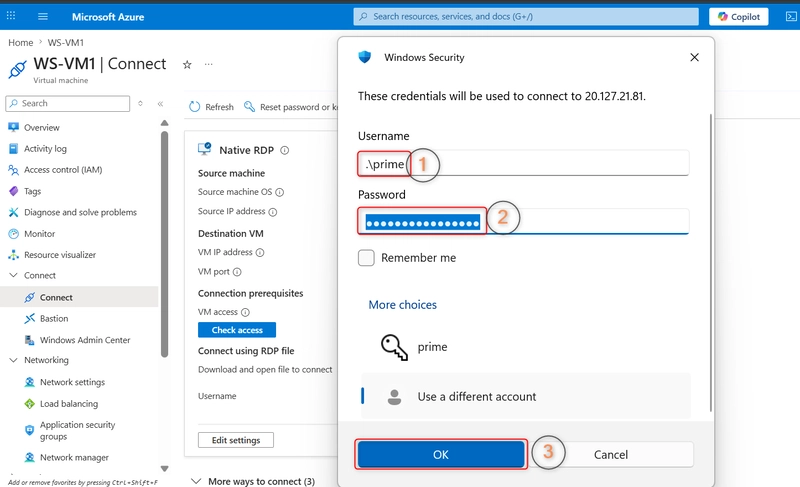
- Enter the username as .\prime and the secure password you chose in Step 3, and choose OK.
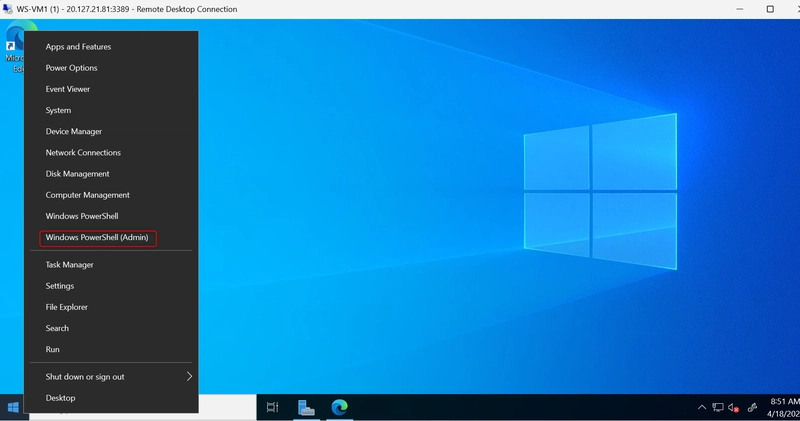
- When signed into the Windows Server virtual machine, right-click on the Start hint and then choose Windows PowerShell (Admin).
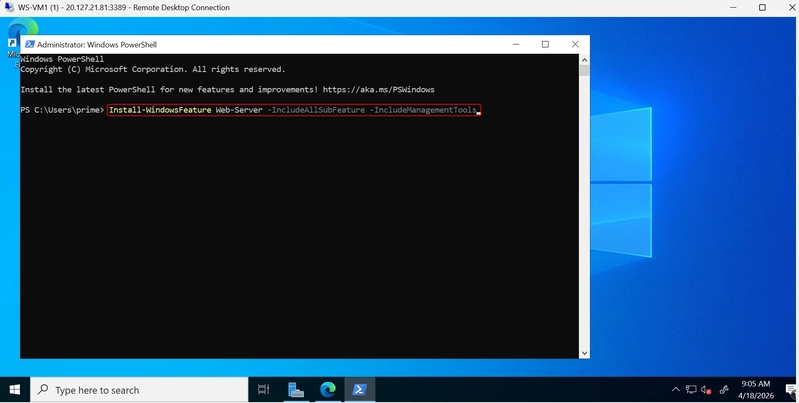
- At the elevated command prompt, type the following command and press Enter.
Install-WindowsFeature Web-Server -IncludeAllSubFeature -IncludeManagementTools
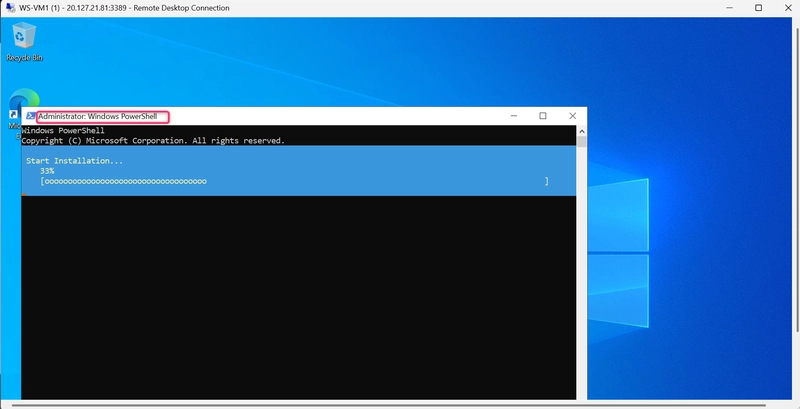
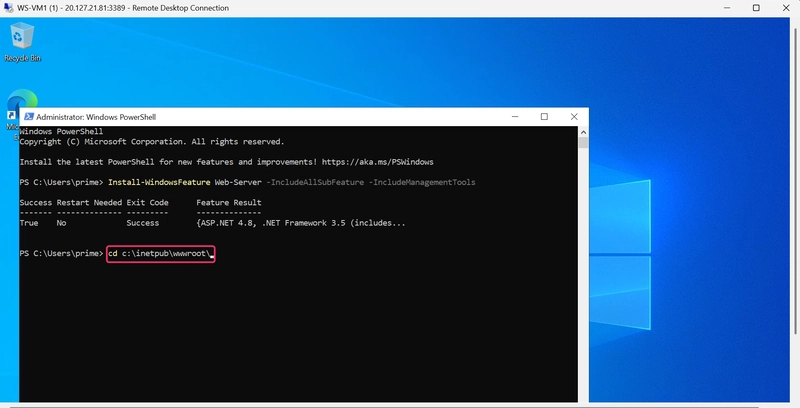
- When the installation completes run the following command to change to the web server root directory.
cd c:\inetpub\wwwroot\
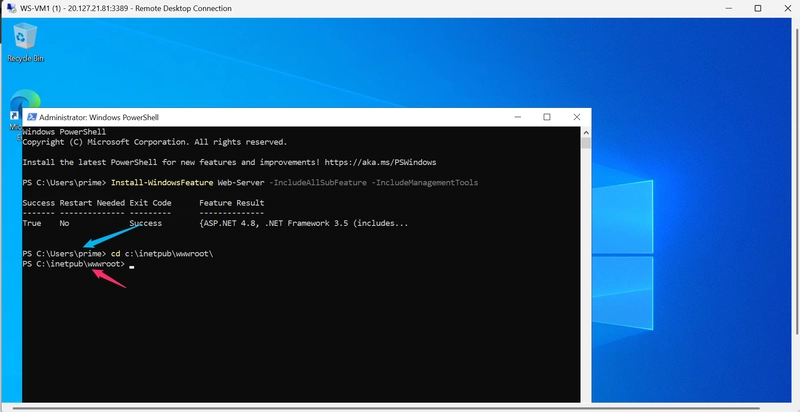
- Run the following command.
Wget https://raw.githubusercontent.com/Azure-Samples/html-docs-hello-world/master/index.html -OutFile index.html
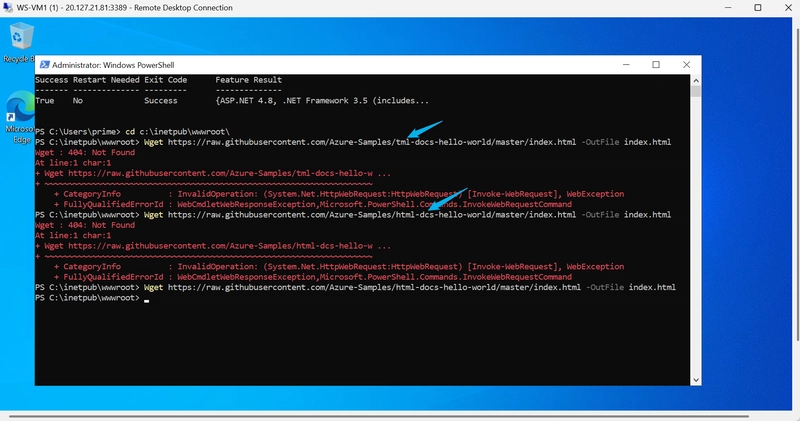
Error like the may occur if the command prompt is not typed correctly.
Step 4: Deploy and configure LX-VM2
This will enable you to deploy and configure a Linux virtual machine.
Navigate through that Azure portal to create a new Virtual Machine like you did before.
On the Basics page of the Create A Virtual Machine wizard, configure the following settings and then choose Review + Create.
| Property | Value |
|---|---|
| Subscription | Your subscription |
| Resource Group | rg-alpha |
| Virtual machine name | LX-VM2 |
| Region | East US |
| Image | Ubuntu Server 20.04 LTS – x64 Gen2 |
| Size | Standard_B2s |
| Authentication type | Password |
| Username | prime |
| Password | P@ssw0rdP@ssw0rd |
| Public inbound ports | SSH (22) |
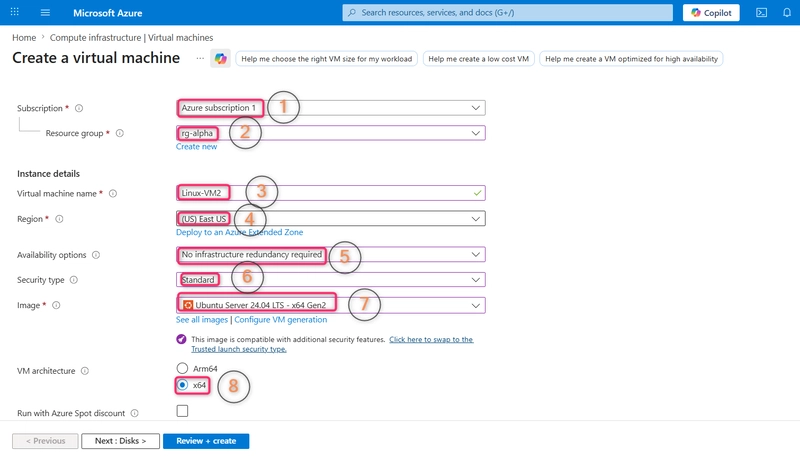
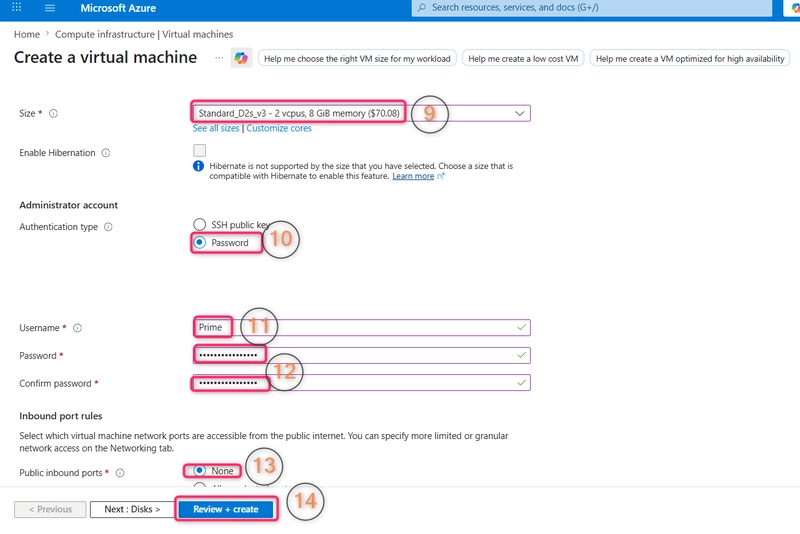
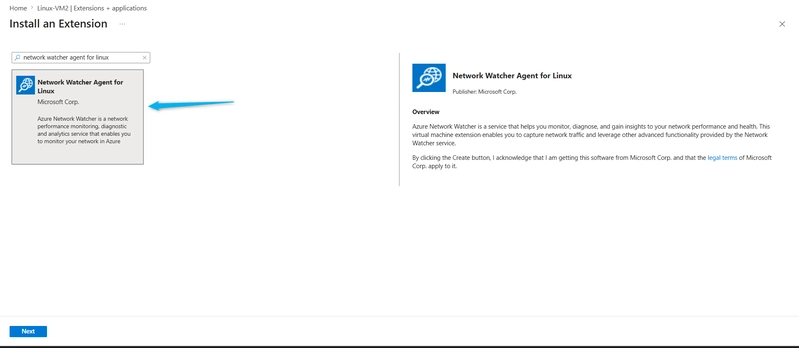
- After the VM deploys, open the VM properties page and choose Extensions + Applications under Settings and choose + Add.
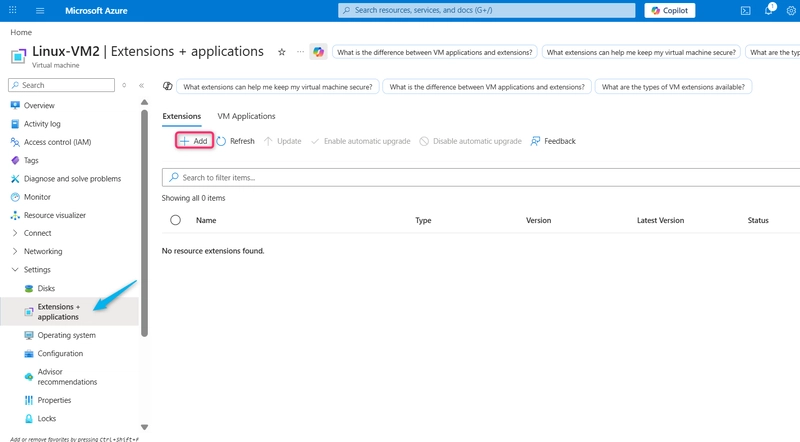
- Select the Network Watcher Agent for Linux. Choose Next and then choose Review and Create. Choose Create.
Step 5: Deploy a web app with an SQL Database
Ensure that you’re signed into the Azure Portal.
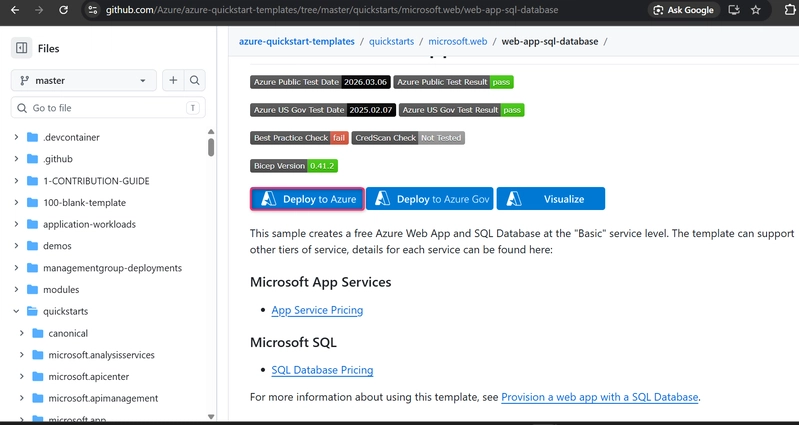
In your browser, open a new browser tab and navigate to
https://github.com/Azure/azure-quickstart-templates/tree/master/quickstarts/microsoft.web/web-app-sql-databaseOn the GitHub page, choose Deploy to Azure. A new tab opens.
If necessary, re-sign into Azure with the account that has Global Administrator privileges.
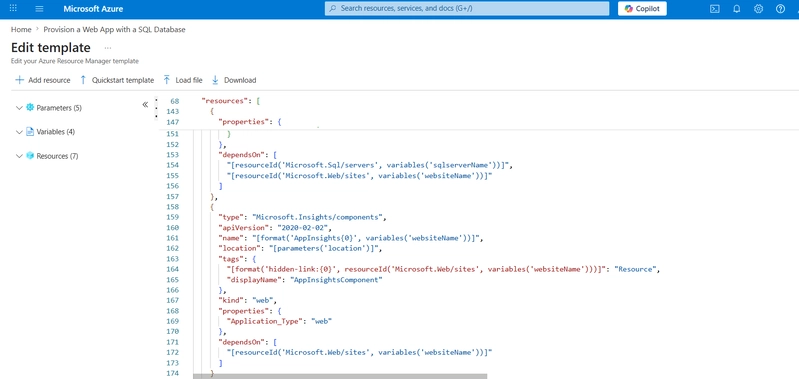
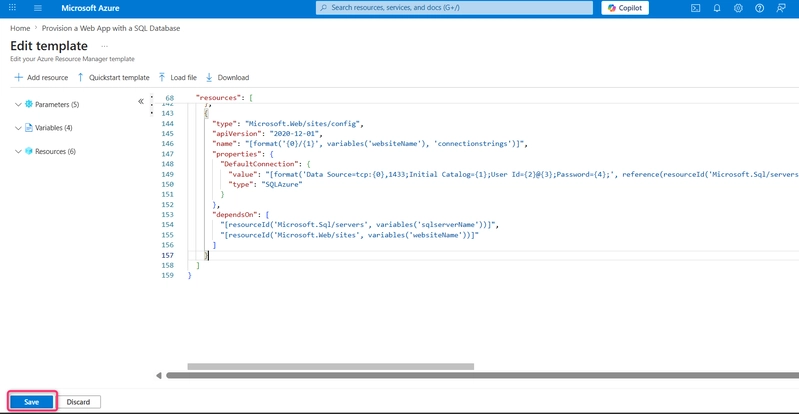
- On the Basics page, select Edit template. In the template editor, delete the contents of lines 158 to 174 inclusive and delete the “,” on line 157. Choose Save.
- On the Basics page, provide the following information and choose Next.
| Property | Value |
|---|---|
| Subscription | Your subscription |
| Resource Group | rg-alpha |
| Region | East US |
| Sku Name | F1 |
| Sku Capacity | 1 |
| SQL Administrator Login | prime |
| SQL Administrator Login Password | P@ssw0rdP@ssw0rd |
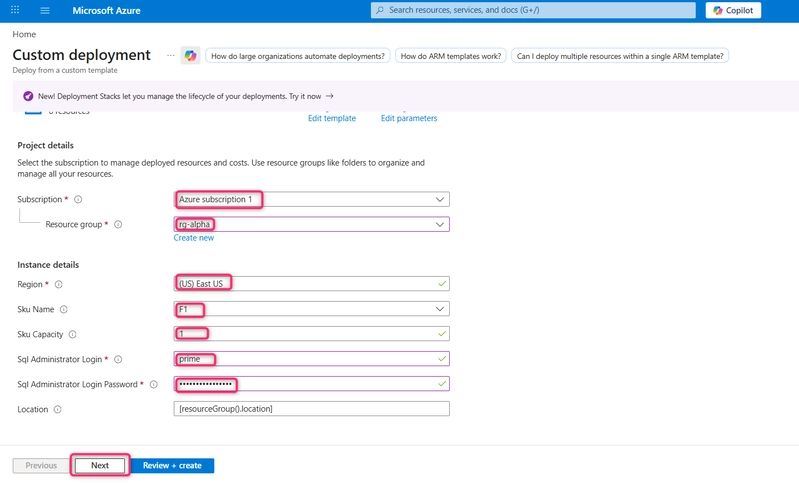
- Review the information presented and select Create.
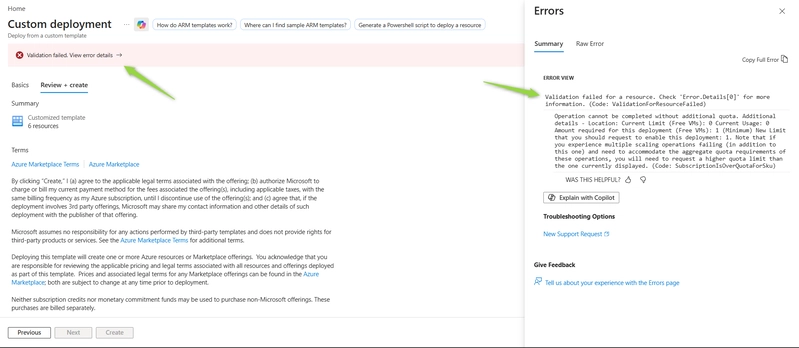
Deployment Failed: “SubscriptionIsOverQuotaForSku”
While deploying my ARM template, I ran into this error:
Validation failed for a resource
Operation cannot be completed without additional quota
Code:SubscriptionIsOverQuotaForSku
At first, this was confusing because I was using a Pay-As-You-Go subscription, so I didn’t expect any limitations.
What the Error Actually Means: Even on a Pay-As-You-Go subscription, Azure enforces regional quota limits.
Important: This is not a template issue, and it does not mean your configuration is wrong.
It simply means: You don’t have enough compute quota in that specific region. And this happened because Azure Quotas are Region-Specific.
So in my case, I changed my region from East US to Europe Central.
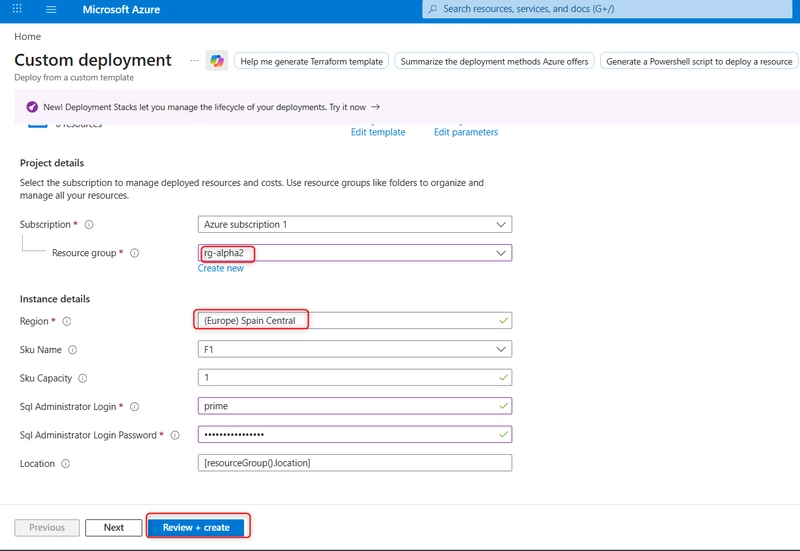
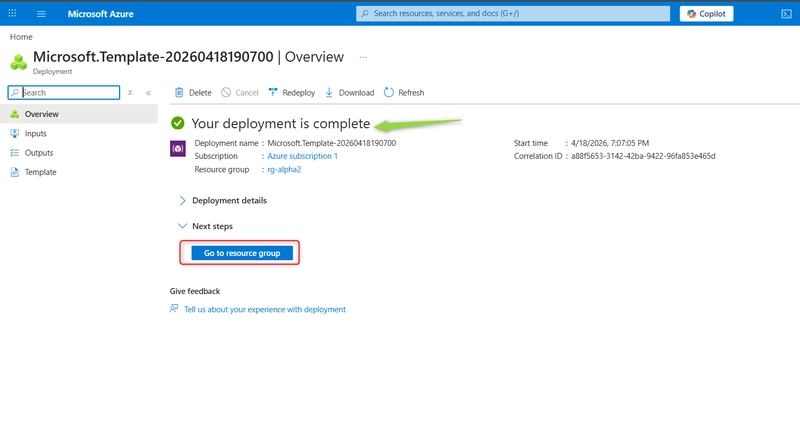
- After the deployment completes, choose Go to resource group.
Step 6: Deploy a Linux web app
Ensure that you’re signed into the Azure Portal.
In your browser, open a new browser tab and navigate to
https://learn.microsoft.com/en-us/samples/azure/azure-quickstart-templates/webapp-basic-linux/On the GitHub page, choose Deploy to Azure.
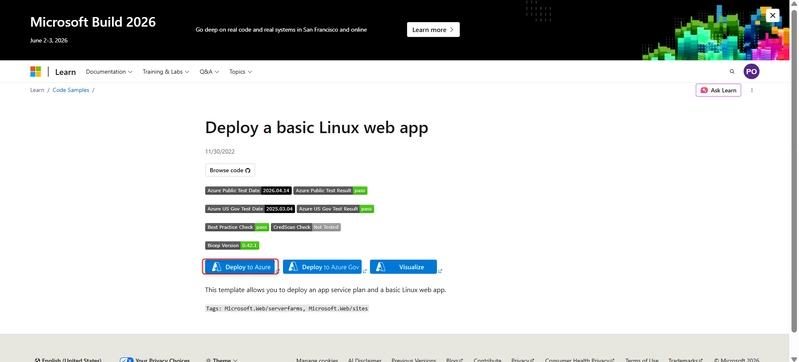
- On the Basics page, provide the following information and choose Next.
| Property | Value |
|---|---|
| Subscription | Your subscription |
| Resource Group | rg-alpha2 |
| Region | Europe (Spain) Central |
| Web App Name | AzureLinuxApp7482 |
| SKU | S1 |
| Linux Fx Version | php |
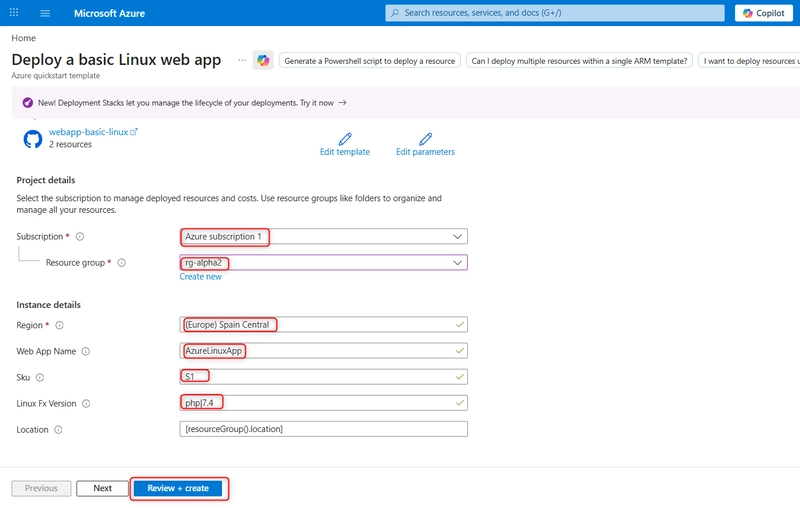
- Review the information and choose Create.
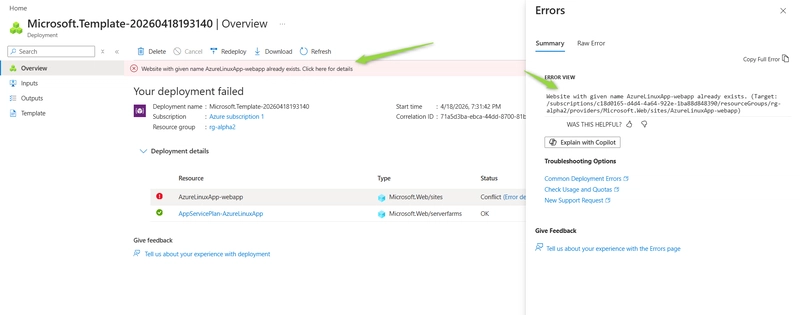
Deployment Failed: Web App Name Already Exists
After resolving the quota issue and proceeding with the deployment, I encountered another error: Website with given name already exists
This happened because Azure App Service (Web App) names must be globally unique across all Azure subscriptions.
This means:
i. The name is not limited to your resource group
ii. The name is not limited to your subscription
iii. It must be unique across all Azure users worldwide
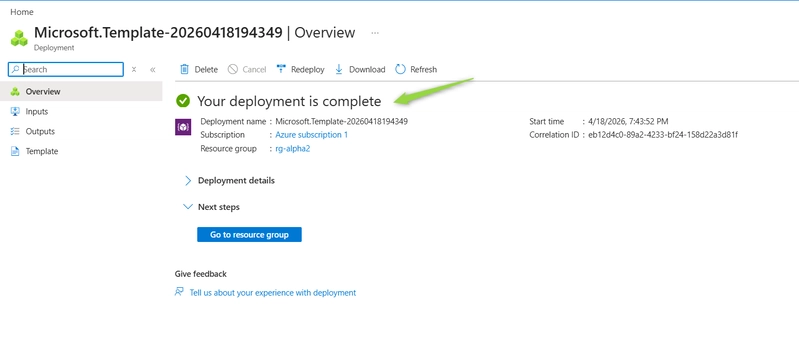
To fix this: I changed the web name to AzureLinuxApp-webapp2.
Conclusion
In this lab, I successfully set up a complete Azure monitoring environment by deploying virtual machines, configuring network access, and provisioning web applications integrated with an SQL database. This provided a practical foundation for understanding how Azure Monitor can be used to observe and manage cloud resources effectively.
Along the way, I encountered real-world deployment challenges such as quota limitations (SubscriptionIsOverQuotaForSku) and global naming conflicts for web apps. These issues highlighted an important reality of working with cloud platforms:
Successful deployments are not just about correct configurations, but also about understanding platform constraints.
By resolving these issues—changing regions to meet quota requirements and using globally unique names—I was able to complete the deployment successfully.
This exercise reinforces key best practices:
Always be aware of region-specific quotas
Ensure resource names (especially web apps) are globally unique
Treat deployment errors as learning opportunities, not blockers
Overall, this setup demonstrates how Azure Monitor can be integrated into a cloud environment to provide visibility, improve reliability, and support proactive system management.