



The Chaos of Unorganized Code
Imagine you're building a full-stack app - your main.js file have 1,000+ lines. Functions for user authentication, data fetching, and UI utils all mashed together. Debugging? A nightmare! Reusing a helper function in another project? first find that particular helper function, carefully watch its scopes.. and the copy-paste hell. And sharing code with teammates? Forget it! This "spaghetti code problem" plagued early JavaScript, turning simple scripts into unmaintainable monsters as projects grew.
Entry of JavaScript modules: a game-changer for splitting code into different reusable files, organized pieces. No more codes pollution in one file or script tag. Modules let you export what you create and import what you need, making your code cleaner, scalable, and team-friendly. Let's dive in.
Why Modules Are Needed
Before ES6 modules (introduced in 2015), developers relied on hacks like IIFEs (Immediately Invoked Function Expressions) or global variables. These caused issue in code flows and conflicts.
Modules solve this by:
- Encapsulating code: Variables and functions stay private unless explicitly exported or used in closures.
- Enabling reuse: Write once, import anywhere.
-
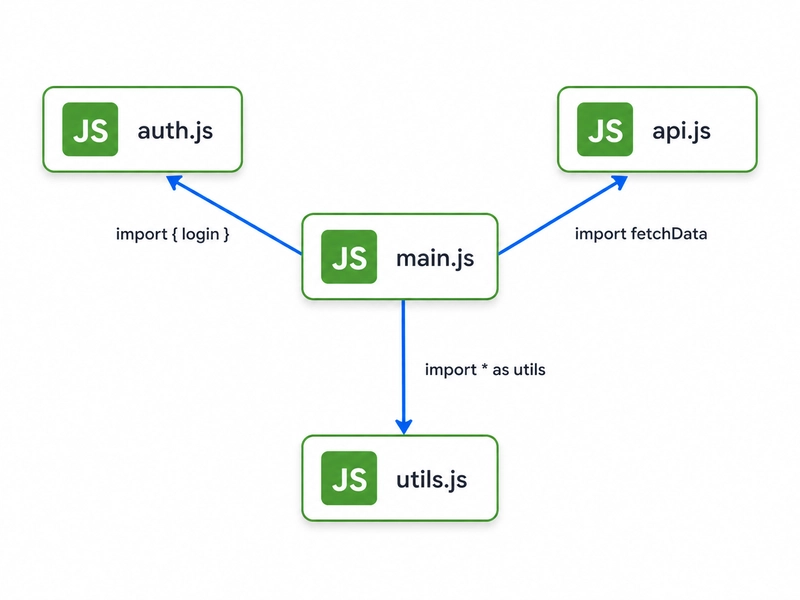
Improving organization: Break apps into logical files (e.g.,
auth.js,api.js) for better understanding.
They arrived natively in browsers via <script type="module">, no bundlers required initially.
Exporting Functions or Values
Exporting shares your code with the world. Place export before declarations in your module file.
Named exports (multiple per file):
// mathUtils.js
export const add = (a, b) => a + b;
export const multiply = (a, b) => a * b;
export const PI = 3.14159;
Default export (only one per file, no name needed):
// user.js
const createUser = (name, email) => ({ name, email });

export default createUser;  // Import it as any name later
Export at the end too:
const add = (a, b) => a + b;
const subtract = (a, b) => a - b;
export { add, subtract };  // Re-export named ones
Importing Modules
To use exports, import them in another file by using relative paths like ./mathUtils.js.
Named imports (match export names):
// main.js
import { add, multiply, PI } from './mathUtils.js';

console.log(add(2, 3));  // 5
Default imports (flexible naming):
// main.js
import createUser from './user.js';  // 'createUser' can be any name

const user = createUser('Ritam', 'ritam@example.com');
Import everything:
import * as math from './mathUtils.js';
math.add(4, 5);

Default vs Named Exports
-
Named: Specific, great for multiple exports. Must match names on import. Ideal for utilities:
import { logError } from './logger.js';. -
Default: One per module, import as any name. Perfect for a module's "main" feature:
import express from 'express';.
Pro tip: Use named for libraries (predictable API), default for single-purpose modules. Mixing works too!
Benefits of Modular Code
Modules transform maintainability:
- Easier debugging: Isolate issues to one file.
- Better collaboration: Teams own modules (e.g., you handle auth, I handle API).
- Tree-shaking: Unused exports vanish in builds.
- Scalability: Your portfolio projects grow without chaos—think Node.js backends or React apps.
Conclusion: Level Up Your JS Projects Today
JavaScript modules aren't just syntax—they're the backbone of modern web dev. Ditch the monolith; embrace exports and imports for code that scales with your ambitions. Next time you start a project, ask: "Can this be a module?" Your future self (and interviewers) will thank you.
Grab your editor, refactor a script, and share your wins!