


Introduction
Learn how to read project properties stored in a C# project file.
By storing property values in the project file rather than in code or appsettings.json.
💡 No tampering once pushed to production.
Step 1
Add the following PropertyGroup to a .csproj file and replace values with your values.
<PropertyGroup>
    <Product>Code sample</Product>
    <Description>A sample project demonstrating assembly metadata retrieval.</Description>
    <Company>Payne services</Company>
    <Copyright>2019-$([System.DateTime]::Now.Year)</Copyright>
</PropertyGroup>
Step 2
Add the following project reference to the project Source code , which contains code to read values from the project file in step 1.
Step 3
Display values in an ASP.NET Core project.
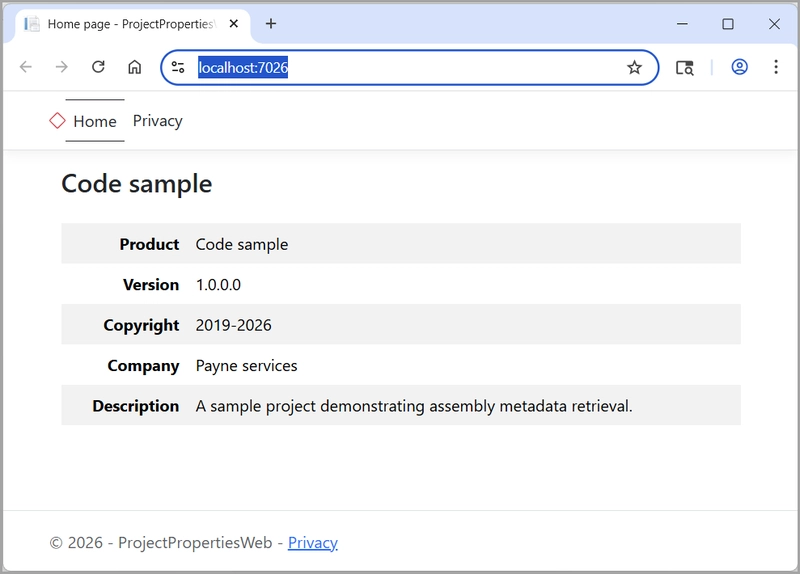
Index.cshtml.cs
public class IndexModel(ILogger<IndexModel> logger) : PageModel
{
    [BindProperty]
    public required Details Details { get; set; }
    private readonly ILogger<IndexModel> _logger = logger;

    public void OnGet()
    {
        Details = GetAllInfo();
    }

    Details GetAllInfo() =>
        new()
        {
            Company = Info.GetCompany(),
            Copyright = Info.GetCopyright(),
            Product = Info.GetProduct(),
            Description = Info.GetDescription(),
            Version = Info.GetVersion().ToString()
        };
}
Index.cshtml (using Bootstrap 5x)
@page
@model IndexModel
@{
    ViewData["Title"] = "Home page";
}
<style>
    .table tr > td:first-child {
        font-weight: bold;
        text-align: right;
    }
    H1 {
        margin-bottom: 1em;
    }
</style>

<div class="container">
    <main>
        <h1 class="fs-3">Code sample</h1>
        <table class="table table-striped table-borderless">
            <tr>
                <td>Product</td>
                <td>@Model.Details.Product</td>
            </tr>
            <tr>
                <td>Version</td>
                <td>@Model.Details.Version</td>
            </tr>
            <tr>
                <td>Copyright</td>
                <td>@Model.Details.Copyright</td>
            </tr>
            <tr>
                <td>Company</td>
                <td>@Model.Details.Company</td>
            </tr>
            <tr>
                <td>Description</td>
                <td>@Model.Details.Description</td>
            </tr>
        </table>
    </main>
</div>
Display values in a Console Core project.
- Uses the same class project as used in the ASP.NET Core project
- The following method gets the values to display using NuGet package Spectre.Console.
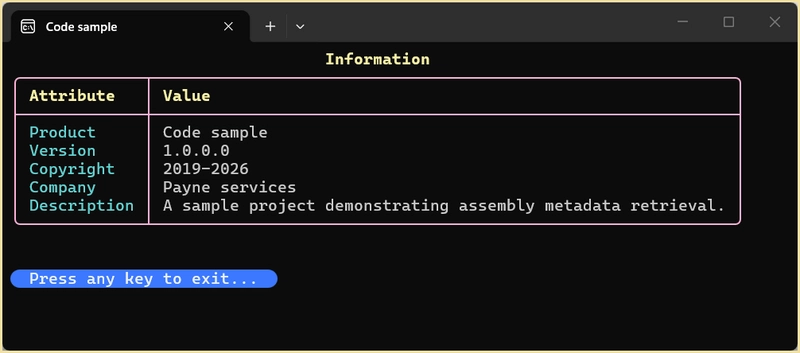
internal static void ShowDetails()
{
    var table = new Table()
        .RoundedBorder()
        .BorderColor(Color.Pink1)
        .Title("[yellow bold]Information[/]");

    table.AddColumn("[yellow bold]Attribute[/]");
    table.AddColumn("[yellow bold]Value[/]");

    var details = GetAllInfo();
    table.AddRow("[cyan]Product[/]", details.Product);
    table.AddRow("[cyan]Version[/]", details.Version);
    table.AddRow("[cyan]Copyright[/]", details.Copyright);
    table.AddRow("[cyan]Company[/]", details.Company);
    table.AddRow("[cyan]Description[/]", details.Description);
    AnsiConsole.Write(table);


    Details GetAllInfo()
    {
        return new Details()
        {
            Company = Info.GetCompany(),
            Copyright = Info.GetCopyright(),
            Product = Info.GetProduct(),
            Description = Info.GetDescription(),
            Version = Info.GetVersion().ToString()
        };
    }
}
Display code.
internal partial class Program
{
    static void Main(string[] args)
    {

        ShowDetails();

        SpectreConsoleHelpers.ExitPrompt(Justify.Left);
    }
}