








Ever wished you could write Node.js native addons in C# instead of C++? .NET Native AOT makes it possible—and practical.
The Problem with Traditional Node.js Addons
If you've ever built a Node.js native addon, you know the pain:
- C++ required: Even for simple functionality, you need C++ knowledge
- node-gyp complexity: Build system that's notoriously finicky
- Python dependency: Requires specific Python versions (often outdated)
- Cross-platform headaches: Different build configurations per OS
For the Microsoft C# Dev Kit team, these friction points added unnecessary complexity to their development workflow. They needed Windows Registry access from their VS Code extension—but the C++ tooling didn't align with their .NET-centric stack.
The Solution: .NET Native AOT
What if you could write Node.js addons in C#? With .NET Native AOT, you can. The C# Dev Kit team replaced their C++ addon with a C# implementation—and it worked beautifully.
Here's why this approach is groundbreaking:
- No Python required - Just the .NET SDK
- Modern C# features - Type safety, async/await, LINQ
- Cross-platform - Works on Windows, Linux, and macOS
- Smaller toolchain - One SDK for everything
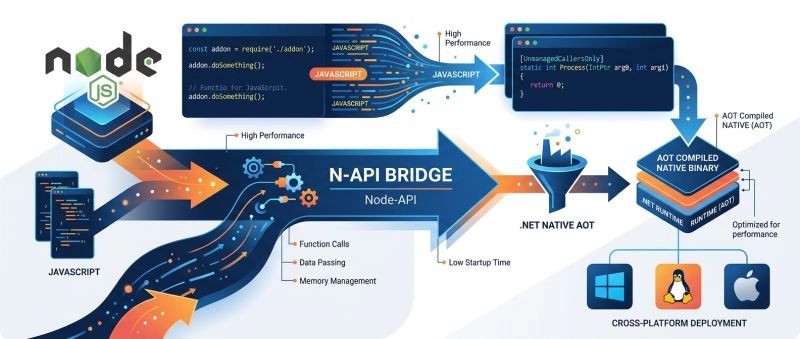
How It Works: N-API + Native AOT
The Magic Ingredient: N-API
N-API (Node-API) is a stable, ABI-compatible C API for building Node.js addons. The key insight: N-API doesn't care what language you use.
As long as your shared library exports the napi_register_module_v1 function and uses the correct C calling convention, Node.js will load it. This makes Native AOT a perfect fit.
Native AOT Compilation
.NET Native AOT compiles your C# code directly to native machine code, producing:
-
Windows:
.dllshared library -
Linux:
.soshared library -
macOS:
.dylibshared library
Node.js treats these as native addons (rename to .node extension).
Step-by-Step Implementation
1. Create the Project
Create a new console app with these properties:
<Project Sdk="Microsoft.NET.Sdk">
  <PropertyGroup>
    <TargetFramework>net10.0</TargetFramework>
    <PublishAot>true</PublishAot>
    <AllowUnsafeBlocks>true</AllowUnsafeBlocks>
  </PropertyGroup>
</Project>
-
PublishAotenables Native AOT compilation -
AllowUnsafeBlocksneeded for pointer interop with N-API
2. Define the Module Entry Point
Node.js expects your shared library to export napi_register_module_v1. We use UnmanagedCallersOnly:
public static unsafe partial class RegistryAddon
{
    [UnmanagedCallersOnly(
        EntryPoint = "napi_register_module_v1",
        CallConvs = [typeof(CallConvCdecl)])]
    public static nint Init(nint env, nint exports)
    {
        Initialize();

        // Register JavaScript functions
        RegisterFunction(
            env,
            exports,
            "readStringValue"u8,
            &ReadStringValue);

        return exports;
    }
}
Key points:
-
UnmanagedCallersOnlytells the AOT compiler to export the method -
EntryPointspecifies the function name Node.js looks for -
CallConvsdefines the calling convention (cdecl for most platforms) -
nintis the native-sized integer equivalent tointptr_t
3. Resolve N-API Functions Dynamically
N-API functions are exported by node.exe itself. We need to resolve them at runtime:
private static void Initialize()
{
    NativeLibrary.SetDllImportResolver(
        Assembly.GetExecutingAssembly(),
        ResolveDllImport);

    static nint ResolveDllImport(
        string libraryName,
        Assembly assembly,
        DllImportSearchPath? searchPath)
    {
        if (libraryName is not "node")
            return 0;

        // Resolve from the host process (Node.js)
        return NativeLibrary.GetMainProgramHandle();
    }
}
4. Define N-API Function Imports
Use LibraryImport (source-generated P/Invoke) for better performance:
private static partial class NativeMethods
{
    [LibraryImport("node", EntryPoint = "napi_create_string_utf8")]
    internal static partial Status CreateStringUtf8(
        nint env, ReadOnlySpan<byte> str, nuint length, out nint result);

    [LibraryImport("node", EntryPoint = "napi_create_function")]
    internal static unsafe partial Status CreateFunction(
        nint env, ReadOnlySpan<byte> utf8name, nuint length,
        delegate* unmanaged[Cdecl]<nint, nint, nint> cb,
        nint data, out nint result);

    [LibraryImport("node", EntryPoint = "napi_get_cb_info")]
    internal static unsafe partial Status GetCallbackInfo(
        nint env, nint cbinfo, ref nuint argc,
        Span<nint> argv, nint* thisArg, nint* data);
}
Why LibraryImport?
- Source-generated (faster than reflection-based DllImport)
- Trimming-compatible out of the box
- Better error messages at compile time
5. Marshal Strings Between JavaScript and C
N-API uses UTF-8 strings. Here's how to read a string argument from JavaScript:
private static unsafe string? GetStringArg(nint env, nint cbinfo, int index)
{
    nuint argc = (nuint)(index + 1);
    Span<nint> argv = stackalloc nint[index + 1];
    NativeMethods.GetCallbackInfo(env, cbinfo, ref argc, argv, null, null);

    if ((int)argc <= index)
        return null;

    // Get the UTF-8 byte length
    NativeMethods.GetValueStringUtf8(env, argv[index], null, 0, out nuint len);

    // Allocate buffer (stack for small, pool for large)
    int bufLen = (int)len + 1;
    byte[]? rented = null;
    Span<byte> buf = bufLen <= 512
        ? stackalloc byte[bufLen]
        : (rented = ArrayPool<byte>.Shared.Rent(bufLen));

    try
    {
        fixed (byte* pBuf = buf)
            NativeMethods.GetValueStringUtf8(env, argv[index], pBuf, len + 1, out _);

        return Encoding.UTF8.GetString(buf[..(int)len)]);
    }
    finally
    {
        if (rented is not null)
            ArrayPool<byte>.Shared.Return(rented);
    }
}
Performance optimizations:
-
stackallocfor small strings (< 512 bytes) - zero heap allocation -
ArrayPoolfor larger strings - reusable buffers -
Span<T>for memory-safe operations - No unnecessary string conversions
6. Implement Your Exported Function
With the plumbing in place, implementing actual functionality is straightforward:
[UnmanagedCallersOnly(CallConvs = [typeof(CallConvCdecl)])]
private static nint ReadStringValue(nint env, nint info)
{
    try
    {
        var keyPath = GetStringArg(env, info, 0);
        var valueName = GetStringArg(env, info, 1);

        if (keyPath is null || valueName is null)
        {
            ThrowError(env, "Expected two string arguments: keyPath, valueName");
            return 0;
        }

        // Your .NET logic here
        using var key = RegistryKey.OpenBaseKey(
            keyPath, RegistryHive.LocalMachine, RegistryView.Registry64);

        return key?.GetValue(valueName) is string value
            ? CreateString(env, value)
            : GetUndefined(env);
    }
    catch (Exception ex)
    {
        // CRITICAL: Always handle exceptions to avoid crashing Node.js
        ThrowError(env, $"Registry read failed: {ex.Message}");
        return 0;
    }
}
Important: Exception handling is critical! Unhandled exceptions in UnmanagedCallersOnly methods will crash the Node.js process.
7. Call from TypeScript
Build your project and rename the output:
dotnet publish -c Release -r win-x64
# Result: RegistryAddon.dll
# Rename to: RegistryAddon.node
Then use it in TypeScript:
// Define the interface
interface RegistryAddon {
    readStringValue(keyPath: string, valueName: string): string | undefined;
}

// Load the native module
const registry = require('./native/win32-x64/RegistryAddon.node') as RegistryAddon;

// Call your C# function!
const sdkPath = registry.readStringValue(
    'SOFTWARE\\dotnet\\Setup\\InstalledVersions\\x64\\sdk',
    'InstallLocation');

console.log('SDK Path:', sdkPath);
Performance Comparison
According to Microsoft's C# Dev Kit team, the .NET Native AOT approach:
| Metric | C++ Addon | .NET Native AOT | Difference |
|---|---|---|---|
| Memory | Lower | Slightly higher | Negligible in long-running processes |
| Startup | Instant | Fast (AOT compiled) | Minimal |
| Performance | Baseline | Comparable | No meaningful difference |
| Binary Size | Smaller | Larger | Tradeoff for tool simplicity |
Key insight: For typical addon workloads (string marshalling, registry access), performance is essentially identical. The GC overhead is negligible in long-running processes like VS Code extensions.
Real-World Benefits
Simplified Development
Before (C++ with node-gyp):
Requirements: C++, Python 2.x, node-gyp, platform-specific build tools
After (C# with Native AOT):
Requirements: .NET SDK, Node.js
Cross-Platform Support
The same C# code works on Windows, Linux, and macOS. Build once, deploy everywhere:
# Windows
dotnet publish -r win-x64

# Linux
dotnet publish -r linux-x64

# macOS
dotnet publish -r osx-x64
Modern Language Features
Get access to the full .NET ecosystem:
- Async/await for I/O operations
- LINQ for data processing
- Records and pattern matching
- Strong typing and IntelliSense
- Comprehensive error handling
Common Pitfalls
1. Exception Handling
Problem: Unhandled exceptions crash Node.js
Solution: Always wrap logic in try-catch, forward errors to JavaScript
2. String Encoding
Problem: Encoding issues, buffer overruns
Solution: Use UTF-8 consistently, proper buffer sizing
3. Function Pointers
Problem: C# delegates don't work with N-API callbacks
Solution: Use delegate* unmanaged[Cdecl]<...> syntax
4. Threading
Problem: N-API functions must be called from Node.js main thread
Solution: Keep addon single-threaded, use async patterns if needed
5. Memory Leaks
Problem: Forgetting to return ArrayPool buffers
Solution: Use try-finally blocks
When to Use This Approach
✅ Great For:
- Cross-platform Node.js tools
- Performance-critical operations
- Teams with .NET expertise
- Replacing Python dependencies
- Consolidating toolchains
❌ Not Ideal For:
- Very simple addons (use JavaScript instead)
- Addons requiring extensive Node.js API surface
- Projects where C++ expertise is readily available
- Extremely memory-constrained environments
Getting Started
Prerequisites
- .NET 10 SDK (or .NET 11 Preview)
- Node.js 18+ (LTS version)
- Basic C# and Node.js knowledge
Project Template
# Create new console app
dotnet new console -n MyNodeAddon

# Edit .csproj to add:
# <PublishAot>true</PublishAot>
# <AllowUnsafeBlocks>true</AllowUnsafeBlocks>
Publishing
# Build for target platform
dotnet publish -c Release -r win-x64

# Rename output for Node.js
mv bin/Release/net10.0/win-x64/publish/MyNodeAddon.dll \
   bin/Release/net10.0/win-x64/publish/MyNodeAddon.node
Conclusion
.NET Native AOT opens an exciting new frontier for Node.js addon development. By leveraging N-API's language-agnostic design, you can write native addons in C# while enjoying:
- ✅ Simpler toolchain (no Python dependency)
- ✅ Modern language features
- ✅ Cross-platform compatibility
- ✅ Comparable performance to C++
The Microsoft C# Dev Kit team has proven this approach works in production. Whether you're building developer tools, performance-critical operations, or just want to unify your tech stack, .NET Native AOT for Node.js addons is worth serious consideration.
Resources
- Microsoft DevBlogs Announcement
- Node.js N-API Documentation
- .NET Native AOT Documentation
- C# Dev Kit on VS Code Marketplace
This post is based on the official Microsoft announcement from April 15, 2026, written by Drew Noakes, Principal Software Engineer at Microsoft.
Follow me on LinkedIn for more .NET and JavaScript content!