



How I designed the Draft type, DraftsService, and the save/upsert flow that powers DotShare v3.2.5 — with full TypeScript code and the decisions behind every choice.
Before v3.2.5, DotShare had zero persistence. Write a 2,000-word Dev.to article in the WebView, switch tabs to check something, come back — gone. Reset. Empty form.
So I built a drafts system. This is Part 1: how I modeled the data and built the storage layer.
Part 2 covers the Two-Way Markdown Sync, Remote Dev.to Drafts, the WebView UI, and the Split-Editor workflow.
The Problem with WebViews
VS Code WebViews are iframes. They get suspended when not visible and fully reset on restart. For a tweet that's annoying. For a structured blog article with frontmatter, tags, cover image, and thousands of words — it's a real productivity loss.
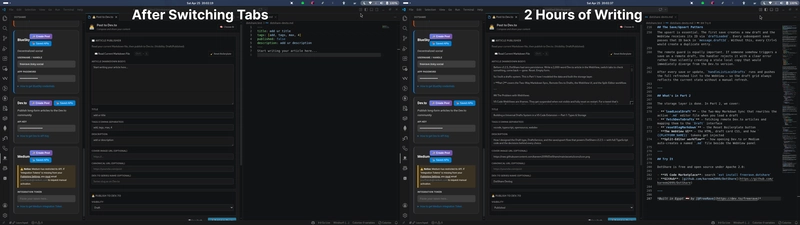
The naive fix is "just auto-save to a file." But that creates new questions: which file? What about social posts that have no file? What if the user has multiple articles open? What about platform-specific metadata like Dev.to series or Medium publish status?
The solution needed to be universal — one system for social posts and blog articles, all 9 platforms, zero config for the user.
Designing the Draft Type
The first thing I did was sit down and define exactly what a "draft" means across all use cases.
A LinkedIn post draft needs: text content, platform, timestamp.
A Dev.to article draft needs: title, tags, description, cover image, canonical URL, series, body markdown, publish status, platform.
One interface had to cover both:
// src/types.ts

export type DraftType = 'social' | 'article';

export interface Draft {
    id: string;
    type: DraftType;
    timestamp: string;
    platforms: SocialPlatform[];
    data: PostData | BlogPost;
    title?: string;      // Human-readable label in the UI
    isRemote?: boolean;  // true = fetched from Dev.to API, not local
    remoteId?: string;   // Dev.to article ID for remote drafts
}
The data field is a union. PostData for social:
export interface PostData {
    text: string;
    media?: string[];  // local file paths
}
BlogPost for long-form articles:
export interface BlogPost {
    id?: string;
    title: string;
    bodyMarkdown: string;
    tags: string[];
    canonicalUrl?: string;
    description?: string;
    coverImage?: string;
    series?: string;
    status: 'draft' | 'published' | 'unlisted';
    platformId: 'devto' | 'medium';
    publishedAt?: string;
    url?: string;
}
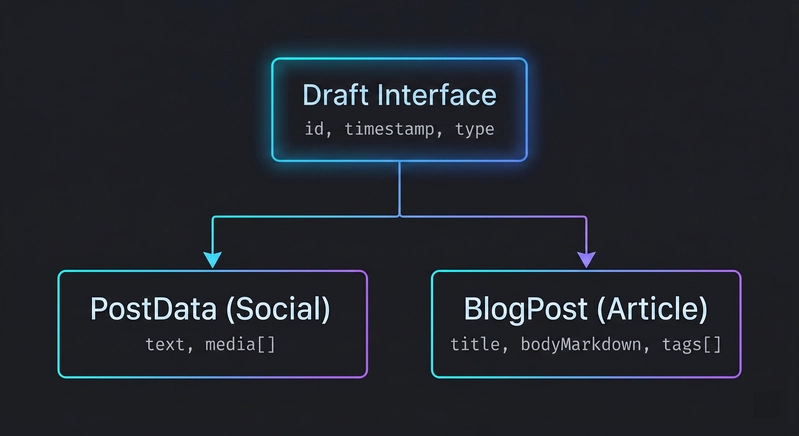
This union lets a single draftsLoaded WebView message carry both types. The WebView switches behavior on draft.type — no separate message commands, no separate storage keys per platform.
The isRemote flag is critical: it marks drafts fetched from the Dev.to API. Remote drafts look identical to local ones in the UI but have different save semantics — you update them via API, not globalState.
Choosing the Storage Backend
I evaluated three options:
Option A — Write to a file in the workspace. Simple, but creates git noise, doesn't work if there's no workspace open, and fails for social post drafts that have no natural file home.
Option B — SQLite via a native module. Powerful, but native modules in VS Code extensions are a packaging nightmare. Cross-platform builds, .vsix size, and esbuild bundling issues ruled this out fast.
Option C — VS Code globalState. This is a key-value store backed by VS Code's own storage layer. It survives restarts, is encrypted at rest on macOS (Keychain), works even without a workspace, requires zero config, and the API is synchronous to read and async to write.
globalState was the obvious choice. The only real limitation is that it's not designed for large datasets — but a list of drafts with text content will comfortably stay under the internal limits for years.
The DraftsService
DraftsService wraps globalState with a clean CRUD interface. The full implementation:
// src/services/DraftsService.ts
import * as vscode from 'vscode';
import { Draft } from '../types';

const DRAFTS_KEY = 'dotshare_drafts_v1';

export class DraftsService {
    constructor(private globalState: vscode.Memento) {}

    getDrafts(): Draft[] {
        return this.globalState.get<Draft[]>(DRAFTS_KEY, []);
    }

    getDraft(id: string): Draft | undefined {
        return this.getDrafts().find(d => d.id === id);
    }

    saveDraft(data: Omit<Draft, 'id' | 'timestamp'>): Draft {
        const drafts = this.getDrafts();
        const draft: Draft = {
            ...data,
            id: `draft_${Date.now()}_${Math.random().toString(36).slice(2, 9)}`,
            timestamp: new Date().toISOString(),
        };
        this.globalState.update(DRAFTS_KEY, [draft, ...drafts]);
        return draft;
    }

    updateDraft(id: string, updates: Partial<Draft>): Draft | undefined {
        const drafts = this.getDrafts();
        const idx = drafts.findIndex(d => d.id === id);
        if (idx === -1) return undefined;
        drafts[idx] = {
            ...drafts[idx],
            ...updates,
            timestamp: new Date().toISOString(),
        };
        this.globalState.update(DRAFTS_KEY, drafts);
        return drafts[idx];
    }

    deleteDraft(id: string): void {
        this.globalState.update(
            DRAFTS_KEY,
            this.getDrafts().filter(d => d.id !== id)
        );
    }
}
Three decisions worth explaining:
_v1 on the key. If I ever change the schema, I read dotshare_drafts_v1, transform the data, write to dotshare_drafts_v2, then delete the old key. No migration scripts, no breaking changes for existing users.
Omit<Draft, 'id' | 'timestamp'> at save. This forces the compiler to prevent callers from passing a stale ID or a hand-crafted timestamp. IDs and timestamps are always generated internally, guaranteed fresh.
Newest first. [draft, ...drafts] prepends instead of appending. The WebView grid always shows the most recent work at the top without any sort step.
Wiring It Into the Handler Chain
DraftsService is instantiated once in MessageHandler and injected down into PostHandler. This keeps a single instance — one source of truth — across the extension's lifetime:
// src/handlers/MessageHandler.ts

export class MessageHandler {
    private draftsService: DraftsService;
    private postHandler: PostHandler;

    constructor(
        private view: vscode.WebviewView,
        private context: vscode.ExtensionContext,
        private historyService: HistoryService,
        private analyticsService: AnalyticsService,
        private mediaService: MediaService
    ) {
        this.draftsService = new DraftsService(context.globalState);

        this.postHandler = new PostHandler(
            view,
            context,
            historyService,
            analyticsService,
            mediaService,
            this.draftsService  // ← injected
        );
    }
}
Routing is handled by a string check — any command that includes the word Draft goes to PostHandler:
if (
    cmd.startsWith('share') ||
    cmd === 'generatePost'  ||
    cmd === 'readMarkdownFile' ||
    cmd.includes('Draft')      // ← catches all 7 draft commands
) {
    await this.postHandler.handleMessage(message);
}
This keeps the routing table flat and readable. Adding a new draft command in the future requires zero changes to MessageHandler.
The Save/Upsert Pattern
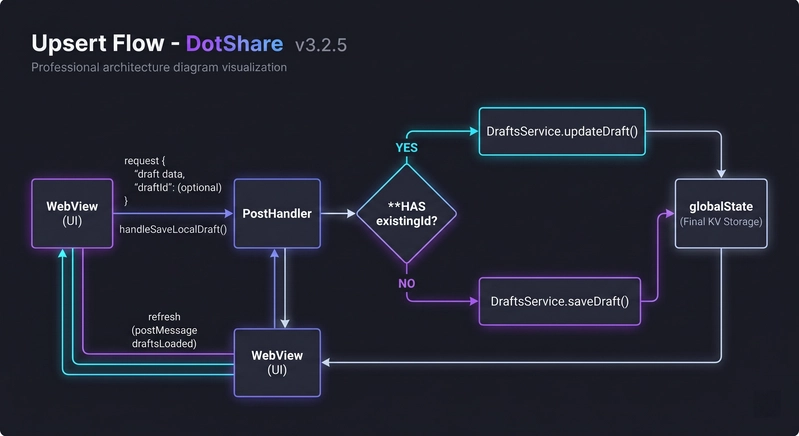
The saveLocalDraft handler is the most-called draft command. It does an upsert — not a blind insert:
private async handleSaveLocalDraft(message: Message): Promise<void> {
    const draft = message.draft as Omit<Draft, 'id' | 'timestamp'>;

    if (!draft) {
        this.sendError('Draft data is required.');
        return;
    }

    // Guard: remote drafts cannot be cloned locally
    if ((draft as Draft).isRemote) {
        this.sendError('Cannot save a remote draft locally. Use "Update" instead.');
        return;
    }

    const existingId = message.draftId as string | undefined;

    if (existingId) {
        // Update existing draft in place
        const updated = this.draftsService.updateDraft(existingId, draft);
        if (updated) {
            this.sendInfo('Draft updated!');
            this.view.webview.postMessage({ command: 'draftLoaded', draft: updated });
        } else {
            this.sendError('Draft not found for update.');
        }
    } else {
        // Create new draft
        const saved = this.draftsService.saveDraft(draft);
        this.sendInfo('Draft saved locally!');
        this.view.webview.postMessage({ command: 'draftLoaded', draft: saved });
    }

    // Always refresh the list
    await this.handleListLocalDrafts();
}
The upsert is essential. The first save creates a new draft and the WebView receives its ID via draftLoaded. Every subsequent save passes that ID back in message.draftId. Without this, every Ctrl+S would create a duplicate entry.
The remote guard is equally important. If someone somehow triggers a save on a remote draft, the handler rejects it with a clear error rather than silently creating a stale local copy that would immediately diverge from the Dev.to version.
After every save or update, handleListLocalDrafts runs and pushes the full refreshed list to the WebView — so the draft grid always reflects the current state without a manual refresh.
What's in Part 2
The storage layer is done. In Part 2, we cover:
-
loadLocalDraft— the Two-Way Markdown Sync that rewrites the active.mdeditor file when you load a draft -
fetchDevToDrafts— fetching remote Dev.to articles and mapping them to theDraftinterface -
resetBlogMarkdown— the Reset Boilerplate button -
The WebView UI — the HTML, draft card CSS, and how
{{PLATFORM_NAME}}tokens get injected -
Split-Editor workflow — how opening Dev.to or Medium auto-creates a named
.mdfile beside the WebView panel
Try It
DotShare is free and open source under Apache 2.0:
-
VS Code Marketplace: Download Extension (or search
ext install freerave.dotshare) - Open VSX Registry: Download for VSCodium
- GitHub: github.com/kareem2099/DotShare
If this saved you time, a ⭐ on the repo means a lot!
Built by @FreeRave