


Related: Long Tasks and Main Thread Blocking heavy React renders are one of the most common sources of Long Tasks.
React's default re-render behavior is intentionally conservative: when a parent re-renders, all children re-render too. This is correct by default — React prioritizes correctness over performance, and render-phase work (function calls, hook execution) is cheap enough that unnecessary re-renders are often harmless. But "often harmless" is not "always harmless."
What this covers: The exact four triggers that cause a component to re-render, how reconciliation and the fiber tree work, why referential equality matters for memoization, the context performance trap, and how to read the React DevTools Profiler to find the root cause of unexpected re-renders.
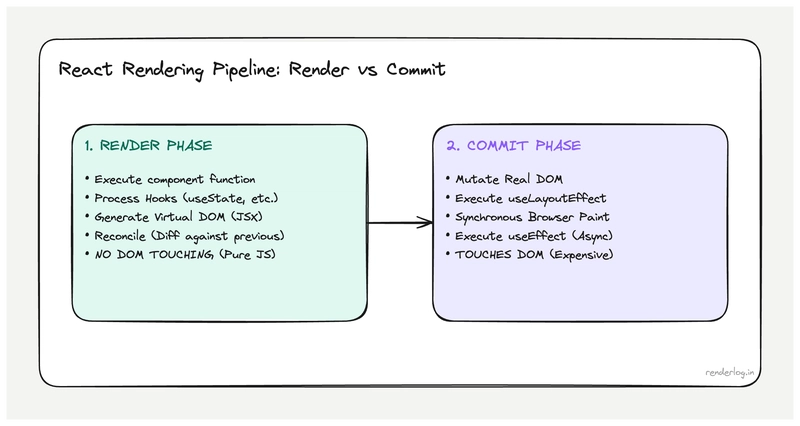
Render phase vs commit phase
React's work of "updating the UI" is split into two fundamentally different phases. Confusing them is the root of a lot of performance misconceptions.
The render phase
The render phase is when React calls your component functions and figures out what the UI should look like. When you call setState, React schedules a render. During the render phase, React:
- Calls the component function (your function component body executes).
- Calls all the hooks in order (
useState,useEffect,useMemo, etc.). - Gets the returned JSX.
- Does this recursively for any child components that also need updating.
- Diffs the new output against the previous output (reconciliation).
Critical insight: the render phase is pure work: React is just computing what the UI should be. **It doesn't touch the DOM yet.* Your component function can be called and produce output that React then decides to discard (this is what StrictMode's double-render exploits see below).
The commit phase
The commit phase is when React actually applies changes to the DOM. It has three sub-phases:
-
Before mutation: fires
getSnapshotBeforeUpdatelifecycle and captures current DOM state. - Mutation: applies DOM insertions, updates, and deletions. This is the only time React directly touches the DOM.
-
Layout: fires
useLayoutEffectandcomponentDidMount/componentDidUpdatesynchronously. This is whyuseLayoutEffectcan measure DOM layout the DOM is updated but the browser hasn't painted yet. - After the commit,
useEffectcallbacks are scheduled for after the browser has painted.
Understanding this split matters because: render phase work is cheap to do multiple times (it's just function calls and object comparisons). Commit phase work touches the DOM and can trigger browser reflow. React is clever about doing as little DOM work as possible.
Reconciliation and the fiber tree
React doesn't just compare new JSX against a flat list of DOM elements. It maintains an internal data structure called the fiber tree a graph of objects representing every component instance in your app, including their state, hooks, and pending work.
Each fiber corresponds to one component instance. When a state update is triggered, React creates an alternative "work in progress" fiber tree and starts reconciling it against the current tree. This is the reconciliation algorithm.
What reconciliation does:
- Compares new JSX element type against the existing fiber's type.
- If the type changed (e.g.,
<Button>became<a>), React unmounts the old component tree and mounts a fresh one. - If the type is the same, React updates the existing fiber with new props, runs hooks again, and recurses into children.
- For lists, it uses keys to match new elements to existing fibers.
The key performance insight: reconciliation is proportional to the size of the fiber tree that gets re-rendered. If you trigger a re-render high in the tree, React walks down through all descendants. This is why the settings checkbox caused 47 re-renders the useState was placed in a component that was the parent of almost everything.
What triggers a re-render
There are exactly four causes of a React component re-rendering:
| Trigger | Description |
|---|---|
| setState call | Calling the setter from useState or useReducer dispatch |
| Props change | Parent re-renders and passes new prop values (by reference) |
| Context value changes | Any consumer of a context re-renders when the context value changes |
| Parent re-renders | A component re-renders when its parent re-renders, even if props didn't change |
The fourth one surprises people the most. In React's default behavior, if a parent re-renders, all children re-render too regardless of whether their props changed. This is the default: without memoization, the component tree re-renders in a cascade from the component that triggered the state change, downward.
This is actually a deliberate design choice. React assumes that re-rendering is cheap (it's just function calls) and that computing whether to skip a render is sometimes more expensive than just doing the render. The defaults are optimized for correctness, not maximum performance.
Re-renders don't mean DOM updates
This is a crucial clarification that trips up a lot of performance investigations.
When 47 components re-render, React calls 47 component functions and gets back 47 JSX trees. Then it diffs those against the previous output. If the output is identical, React makes zero DOM changes for that component. No DOM mutations, no browser reflow, nothing.
So "47 components re-rendered" in React DevTools means "47 component functions were called, not "47 DOM nodes were updated." The actual DOM impact depends on how many of those components produced different output.
This distinction matters because: pure render cost (function calls, hook execution) is usually cheap. DOM mutation cost is what triggers browser layout and paint. If your 47 re-rendering components all produce the same output as before, you might have wasted 2ms of JavaScript time, but you've caused zero additional browser rendering work.
That said, 47 function calls isn't free: if any of those functions do expensive computations inline (without useMemo), or if React itself has to run through complex reconciliation logic, you'll feel it.
Why referential equality matters
This is where function components differ fundamentally from the mental model of "props changed = new values." React uses referential equality (===) to compare props and determine if a memoized component should skip its render.
function Parent() {
  const [count, setCount] = useState(0);

  // ⚠️ New object reference created on every render
  const config = { theme: 'dark', size: 'medium' };

  // ⚠️ New function reference created on every render
  const handleClick = () => setCount(c => c + 1);

  return (
    <>


    </>
  );
}
Every time Parent re-renders, config and handleClick are brand new objects. They're deeply equal to the previous values (same shape, same content) but config === previousConfig is false because they're different object references.
If Settings is wrapped in React.memo, it will still re-render because its config prop is a new reference, even though nothing meaningfully changed.
// useMemo stabilizes the reference between renders
const config = useMemo(() => ({ theme: 'dark', size: 'medium' }), []);

// useCallback stabilizes function references
const handleClick = useCallback(() => setCount(c => c + 1), []);
useMemo and useCallback are not about avoiding "expensive computations: they're primarily about referential stability. Their main job is to prevent downstream re-renders caused by new object/function references.
The context performance problem
Context is often described as a solution for "prop drilling: passing data through many levels of components. It is that. It's also a performance footgun if you're not careful about what you put in it.
Context is a broadcast. When the context value changes, every component that consumes that context re-renders, regardless of whether the specific piece of data it reads changed.
// ⚠️ This context re-renders ALL consumers when ANYTHING in the object changes
const AppContext = createContext({
  user: null,
  theme: 'light',
  notifications: [],
  sidebarOpen: false,
});

function App() {
  const [sidebarOpen, setSidebarOpen] = useState(false);

  // New object reference when sidebarOpen changes
  // → Every context consumer re-renders, including deep UI components that only care about `user`
  const value = { user, theme, notifications, sidebarOpen };

  return <AppContext.Provider value={value}>{children}</AppContext.Provider>;
}
Toggling the sidebar causes every consumer of AppContext to re-render, including components that only ever read user. The fix is to split context by update frequency:
// Stable values that rarely change
const UserContext = createContext(null);
// Dynamic values that change often
const UIStateContext = createContext({ sidebarOpen: false });

// Now sidebar state changes only affect UIStateContext consumers
A useful mental model: each context should have one reason to change. If your context value object contains both stable auth data and frequently-changing UI state, you'll cause unnecessary re-renders across the entire consumer tree.
Keys in lists: what they actually do
Keys serve a specific mechanical purpose during reconciliation. React uses keys to match new list elements to existing fibers when the list changes. Without keys (or with incorrect keys), React falls back to matching by position.
// Without keys  React matches by index
// Adding an item to the beginning: React thinks EVERY item changed
{items.map((item, index) => (

))}

// With stable IDs: React correctly identifies which item was added
{items.map(item => (

))}
When you use key={index} and prepend an item to the list, React sees:
- Position 0: had
{id: 1}, now has{id: 0}→ update this fiber - Position 1: had
{id: 2}, now has{id: 1}→ update this fiber - etc.
Every fiber gets updated because positions changed, even though only one item was added. With stable IDs, React sees that existing fibers just shifted position and correctly reconciles with minimal work.
The random-key anti-pattern is even worse:
// ⚠️ Generates a new key on every render  destroys all reconciliation benefits
{items.map(item => (

))}
With random keys, every render unmounts all existing Card components and mounts fresh ones. You lose all component state, all DOM node reuse, and get maximum mount/unmount work on every render.
React 18 automatic batching
Before React 18, state updates inside setTimeout, Promise.then, or native event handlers were processed individually: one setState = one re-render.
// React 17: 2 renders
setTimeout(() => {
  setCount(c => c + 1); // Render 1
  setLoading(false);    // Render 2
}, 1000);

// React 18: 1 render (automatic batching)
setTimeout(() => {
  setCount(c => c + 1); // Batched
  setLoading(false);    // Batched → single render
}, 1000);
React 18's automatic batching extends the existing batching behavior (which previously only worked in React event handlers) to all asynchronous contexts. This is a free performance improvement that many apps benefit from immediately after upgrading.
The cases where this matters most: fetch callbacks that update multiple state values, async event handlers that set loading + data states together, and any code that does multiple setState calls in a row in async code.
If you need to explicitly opt out of batching (rare), flushSync from react-dom forces synchronous processing:
// Forces immediate render after each setState
flushSync(() => setCount(1));
flushSync(() => setLoading(false));
StrictMode's double-render in development
If you're using React.StrictMode (you should be in development), your component functions are called twice during the render phase in development mode. This is intentional and a source of confusion for developers who see their console.log appearing twice.
What StrictMode is doing: it deliberately calls your component function twice to check that the function is pure that calling it multiple times with the same inputs produces the same output. If your component has side effects in the render phase (network requests, direct DOM mutations, setting external variables), the double-render will expose them because those effects will fire twice.
function BadComponent() {
  // ⚠️ Side effect in render  this fires twice in StrictMode development
  someGlobalCounter++;

  return <div>{someGlobalCounter}</div>;
}
The double-render only happens in development mode. Production builds render once. If something works in development but breaks in production differently, StrictMode's double-render is not the cause but the bugs it exposes in development might surface as subtle issues in production.
Reading the React Profiler
The React DevTools Profiler is the right tool for understanding re-renders. Open DevTools → Components → Profiler. Hit Record, do the interaction that feels slow, stop recording.
The flame chart shows every component that rendered, how long it took, and crucially why it rendered:
- Props changed one or more props have a different reference than the previous render.
-
State changed a
useStateoruseReducerhook in this component changed. - Context changed a context this component subscribes to changed.
- Parent re-rendered no local reason, but the parent rendered so this did too.
- Hooks changed a hook produced a different value than before.
The "why did this render?" information is invaluable for diagnosing unnecessary re-renders. When you see "parent re-rendered" for a component that shouldn't care about its parent's state change, that's the target for React.memo. When you see "props changed" for a memoized component that's receiving an object prop, that's the target for useMemo.
| Profiler "Why" | Likely fix |
|---|---|
| "Parent rendered" on a pure display component | Wrap with React.memo
|
| "Props changed" on a memoized component | Stabilize prop reference with useMemo/useCallback
|
| "Context changed" but component only reads one field | Split context by update frequency |
| "State changed" unexpected | Check if the state is co-located at the right level |
The Profiler also shows total render duration per component. If a single component consistently takes 15ms+ to render, that's a component-level optimization opportunity either memoizing expensive calculations inside it or splitting it into smaller pieces.
Read the original article on Renderlog.in:
https://renderlog.in/blog/react-rerendering-when-trees-update/
If you found this helpful, I've also built some free tools for developers and everyday users. Feel free to try them once:
JSON Tools: https://json.renderlog.in
Text Tools: https://text.renderlog.in
QR Tools: https://qr.renderlog.in