


Your Dockerfile builds, your container starts, and your triggers never fire. The Functions host logs "no functions found" or the container sits idle, processing nothing. The gap between a working image and a working function app is entirely configuration. The runtime needs specific environment variables, the build must publish to the exact path the host expects, and Azurite connections behave differently inside a container network than on localhost. Four walls, four fixes. All code samples are in the companion repo.
Pitfall 1: Environment Variables That Vanish
Your container starts, the Functions host initializes, and the logs show this:
[2026-04-20T08:12:03Z] No job functions found. Try making your job classes and methods public.
[2026-04-20T08:12:03Z] If you're using binding extensions (e.g. Azure Storage, ServiceBus, Timers, etc.)
[2026-04-20T08:12:03Z] make sure you've called the registration method for the extension(s)
[2026-04-20T08:12:03Z] in your startup code
[2026-04-20T08:12:03Z] 0 functions loaded
You check your code. The classes are public. The methods are public. The bindings are registered. Everything runs fine with func start on your machine.
The error is misleading. The real cause: FUNCTIONS_WORKER_RUNTIME is not set.
Why the file you trusted does not exist here
local.settings.json is a dev-time convenience. The Azure Functions Core Tools reads it when you run func start locally. Inside a container, that file is never loaded. The container runtime reads OS environment variables only, and if FUNCTIONS_WORKER_RUNTIME is missing, the host cannot determine which language worker to start. It discovers zero functions and prints an error that sends you looking at your code instead of your configuration.
AzureWebJobsStorage is the second variable that catches people. Without it, you get a different failure:
Value cannot be null. (Parameter 'connectionString')
Or worse, no error at all. HTTP triggers still work because they do not require storage. You test with an HTTP endpoint, everything responds, you deploy, and your queue triggers silently never fire. The host needs a storage connection to manage leases, checkpoints, and timer schedules for every non-HTTP trigger type.
If you set FUNCTIONS_WORKER_RUNTIME to dotnet instead of dotnet-isolated, the host raises AZFD0013: the configured runtime does not match the worker runtime metadata in your published artifacts. Another error that points away from the actual one-word fix.
The second trap: .env files that silently mangle values
Azure Storage connection strings are long. If your .env file wraps them across lines, Docker Compose silently truncates or corrupts the value:
# Broken: line-wrapped connection string
AzureWebJobsStorage=DefaultEndpointsProtocol=http;AccountName=devstoreaccount1;
  AccountKey=Eby8vdM02xNOcqFlqUwJPLlmEtlCDXJ1OUzFT50uSRZ6IFsuFq2UVErCz4I6tq/K1SZFPTOtr/KBHBeksoGMGw==;
  BlobEndpoint=http://azurite:10000/devstoreaccount1;
  QueueEndpoint=http://azurite:10001/devstoreaccount1;

# Working: entire value on one line
AzureWebJobsStorage=DefaultEndpointsProtocol=http;AccountName=devstoreaccount1;AccountKey=Eby8vdM02xNOcqFlqUwJPLlmEtlCDXJ1OUzFT50uSRZ6IFsuFq2UVErCz4I6tq/K1SZFPTOtr/KBHBeksoGMGw==;BlobEndpoint=http://azurite:10000/devstoreaccount1;QueueEndpoint=http://azurite:10001/devstoreaccount1;
No warning, no parse error. The value just stops at the first newline.
The fix: separate constants from secrets
Bake values that never change per environment into your Dockerfile:
ENV AzureWebJobsScriptRoot=/home/site/wwwroot
ENV FUNCTIONS_WORKER_RUNTIME=dotnet-isolated
Pass everything else through your Compose file or deployment config:
services:
  functions:
    build: .
    environment:
      - AzureWebJobsStorage=${AzureWebJobsStorage}
      - APPLICATIONINSIGHTS_CONNECTION_STRING=${APPLICATIONINSIGHTS_CONNECTION_STRING}
    env_file:
      - .env
Connection strings and instrumentation keys stay out of the image. They come from .env locally and from app settings or Key Vault references in production.
One more if you are deploying custom containers to App Service specifically: set WEBSITES_ENABLE_APP_SERVICE_STORAGE=false. The default (true) mounts persistent storage over /home, which overwrites your published function code at startup. This does not apply to Container Apps, only App Service (GitHub issue #642).
Pitfall 2: Azurite and Docker Networking
Most tutorials tell you to set AzureWebJobsStorage to UseDevelopmentStorage=true and move on. That shorthand expands to a full connection string pointing at localhost:
DefaultEndpointsProtocol=http;
AccountName=devstoreaccount1;
AccountKey=Eby8vdM02xNOcqFlqUwJPLlmEtlCDXJ1OUzFT50uSRZ6IFsuFq2UVErCz4I6tq/K1SZFPTOtr/KBHBeksoGMGw==;
BlobEndpoint=http://127.0.0.1:10000/devstoreaccount1;
QueueEndpoint=http://127.0.0.1:10001/devstoreaccount1;
TableEndpoint=http://127.0.0.1:10002/devstoreaccount1;
See those 127.0.0.1 addresses? When Azurite runs on your machine, that works fine. Inside Docker, it breaks.
Each container runs in its own network namespace. 127.0.0.1 inside the functions container refers to the functions container itself, not Azurite. Your function tries to reach storage on its own loopback interface, finds nothing listening, and fails silently or throws a connection error depending on the trigger type.
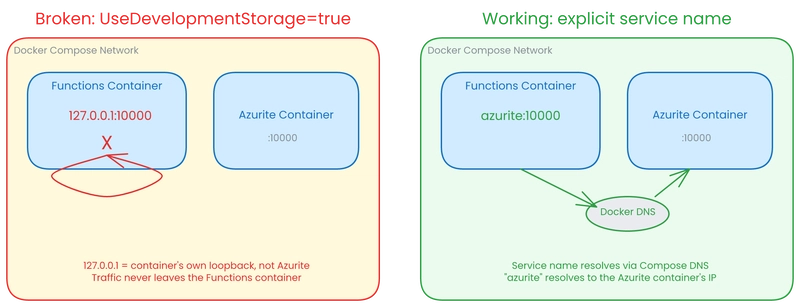
Docker Compose creates a shared bridge network where each service name resolves to the corresponding container's IP. So the fix is to spell out the full connection string with the Compose service name replacing 127.0.0.1:
DefaultEndpointsProtocol=http;
AccountName=devstoreaccount1;
AccountKey=Eby8vdM02xNOcqFlqUwJPLlmEtlCDXJ1OUzFT50uSRZ6IFsuFq2UVErCz4I6tq/K1SZFPTOtr/KBHBeksoGMGw==;
BlobEndpoint=http://azurite:10000/devstoreaccount1;
QueueEndpoint=http://azurite:10001/devstoreaccount1;
TableEndpoint=http://azurite:10002/devstoreaccount1;
azurite here is whatever you named the service in your docker-compose.yml. DNS resolution happens automatically on the Compose network.
But DNS resolving correctly is not enough. By default, Azurite binds to 127.0.0.1 inside its own container, which means it only accepts connections from itself. You need to pass --blobHost 0.0.0.0 --queueHost 0.0.0.0 --tableHost 0.0.0.0 so Azurite listens on all interfaces. Without this, the functions container resolves azurite to the right IP, opens a TCP connection, and gets "Connection refused."
This pitfall hides well because HTTP triggers don't need storage. You build a function app, add an HTTP trigger, test it in Docker, everything works. Then you add a queue trigger and it silently does nothing: no errors in the console, no messages processed, no indication that storage is unreachable. The function host quietly skips triggers it can't initialize.
A quick connectivity check saves you the debugging:
docker compose exec functions curl -s http://azurite:10000
If Azurite is reachable and bound correctly, you get back a short XML or text response. If you get "Connection refused," check the bind flags. If you get a DNS error, check your service name.
Part 1 already showed the working Compose file with these settings in place. That is why each piece is there.
Pitfall 3: Debugging a Silent Container
Your container starts, the health check passes, but nothing happens. No HTTP responses, no queue processing, no timer triggers. The logs show the host booting and then silence. This is the most common failure mode with Azure Functions in Docker, and it has six distinct causes. Work through them in order.
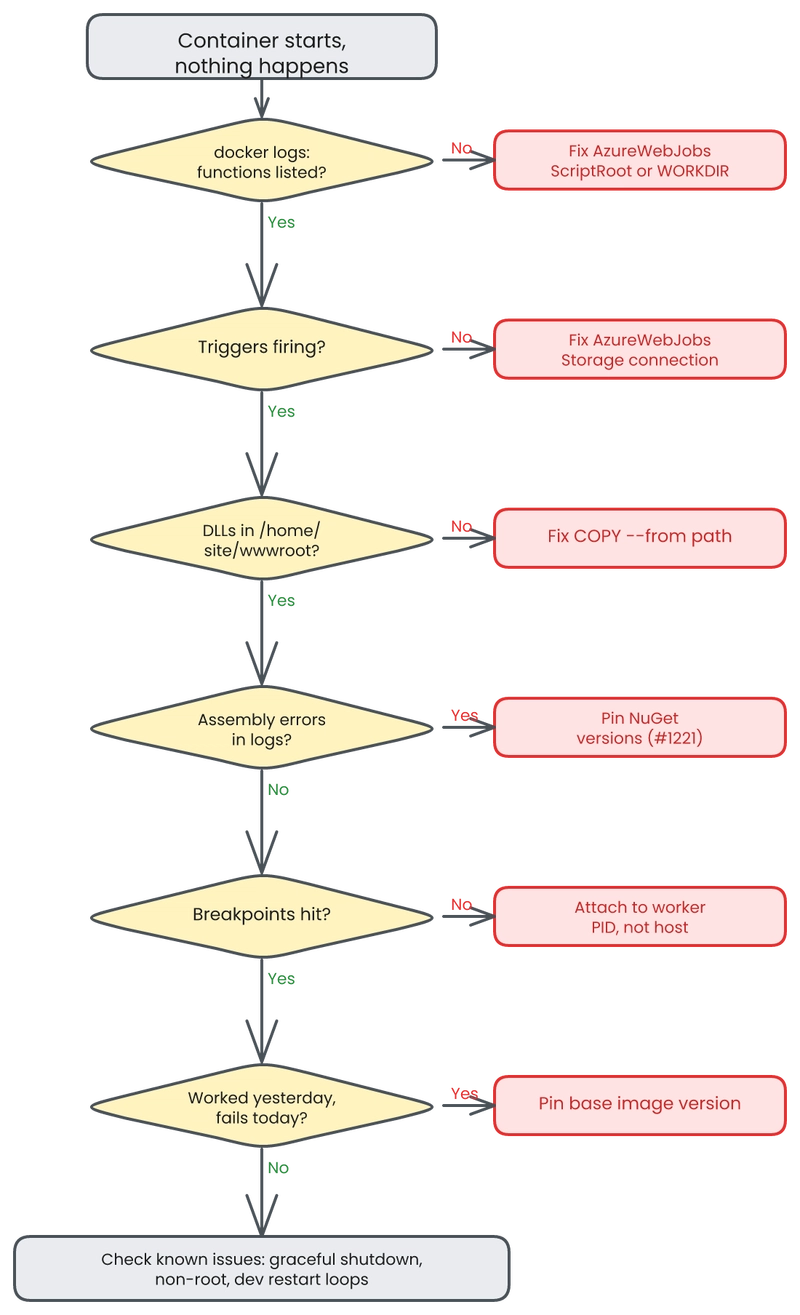
Step 1: Check if the host found your functions. Run docker logs <container> and look for the function discovery block near startup:
Host initialized (348ms)
Found the following functions:
  ProcessOrder: timerTrigger
  SubmitOrder: httpTrigger
If you see "Host initialized" but zero functions listed, your AzureWebJobsScriptRoot is wrong or your Dockerfile's WORKDIR does not point to /home/site/wwwroot. The host scans that directory for compiled function metadata. If it points somewhere else, it finds nothing and starts successfully with nothing to run. This is the root cause in #642 and #980.
Step 2: Check storage connectivity. If your functions are listed but triggers never fire, the problem is almost always storage. Look for this error in the logs:
The Azure Storage connection string named 'Storage' does not exist.
Timer triggers and queue triggers need a valid AzureWebJobsStorage connection to coordinate leases and checkpoints. HTTP triggers work without storage, so a container that responds to HTTP but ignores everything else is a storage configuration problem. Verify your environment variables:
docker compose exec functions env | grep FUNCTIONS
This surfaces FUNCTIONS_WORKER_RUNTIME, AzureWebJobsStorage, and any other Functions-specific configuration in the running container.
Step 3: Inspect the container filesystem. When functions still do not appear after fixing the script root, the published output may not be where you think it is. Check directly:
docker compose exec functions ls /home/site/wwwroot
You should see your .dll files, host.json, function.json files, and the worker.config.json. A wrong COPY --from=build path in a multi-stage Dockerfile is the most common cause: the build stage publishes to /app/publish but the copy targets /app/out, and the container starts with an empty wwwroot.
Step 4: Check for assembly conflicts. If the host discovers your functions but the worker crashes on invocation, look for FileNotFoundException referencing assemblies like System.Memory.Data. This happens when in-process WebJobs SDK packages ship inside an isolated worker image. The host and worker expect different assembly versions, and the loader fails silently until a trigger actually fires. Pin your NuGet package versions to match the host's expectations. See #1221 for the specific version matrix.
Step 5: Attach a debugger. When the logs tell you nothing useful, attach directly. VS Code's pipeTransport configuration or Rider's Docker attach both work. The critical detail: the Functions host and the isolated worker are separate .NET processes. The host is the parent process managing triggers; your code runs in the worker. Attach to the worker PID, not the host PID. If you attach to the host, you will see trigger infrastructure but none of your breakpoints will hit.
Step 6: Watch for broken image tags. Sometimes your container worked yesterday and fails today with no code changes. Base image tag updates can silently break functions. Tag 4.33.2 broke function discovery for days before anyone traced it back to the image itself (#1068). Always pin specific version tags in your Dockerfile. Never use :latest for the Functions base image in production.
Other Known Issues
A few problems fall outside the decision tree but will bite you eventually:
No graceful shutdown. The default entrypoint start.sh runs as PID 1 and does not forward SIGTERM to child processes. Your container gets SIGKILL after the orchestrator's grace period expires, which means in-flight executions are terminated without cleanup. This has been open for five years (#404). Workaround: use dumb-init or a custom entrypoint that traps signals.
Non-root containers break startup. The Functions host needs write access to /azure-functions-host at startup. Running the container as a non-root user fails unless you fix directory permissions in your Dockerfile (#424).
Development environment restart loops. Setting AZURE_FUNCTIONS_ENVIRONMENT=Development can trigger the host to restart repeatedly as it watches for file changes that never settle (#1207). Use Production or Staging in Docker unless you specifically need development-mode diagnostics.
Pitfall 4: Image Size and Cold Start
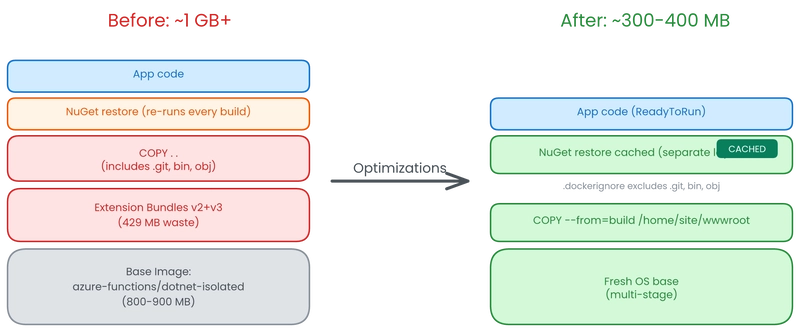
The default Azure Functions base image is 800-900 MB. Add your application code, NuGet packages, and assets, and you're over 1 GB before your first request arrives (#236).
The -slim tags can paradoxically be larger than the regular tags (#1230). Always verify with docker images.
Old extension bundles (v2 and v3) still ship inside the v4 images, wasting roughly 429 MB on code your app will never execute (#880).
Every optimization here is measurable. Start with docker images and track the delta.
.dockerignore
Without a .dockerignore, COPY . . sends your entire working directory to the Docker daemon, including .git/ history and local.settings.json (which contains connection strings and keys).
bin/
obj/
.git/
.vs/
.vscode/
local.settings.json
node_modules/
*.user
Dockerfile
This alone can cut your build context by hundreds of megabytes and prevent secrets from leaking into image layers.
Layer ordering for cache hits
The order of your COPY instructions determines whether Docker can reuse cached layers. Copy the project file first, restore, then copy everything else:
COPY MyFunctionApp.csproj .
RUN dotnet restore

COPY . .
RUN dotnet publish -c Release -o /home/site/wwwroot
When only source code changes, the restore layer stays cached:
Step 3/7 : RUN dotnet restore
 ---> Using cache
 ---> 4a8b2c1d3e5f
Step 4/7 : COPY . .
 ---> 9f1e2d3c4b5a
That "Using cache" line saves 30-120 seconds per build depending on your package count. Without this ordering, every code change re-downloads every NuGet package.
ReadyToRun compilation
Add the PublishReadyToRun flag to pre-compile IL to native code, reducing JIT time at startup:
RUN dotnet publish -c Release -o /home/site/wwwroot \
    -p:PublishReadyToRun=true
This increases image size slightly but cuts cold start latency by front-loading compilation to build time instead of request time.
Trimming (PublishTrimmed=true) is the more aggressive option. It strips unused assemblies and can dramatically reduce image size. But the Functions runtime uses reflection to discover your function endpoints, and the trimmer can remove types it considers unreachable. If your functions disappear after trimming, that's why. Use trimming only if you're willing to maintain trim annotations and test thoroughly.
Cold start: the numbers that matter
On Azure Container Apps, image pull time dominates cold start because the platform scales to zero:
| Image size | Pull time | Total cold start |
|---|---|---|
| ~480 MB | ~20s | ~25-30s |
| ~140 MB | ~7s | ~12-15s |
That 13-second pull difference hits every scale-from-zero event. On Functions Premium with always-ready instances, the image is cached on warm infrastructure, so size matters less for latency. It still matters for deployment speed and registry costs.
CVE accumulation
Base images are only rebuilt monthly, so vulnerabilities accumulate between rebuilds (#1185). A multi-stage build where you copy your published output onto a fresh OS base gives you control over patching:
FROM mcr.microsoft.com/dotnet/sdk:8.0 AS build
# ... build steps ...

FROM mcr.microsoft.com/azure-functions/dotnet-isolated:4-dotnet-isolated8.0
COPY --from=build /home/site/wwwroot /home/site/wwwroot
Run docker images after applying these changes. A starting point of 1 GB+ dropping to 300-400 MB is typical when you combine layer optimization, proper .dockerignore, and ReadyToRun instead of carrying dead extension bundles.
Pre-Deploy Checklist
Save yourself a repeat debugging session. Run through this before every container deployment.
- [ ]
FUNCTIONS_WORKER_RUNTIMEset todotnet-isolatedin your container environment, not inherited fromlocal.settings.json - [ ]
AzureWebJobsStorageuses explicit endpoint strings with Docker service names instead ofUseDevelopmentStorage=true - [ ] Connection strings are single-line in
.envfiles with no line-wrapping - [ ]
docker logsconfirms all expected functions discovered at startup - [ ]
AzureWebJobsScriptRootpoints to/home/site/wwwroot(verify if using a custom base image) - [ ]
.dockerignoreexcludesbin/,obj/,.git/, andlocal.settings.json - [ ] NuGet restore layer cached separately from the source code copy step
- [ ] Base image tag pinned to a specific version, not
:latest - [ ] Azurite bound to
0.0.0.0in your Compose configuration - [ ] Image tested with
docker compose uplocally before pushing to any registry
Which of these four pitfalls cost you the most debugging time: environment variables, Azurite networking, silent startup failures, or image size?
Azure Functions Beyond the Basics
- Part 1: Running Azure Functions in Docker: Why and How
- Part 2: Docker Pitfalls I Hit (And How to Avoid Them) (this article)