





Introduction
Modern web applications are predominantly built as Single Page Applications (SPAs). Frameworks like React, Vue, and Angular deliver rich, interactive experiences by rendering HTML entirely in the browser using JavaScript. While this creates excellent user experiences, it introduces a critical SEO problem: search engine bots and social media crawlers cannot reliably execute JavaScript, meaning they often see an empty page.
This guide walks through building a production-grade prerendering system that solves this problem completely — without relying on any paid third-party service. Using Cloudflare Workers at the edge, Puppeteer, and Cloudflare Workers KV for persistent caching, we will build a system that:
- Intercepts bot traffic at the CDN edge before it reaches your origin server.
- Serves fully rendered HTML snapshots from a fast KV cache.
- Stays entirely within Cloudflare's free tier for most use cases.
- Scales to hundreds or thousands of pages using a simple batch crawl strategy.
Prerequisites
Before getting started, make sure you have the following:
- A Cloudflare account (free tier is sufficient to start).
- A domain added to Cloudflare with DNS proxied.
- Node.js v18 or higher installed on your local machine.
-
Wrangler CLI installed:
npm install -g wrangler - Basic familiarity with JavaScript and command-line tools.
- Your website must have a
sitemap.xmlavailable at a public URL.
Important: Cloudflare Browser Rendering requires the
@cloudflare/puppeteernpm package and must be deployed via Wrangler CLI — it cannot be used from the Cloudflare dashboard editor alone.
Implementation
Step 1: Create a Cloudflare Worker
What Is a Worker?
A Cloudflare Worker is a serverless JavaScript function that runs at Cloudflare's edge locations. It allows you to:
- Intercept HTTP requests.
- Read/write KV data and return custom responses.
1.1 Navigate to Workers
- Log in to the Cloudflare Dashboard.
- Go to Build → Compute & AI → Workers & Pages.
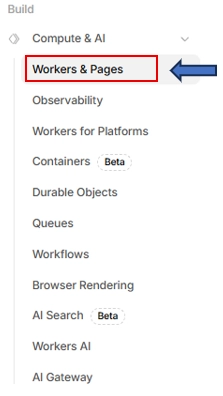
- Click Create Application.

1.2 Create a New Worker
Step 2: Create a Workers KV Namespace
What Is a KV Namespace?
A KV namespace stores data as key-value pairs:
key → value
"/about" → "<html>About Page</html>"
Each key represents a URL path, and the value is the pre-rendered HTML. Workers KV is a globally distributed key-value storage optimized for fast reads.
2.1 Create KV Namespace
- Go to Build → Storage & Databases → Workers KV.
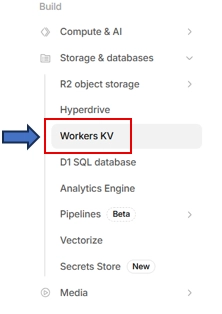
- Click Create Instance.

- Give the namespace a name, for example:
PRERENDER_KV_HTML.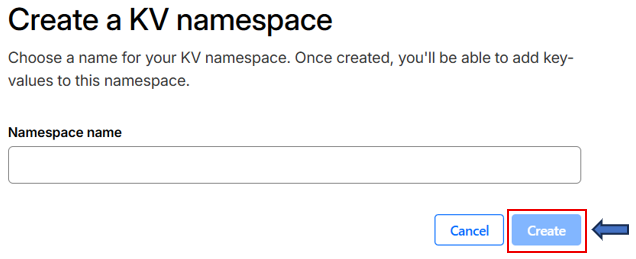
- Click Create. After creation, copy the Namespace ID (used internally by Cloudflare).
Step 3: Bind KV Namespace to the Worker
Binding allows the Worker code to access the KV namespace.
3.1 Add KV Binding
- Open your Worker.
- Go to Build → Workers & Pages → Settings → Bindings.

- Click Add binding.

- Choose KV Namespace.
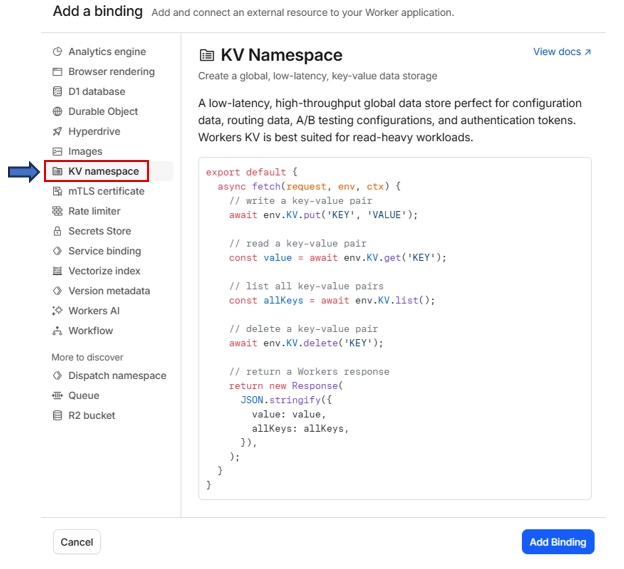
Fill in the fields:
| Field | Value |
|---|---|
| Variable name | Your variable name |
| KV namespace | Your KV namespace name |
- Click Add Binding.
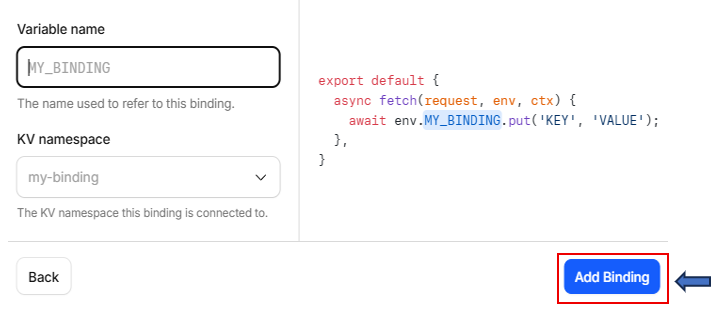
Why Variable Name Matters: The variable name is how you access KV inside JavaScript code:
env.PRERENDER_HTML_KV.get("/about")The namespace name and variable name do not need to match.
Step 4: Serve HTML Pages from KV Using the Worker
4.1 Final Worker Code
Go to Build → Workers & Pages → Settings → Edit Code

Replace the default Worker code with the following:
export default {
  async fetch(request, env) {
    const url = new URL(request.url);
    let key = url.pathname;

    // Convert homepage "/" to "/index" for KV storage compatibility
    if (key === "/") key = "/index";

    // Attempt to retrieve pre-rendered HTML from KV
    const html = await env.PRERENDER_HTML_KV.get(key);

    if (html) {
      return new Response(html, {
        headers: { "Content-Type": "text/html" },
      });
    }

    return new Response("Not Found", { status: 404 });
  },
};
How the Code Works
The system takes the URL path (like /about or /contact) from the request and uses it as a key to check in KV storage. Since the homepage / cannot be stored directly, it is converted to /index. If the HTML is found in KV, it is returned instantly. If not, a 404 response is sent.
KV Key Naming Rules
KV keys must match the URL paths exactly:
- The homepage
/is stored as/index. - All other pages like
/aboutor/pricingare stored as their exact paths.
This makes fetching data simple and fast.
4.2 Testing the Setup
- Go to Build → Storage & Databases → Workers KV.
- Add a test entry in KV:
-
Key:
/test -
Value:
<h1>KV Test Page</h1>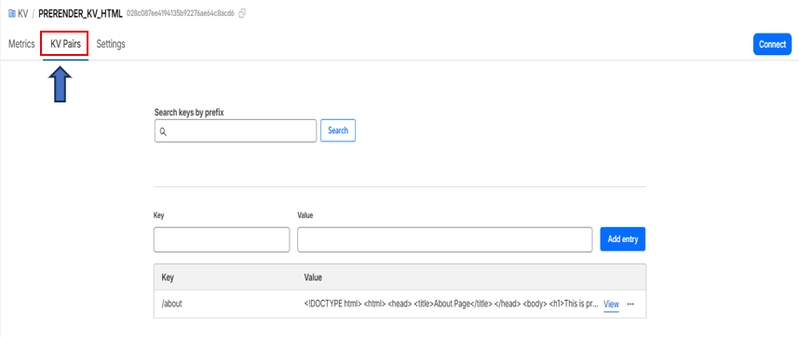
-
Key:
- Go to Workers & Pages → Edit Code → Preview.
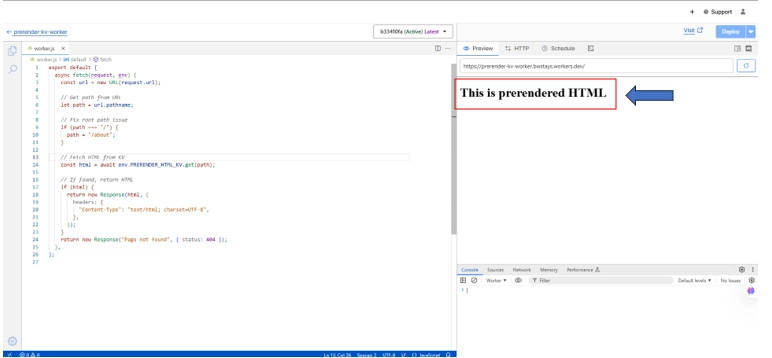 If the page loads correctly, your KV + Worker setup is working.
Step 5: Manually Store One HTML Page in KV and Serve It
Before automating the process across 90+ pages, verify the system works for a single page.
5.1 Choose One Page to Prerender
Start with the homepage, for example: https://www.bwstays.com
5.2 Copy the Full HTML Source
- Open the page in your browser.
- Right-click → View Page Source (NOT "Inspect").
- You will see the entire rendered source code.
- Press Ctrl + A to select all, then copy everything.
This is your pre-rendered HTML.
5.3 Store HTML in Workers KV
- Go to Storage & Databases → Workers KV → Your KV Namespace → KV Pairs.
- Add an entry:
-
Key:
/about - Value: Paste the full HTML you copied.
-
Key:
- Click Save.
5.4 Test the Worker
Go to Compute & AI → Workers & Pages → Your Worker namespace → Visit.
Your website should now serve the pre-rendered page from KV.
Step 6: Enable Cloudflare Browser Rendering
6.1 Enable Browser Rendering
- Go to your Cloudflare Dashboard → Account Home.
- In the left sidebar, click Build → Compute → Browser Rendering.
- Make sure it is enabled for your account.
Note: The
@cloudflare/puppeteerpackage needs to be explicitly declared in your Worker's configuration. You cannot use npm imports directly in the Cloudflare dashboard editor — deployment must be done via Wrangler CLI.
6.2 Install Node.js & Wrangler
Open your terminal and run:
npm install -g wrangler
To verify the installation:
wrangler --version
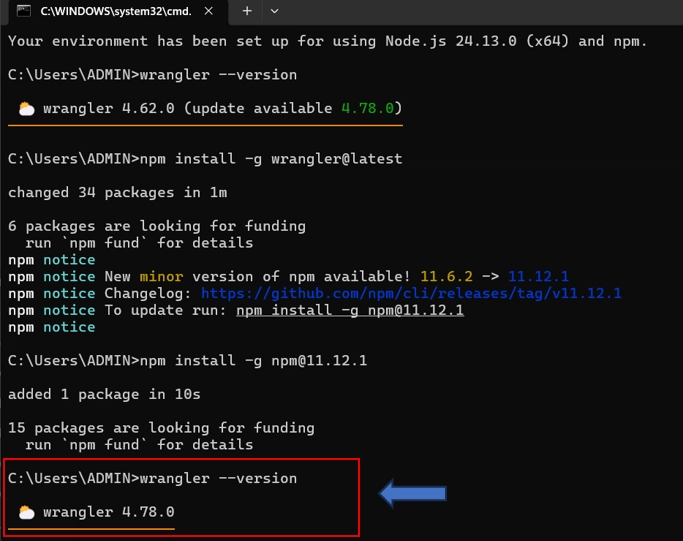
6.3 Log In to Cloudflare
wrangler login
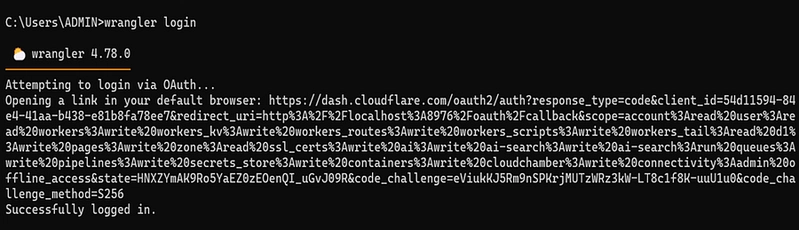
Step 7: Create the Sitemap Crawler Worker Project
7.1 Create the Project Folder
Open your terminal and run:
mkdir prerender-sitemap-crawler
cd prerender-sitemap-crawler
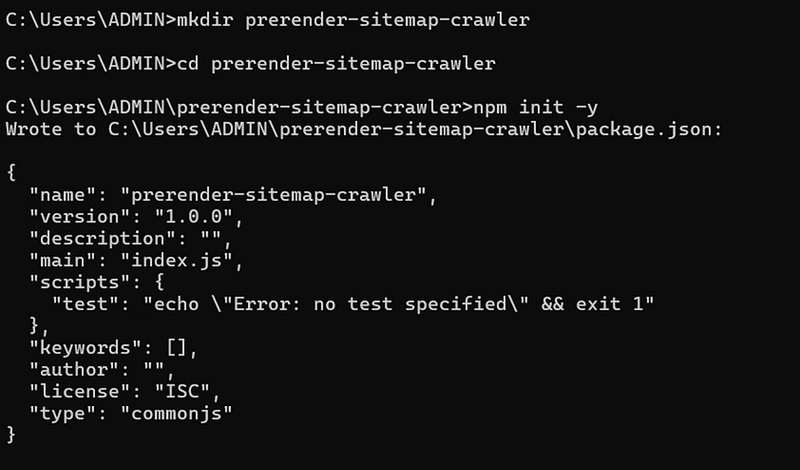
7.2 Initialize the Project and Install Dependencies
npm init -y
npm install @cloudflare/puppeteer
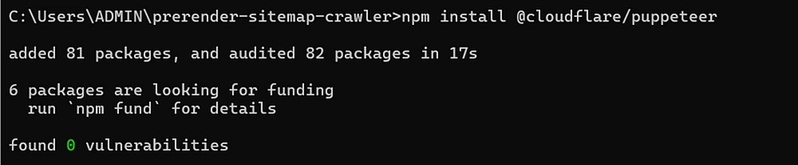
This creates the following structure:
prerender-sitemap-crawler/
├── package.json
├── package-lock.json
└── node_modules/
Step 8: Create Configuration and Worker Files
8.1 Get the KV Namespace ID
- Go to Cloudflare Dashboard → Storage & Databases → Workers KV.
- Click on your Worker KV.
- Go to the Settings tab.
- Copy your Namespace ID.
8.2 Create wrangler.toml
notepad wrangler.toml
Click Yes when prompted to create the file. Paste the following configuration:
name = "prerender-sitemap-crawler"
main = "src/index.js"
compatibility_date = "2024-01-01"

[browser]
binding = "MYBROWSER"

[[kv_namespaces]]
binding = "PRERENDER_HTML_KV"
id = "YOUR_KV_NAMESPACE_ID_HERE"
Save and close the file.
8.3 Create the Worker Script
mkdir src
notepad src\index.js
Paste the following Worker code:
import puppeteer from "@cloudflare/puppeteer";
export default {
  async fetch(request, env) {
    const url = new URL(request.url);
    if (url.pathname !== "/run") {
      return new Response("Visit /run?batch=0 to trigger sitemap prerender", { status: 200 });
    }
    const batchIndex = parseInt(url.searchParams.get("batch") || "0");
    const BATCH_SIZE = 5;
    const SITEMAP_URL = "https://www.bwstays.com/sitemap.xml";
    const KV = env.PRERENDER_KV_HTML;
    try {
      const sitemapRes = await fetch(SITEMAP_URL);
      const sitemapText = await sitemapRes.text();
      const locMatches = [...sitemapText.matchAll(/<loc>(.*?)<\/loc>/g)];
      const allUrls = locMatches.map(m => m[1].trim());
      if (allUrls.length === 0) {
        return new Response("No URLs found in sitemap", { status: 200 });
      }
      const start = batchIndex * BATCH_SIZE;
      const end = start + BATCH_SIZE;
      const batchUrls = allUrls.slice(start, end);
      if (batchUrls.length === 0) {
        return new Response(JSON.stringify({
          message: "✅ All batches completed!",
          totalUrls: allUrls.length,
          totalBatches: Math.ceil(allUrls.length / BATCH_SIZE)
        }, null, 2), {
          headers: { "Content-Type": "application/json" },
        });
      }
      let browser;
      try {
        browser = await puppeteer.launch(env.MYBROWSER);
      } catch (browserErr) {
        return new Response(JSON.stringify({
          error: "Failed to launch browser",
          detail: browserErr.message
        }, null, 2), {
          status: 500,
          headers: { "Content-Type": "application/json" },
        });
      }
      const results = [];
      for (const pageUrl of batchUrls) {
        let page;
        try {
          page = await browser.newPage();
          await page.setUserAgent("Mozilla/5.0 (compatible; Googlebot/2.1)");
          await page.setViewport({ width: 1280, height: 800 });
          await page.goto(pageUrl, { waitUntil: "networkidle0", timeout: 25000 });
          const html = await page.content();
          const parsedUrl = new URL(pageUrl);
          let key = parsedUrl.pathname;
          if (key === "/") key = "/index";
          await KV.put(key, html);
          results.push({ url: pageUrl, key, status: "ok" });
        } catch (pageErr) {
          results.push({ url: pageUrl, status: "error", error: pageErr.message });
        } finally {
          if (page) try { await page.close(); } catch (_) {}
        }
      }
      try { await browser.close(); } catch (_) {}

      const nextBatch = batchIndex + 1;
      const nextUrl = `https://prerender-sitemap-crawler.bwstays.workers.dev/run?batch=${nextBatch}`;
      const isLastBatch = end >= allUrls.length;
      return new Response(JSON.stringify({
        totalUrls: allUrls.length,
        totalBatches: Math.ceil(allUrls.length / BATCH_SIZE),
        currentBatch: batchIndex,
        processedRange: `URLs ${start + 1} to ${Math.min(end, allUrls.length)}`,
        results,
        nextStep: isLastBatch ? "✅ All pages completed!" : `Visit next: ${nextUrl}`
      }, null, 2), {
        headers: { "Content-Type": "application/json" },
      });
    } catch (fatalErr) {
      return new Response(JSON.stringify({
        error: "Fatal worker error",
        detail: fatalErr.message,
        batch: batchIndex
      }, null, 2), {
        status: 500,
        headers: { "Content-Type": "application/json" },
      });
    }
  },
};
Save and close the file.
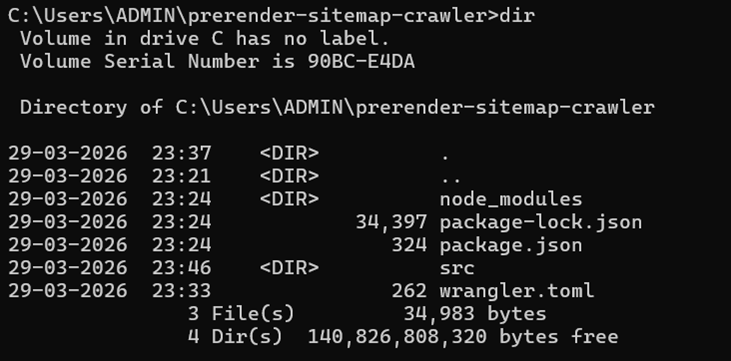
8.4 Verify Folder Structure
dir
Expected output:
prerender-sitemap-crawler/
├── wrangler.toml
├── package.json
├── package-lock.json
├── node_modules/
└── src/
    └── index.js
8.5 Deploy the Worker
wrangler deploy
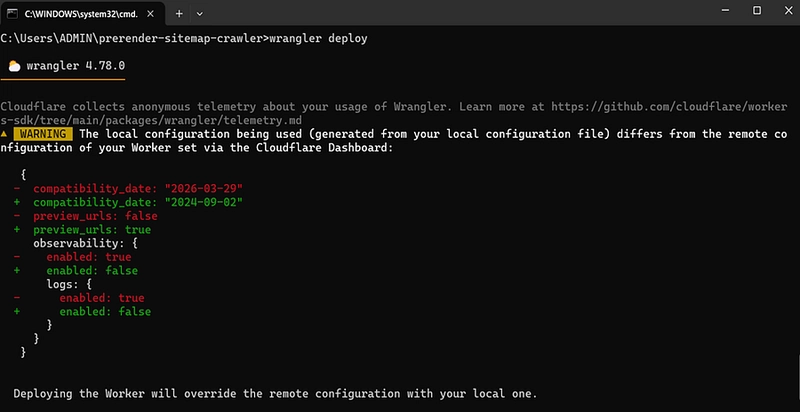
Type Y and press Enter when prompted.

Step 9: Add Browser Rendering Binding in the Dashboard
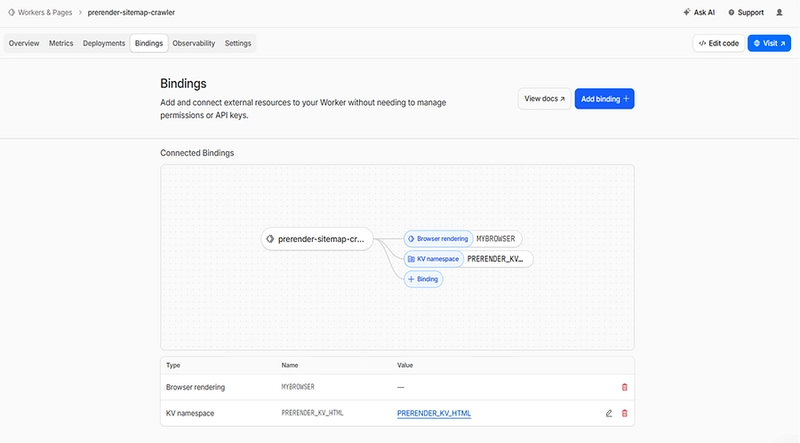
Even though wrangler.toml declares the browser binding, it must also be confirmed in the dashboard:
- Go to Cloudflare Dashboard → Workers & Pages.
- Click prerender-sitemap-crawler.
- Click Settings → Bindings → Add.
- Choose Browser Rendering.
- Set Variable name to
MYBROWSER(or your chosen variable name). - Click Save.
- Run
wrangler deployagain from your terminal.
Step 10: Run the Sitemap Crawler in Batches
Why Batches?
Cloudflare Workers have a CPU/execution time limit per request. Running all pages at once can cause:
- Error 1101 — Worker threw exception (resource limit)
- Error 1102 — Worker exceeded resource limits
- Error 429 — Browser Rendering rate limit exceeded
The recommended approach is to process 5 pages per batch with a 2–3 minute wait between each batch to avoid rate limiting.
How to Run Each Batch
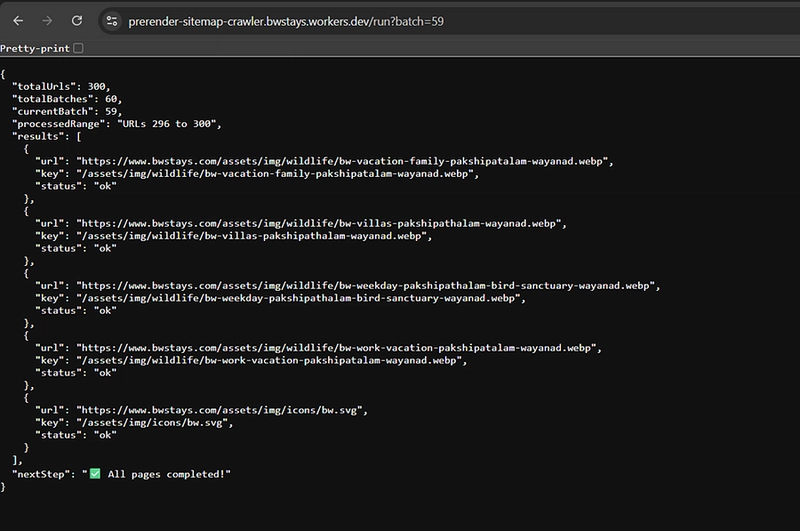
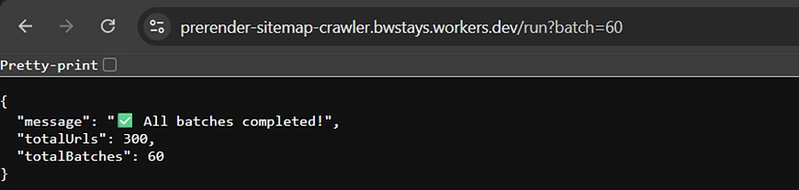
Visit each URL in your browser, waiting for the full JSON response before proceeding:
Batch 0: https://prerender-sitemap-crawler.yoursite.workers.dev/run?batch=0
Batch 1: https://prerender-sitemap-crawler.yoursite.workers.dev/run?batch=1
Batch 2: https://prerender-sitemap-crawler.yoursite.workers.dev/run?batch=2
...
Batch 59: https://prerender-sitemap-crawler.yoursite.workers.dev/run?batch=59
Expected JSON Response per Batch
{
  "batch": 0,
  "results": [
    { "url": "https://www.yoursite.com/about", "key": "/about", "status": "ok" },
    { "url": "https://www.yoursite.com/pricing", "key": "/pricing", "status": "ok" }
  ]
}
Safe Batch Workflow
- Open the batch URL in your browser.
- Wait for the full JSON response to appear.
- Confirm results show
"status": "ok". - Wait 2–3 minutes before opening the next batch.
- Close the tab safely.
- Open the next batch URL.
Step 11: Verify KV Is Fully Populated
- Go to Cloudflare Dashboard → Storage & Databases → Workers KV.
- Click PRERENDER_KV_HTML.
- Click the KV Pairs tab.
- Confirm all your entries are present.
Performance Benchmarks
The following benchmarks reflect real-world observations using Cloudflare Browser Rendering on the Workers Free plan. Times vary based on page complexity and JavaScript bundle size.
Crawl Time by Site Size
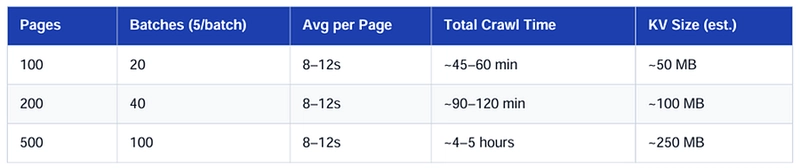
Note: Total crawl time includes the mandatory 2–3 minute wait between batches. On a paid plan with higher concurrency limits, these times can be reduced significantly.
Static vs Dynamic Site Comparison
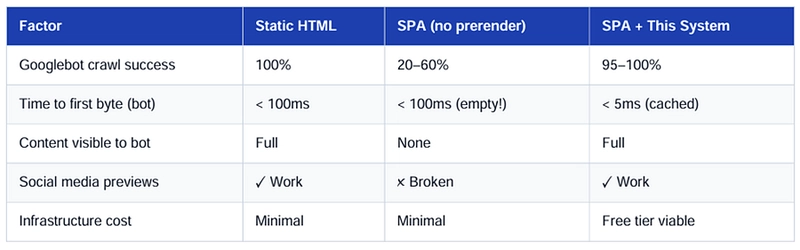
Why 5 Pages Per Batch Works Well on the Free Plan
- Each page takes 8–15 seconds to render — 5 pages fits within the 30-second Worker execution limit.
- One browser per batch avoids concurrency limit errors (free plan: 2 concurrent max).
- 2–3 minute cooldown lets the rate limit window reset between batches.
- Batch size can be increased to 10 on a paid plan with a shorter 60-second wait.
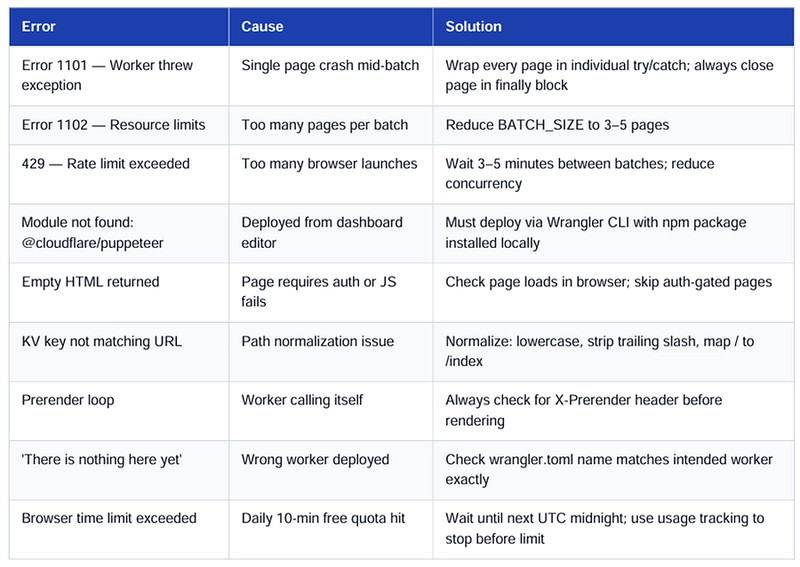
Common Pitfalls & Solutions
Competitor Landscape & Cost Analysis
Before wrapping up, it is worth understanding the cost savings of building this system yourself versus using a managed prerendering service.
The Prerendering Market in 2026
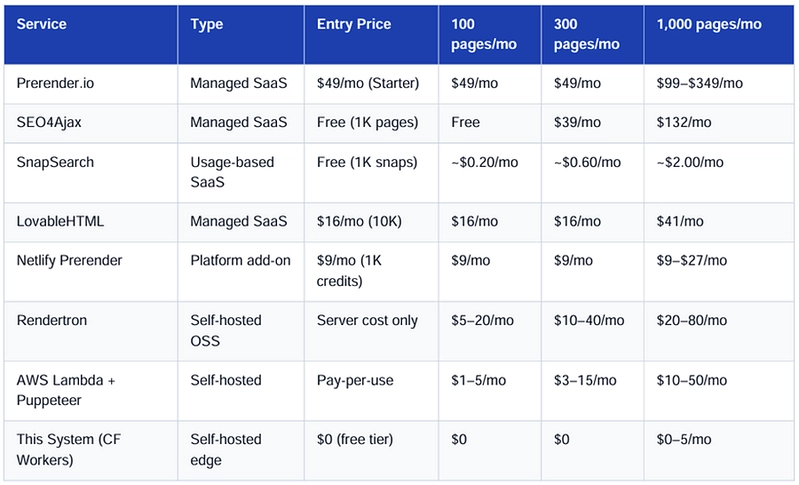
The JavaScript prerendering market has consolidated around a handful of managed services. Most charge based on the number of renders (cached page snapshots) per month and how frequently those caches are refreshed.
Key Market Shift: As of October 15, 2025, Prerender.io discontinued its unlimited free plan (1,000 renders/month) and replaced it with a 30-day trial only. New users must subscribe to a paid plan after the trial ends. This makes self-hosted solutions significantly more attractive for cost-conscious teams.
Competitor Pricing Comparison (2026)
5-Year Total Cost of Ownership Analysis
Assuming a medium-sized website with 300 pages that refreshes its cache monthly:
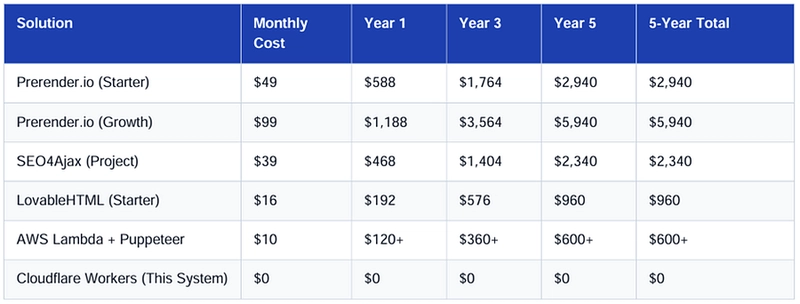
5-Year Savings:
- vs Prerender.io Starter: $2,940
- vs Prerender.io Growth: $5,940
- vs SEO4Ajax: $2,340
The Engineering Time Break-Even
There is one honest cost to acknowledge with this approach: your engineering time.
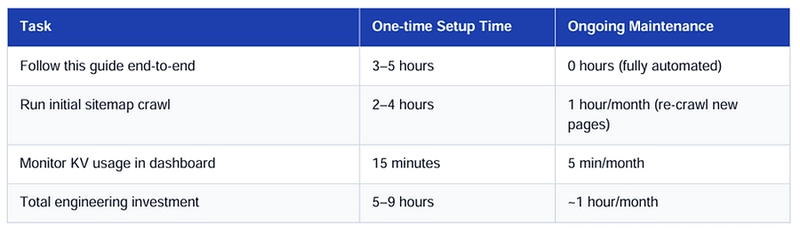
If you have a developer on your team who can follow this guide, the Cloudflare Workers approach pays for itself within 60 days and saves $500–$6,000 over 5 years depending on which paid service you would have used.
The only scenarios where a paid service may be worth it:
- You have zero developer access.
- You have strict data residency requirements.
- You need AI search visibility monitoring built-in.
Key Advantages of This Approach
- Zero external dependencies — no Prerender.io, no Rendertron, no third-party services.
- Edge-native delivery — HTML served from Cloudflare's global network in under 5ms.
- Cost-effective — entirely free for most small-to-medium sites on the Workers free plan.
- Resilient — on-demand headless rendering catches any pages missed by the initial crawl.
- Maintainable — two focused Workers with clear, single responsibilities.
Conclusion
Building a prerendering system using Cloudflare Workers, Puppeteer, and KV Storage provides a powerful, scalable, and cost-efficient solution to solve SEO challenges in modern JavaScript-heavy applications. By leveraging edge computing, you can serve fully rendered HTML to bots instantly, improving search visibility and performance without modifying the core frontend architecture.
One of the biggest advantages of this approach is its ability to run within the free tier limits:
- 100,000 Worker requests per day
- 10 minutes of browser rendering time
- 1 GB of KV storage
This is more than sufficient to prerender and serve hundreds of pages at zero cost — making it an ideal solution for startups, personal projects, and medium-scale applications looking for a budget-friendly SEO optimization strategy.
Overall, this system demonstrates how modern serverless tools can be combined to build a production-ready, scalable prerendering pipeline without relying on expensive third-party services.
Project Repository
Find the complete source code and configuration files here:
🔗 https://github.com/Raakeshkripal/Cloudflare-Prerender-System
Have questions or improvements to suggest? Feel free to open an issue or contribute via pull request.