






Last week a friend sent me a voice memo. "I found this incredible bass line in an old soul track," he said, "but I can't isolate it without paying $30/month for some cloud service that wants my email, my credit card, and probably my firstborn."
He's not wrong. The audio stem separation landscape in 2026 is a mess of subscription walls and cloud uploads. Most tools send your audio to a remote GPU, process it, and send back the stems. You get results in minutes, sure, but your unreleased remix idea now lives on someone else's server.
I wanted to see if the entire pipeline could run locally, in a browser tab, with zero network requests after the initial page load.
Turns out it can.
What stem separation actually is
For those unfamiliar: source separation (also called demixing or unmixing) is the process of decomposing a mixed audio signal into its constituent sources. A typical pop track is a sum of vocals, drums, bass, and everything else (guitars, synths, keys, strings). The AI's job is to reverse that sum.
The state of the art traces back to Meta's Demucs, a hybrid model that operates in both time domain and frequency domain simultaneously. It was trained on thousands of multitrack recordings where the individual stems are known, so it learned the spectral fingerprints that distinguish a kick drum from a bass guitar from a human voice.
The interesting bit is that Demucs v4 (htdemucs) uses a transformer architecture fused with a convolutional U-Net. The transformer handles long-range dependencies (like a sustained vocal note over a drum fill), while the U-Net captures local spectral patterns. The result is significantly less "bleeding" between stems compared to older approaches.
Running it in the browser with ONNX + WebAssembly
The Audio Stem Splitter on Kitmul loads an ONNX-exported version of the Demucs model and runs inference entirely via ONNX Runtime Web backed by WebAssembly. No server. No upload. The audio bytes never leave your machine.
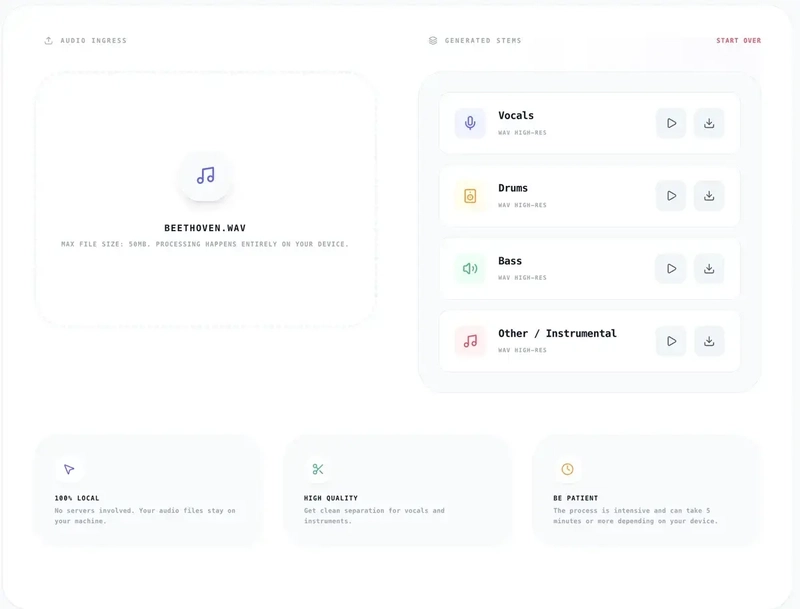
Here's what happens when you drop an audio file:
- The file is decoded to raw PCM using the Web Audio API's
decodeAudioData - If the sample rate isn't 44100 Hz, it gets resampled via an
OfflineAudioContext - The audio is chunked and fed through the ONNX model in a Web Worker to avoid blocking the UI thread
- The model outputs four spectral masks (vocals, drums, bass, other)
- Each mask is applied to the original spectrogram to produce isolated stems
- The stems are encoded back to WAV for download
The whole pipeline is embarrassingly parallel in theory, but in practice you're bounded by the single WASM thread and available RAM. A 4-minute song takes roughly 3-5 minutes on a modern laptop. Not fast, but not bad for running a neural network in a browser tab.
The privacy argument nobody is making
Every time you upload a track to LALAL.AI, Moises, or Stem Roller, you're sending potentially copyrighted audio (or your own unreleased work) to a third-party server. Their privacy policies usually say they "don't store your files permanently," but the operative word is "permanently."
With client-side processing, the question of data retention is moot. There's nothing to retain. Your browser downloads the model weights once (cached for future visits), runs the math locally, and produces output files that exist only in your device's memory until you explicitly save them.
This matters especially for:
- Producers working with unreleased material
- DJs preparing sets with copyrighted tracks
- Music teachers creating practice tracks for students
- Forensic audio analysts working with sensitive recordings
Practical use cases I didn't expect
The obvious use case is karaoke (remove vocals, sing along). But I've seen people use stem separation for things I hadn't considered:
Transcription aid. A jazz pianist told me she splits out the piano stem from classic recordings to transcribe voicings more accurately. When you can hear the piano in isolation, you catch harmonic details that get buried in the full mix.
Sample archaeology. Hip-hop producers dig through vinyl rips looking for loops. Isolating the drum break from a 1970s funk track gives you a clean sample without having to EQ out the horns by hand.
Accessibility. Someone who is hard of hearing mentioned that boosting the vocal stem and attenuating the instrumental makes dialogue-heavy content (podcasts with music beds, film scenes) significantly clearer.
A/B testing mixes. If you're learning to mix, splitting a professional track into stems lets you rebuild the mix from scratch in your DAW and compare your choices against the original balance.
The model's limitations (honest take)
The separation isn't perfect. Here's where the model struggles:
- Heavily compressed or low-bitrate audio produces more artifacts. Start with 320kbps MP3 or WAV if you can.
- Dense arrangements with many layered instruments bleed more into the "other" stem. A solo guitar-and-voice track separates beautifully; a wall-of-sound Phil Spector production, not so much.
- Mono recordings lose the spatial cues that help the model distinguish sources. Stereo is always better.
- Very long files (>10 minutes) will challenge your device's RAM. The 50MB file size limit is there for a reason.
If you need studio-grade results for a commercial release, you probably want iZotope RX or the full Demucs CLI on a GPU. But for quick workflows, creative exploration, or situations where privacy matters more than perfection, browser-based separation is genuinely useful.

How it compares to the competition
| Feature | Kitmul Stem Splitter | LALAL.AI | Moises | Demucs CLI |
|---|---|---|---|---|
| Processing | 100% local (browser) | Cloud GPU | Cloud GPU | Local GPU/CPU |
| Price | Free | $15-30/mo | $4-17/mo | Free (OSS) |
| Privacy | No upload | Upload required | Upload required | No upload |
| Setup | Zero | Account + payment | Account + payment | Python + ffmpeg |
| Quality | Good (ONNX htdemucs) | Very good | Very good | Best (full model) |
| Speed | 3-5 min/song | ~30 sec | ~1 min | ~30 sec (GPU) |
The tradeoff is clear: you sacrifice some speed and marginal quality for zero setup, zero cost, and complete privacy. For most non-professional workflows, that's the right call.
The Web Audio API is more capable than you think
Building this reinforced something I keep discovering: the browser audio stack is seriously underrated. Between AudioContext for real-time processing, OfflineAudioContext for offline rendering, AudioWorklet for custom DSP on a dedicated thread, and now ONNX Runtime Web for running neural networks, you can build legitimate audio production tools that would have required native apps five years ago.
If you're a developer interested in this space, the combination of Web Workers for heavy computation + SharedArrayBuffer for zero-copy data transfer + WASM for near-native math performance is the stack to bet on.
Try it
The Audio Stem Splitter is free, works in any modern browser, and processes everything locally. Drop an MP3 or WAV, wait a few minutes, and download your isolated vocals, drums, bass, and instrumental tracks.
If you're into music production, the Loop Music Creator (browser-based DAW) and the YouTube Loop Mix (dual-deck DJ tool) pair well with separated stems for remixing workflows.
All three tools run in your browser. No accounts. No uploads. No subscriptions.