





``
Introduction
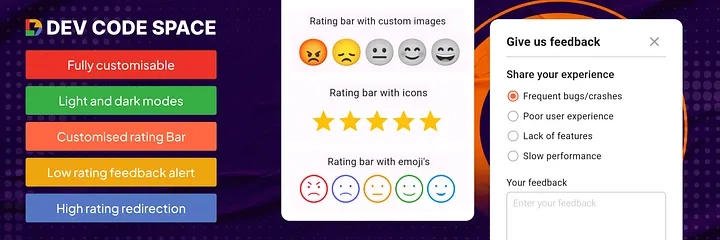
User feedback collection cannot be overemphasized, therefore, if an app is to grow in both quality and satisfaction, The package offers a developer versatile solutions into making bars rated with icons, emojis, and even custom images. Further, this allows dynamic feedback alerts, hence allowing the user to include as much detail in their feedback as possible and rate your app. This will walk you through the setup and usage of this package, hence you can make full use of its features.
Key Features
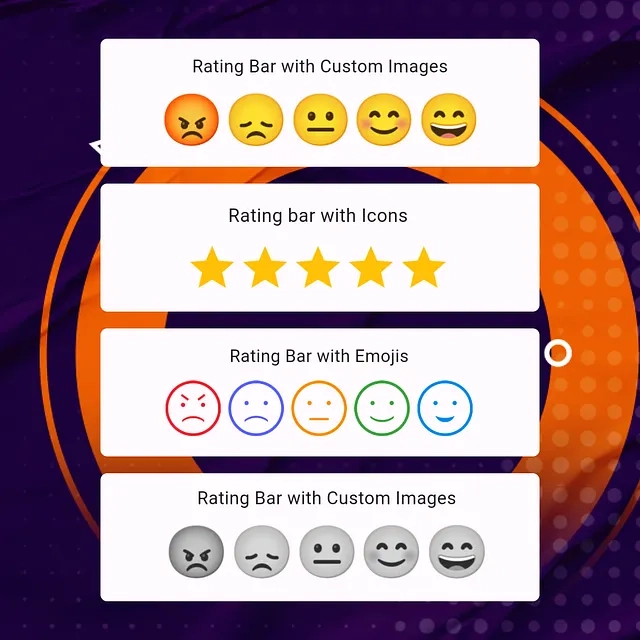
Custom Icon Rating: Use any icon to represent rating units.
Smiley Emojis Rating: Default emoji images to express ratings.
Custom Image Rating: Use your custom images for ratings.
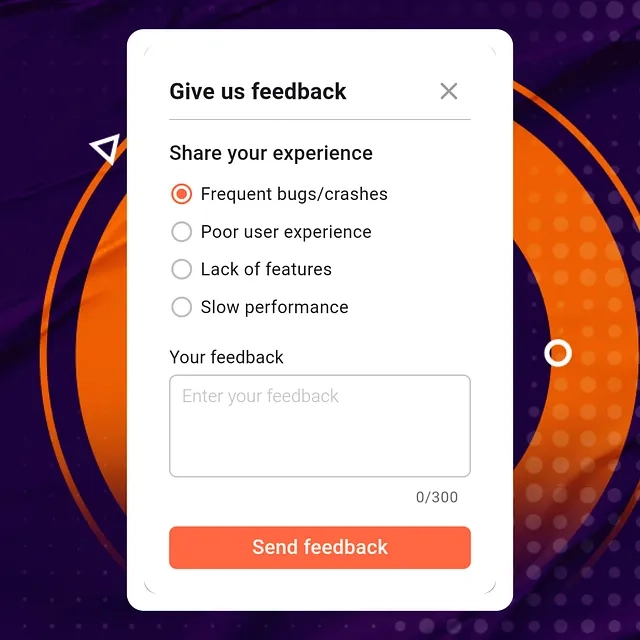
Feedback Alert Box for Low Ratings: Prompt users to provide feedback if they rate low.
Redirect to Store for High Ratings: Redirect users to the app store for a review if they rate high.
Customizable UI & Contents: Fully customizable to fit your app’s theme.
Submission Callback: Get feedback data with a callback function.
Installation
First, add the rating_and_feedback_collector package to your pubspec.yaml file:
`yaml

dependencies:

  rating_and_feedback_collector: ^0.0.2

`
Then, run pub get to fetch the package.
Importing the Package
Next, import the package into your Dart file:
`dart
import 'package:rating_and_feedback_collector/rating_and_feedback_collector.dart';
`
Usage
Here are examples of how to use the package’s main features:
Rating Bar with Icons
The RatingBar widget allows you to use icons to represent ratings. You can customize the icons, their size, colors, and whether half ratings are allowed.
`dart

double _rating = 0.0;

RatingBar(

  iconSize: 40, // Size of the rating icons

  allowHalfRating: true, // Allows selection of half ratings

  filledIcon: Icons.star, // Icon for a filled rating unit

  halfFilledIcon: Icons.star_half, // Icon for a half-filled rating unit

  emptyIcon: Icons.star_border, // Icon for an empty rating unit

  filledColor: Colors.amber, // Color of filled rating units

  emptyColor: Colors.grey, // Color of empty rating units

  currentRating: _rating, // Set initial rating value

  onRatingChanged: (rating) { // Callback triggered when the rating is changed

    setState(() { _rating = rating; });

  },

),

`
Rating Bar with Emoji Images
The RatingBarEmoji widget uses default emoji images to represent ratings.
`dart

double _rating = 0.0;

RatingBarEmoji(

  imageSize: 45, // Size of image in the rating bar

  currentRating: _rating, // Set initial rating value

  onRatingChanged: (rating) { // Callback triggered when the rating is changed

    setState(() { _rating = rating; });

  },

),

`
Rating Bar with Custom Images
The RatingBarCustomImage widget allows you to use custom images for different rating levels.
`dart

double _rating = 0.0;

RatingBarCustomImage(

  imageSize: 45, // Size of image in the rating bar

  currentRating: _rating, // Set initial rating value

  activeImages: const [

    AssetImage('assets/Images/ic_angry.png'),

    AssetImage('assets/Images/ic_sad.png'),

    AssetImage('assets/Images/ic_neutral.png'),

    AssetImage('assets/Images/ic_happy.png'),

    AssetImage('assets/Images/ic_excellent.png'),

  ],

  deActiveImages: const [

    AssetImage('assets/Images/ic_angryDisable.png'),

    AssetImage('assets/Images/ic_sadDisable.png'),

    AssetImage('assets/Images/ic_neutralDisable.png'),

    AssetImage('assets/Images/ic_happyDisable.png'),

    AssetImage('assets/Images/ic_excellentDisable.png'),

  ],

  onRatingChanged: (rating) { // Callback triggered when the rating is changed

    setState(() { _rating = rating; });

  },

),

`
Customization Properties
The package offers various properties to customize the rating bar and feedback dialog:
currentRating (double): Set initial rating value
filledIcon (only for RatingBar) (IconData?): Icon for a filled rating unit
halfFilledIcon (only for RatingBar) (IconData?): Icon for a half-filled rating unit
emptyIcon (only for RatingBar) (IconData?): Icon for an empty rating unit
filledColor (only for RatingBar) (Color?): Color of filled rating units
emptyColor (only for RatingBar) (Color?): Color of empty rating units
iconSize (double?): Size of the rating icons
onRatingChanged (Function(double)): Callback triggered when the rating is changed
allowHalfRating (only for RatingBar) (bool?): Allows selection of half ratings
isGoogleFont (bool?): Set to true for using Google fonts
fontFamilyName (String?): Custom font family name or Google font family name
showFeedbackForRatingsLessThan (double?): Threshold rating value below which feedback box is shown
feedbackBoxTitle (String?): Title for the feedback box
lowRatingFeedbackTitle (String?): Title for feedback options in the low rating feedback box
lowRatingFeedback (List?): List of feedback strings for low ratings
showDescriptionInput (bool?): Option to show input box for user descriptions in the feedback dialog
descriptionTitle (String?): Title for the description input box in the feedback dialog
descriptionPlaceHolder (String?): Placeholder text for the description input box
descriptionCharacterLimit (int?): Character limit for the description input
submitButtonTitle (String?): Title for the submit button in the feedback dialog
onSubmitTap (Function(selectedFeedback, description)): Callback function triggered on submission of feedback
showRedirectToStoreForRatingsGreaterThan (double?): Threshold rating value above which the app redirects to the store for a review
androidPackageName (String?): Android package name for the app, used in the store redirect
iosBundleId (String?): iOS bundle ID for the app, used in the store redirect
innerWidgetsBorderRadius (double?): **Border radius for the feedback dialog widgets
**alertDialogBorderRadius (double?): **Border radius for the feedback dialog
**Conclusion
Rating_and_feedback_collector Package is the optimal solution for adding highly flexible rating bars and in-app feedback alerts into your Flutter app.
By incorporating this package you can raise user’s interest, collect useful feedback and eventually boost your app’s ratings in the store. Include this package into your app and enjoy its flexible and user-friendly elements.

more information, check out the
https://pub.dev/packages/rating_and_feedback_collector

Thanks for reading! If you found this post useful, please share it with others in your network and follow me for more Flutter insights and tutorials. Keep coding and stay awesome!