








This article is a machine translation of the contents of the following URL, which I wrote in Japanese:

CloudFormation で未対応の ActionAfterCompletion を指定した EventBridge Scheduler を作成する #AWS - Qiita
はじめに こんにちは、ほうき星 @H0ukiStar です。 皆さんは CloudFormation で ActionAfterCompletion を指定した EventBridge Schedulder を作成したいと思ったことはありませんか? 私はあります。 Eve...
 qiita.com
Introduction
Hi, I'm @H0ukiStar.
Have you ever wanted to create an EventBridge Scheduler with ActionAfterCompletion specified in CloudFormation?
I have.
The CloudFormation resource for creating EventBridge Scheduler schedules, AWS::Scheduler::Schedule, does not currently support the ActionAfterCompletion property, as shown in the official documentation below:
My assumption is that this limitation exists because when ActionAfterCompletion is set to DELETE, the schedule resource is automatically deleted after execution completes. If CloudFormation allowed this property, the resource would disappear outside of CloudFormation’s control, potentially causing drift.
However, there are cases where it is useful to create a schedule with ActionAfterCompletion from CloudFormation. For example, if you repeatedly deploy one-time schedules through CloudFormation, being able to specify ActionAfterCompletion: DELETE allows the schedule to clean itself up automatically after execution.
In this article, I will show how to achieve this by using a CloudFormation custom resource.
What is a CloudFormation Custom Resource (AWS::CloudFormation::CustomResource)?
A CloudFormation custom resource allows you to create resources or execute APIs that are not natively supported by CloudFormation.
It can invoke an SNS topic or a Lambda function, and the invoked function can perform tasks such as:
- Creating AWS resources not supported by native CloudFormation resources
- Integrating with external services through APIs
- Automating initialization or registration processes
In this article, we will use a custom resource backed by AWS Lambda to create an EventBridge Scheduler schedule with ActionAfterCompletion.
Sample Lambda Function for Creating a Schedule Resource with ActionAfterCompletion
A CloudFormation custom resource has a ServiceToken property, which is used to specify the ARN of the Lambda function that handles the resource lifecycle.
The Lambda function referenced by ServiceToken can either be defined inline in the CloudFormation template or deployed in advance and referenced externally.
In this example, I prepared the Lambda function beforehand and deployed it using AWS SAM.
The complete source code, including the SAM template, is available in the following repository:
https://github.com/H0ukiStar/sample-aws-cfn-schedule-with-action-after-completion
# lambda_function.py
from __future__ import print_function
import re
import json
from typing import Optional
from datetime import datetime

import boto3
import urllib3
from pydantic import BaseModel, ValidationError


class FlexibleTimeWindowProperty(BaseModel):
    """
    Flexible time window configuration for EventBridge Scheduler.
    """
    MaximumWindowInMinutes: Optional[int] = None
    Mode: Optional[str] = None


class TargetProperty(BaseModel):
    """
    Target configuration for EventBridge Scheduler.
    """
    class DeadLetterConfigProperty(BaseModel):
        """
        Dead letter queue configuration.
        """
        Arn: Optional[str] = None

    class EventBridgeParametersProperty(BaseModel):
        """
        EventBridge event parameters.
        """
        DetailType: Optional[str] = None
        Source: Optional[str] = None

    class KinesisParametersProperty(BaseModel):
        """
        Kinesis stream parameters.
        """
        PartitionKey: Optional[str] = None

    class RetryPolicyProperty(BaseModel):
        """
        Retry policy configuration.
        """
        MaximumEventAgeInSeconds: Optional[int] = None
        MaximumRetryAttempts: Optional[int] = None

    class SageMakerPipelineParametersProperty(BaseModel):
        """
        SageMaker Pipeline parameters.
        """
        class PipelineParameterListItemProperty(BaseModel):
            """
            Individual pipeline parameter.
            """
            Name: Optional[str] = None
            Value: Optional[str] = None

        PipelineParameterList: Optional[list[PipelineParameterListItemProperty]] = None

    class SqsParametersProperty(BaseModel):
        """
        SQS queue parameters.
        """
        MessageGroupId: Optional[str] = None

    Arn: Optional[str] = None
    DeadLetterConfig: Optional[DeadLetterConfigProperty] = None
    # EcsParameters: Optional[dict] = None
    EventBridgeParameters: Optional[EventBridgeParametersProperty] = None
    Input: Optional[str] = None
    KinesisParameters: Optional[KinesisParametersProperty] = None
    RetryPolicy: Optional[RetryPolicyProperty] = None
    RoleArn: Optional[str] = None
    SageMakerPipelineParameters: Optional[SageMakerPipelineParametersProperty] = None
    SqsParameters: Optional[SqsParametersProperty] = None


class ScheduleProperty(BaseModel):
    """
    EventBridge Scheduler schedule configuration.
    """
    ActionAfterCompletion: Optional[str] = None
    Description: Optional[str] = None
    EndDate: Optional[datetime] = None
    FlexibleTimeWindow: Optional[FlexibleTimeWindowProperty] = None
    GroupName: Optional[str] = None
    KmsKeyArn: Optional[str] = None
    Name: str
    ScheduleExpression: Optional[str] = None
    ScheduleExpressionTimezone: Optional[str] = None
    StartDate: Optional[datetime] = None
    State: Optional[str] = None
    Target: Optional[TargetProperty] = None


def lambda_handler(event: dict, context: object) -> None:
    """
    AWS Lambda handler for CloudFormation custom resource managing EventBridge Scheduler schedules.

    Handles Create, Update, and Delete operations for EventBridge Scheduler schedules
    as a CloudFormation custom resource. Supports ActionAfterCompletion property to enable
    automatic schedule actions (e.g., deletion) after completion.

    Parameters
    ----------
    event : dict
        Lambda event object containing CloudFormation request details.
    context : object
        Lambda context object containing runtime information.

    Returns
    -------
    None
        Sends response to CloudFormation via HTTP callback.

    Notes
    -----
    - For Create: Creates a new schedule and returns its ARN
    - For Update: Updates existing schedule or creates new one if Name changed
    - For Delete: Deletes the schedule unless it failed during creation/update
    """
    print(f"{event['ResourceProperties']=}")

    try:
        schedule_property: ScheduleProperty = ScheduleProperty(
            **event["ResourceProperties"]
        )
    except ValidationError as e:
        send(event, context, "FAILED", {}, reason=f"Resource properties pre validation failed: {e.errors()}")
        return

    scheduler_client = boto3.client("scheduler")
    request_type: str = event["RequestType"]
    print(f"{request_type=}")

    if request_type == "Create":
        try:
            response: dict = scheduler_client.create_schedule(
                **schedule_property.model_dump(exclude_none=True)
            )
            send(event, context, "SUCCESS", {"Arn": response["ScheduleArn"]}, physicalResourceId=schedule_property.Name)
        except Exception as e:
            send(event, context, "FAILED", {}, reason=f"{e}", physicalResourceId="CREATE_FAILED")
        return
    elif request_type == "Update":
        try:
            old_schedule_property: ScheduleProperty = ScheduleProperty(
                **event["OldResourceProperties"]
            )
        except ValidationError as e:
            send(event, context, "FAILED", {}, reason=f"Old resource properties pre validation failed: {e.errors()}")
            return

        physical_resource_id: str = event["PhysicalResourceId"]

        # Create a new schedule if Name has changed
        if old_schedule_property.Name != schedule_property.Name:
            try:
                # CloudFormation will automatically delete the old schedule when the physical ID changes, so no explicit deletion is needed in Update.
                response: dict = scheduler_client.create_schedule(
                    **schedule_property.model_dump(exclude_none=True)
                )
                send(event, context, "SUCCESS", {"Arn": response["ScheduleArn"]}, physicalResourceId=schedule_property.Name)
            except Exception as e:
                send(event, context, "FAILED", {}, reason=f"{e}", physicalResourceId="UPDATE_FAILED")
            return

        # Update the schedule if Name is the same
        try:
            existing_schedule: dict = scheduler_client.get_schedule(Name=physical_resource_id)
            existing_schedule_property: ScheduleProperty = ScheduleProperty(**existing_schedule)

            update_params: dict = existing_schedule_property.model_dump(exclude_none=True)
            new_params: dict = schedule_property.model_dump(exclude_none=True)
            update_params.update(new_params)

            response: dict = scheduler_client.update_schedule(**update_params)
            send(event, context, "SUCCESS", {"Arn": response["ScheduleArn"]}, physicalResourceId=schedule_property.Name)
        except Exception as e:
            send(event, context, "FAILED", {}, reason=f"{e}", physicalResourceId=physical_resource_id)
        return
    elif request_type == "Delete":
        physical_resource_id: str = event["PhysicalResourceId"]

        # Skip deletion and return success if CREATE_FAILED (schedule does not exist) or UPDATE_FAILED (should not delete)
        if physical_resource_id == "CREATE_FAILED" or physical_resource_id == "UPDATE_FAILED":
            send(event, context, "SUCCESS", {})
            return

        try:
            scheduler_client.delete_schedule(Name=physical_resource_id)
            send(event, context, "SUCCESS", {})
        except scheduler_client.exceptions.ResourceNotFoundException:
            # If the schedule is already deleted, consider it a success
            send(event, context, "SUCCESS", {})
        except Exception as e:
            send(event, context, "FAILED", {}, reason=f"{e}")
        return
    send(event, context, "FAILED", {}, reason=f"Unsupported request type: {request_type}")
    return


# Copyright Amazon.com, Inc. or its affiliates. All Rights Reserved.
# SPDX-License-Identifier: MIT-0
http = urllib3.PoolManager()


def send(event, context, responseStatus, responseData, physicalResourceId=None, noEcho=False, reason=None):
    responseUrl = event['ResponseURL']

    responseBody = {
        'Status': responseStatus,
        'Reason': reason or "See the details in CloudWatch Log Stream: {}".format(context.log_stream_name),
        'PhysicalResourceId': physicalResourceId or context.log_stream_name,
        'StackId': event['StackId'],
        'RequestId': event['RequestId'],
        'LogicalResourceId': event['LogicalResourceId'],
        'NoEcho': noEcho,
        'Data': responseData
    }

    json_responseBody = json.dumps(responseBody)

    print("Response body:")
    print(json_responseBody)

    headers = {
        'content-type': '',
        'content-length': str(len(json_responseBody))
    }

    try:
        response = http.request('PUT', responseUrl, headers=headers, body=json_responseBody)
        print("Status code:", response.status)

    except Exception as e:
        print("send(..) failed executing http.request(..):", mask_credentials_and_signature(e))


def mask_credentials_and_signature(message):
    """
    Mask AWS credentials and signatures in error messages.

    Redacts sensitive AWS credential and signature information from messages
    before logging to prevent credential exposure.

    Parameters
    ----------
    message : str
        Error message or string that may contain AWS credentials.

    Returns
    -------
    str
        Message with credentials and signatures masked.

    Notes
    -----
    Masks the following AWS authentication parameters:
    - X-Amz-Credential
    - X-Amz-Signature
    """
    message = re.sub(r'X-Amz-Credential=[^&\s]+', 'X-Amz-Credential=*****', message, flags=re.IGNORECASE)
    return re.sub(r'X-Amz-Signature=[^&\s]+', 'X-Amz-Signature=*****', message, flags=re.IGNORECASE)
Note
Pydantic validation in this sample is mainly used to convert values such as
datetimeandint. Validation for allowed strings or numeric ranges is left to the EventBridge Scheduler API throughboto3.Warning
EcsParametersis not implemented in this sample.
Verification
The following sample CloudFormation template creates an EventBridge Scheduler schedule with ActionAfterCompletion enabled:
AWSTemplateFormatVersion: 2010-09-09
Description: Sample template for managing EventBridge Scheduler with ActionAfterCompletion using a CloudFormation custom resource

Resources:
  CustomScheduleWithActionAfterCompletion:
    Type: Custom::ScheduleWithActionAfterCompletion
    Properties:
      ServiceTimeout: 30
      # Replace with the ARN of the deployed custom resource Lambda function
      ServiceToken: arn:aws:lambda:ap-northeast-1:123456789012:function:cfn-custom-resource-schedule-with-aac

      Name: schedule-with-aac
      ActionAfterCompletion: DELETE

      FlexibleTimeWindow:
        Mode: OFF

      # Replace with the desired schedule expression
      ScheduleExpression: at(2026-04-30T00:00:00)

      ScheduleExpressionTimezone: Asia/Tokyo

      Target:
        # Replace with the ARN of the target resource to invoke
        Arn: arn:aws:lambda:ap-northeast-1:123456789012:function:example-function

        # Replace with the ARN of the IAM role that EventBridge Scheduler assumes
        RoleArn: arn:aws:iam::123456789012:role/example-scheduler-role
Warning
- Replace
ServiceTokenwith the ARN of the deployed Lambda function- Replace
Targetwith the desired schedule target configuration
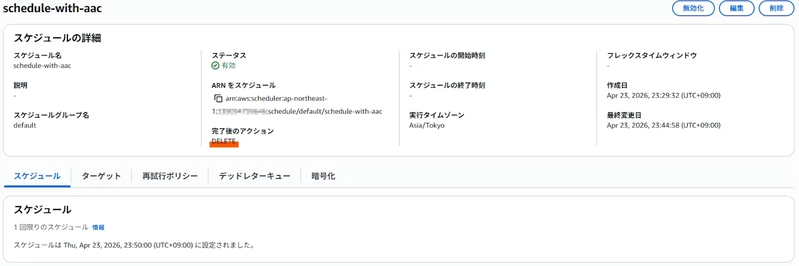
Deploy the above template with CloudFormation. If the schedule is created successfully with ActionAfterCompletion set, the custom resource is working as expected.

Notes
As mentioned earlier, when ActionAfterCompletion is set to DELETE, the schedule resource is automatically removed after execution.
CloudFormation custom resources do not support drift detection, so even if the schedule is deleted by EventBridge Scheduler, the CloudFormation stack will not be marked as drifted.
However, when deleting the CloudFormation stack, the custom resource Lambda function receives a Delete event. Therefore, it is a good idea to handle ResourceNotFoundException as SUCCESS:
try:
    scheduler_client.delete_schedule(Name=physical_resource_id)
    send(event, context, "SUCCESS", {})
except scheduler_client.exceptions.ResourceNotFoundException:
    send(event, context, "SUCCESS", {})
except Exception as e:
    send(event, context, "FAILED", {}, reason=f"{e}")
Conclusion
In this article, I showed how to create an EventBridge Scheduler schedule with ActionAfterCompletion using a CloudFormation custom resource.
There are many cases where AWS SDK APIs support features that CloudFormation does not yet expose as native resources or properties. The same custom resource pattern introduced here can be applied to those situations as well.
I hope this article helps someone facing the same challenge.