







Choose Arduino Modules by Scene, Not by Specification
A module list tells you what to buy.
A scene tells you why the module belongs there.
That difference matters.
Most Arduino beginners ask the wrong shopping question:
Which sensor should I buy?
A better design question is:
What moment do I want the object to understand?
If the moment is a visitor entering a gallery, the device needs presence sensing. If the moment is a hand moving closer, it needs distance. If the moment is a deliberate choice, it needs touch. If the moment is emotional feedback, it needs light, motion, or sound.
This article uses the same common interactive-device modules as a normal Arduino kit guide, but organizes them by situation and interaction.
Affiliate disclosure: As an Amazon Associate, I earn from qualifying purchases. The Amazon links in this guide use an affiliate tag.
The core rule: start from the human moment
Do not start with HC-SR04, PIR, ESP32, WS2812B, or servo.
Start with a human sentence.
Good interaction sentences look like this:
- When someone enters the room, the object wakes up.
- When a hand approaches, the light becomes warmer.
- When someone touches the surface, the object changes mode.
- When the object is tilted, the sound shifts.
- When the visitor leaves, the object slowly returns to rest.
Those sentences already imply the modules.
Presence suggests PIR.
Distance suggests ultrasonic or time-of-flight.
Intentional choice suggests capacitive touch.
Body motion suggests IMU.
Atmosphere suggests LED strip.
Physical gesture suggests servo.
State explanation suggests OLED.
The module is not the starting point. The module is the answer to a scene.
Scenario 1: the object sleeps until someone enters
Imagine a small installation near a doorway.
Nobody is nearby. The object is dark. It should not flash randomly. It should not keep moving. It should feel like it is waiting.
A visitor enters the space.
The object wakes up.
That scene needs presence sensing, not precise distance.
Use:
- HC-SR501 PIR motion sensor
- Arduino Uno or ESP32
- WS2812B LED strip or a soft LED output
- optional OLED for debugging during setup
Why PIR fits:
A PIR sensor detects changes in infrared patterns. It is good for noticing that a warm body moved in the area. It is not good for measuring how close the visitor is.
Interaction behavior:
- idle state: LEDs off or very dim
- first motion: object wakes softly
- hold state: object stays awake for a few seconds
- no motion: object fades back to rest
The important part is the hold state.
If you connect PIR directly to LED on/off, the object feels nervous. It blinks whenever the sensor changes. If you add a hold state, the object feels aware. It noticed someone and stayed attentive.
Suggested parts:
- HC-SR501 PIR Motion Sensor: presence detection for room-scale wake behavior. Amazon search
- ESP32 Development Board: useful when the installation later needs wireless settings or logging. Amazon search
- WS2812B LED Strip: visible wake and rest feedback. Amazon search
Scenario 2: the light reacts to how close the hand is
Now imagine the visitor has already walked closer.
The object is awake. The visitor reaches toward it.
The light should not simply turn on. It should change as the hand approaches.
That scene needs distance sensing.
Use:
- HC-SR04 ultrasonic sensor for visible, low-cost distance interaction
- VL53L0X or VL53L1X time-of-flight sensor for compact hidden sensing
- WS2812B LED strip for output
- ESP32 or Arduino Uno as controller
Why distance fits:
Distance lets you design zones.
For example:
- farther than 100 cm: object waits
- 60 to 100 cm: cool low light
- 30 to 60 cm: warmer light
- 10 to 30 cm: bright intimate glow
- under 10 cm: ignore or clamp value to avoid unstable readings
This is more expressive than a threshold.
A threshold says: if distance is less than 30 cm, turn on.
A zone says: as you approach, the object changes its emotional temperature.
That is interaction design.
Technical behavior:
- smooth the distance readings
- ignore impossible jumps
- use pulseIn with timeout for HC-SR04
- map distance to brightness or color temperature
- avoid rapid flicker by easing the output
Suggested parts:
- HC-SR04 Ultrasonic Sensor Module: cheap and easy distance sensing for prototypes. Amazon search
- VL53L0X Time-of-Flight Sensor: smaller and cleaner for hidden proximity sensing. Amazon search
- 5V LED Power Supply: needed when LED strips become more than a tiny test. Amazon search
Scenario 3: touch means permission
Presence is passive.
Distance is exploratory.
Touch is intentional.
That is why capacitive touch modules are powerful in interactive devices. They do not only detect contact. They change the social meaning of the object.
Imagine a lamp that wakes when you enter, glows warmer as you approach, and changes mode only when you touch the side.
That touch says: I choose to interact.
Use:
- TTP223 capacitive touch module
- copper tape or conductive pad behind a surface
- ESP32 or Arduino Uno
- LED strip, OLED, or servo as feedback
Good touch interactions:
- tap to change mode
- long press to save a color
- touch and hold to make the object breathe
- double tap to reset
- hidden touch point behind wood, acrylic, or paper
Bad touch interactions:
- touch wire too long and noisy
- no debounce
- no visible feedback after touch
- touch point hidden so well the user never finds it
Design behavior:
After a touch, the object should acknowledge the action immediately. A short light ripple, a tiny servo nod, or a display change tells the user: your intention was received.
Suggested parts:
- TTP223 Capacitive Touch Sensor Module: simple intentional input for surfaces. Amazon search
- Copper Foil Tape: useful for making larger custom touch areas. Amazon search
- 0.96 inch I2C OLED Display: useful for showing modes while prototyping. Amazon search
Scenario 4: the object moves like it has intention
Light is fast.
Motion is emotional.
A tiny servo can make an object feel alive, but only if the motion has timing.
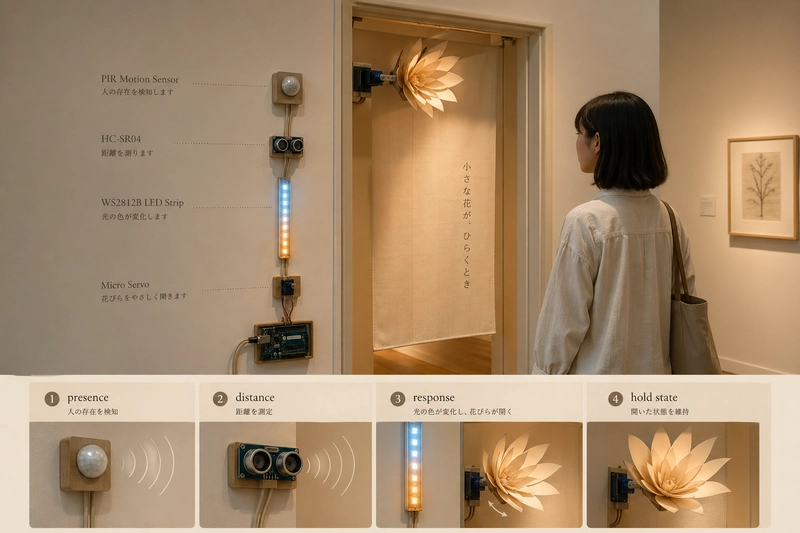
Imagine a paper flower near the doorway. When a visitor approaches, the LEDs warm slowly. Then the flower opens a little. When the visitor leaves, it does not snap shut. It waits, then closes gently.
That scene needs mechanical output.
Use:
- SG90 micro servo for lightweight movement
- MG996R or stronger servo for heavier mechanisms
- external 5V power supply
- Arduino Servo library or ESP32-compatible servo control
Good servo interactions:
- slow opening
- small hesitation before movement
- eased return
- limited range so the mechanism does not hit hard stops
- separate power so the controller does not reset
Bad servo interactions:
- jump from 0 to 90 degrees instantly
- power servo from the Arduino 5V pin
- attach heavy mechanical parts to SG90
- let visitors force the mechanism by hand
Interaction behavior:
A servo should not only move. It should move with character.
Fast snap means alarm.
Slow opening means invitation.
Small repeated motion means curiosity.
Delayed closing means memory.
Suggested parts:
- SG90 Micro Servo: good for small paper, foam, and lightweight mechanisms. Amazon search
- MG996R Metal Gear Servo: better for stronger physical mechanisms. Amazon search
- 5V 3A Power Supply: safer for servo and LED experiments than board power. Amazon search
Scenario 5: the object knows its own body
Some interactions are not about a visitor approaching.
They are about the object being moved.
A handheld controller, wearable piece, kinetic sculpture, or portable lamp needs to know tilt, shake, vibration, or rotation.
That scene needs an IMU.
Use:
- MPU6050 accelerometer and gyroscope module
- ESP32 or Arduino Uno
- LED, sound, or servo output
Interaction examples:
- tilt left to cool the color
- tilt right to warm the color
- shake to clear the current state
- lift the object to wake it
- place it down to let it sleep
- rotate it to control brightness
Technical behavior:
- calibrate the resting value
- smooth raw readings
- use thresholds for gesture events
- do not chase exact angles too early
- mount the sensor consistently inside the object
Design note:
An IMU gives the object a body sense. It lets the object respond to how it is held, not only what happens around it.
Suggested parts:
- MPU6050 Accelerometer Gyroscope Module: common motion and tilt input for Arduino projects. Amazon search
- Jumper Wires and Breadboard Kit: useful for quick IMU orientation tests. Amazon search
Scenario 6: the object should explain itself during testing
During development, the designer needs to know what the object thinks.
Is PIR active?
What distance is the sensor reading?
Which mode is active?
Is the servo waiting, opening, holding, or closing?
A small OLED display is useful here, even if it is removed from the final object.
Use:
- 0.96 inch I2C OLED display
- serial monitor during early tests
- debug mode in code
Good debug display lines:
state: awake
pir: active
distance: 42 cm
mode: warm
servo: opening
This is not decoration. It is design instrumentation.
Without feedback, the maker guesses. With feedback, the maker can tune the interaction.
Suggested parts:
- 0.96 inch I2C OLED Display Module: compact state display for prototypes. Amazon search
Scenario 7: the installation must run for hours
A desk demo can survive weak power.
A real installation cannot.
If the object uses LEDs, servos, sound, or relays, the power system becomes part of the interaction quality.
A weak power supply creates:
- LED flicker
- servo jitter
- ESP32 resets
- sensor noise
- random behavior that looks like bad code
Use:
- dedicated 5V power supply
- buck converter when stepping down from 12V
- common ground between controller and outputs
- logic level shifter for 3.3V controller to 5V LED data
- capacitor near LED power input
Interaction behavior:
The user does not see the power supply. The user feels stability.
A stable object feels calm.
An unstable object feels cheap, even if the concept is good.
Suggested parts:
- 5V 10A LED Power Supply: useful for longer LED strips and installations. Amazon search
- DC Buck Converter Module: useful when the project has a 12V source but needs 5V electronics. Amazon search
- Logic Level Shifter Module: helps ESP32 talk to 5V modules more reliably. Amazon search
A complete scene-based build
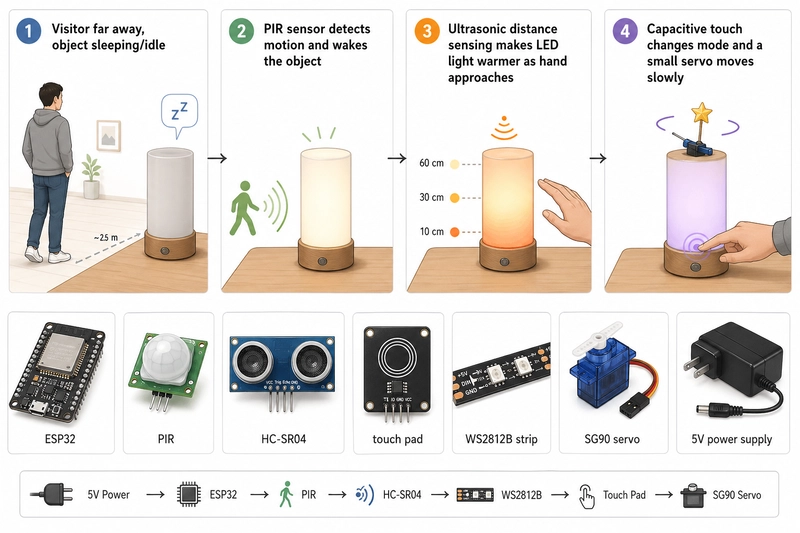
Here is a complete interaction scene.
Scene:
A small tabletop object waits in a gallery. When a visitor enters the area, it wakes. When the visitor approaches, the light becomes warmer. When the visitor touches the surface, the object changes mode and a small servo moves slowly.
Modules:
- ESP32: main controller
- PIR sensor: wakes the object when motion appears
- HC-SR04 or VL53L0X: measures approach distance
- TTP223 touch module: confirms intentional interaction
- WS2812B LED strip: shows emotional state
- SG90 servo: creates physical movement
- OLED display: shows state during tuning
- 5V power supply: powers LEDs and servo
- logic level shifter: improves LED signal reliability with ESP32
Interaction states:
- sleeping
- visitor detected
- approach detected
- touch confirmed
- active mode
- hold state
- return to rest
That state list is more important than the shopping list.
The shopping list gives you parts.
The state list gives you behavior.
Minimal state logic
The code structure should follow the scene.
This sketch is a state-machine skeleton. It does not pretend that one analogWrite line can drive a WS2812B strip or a servo. In a real build, showSleepingLight, showAwakeGlow, showActiveMode, and moveServoSlowly would call FastLED, Adafruit NeoPixel, Servo, or your chosen output library.
const int pirPin = 2;
const int touchPin = 4;

unsigned long lastPresenceTime = 0;
const unsigned long holdTime = 8000;
bool activeMode = false;
bool lastTouch = false;

void setup() {
  pinMode(pirPin, INPUT);
  pinMode(touchPin, INPUT);
}

void loop() {
  // 中文區塊:先判斷人是否進入場景
  bool presence = digitalRead(pirPin) == HIGH;
  if (presence) {
    lastPresenceTime = millis();
  }

  // 中文區塊:用 hold state 避免互動忽明忽暗
  bool awake = millis() - lastPresenceTime < holdTime;

  // 中文區塊:touch 代表使用者主動選擇互動
  bool touchNow = digitalRead(touchPin) == HIGH;
  if (awake && touchNow && !lastTouch) {
    activeMode = !activeMode;
  }
  lastTouch = touchNow;

  // 中文區塊:輸出函式由 LED/servo 函式庫實作
  if (!awake) {
    showSleepingLight();
  } else if (activeMode) {
    showActiveMode();
    moveServoSlowly();
  } else {
    showAwakeGlow();
  }
}
This is not a complete installation code. It is a pattern.
The pattern is:
presence creates wakefulness.
touch changes intention.
output functions show state through light, motion, or sound.
That is the structure most beginner projects miss.
What to buy for this scene
If I were building this exact interaction, I would buy a balanced kit instead of a random sensor pack.
Input:
- HC-SR501 PIR Motion Sensor: wake the object when someone enters the area. Amazon search
- HC-SR04 Ultrasonic Sensor or VL53L0X ToF Sensor: measure approach distance. Amazon search
- TTP223 Capacitive Touch Sensor: create intentional user input. Amazon search
- MPU6050 IMU: add tilt or object-body awareness later. Amazon search
Controller:
- ESP32 Development Board: good for connected interactive objects. Amazon search
- Arduino Uno Compatible Board: good for first tests and workshops. Amazon search
Output:
- WS2812B 5V LED Strip: color, warmth, rhythm, and state feedback. Amazon search
- SG90 Micro Servo: small physical gesture. Amazon search
- 0.96 inch I2C OLED Display: debugging and state display. Amazon search
Power and reliability:
- 5V Power Supply: separate power for LEDs and servo. Amazon search
- Logic Level Shifter: stable ESP32 to 5V LED data. Amazon search
- DC Buck Converter: useful for installation power design. Amazon search
The interaction checklist
Before buying a module, write one line for each column.
Human scene:
- A visitor enters.
- A hand approaches.
- A person touches the object.
- The object is lifted.
- The visitor leaves.
Sensor meaning:
- presence
- distance
- intention
- body motion
- absence
Output response:
- wake
- warm
- change mode
- move
- return to rest
Module choice:
- PIR
- ultrasonic or ToF
- capacitive touch
- IMU
- LED, servo, sound, display
If you cannot fill these columns, do not buy another module yet.
You do not have a shopping problem.
You have a scene problem.
The takeaway
A useful interactive-device kit is not a box of impressive parts.
It is a set of ways to understand a scene.
PIR understands presence.
Ultrasonic and time-of-flight understand distance.
Touch understands intention.
IMU understands the object's own movement.
LEDs express state.
Servos express physical gesture.
OLED displays reveal what the object thinks during development.
Power modules make the whole thing stable enough to trust.
Start with the scene. Then buy the module.
That is how a pile of Arduino parts becomes an interaction.
Affiliate disclosure
As an Amazon Associate, I earn from qualifying purchases.
I am building a one-time-access interactive device guide for makers who want complete scene-to-sensor-to-output patterns instead of random tutorials. No email. No subscription. One-time access. Whop URL is not included here until the product page is live.