





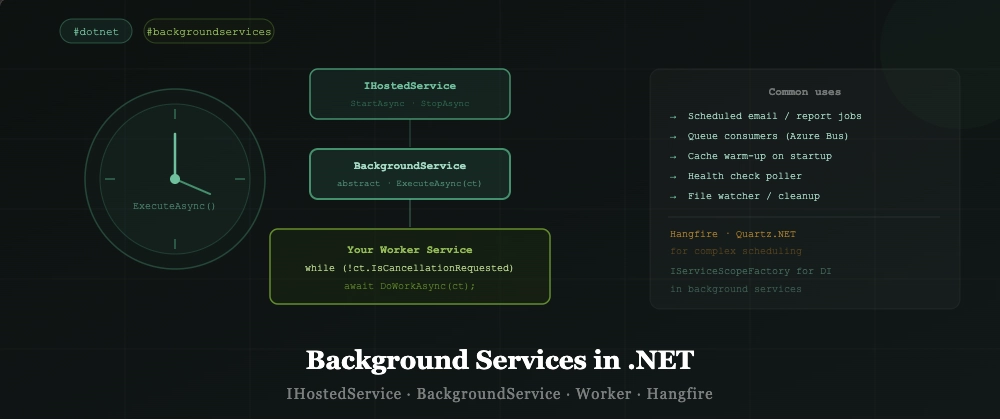

IHostedService, BackgroundService, Worker Service, scoped services in background, Hangfire comparison
Not all work in a .NET application happens within an HTTP request.
Scheduled jobs, message queue consumers, cache warmers, health check pollers — these all run in the background, independently of the request pipeline.
IHostedService — The Foundation
IHostedService tells the .NET host: "run this when the application starts, stop it when the application stops."
public interface IHostedService
{
    Task StartAsync(CancellationToken cancellationToken);
    Task StopAsync(CancellationToken cancellationToken);
}
Basic implementation
public class StartupCacheWarmer : IHostedService
{
    private readonly IProductCache _cache;
    private readonly ILogger<StartupCacheWarmer> _logger;

    public StartupCacheWarmer(IProductCache cache, ILogger<StartupCacheWarmer> logger)
    {
        _cache = cache;
        _logger = logger;
    }

    public async Task StartAsync(CancellationToken ct)
    {
        _logger.LogInformation("Warming cache...");
        await _cache.LoadAsync(ct);
        _logger.LogInformation("Cache ready.");
    }

    public Task StopAsync(CancellationToken ct) => Task.CompletedTask;
}

// Register
builder.Services.AddHostedService<StartupCacheWarmer>();
BackgroundService — For Long-Running Work
BackgroundService is an abstract base class for long-running background tasks. Override ExecuteAsync.
public class OrderProcessor : BackgroundService
{
    private readonly ILogger<OrderProcessor> _logger;

    public OrderProcessor(ILogger<OrderProcessor> logger) => _logger = logger;

    protected override async Task ExecuteAsync(CancellationToken stoppingToken)
    {
        _logger.LogInformation("Order processor started.");

        while (!stoppingToken.IsCancellationRequested)
        {
            try
            {
                await ProcessPendingOrdersAsync(stoppingToken);
                await Task.Delay(TimeSpan.FromSeconds(30), stoppingToken);
            }
            catch (OperationCanceledException)
            {
                // Graceful shutdown — expected
            }
            catch (Exception ex)
            {
                _logger.LogError(ex, "Error processing orders.");
                await Task.Delay(TimeSpan.FromSeconds(5), stoppingToken); // Back off
            }
        }

        _logger.LogInformation("Order processor stopped.");
    }

    private async Task ProcessPendingOrdersAsync(CancellationToken ct) { }
}
Using DI Inside Background Services
Background services are registered as singletons.
You cannot directly inject scoped services (like DbContext) into a singleton.
The solution: IServiceScopeFactory
public class ReportGenerator : BackgroundService
{
    private readonly IServiceScopeFactory _scopeFactory;

    public ReportGenerator(IServiceScopeFactory scopeFactory)
        => _scopeFactory = scopeFactory;

    protected override async Task ExecuteAsync(CancellationToken ct)
    {
        while (!ct.IsCancellationRequested)
        {
            await GenerateReportsAsync(ct);
            await Task.Delay(TimeSpan.FromHours(1), ct);
        }
    }

    private async Task GenerateReportsAsync(CancellationToken ct)
    {
        // Create a new scope for each execution
        using var scope = _scopeFactory.CreateScope();
        var db = scope.ServiceProvider.GetRequiredService<AppDbContext>();
        var emailService = scope.ServiceProvider.GetRequiredService<IEmailService>();

        var orders = await db.Orders.Where(o => !o.Reported).ToListAsync(ct);
        await emailService.SendReportAsync(orders);

        foreach (var order in orders) order.Reported = true;
        await db.SaveChangesAsync(ct);
    }
}
Create a new scope for each unit of work. The DbContext is properly scoped and disposed.
Consuming a Message Queue
public class OrderEventConsumer : BackgroundService
{
    private readonly IServiceBusClient _bus;
    private readonly IServiceScopeFactory _scopeFactory;

    public OrderEventConsumer(IServiceBusClient bus, IServiceScopeFactory scopeFactory)
    {
        _bus = bus;
        _scopeFactory = scopeFactory;
    }

    protected override async Task ExecuteAsync(CancellationToken ct)
    {
        await foreach (var message in _bus.ReadMessagesAsync(ct))
        {
            using var scope = _scopeFactory.CreateScope();
            var handler = scope.ServiceProvider.GetRequiredService<IOrderEventHandler>();
            await handler.HandleAsync(message, ct);
        }
    }
}
When to Use Hangfire or Quartz.NET
BackgroundService is great for continuous loops and simple scheduling.
Hangfire
// One-off job
BackgroundJob.Enqueue(() => Console.WriteLine("Hello from background"));

// Recurring job
RecurringJob.AddOrUpdate("daily-report", () => SendDailyReport(), Cron.Daily);
Hangfire persists jobs to a database — jobs survive application restarts.
Quartz.NET
More powerful scheduling: cron expressions, job dependencies, misfire handling, clustering.
var trigger = TriggerBuilder.Create()
    .WithCronSchedule("0 0 8 * * ?") // Every day at 8am
    .Build();
Decision guide
| Scenario | Use |
|---|---|
| Continuous loop (poll queue, process stream) | BackgroundService |
| Simple recurring task | BackgroundService |
| Scheduled jobs that survive restarts | Hangfire |
| Complex cron scheduling | Quartz.NET |
| Distributed job coordination | Hangfire or Quartz with clustering |
Interview-Ready Summary
-
IHostedService= runs on app start, stops on app stop — good for one-off startup tasks -
BackgroundService= abstract base for long-running loops — overrideExecuteAsync - Always respect
CancellationToken— checkstoppingToken.IsCancellationRequested - Background services are singletons — never inject scoped services directly
- Use
IServiceScopeFactoryto resolve scoped services within background work - Hangfire = persistent jobs, survive restarts, dashboard included
- Quartz.NET = advanced cron scheduling, distributed clustering
A strong interview answer:
"BackgroundService is the built-in way to run long-running background work in .NET. You override ExecuteAsync and loop with a CancellationToken for graceful shutdown. The main gotcha is DI lifetime — background services are singletons, so you need IServiceScopeFactory to resolve scoped services like DbContext. For more complex scheduling needs — like jobs that survive restarts or complex cron expressions — Hangfire or Quartz.NET are better choices."